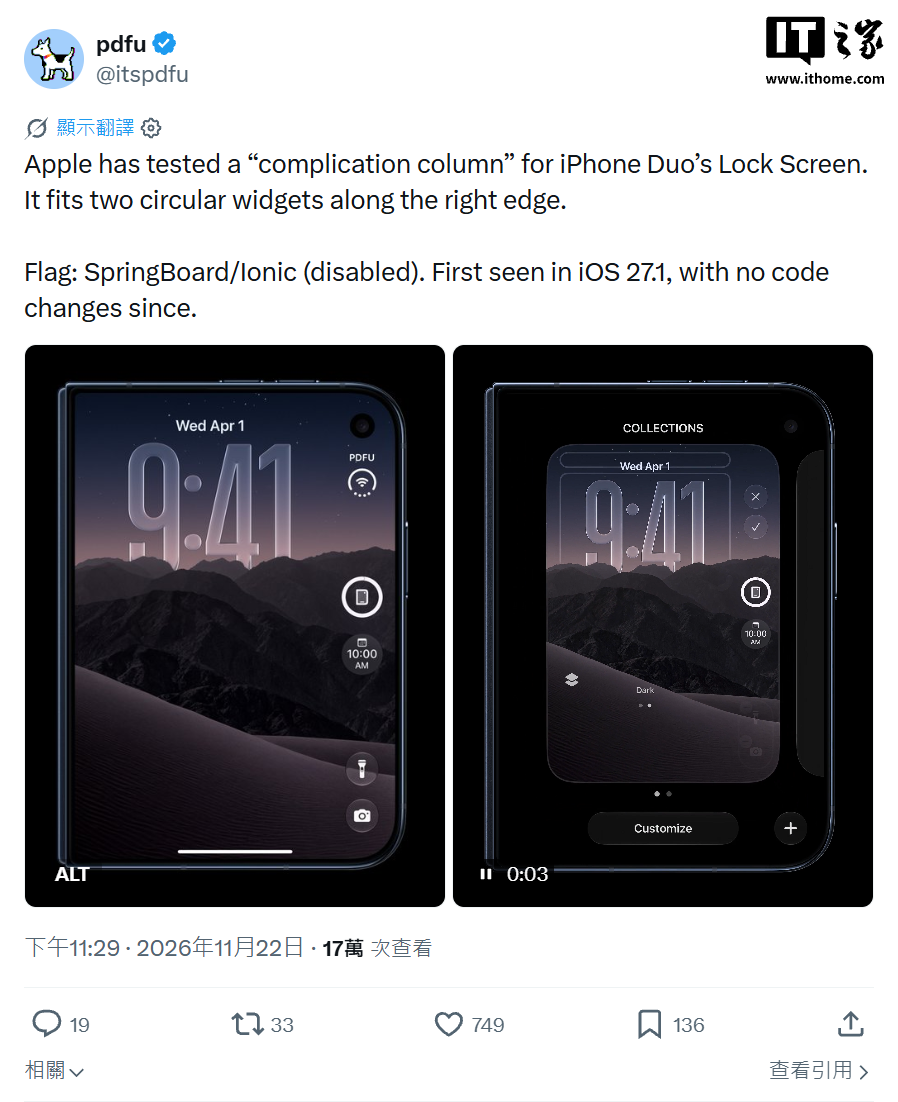
Apple의 듀얼 잠금 화면 위젯 테스트
X 플랫폼의 소식통 pdfu가 어제 공개한 정보에 따르면, Apple은 잠금 화면 상태에서 화면 오른쪽에 두 개의 다른 위젯을 표시할 수 있는 'iPhone Duo'라는 실험적인 인터페이스를 테스트했습니다.
이 기능은 화면 오른쪽에 세로로 배열된 원형 위젯을 추가할 수 있습니다. pdfu는 오른쪽 위젯이 기존 하단 바와 동시에 사용될 수 있어 사용자가 잠금 화면에서 더 많은 정보를 확인할 수 있다고 설명했습니다.
이 추가 위젯 영역은 'Complication Column'이라고 불리며, 손전등 및 카메라 단축키가 있는 사용자 지정 버튼 위에 위치합니다. 하지만 현재 이 위젯은 비활성화 상태이므로 Apple이 이 기능을 계속 개발 중인지는 확실하지 않습니다.
총평
Apple은 잠금 화면에 두 개의 원형 위젯을 추가하여 더 많은 정보를 표시할 수 있는 'iPhone Duo'라는 실험적인 인터페이스를 테스트했습니다. 이 'Complication Column'은 기존 하단 바와 함께 작동할 수 있지만, 현재는 비활성화 상태로 개발 지속 여부는 불분명합니다.
Apple 实验性界面功能爆料
据 X 平台消息人士 pdfu 昨日爆料,Apple 曾测试过一套名为“iPhone Duo”的实验性用户界面。
锁屏小组件增强功能
- 该功能允许在 iPhone 的锁屏状态下,于屏幕右侧显示两个不同的小组件。
- 这些新增的小组件将以纵向排列的圆形形式呈现。
- 这一额外区域的设计目标是让用户能够在锁屏上查看更多信息,并且可以与现有的底部栏小组件同时使用。
“复杂功能栏”技术细节
- 该额外的组件区域被称为“Complication Column”(复杂功能栏)。
- 它的具体位置是在放置手电筒和相机快捷方式的自定义按钮上方。
当前开发状态与未知性
目前,这一新增的小组件区域仍处于禁用状态,因此尚不清楚 Apple 是否仍在持续开发该功能。
总结
消息人士爆料称,Apple 正在测试一款名为“iPhone Duo”的实验性界面。该核心功能旨在通过在锁屏右侧增加一个“Complication Column”,允许用户同时查看两个纵向排列的小组件信息,从而极大地增强了锁屏状态下的信息展示能力。
Appleによるデュアルロック画面ウィジェットのテスト
Xプラットフォームの情報源pdfuによると、Appleが「iPhone Duo」という実験的なインターフェースをテストしていたことが明らかになりました。この機能は、ロック画面の状態において、画面右側に2種類の異なるウィジェットを表示できるものです。
この新機能では、縦に配置された円形のウィジェットを追加することが可能です。pdfu氏の説明によると、右側のウィジェットが既存のボトムバーと同時に使用できるため、ユーザーはロック画面上でより多くの情報を確認できるようになるとされています。
追加されるこのウィジェットエリアは「Complication Column」と呼ばれ、懐中電灯やカメラなどのショートカットボタンの上に配置されます。ただし、現時点ではこのウィジェット機能は非アクティブな状態であり、Appleが今後も開発を継続するかどうかは未定です。
概要と仕様
- インターフェース名: iPhone Duo
- テスト内容: ロック画面に2種類のウィジェットを表示可能にする実験的機能。
- 追加要素: 「Complication Column」という縦型ウィジェットエリアが右側に新設される。
- 配置場所: 懐中電灯やカメラなどのショートカットボタンの上部。
- 動作特性: 既存のボトムバーと同時に利用可能だが、現時点では非アクティブ状態である。
まとめ
Appleは、ロック画面に2つの円形ウィジェットを追加し、より多くの情報表示を可能にする「iPhone Duo」という実験的なインターフェースをテストしました。この新機能の核となる「Complication Column」は既存のボトムバーと連携できるものの、現時点では非アクティブな状態であり、今後の開発継続については注目が必要です。
Testing an Experimental Dual Widget Interface on Apple Lock Screen
According to source pdfu on the X platform, Apple has been testing an experimental interface called 'iPhone Duo.' This feature allows users to display two distinct widgets on the right side of the lock screen.
The functionality enables the addition of vertically arranged circular widgets along the right edge of the display. pdfu explained that because this new widget area can operate simultaneously with the existing bottom bar, it would allow users to access a greater amount of information directly from the lock screen.
This dedicated space for additional widgets is referred to as the 'Complication Column.' It is positioned above custom buttons, such as those used for flashlight and camera shortcuts. However, because this widget area is currently disabled, it remains uncertain whether Apple plans to continue developing this feature.
Key Features of the Complication Column
- Interface Name: iPhone Duo
- Functionality: Displays two separate widgets on the lock screen.
- Widget Placement: Vertically arranged circular widgets located on the right side of the display.
- Integration: The new widget area can operate concurrently with the existing bottom bar.
- Status: Currently disabled, and future development is unconfirmed.
Summary
Apple has reportedly tested an experimental interface called 'iPhone Duo,' designed to enhance the lock screen by allowing two distinct widgets to be displayed on the right side of the device. This new area, dubbed the 'Complication Column,' can work alongside existing bottom bars to provide users with more information at a glance. While promising increased functionality, the feature is currently disabled, leaving its continued development status uncertain.