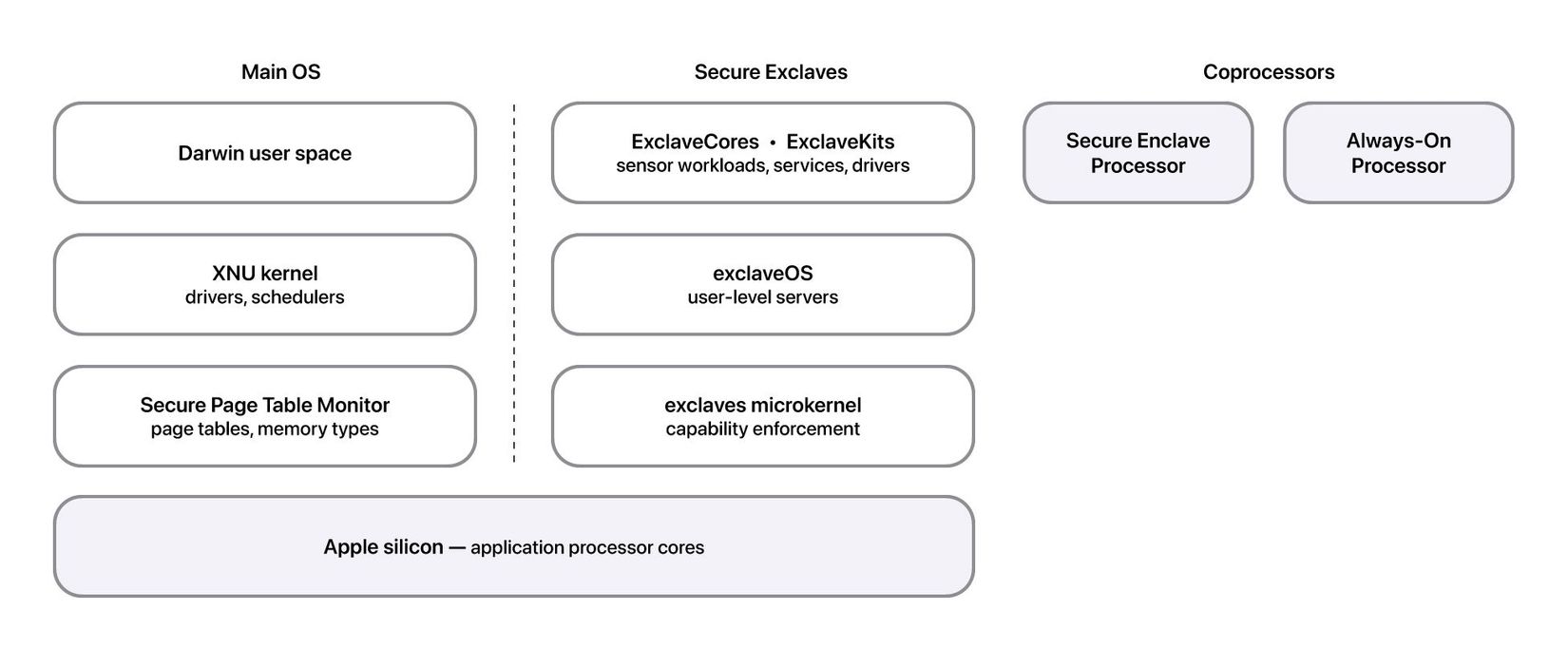
새로운 보안 아키텍처 'Secure Exclaves'
Apple은 오늘(11월 12일) 새로운 블로그 게시물을 통해 iPhone 18 Pro 등 기기를 위한 새로운 'Secure Exclaves' 아키텍처와 'Hey Siri' 작동 방식에 대해 자세히 설명했습니다.
공식 블로그 게시물에 따르면, iPhone 18 Pro 및 iPhone 18 Pro Max에서 Apple은 'Hey Siri' 음성 호출을 위해 '저전력 1차 필터링 → Secure Exclaves 재확인 → 화면 표시 검증 후 오디오 전송' 프로세스를 설계했습니다. 이는 오인식을 줄이고, 사용자가 기기가 언제 실제로 오디오를 수신하기 시작하는지 직관적으로 알 수 있도록 합니다.
'Hey Siri' 작동 방식
블로그 게시물에 소개된 작동 방식은 다음과 같습니다.
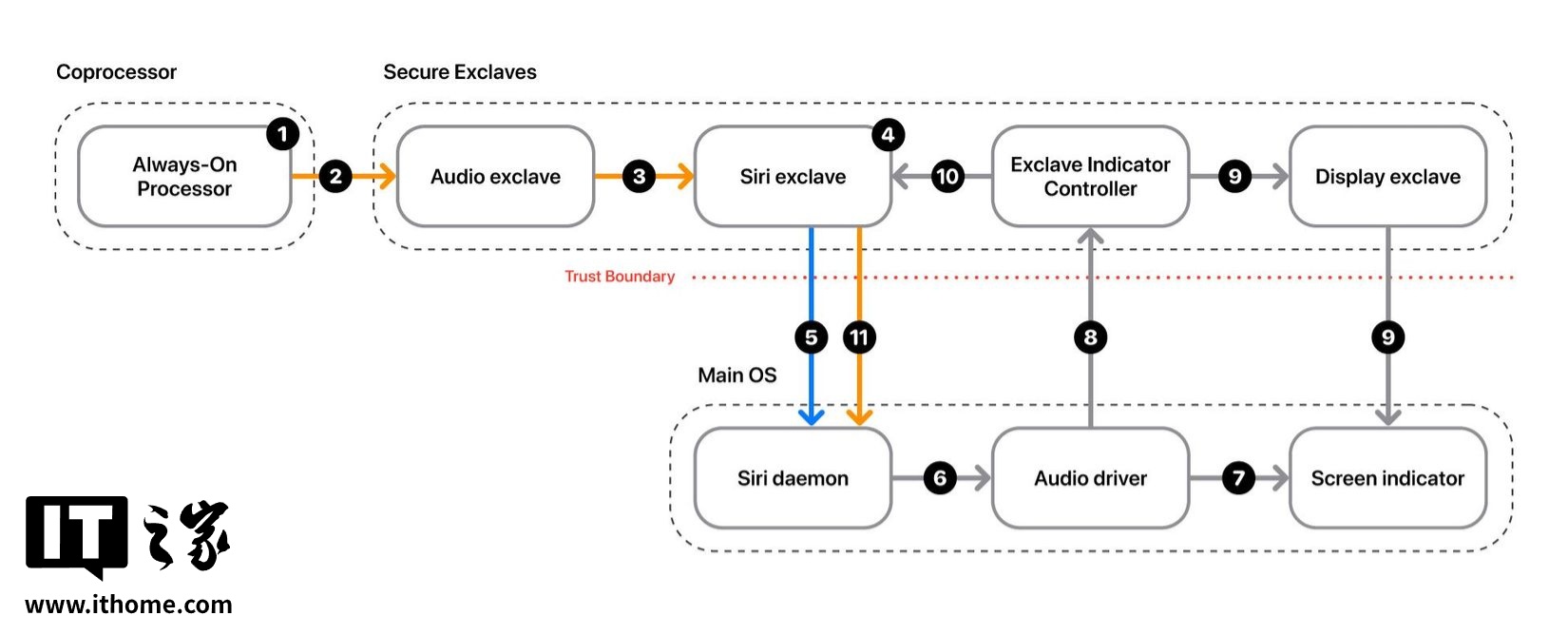
- 상시 저전력 청취: Always-On Processor(AOP)는 주변 소리를 지속적으로 듣고 'Hey Siri'일 가능성이 있는 음성 조각을 찾습니다. AOP는 대략적인 1차 판단만 하며, 완전한 녹음본을 주 시스템에 직접 전달하지 않습니다.
- 의심될 때만 주 칩 활성화: AOP가 '호출어를 들었을 가능성'이 있다고 판단하면, iPhone 18 Pro 및 iPhone 18 Pro Max는 주 프로세서를 활성화하고 관련 오디오 버퍼를 오디오 Secure Exclaves로 전달합니다. 이는 주 칩이 장시간 고전력으로 작동하는 것을 방지합니다.
- 오디오 Secure Exclaves의 에코 제거: 오디오 Secure Exclaves는 오디오에 에코 제거 등의 처리를 수행하여 음성을 더 선명하게 만든 다음, 처리된 오디오를 Siri Secure Exclaves로 전달합니다.
- 더 정교한 2차 확인: Siri Secure Exclaves는 더 크고 정교한 호출어 인식 모델을 실행하여 사용자가 실제로 'Hey Siri'라고 말했는지 추가로 확인합니다. Apple은 이 단계가 AOP 단독 판단 시보다 훨씬 많은 오인식을 걸러낼 수 있다고 설명합니다.
- 확인 후 Siri '활성화': 호출어가 유효하다고 확인되면, Siri Secure Exclaves는 주 시스템의 Siri 데몬에 '활성화' 플래그만 보냅니다. 이때는 오디오를 전송하지 않습니다.
- 마이크 요청 및 표시점 표시: Siri 데몬은 오디오 드라이버에 마이크 권한을 요청하고, 오디오 드라이버는 인터페이스를 호출하여 마이크 표시점을 그리고 'Exclaves Indicator Controller'(EIC)에 오디오 접근을 신청합니다.
- 화면 표시 검증 필수: EIC는 보안 디스플레이 Secure Exclaves에 화면에 렌더링된 마이크 표시점의 색상, 모양, 표시 시간, 최저 밝기, 그리고 주변 픽셀이 가리는지 여부 등을 확인하도록 요구합니다. 검증이 통과되어야 시스템이 '주변 모드'에서 '활성 모드'로 전환되고 오디오가 흘러나가는 것이 허용됩니다.
- 오디오를 Siri에 전달: 검증이 통과된 후, Siri Secure Exclaves는 'Hey Siri'를 포함한 이전 오디오 및 후속 요청 내용을 Siri 데몬에 전달합니다. 표시점은 Siri 세션이 끝날 때까지 계속 표시되며, 최소 3초 동안 유지됩니다.
개인 정보 보호
iPhone 18 Pro, iPhone 18 Pro Max가 'Hey Siri'에 항상 응답하기 위해 백그라운드에서 계속 녹음 및 녹화하는지에 대해 Apple은 블로그 게시물에서 "백그라운드에서는 읽고 나면 바로 삭제되는 처리 메커니즘을 채택한다"고 답변했습니다. 상시 저전력 청취 상태에서 카메라와 마이크가 포착한 원본 화면과 소리는 칩의 완전히 독립적인 Secure Exclaves로 직접 전송됩니다.
데이터가 Secure Exclaves에 들어가면 AI는 복잡한 오디오 및 비디오를 '누군가 왔다', '이것은 가족 구성원 A다', '호출어를 들었다'와 같은 극도로 단순한 신호로 변환하는 역할만 합니다. 인식이 완료되면 원본 오디오 및 비디오 데이터는 즉시 파괴됩니다.
또한 Apple은 "누구도 원본 데이터를 얻을 수 없다"고 약속했습니다. 타사 앱뿐만 아니라 iOS/macOS 주 시스템, 심지어 Apple 자신도 Secure Exclaves 내의 원본 오디오 및 비디오 스트림에 접근하거나 추출할 수 없습니다.
총평
Apple의 새로운 'Secure Exclaves' 아키텍처는 iPhone 18 Pro 및 iPhone 18 Pro Max의 'Hey Siri' 기능을 위한 정교한 다단계 보안 및 개인 정보 보호 시스템을 제공합니다. 저전력 1차 필터링부터 Secure Exclaves 내의 정밀한 재확인, 그리고 화면 표시 검증에 이르기까지, 이 시스템은 오인식을 최소화하고 사용자에게 시각적인 피드백을 제공합니다. 특히, 모든 원본 오디오 및 비디오 데이터는 Secure Exclaves 내에서 처리된 후 즉시 파괴되며, Apple을 포함한 어떤 주체도 접근할 수 없어 사용자 개인 정보 보호를 강화합니다.
核心功能与设备适用性
- Apple发布了面向iPhone 18 Pro和iPhone 18 Pro Max的全新“安全隔离区”(Secure Exclaves)架构,旨在提升用户隐私保护并优化语音交互体验。
增强型“Hey Siri”唤醒流程(多级过滤机制)
为减少误唤醒,Apple设计了从低功耗监听到最终音频放行的多阶段校验流程:
- 常驻监听与初步判断: Always-On Processor (AOP) 持续进行低功耗环境声音监听,仅做粗略的第一轮判断。
- 主芯片唤醒控制: 只有当 AOP 判断“可能听到了唤醒词”时,才会唤醒主处理器,并将音频缓冲交给音频隔离区,避免主芯片长期高功耗运行。
- 多重信号处理与复核: 音频首先经过音频隔离区的回声消除处理;随后进入Siri隔离区进行更大、更精细的唤醒词识别模型复核,以过滤掉AOP阶段可能产生的误报。
- 系统激活流程: 只有当Siri隔离区确认唤醒词成立后,才会向主系统发送“唤醒”标志(此时不传输音频)。
用户体验与安全指示校验
为了增强透明度,Apple引入了严格的屏幕显示和权限控制机制:
- 麦克风权限请求: Siri守护进程向音频驱动请求麦克风权限。
- 隔离区指示点校验: 音频驱动调用界面绘制麦克风指示点后,必须通过“隔离区指示控制器”(EIC)的安全显示隔离区检查(包括颜色、形状、时长、亮度及像素遮挡等)。
- 模式切换与音频放行: 只有经过上述所有校验通过,系统才会从“环境模式”切换为“主动模式”,并允许音频流出。麦克风指示点将持续显示至Siri会话结束,且最短持续时间为3秒。
数据隐私保护与隔离区机制
针对后台录音的担忧,Apple强调了其数据的处理和安全承诺:
- 阅后即焚处理: 在常驻低功耗监听状态下,摄像头和麦克风捕捉到的原始画面和声音会被直接送入芯片上完全独立的Secure Exclaves隔离区。
- 数据简化与销毁: AI在隔离区负责将复杂的音视频信号简化为极简的信号(如“有人来了”、“听到了唤醒词”)。一旦识别完成,原始的音视频数据会立即被销毁。
- 最高级别安全承诺: Apple承诺,没有任何实体可以访问或提取隔离区的原始音视频流,包括第三方App、iOS/macOS主系统,甚至Apple公司自身。
总结
本次更新的核心在于构建了一个多层级的“安全隔离区”架构,极大地提升了iPhone 18 Pro系列在语音交互和隐私保护方面的安全性与透明度。通过AOP、音频隔离区和Siri隔离区的分级校验,Apple不仅大幅减少了误唤醒,更确保了原始音视频数据在进入主系统前即被销毁,并承诺任何主体都无法访问这些敏感的原始数据流。
新しいセキュリティアーキテクチャ「Secure Exclaves」
Appleは本日(11月12日)、新しいブログ投稿を通じて、iPhone 18 Proなどのデバイス向けに導入される新しい「Secure Exclaves」アーキテクチャと、「Hey Siri」の動作メカニズムについて詳細を説明しました。
公式ブログによると、iPhone 18 ProおよびiPhone 18 Pro Maxでは、「Hey Siri」という音声呼びかけのために、「低電力一次フィルタリング → Secure Exclavesによる再検証 → ディスプレイ表示検証後のオーディオ送信」というプロセスが設計されています。これにより誤認識を減らし、ユーザーがデバイスが実際にいつオーディオを受信し始めたのかを直感的に把握できるようにしています。
「Hey Siri」の動作メカニズム
ブログ投稿で紹介された動作フローは以下の通りです。
- 常時低電力リスニング: Always-On Processor (AOP) が周囲の音を継続的に監視し、「Hey Siri」である可能性のある音声断片を探します。AOPはあくまで大まかな一次判断のみを行い、完全な録音データをメインシステムに直接送信することはありません。
- 疑わしい場合のみメインチップを起動: AOPが「呼びかけを聞いた可能性がある」と判断した場合、iPhone 18 ProおよびiPhone 18 Pro Maxはメインプロセッサを起動し、関連するオーディオバッファをオーディオSecure Exclavesに渡します。これにより、メインチップが長時間高電力で動作することを防ぎます。
- オーディオSecure Exclavesによるエコー除去: オーディオSecure Exclavesは、オーディオに対してエコー除去などの処理を実行し、音声をよりクリアにした後、処理されたオーディオをSiri Secure Exclavesに渡します。
- より精度の高い二次検証: Siri Secure Exclavesは、より大きく洗練された呼びかけ認識モデルを実行し、ユーザーが実際に「Hey Siri」と言ったかどうかを追加で確認します。Appleによると、この段階を経ることで、AOP単独の判断時よりも遥かに多くの誤認識を排除できるとしています。
- 検証後のSiri「アクティベート」: 呼びかけが有効であると確認されると、Siri Secure ExclavesはメインシステムのSiriデーモンに対し、「アクティベーション」フラグのみを送信します。この時点ではオーディオデータは送信されません。
- マイク要求と表示点表示: Siriデーモンはオーディオドライバーにマイク権限を要求し、オーディオドライバーがインターフェースを呼び出してマイクの表示点を描画し、「Exclaves Indicator Controller」(EIC)にオーディオアクセスを申請します。
- ディスプレイ表示検証が必須: EICは、セキュリティディスプレイSecure Exclavesに対し、画面上にレンダリングされたマイク表示点の色、形状、表示時間、最低輝度、および周囲のピクセルに隠されていないかなどを確認するよう要求します。この検証を通過して初めて、システムは「待機モード」から「アクティブモード」に移行し、オーディオの流出が許可されます。
- Siriへのオーディオ送信: 検証が完了した後、Siri Secure Exclavesは、「Hey Siri」を含む過去のオーディオおよび今後のリクエスト内容をSiriデーモンに渡します。表示点はSiriセッションが終了するまで継続的に表示され、最低3秒間維持されます。
プライバシー保護
iPhone 18 Pro、iPhone 18 Pro Maxが「Hey Siri」に対応するためにバックグラウンドで常時録音・記録を行うかという点について、Appleはブログ投稿で「バックグラウンドでは読み取り後すぐに削除される処理メカニズムを採用する」と回答しています。常時低電力リスニングの状態において、カメラとマイクが捉えた生データ(オリジナル画面や音声)は、チップの完全に独立したSecure Exclavesに直接送信されます。
データがSecure Exclavesに入ると、AIは複雑なオーディオおよびビデオを「誰かが来た」「これは家族構成員Aだ」「呼びかけを聞いた」といった極めて単純な信号に変換する役割のみを果たします。認識が完了すると、元のオーディオおよびビデオデータは即座に破棄されます。
さらにAppleは、「誰も生データを入手することはできない」と保証しています。サードパーティのアプリだけでなく、iOS/macOSメインシステム、さらにはApple自身でさえも、Secure Exclaves内のオリジナルオーディオおよびビデオストリームにアクセスしたり抽出したりすることはできません。
まとめ
Appleが導入した新しい「Secure Exclaves」アーキテクチャは、iPhone 18 ProおよびiPhone 18 Pro Maxの「Hey Siri」機能に対し、高度な多段階セキュリティとプライバシー保護システムを提供します。低電力一次フィルタリングからSecure Exclaves内での精密な再検証、そして画面表示による物理的な検証に至るまで、誤認識を最小限に抑えつつユーザーに視覚的フィードバックを提供します。特に重要な点として、すべての生データはSecure Exclaves内で処理された後即座に破棄され、Appleを含むいかなる主体からもアクセスできないため、ユーザーのプライバシー保護が大幅に強化されています。
New Security Architecture 'Secure Exclaves'
Apple detailed its new 'Secure Exclaves' architecture and the operational mechanism for 'Hey Siri' for devices like the iPhone 18 Pro in a new blog post released today (November 12).
According to the official blog post, Apple designed a process for 'Hey Siri' voice activation on the iPhone 18 Pro and iPhone 18 Pro Max that involves: 'Low-power primary filtering → Secure Exclaves reconfirmation → Screen display verification, followed by audio transmission.' This system aims to reduce false positives and provide users with an intuitive understanding of when the device actually begins receiving audio.
How 'Hey Siri' Works
The operational mechanism introduced in the blog post is as follows:
- Always-On Low-Power Listening: The Always-On Processor (AOP) continuously listens to ambient sounds, searching for voice snippets that might be "Hey Siri." The AOP performs only a rough primary judgment and does not directly transmit complete recordings to the main system.
- Main Chip Activation Only When Suspicious: If the AOP determines there is a possibility of hearing the 'wake word,' the iPhone 18 Pro and iPhone 18 Pro Max activate the main processor and pass relevant audio buffers to the Audio Secure Exclaves. This prevents the main chip from operating at high power for extended periods.
- Echo Removal in Audio Secure Exclaves: The Audio Secure Exclaves perform processing, such as echo removal, on the audio to make the voice clearer before passing the processed audio to the Siri Secure Exclaves.
- More Refined Secondary Confirmation: The Siri Secure Exclaves run a larger and more sophisticated wake word recognition model for additional verification of whether the user actually said 'Hey Siri.' Apple explains that this stage can filter out significantly more false positives than relying solely on AOP judgment.
- Siri Activation After Confirmation: Once the wake word is confirmed as valid, the Siri Secure Exclaves send only an 'activate' flag to the main system's Siri daemon; no audio is transmitted at this point.
- Microphone Request and Indicator Display: The Siri daemon requests microphone permission from the audio driver, which then calls the interface to draw the microphone indicator on screen and applies for audio access through the 'Exclaves Indicator Controller' (EIC).
- Mandatory Screen Display Verification: The EIC requires confirmation from the secure display Secure Exclaves regarding the color, shape, display duration, minimum brightness, and whether surrounding pixels obscure the rendered microphone indicator. System transition from 'ambient mode' to 'active mode,' allowing audio flow, only occurs after verification passes.
- Transmitting Audio to Siri: After successful verification, the Siri Secure Exclaves pass previous audio (including 'Hey Siri') and subsequent requests to the Siri daemon. The indicator remains visible until the Siri session ends, lasting for a minimum of three seconds.
Privacy
Regarding whether the iPhone 18 Pro and iPhone 18 Pro Max continuously record and capture audio in the background to respond to 'Hey Siri,' Apple stated in the blog post that they "adopt a processing mechanism that is read and deleted immediately in the background." The raw screen and sound captured by the camera and microphone during always-on low-power listening are transmitted directly to a completely independent Secure Exclaves on the chip.
Once data enters the Secure Exclaves, AI's role is limited to converting complex audio and video into extremely simple signals, such as 'someone arrived,' 'this is family member A,' or 'wake word detected.' After recognition is complete, the original audio and video data are immediately destroyed.
Furthermore, Apple promised that "no one can obtain the raw data." Not only third-party apps but also the iOS/macOS main system, and even Apple itself, cannot access or extract the raw audio and video stream within the Secure Exclaves.
Summary
Apple's new 'Secure Exclaves' architecture provides a sophisticated multi-stage security and privacy system for the 'Hey Siri' feature on the iPhone 18 Pro and iPhone 18 Pro Max. The process minimizes false positives through low-power primary filtering, precise reconfirmation within Secure Exclaves, and mandatory screen display verification. Crucially, all raw audio and video data are processed and immediately destroyed within the Secure Exclaves, ensuring that no entity, including Apple itself, can access it, thereby strengthening user privacy.