HomeView 앱 지원
MacRumors는 11월 2일(현지 시간) Apple의 첫 스마트 홈 허브인 HomeView에 App Store가 탑재되지 않지만, 사용자가 iPhone 18 Pro와 페어링하여 CarPlay를 통해 Spotify와 같은 일부 멀티미디어 앱을 실행할 수 있다고 보도했습니다.
Broadcasts 앱 개발자 Steve Troughton-Smith는 10월 31일 Mastodon을 통해 HomeView에 내장된 앱 목록을 공개했습니다.
- 캘린더
- 연락처
- 홈
- 메시지
- 사진
- 사파리
- 설정
- 날씨
또한 캘린더, 메시지 등 앱의 개인 콘텐츠 표시는 페어링된 iPhone 또는 iPad가 동일한 Wi-Fi 네트워크에 있는지, 최근에 잠금 해제되었는지, 그리고 HomeView가 사용자를 인식했는지 여부에 따라 달라집니다.
위에 언급된 HomeView 내장 앱 외에도 일부 Apple 앱은 iPhone과 페어링하여 CarPlay를 통해 액세스해야 합니다.
- Apple Music Classical
- Apple News
- Apple TV
- 오디오북
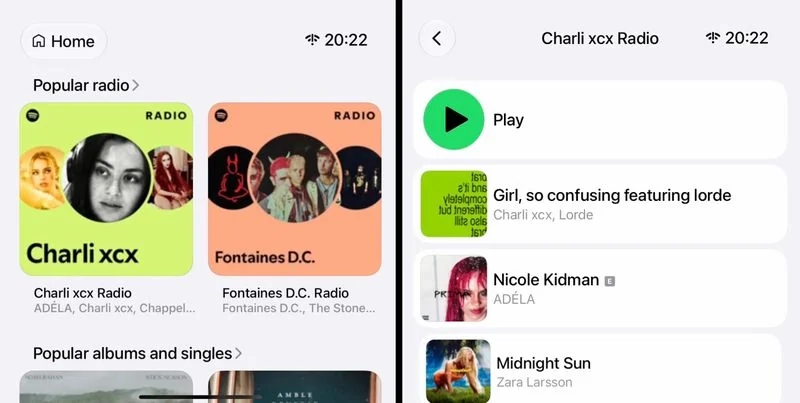
타사 앱의 경우, 개발자는 Spotify 앱 실행 화면을 보여주며 이러한 타사 오디오 및 비디오 앱도 CarPlay를 통해 액세스해야 하며 근처에 페어링된 iPhone이 필요하다고 밝혔습니다. 개발자는 이러한 앱은 iPhone이 근처에 있을 때만 작동한다고 명확히 언급했습니다.
통신 메커니즘 측면에서 HomeView 내부의 이 메커니즘은 PebblePlay라고 불리며, HomeView에서 앱이 제공하는 인터페이스 템플릿에 따라 디스플레이를 재구성합니다. 예를 들어, 원래의 탭 템플릿은 메뉴로 변경됩니다.
총평
Apple의 첫 스마트 홈 허브 HomeView는 App Store를 지원하지 않지만, iPhone 18 Pro와 페어링하여 CarPlay를 통해 Spotify와 같은 멀티미디어 앱을 실행할 수 있습니다. 캘린더, 메시지 등 내장 앱 외에 Apple Music Classical, Apple News, Apple TV 등 일부 Apple 앱과 타사 오디오/비디오 앱은 CarPlay를 통해 iPhone과 연동되어야 합니다. HomeView의 통신 메커니즘인 PebblePlay는 앱 인터페이스를 재구성하여 표시합니다.
Apple HomeView智能家居中枢概述
- 根据MacRumors的报道,苹果首款智能家居中枢HomeView虽然没有配备App Store应用商店。
- 该设备的核心功能是作为家庭控制中心,但其运行和部分应用的显示高度依赖于与用户的iPhone配对状态。
核心连接机制与使用前提
- **关键依赖:** HomeView的许多功能(包括日历、信息等个人内容)需要与附近的iPhone或iPad进行配对,并要求设备处于同一Wi-Fi网络下且近期解锁。
- **应用运行限制:** 无论是Apple原生应用还是第三方应用,若要使用部分多媒体和通信功能,必须通过CarPlay接入,并且依赖附近已配对的iPhone才能工作。
支持的应用生态系统
HomeView可运行的应用程序分为内置应用、需要CarPlay连接的原生应用以及第三方应用。
- **原生/内置应用(需依赖配对设备):** 开发者展示了日历和信息等个人内容,其显示涉及是否识别出使用者。
- **Apple生态系统应用(需通过iPhone配对经CarPlay接入):**
- Apple Music Classical
- Apple News
- Apple TV
- 有声书(Audiobooks)
- **第三方多媒体应用:** 开发者展示了Spotify等音频和视频应用的界面,这些应用同样需要通过CarPlay接入并依赖附近的iPhone。
内部技术与显示机制
- HomeView内部的通信机制被称为“PebblePlay”。
- 该机制负责根据应用程序提供的界面模板在HomeView上重新构建显示效果;例如,原始的标签页模板会被转换成菜单形式进行展示。
总结
苹果首款智能家居中枢HomeView虽然功能强大,但其应用生态和核心体验高度依赖于与用户的iPhone配对及CarPlay连接。设备通过“PebblePlay”机制重构界面,并要求用户在附近使用已配对的手机才能运行包括Spotify、Apple Music等多种多媒体和通信类应用。
HomeViewアプリのサポート状況
MacRumorsによると、Apple初のスマートホームハブとなる「HomeView」はApp Storeを搭載しないものの、iPhone 18 Proとペアリングし、CarPlayを通じてSpotifyのような一部のマルチメディアアプリを実行できると報じられています。
Broadcastsアプリの開発者であるSteve Troughton-Smith氏は、Mastodonを通じて、HomeViewに内蔵されているアプリのリストを公開しました。その内訳は以下の通りです。
- カレンダー
- 連絡先
- ホーム
- メッセージ
- 写真
- Safari
- 設定
- 天気
また、カレンダーやメッセージといったアプリの個人コンテンツ表示は、ペアリングされたiPhoneまたはiPadが同じWi-Fiネットワークに接続されているか、最近ロック解除されたか、そしてHomeViewがユーザーを認識しているかどうかによって異なります。
上記で言及された内蔵アプリ以外にも、一部のAppleアプリは、iPhoneとペアリングしCarPlay経由でアクセスする必要があります。これには以下のものが含まれます。
- Apple Music Classical
- Apple News
- Apple TV
- オーディオブック
サードパーティ製のアプリに関しては、開発者はSpotifyの実行画面を示し、これらの外部オーディオ・ビデオアプリもCarPlay経由でアクセスする必要があり、近くにペアリングされたiPhoneが必須であることを明らかにしました。開発者は、これらのアプリはiPhoneが近接している場合にのみ機能すると明確に述べています。
通信メカニズムの面では、HomeView内部の仕組みは「PebblePlay」と呼ばれ、HomeView上でアプリが提供するインターフェーステンプレートに応じてディスプレイを再構築します。例えば、元のタブ形式のテンプレートはメニュー形式に変更されます。
まとめ
Apple初のスマートホームハブ「HomeView」はApp Storeをサポートしませんが、iPhone 18 ProとペアリングしCarPlayを利用することで、Spotifyのようなマルチメディアアプリや一部のApple/サードパーティ製アプリを実行できます。内蔵アプリとは異なり、これらの機能はすべてCarPlay経由でiPhoneとの連携が必要です。また、HomeViewの表示再構築を担う独自の通信メカニズムが「PebblePlay」として採用されています。
HomeView App Support
MacRumors reported on November 2nd (local time) that Apple's first smart home hub, HomeView, will not feature the App Store. However, users can run certain media apps, such as Spotify, through CarPlay when paired with an iPhone 18 Pro.
Developer Steve Troughton-Smith revealed a list of built-in applications on HomeView via Mastodon on October 31st:
- Calendar
- Contacts
- Home
- Messages
- Photos
- Safari
- Settings
- Weather
Furthermore, the display of personal content for apps like Calendar and Messages depends on whether the paired iPhone or iPad is connected to the same Wi-Fi network, has been recently unlocked, and if HomeView recognizes the user.
In addition to the built-in applications mentioned above, some Apple apps must be accessed via CarPlay when paired with an iPhone:
- Apple Music Classical
- Apple News
- Apple TV
- Audiobooks
For third-party apps, the developer showed the Spotify app screen and stated that these audio and video applications also require access through CarPlay and necessitate a nearby paired iPhone. The developer explicitly noted that these apps only function when an iPhone is in close proximity.
In terms of communication mechanisms, this system within HomeView is called PebblePlay. It reconfigures the display based on the interface template provided by the app running in HomeView. For example, the original tab template will change to a menu format.
Summary
Apple's first smart home hub, HomeView, will not support the App Store, but it allows users to run media apps like Spotify via CarPlay when paired with an iPhone 18 Pro. While built-in apps cover core functions (Calendar, Messages), accessing some Apple and third-party audio/video apps requires pairing through CarPlay and proximity to a nearby iPhone. The system utilizes a mechanism called PebblePlay to dynamically reconfigure the display based on the specific app's interface template.