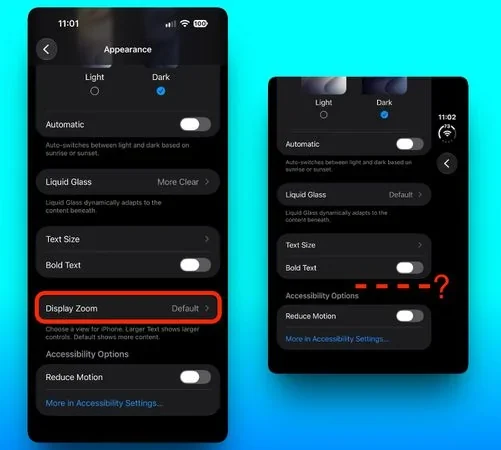
디스플레이 줌 설정 제한
IT매체 macobserver는 Apple의 첫 폴더블 iPhone Duo에서 초기 부팅 시 디스플레이 줌(Display Zoom) 레벨을 한 번 선택하면 설정에서 다시 조정할 수 없다고 보도했습니다.
macobserver의 보도에 따르면, 사용자가 iPhone Duo를 처음 설정할 때 "외관" 페이지에서 "기본", "중간", "크게" 세 가지 옵션을 통해 텍스트 및 시스템 아이콘의 표시 크기를 조정할 수 있습니다. 그러나 초기 설정을 완료한 후에는 시스템에서 해당 디스플레이 줌 설정을 찾을 수 없어 다른 iPhone처럼 언제든지 변경할 수 없습니다.
Reddit 커뮤니티의 사용자 u/earthdog는 Apple 공식 고객 서비스에 문의한 결과, Apple의 선임 상담원이 현재 줌 레벨을 전환할 수 있는 버튼이나 메뉴가 없음을 확인했다고 게시했습니다. 사용자가 "중간"에서 "크게"로 변경하려면, 현재로서는 기기 데이터를 지우고 다시 시작하여 초기 설정을 다시 완료하는 방법밖에 없습니다.
macobserver는 이러한 제한이 제품 디자인 의도인지 시스템 기능 버그인지 아직 불분명하다고 밝혔습니다. 일부 사용자들은 폴더블 디스플레이의 표시 적응과 관련이 있을 수 있다고 추측하지만, 이 주장은 확인되지 않았습니다. macobserver는 Apple에 답변을 요청했으며, 향후 업데이트를 통해 조정 기능이 복원될지는 아직 미지수입니다.
Apple의 첫 폴더블 iPhone Duo는 FaceTime의 "시선 맞춤" 기능도 누락된 것으로 확인되었습니다.
총평
Apple의 첫 폴더블 iPhone Duo는 초기 설정 시 디스플레이 줌 레벨을 한 번 선택하면 이후 변경할 수 없는 제한이 있는 것으로 알려졌습니다. 현재로서는 설정을 변경하려면 기기를 초기화해야 하며, 이는 제품 디자인 의도인지 버그인지 불분명합니다. 또한, 이 모델은 FaceTime의 "시선 맞춤" 기능도 지원하지 않습니다.
Apple首款折叠屏手机的系统限制发现
科技媒体 macobserver 报道了关于 Apple 首款折叠 iPhone Duo 的使用体验问题。文章指出,该设备在首次开机和设置过程中存在多项功能上的局限性。
显示缩放级别调整受限
- 初始设置流程:用户在“外观”页面进行首次设置时,可以选择三个显示缩放级别选项:“默认”、“中等”和“大”,用于调整系统文字及图标的显示大小。
- 使用限制:然而,一旦完成设备初始化设置,系统内便无法找到相应的入口来再次修改或切换此显示缩放级别,与传统 iPhone 的灵活性存在差异。
官方确认的更换缩放级别的唯一方法
- 技术咨询结果:用户联系 Apple 官方客服后获悉,目前系统中确实没有可供切换缩放级别的按钮或菜单。
- 强制重置流程:若用户需要从一个级别(如“中等”)更改到另一个级别(如“大”),现有唯一的办法是抹掉设备数据,重新启动并再次完成整个初始设置过程。
其他功能缺失与技术猜测
- FaceTime 功能缺失:文章标题同时确认了该款 iPhone Duo 缺少 FaceTime 的“眼神交流”(Eye Contact)功能。
- 限制原因推测:目前尚不清楚此显示缩放限制是产品设计上的固定安排,还是系统功能 Bug;部分用户猜测这可能与折叠屏显示器的适配有关,但这一说法未经证实。
总结
Apple 首款折叠 iPhone Duo 在初期设置后,其“外观”页面的显示缩放级别(默认、中等、大)无法在系统内进行二次调整,唯一的变更是需要抹掉数据重置设备。此外,该机型还确认缺少 FaceTime 的眼神交流功能,这些限制引发了用户对其系统设计和未来更新的关注。
ディスプレイズーム設定の制限
ITメディアのmacobserverが報じたところによると、Apple初の折りたたみ式iPhone Duoにおいて、初期起動時に「ディスプレイズーム(Display Zoom)」レベルを一度選択すると、設定画面から再調整することができないという問題が確認されました。
macobserverの報道によれば、ユーザーがiPhone Duoを初めてセットアップする際、「外観」ページで「標準」「中程度」「大」の3つのオプションを通じて、テキストやシステムアイコンの表示サイズを調整できます。しかし、初期設定を完了した後では、他のiPhoneのようにいつでも変更できるシステム上のディスプレイズーム設定を見つけることができません。
Redditコミュニティのユーザーu/earthdogがApple公式カスタマーサービスに問い合わせた結果、Appleの上級サポート担当者から、現在、ズームレベルを切り替えるためのボタンやメニューが存在しないことが確認されたと投稿しています。もしユーザーが「中程度」から「大」に変更したい場合、現時点ではデバイスのデータを消去し、再起動して初期設定をやり直す方法しかありません。
macobserverは、この制限が製品デザイン上の意図なのか、システム機能のバグなのかは未だ不明であるとしています。一部のユーザーからは、折りたたみディスプレイの表示適応性に関連しているのではないかという推測もありますが、これは確認されていません。macobserverはAppleに回答を求めており、今後のアップデートで調整機能が復活するかどうかは現時点では不透明です。
また、この初の折りたたみ式iPhone Duoには、FaceTimeの「視線追跡(Look Around)」機能も搭載されていないことが判明しています。
まとめ
Apple初の折りたたみ式iPhone Duoは、初期設定時に選択したディスプレイズームレベルを後から変更できないという制限があることが報じられました。現在、設定を変更するにはデバイスの初期化が必要であり、これが設計上の意図によるものかバグなのかは不明です。さらに、本モデルはFaceTimeの「視線追跡」機能もサポートしていない点に注意が必要です。
Display Zoom Setting Limitations
The IT media outlet macobserver reported that Apple's first foldable iPhone Duo restricts users from adjusting the Display Zoom level after selecting it during initial setup.
According to macobserver, when a user initially sets up the iPhone Duo, they can adjust the display size of text and system icons using three options—"Default," "Medium," and "Large"—on the "Appearance" page. However, once the initial setup is complete, the system does not provide an accessible setting for this Display Zoom level, making it impossible to change at any time like other iPhones.
A Reddit community user (u/earthdog) posted that after contacting Apple official customer service, a senior representative confirmed there is currently no button or menu available to switch the zoom level. The only way for a user to change from "Medium" to "Large," for example, is by erasing the device data and restarting to complete the initial setup again.
macobserver noted that it remains unclear whether this limitation is an intentional product design choice or a system function bug. While some users speculate it might be related to display adaptation on foldable screens, this claim has not been confirmed. macobserver has requested a response from Apple and stated that whether the adjustment feature will be restored through future updates remains unknown.
Furthermore, it was also noted that Apple's first foldable iPhone Duo lacks the "Eye Contact" feature found in FaceTime.
Summary
Apple's first foldable iPhone Duo reportedly features a significant limitation: once users select a Display Zoom level during initial setup, they cannot adjust it afterward. Currently, changing this setting requires factory resetting the device, and whether this is an intended design constraint or a bug remains unconfirmed. Additionally, the model does not support FaceTime's "Eye Contact" feature.