Apple iPhone Duo Touch ID 활용 팁
IT之家 10월 31일 소식, 생각만 멈추지 않는다면 방법은 언제나 어려움보다 많습니다. 일부 사용자들이 Touch ID가 불편하다고 불평하자, Reddit 사용자 @Wrznlmw는 지난주 Apple iPhone Duo에 대한 작은 팁을 공유했습니다.
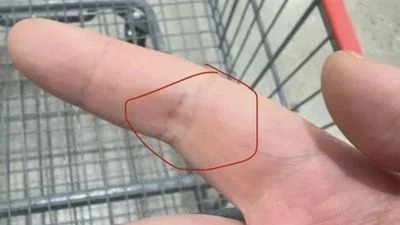
MacRumors에 따르면, 지문을 등록할 때 사용자는 기본 손가락 끝이나 지문이 아닌 검지 손가락의 두 번째 마디 근처의 지문을 시스템에 등록할 수 있습니다. 이렇게 하면 휴대폰을 집어 들 때 손가락 관절이 측면 전원 버튼에 자연스럽게 닿으면서 지문 인식 및 잠금 해제가 완료됩니다.
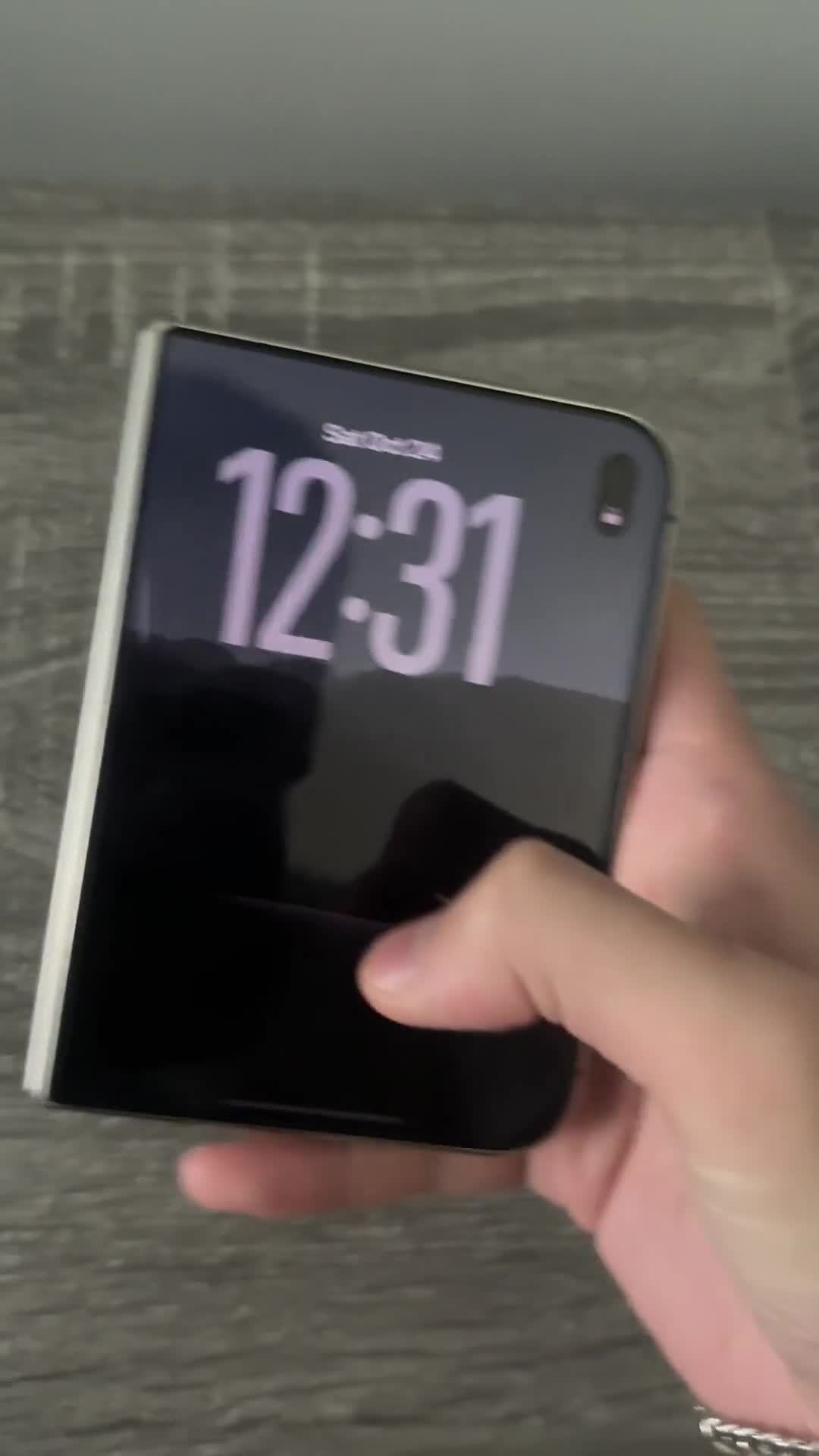
Apple iPhone Duo의 Touch ID 지문 센서는 측면 전원 버튼에 통합되어 있습니다. 일반적인 사용 시에는 사용자가 손가락 위치를 조정하여 손가락 끝이 센서에 닿도록 해야 하지만, 검지 손가락의 두 번째 마디 근처 지문을 등록하면 휴대폰을 일상적으로 잡을 때의 자연스러운 접촉 동작을 활용하여 인식을 완료할 수 있습니다.
이 팁은 빠르게 다른 사용자들의 관심을 받았습니다. 한 Reddit 사용자는 손가락을 자연스럽게 잡았을 때 센서에 닿는 부분을 지문으로 등록하면 휴대폰을 집어 든 후 손가락을 추가로 조정하는 작업을 줄일 수 있다고 말했습니다.
이전에 iPhone Duo가 Face ID 대신 Touch ID를 사용한 디자인은 논쟁을 불러일으켰습니다. Apple이 지문 인식 센서를 측면 버튼에 통합하면서 일부 미디어 리뷰에서는 Touch ID가 Face ID에 비해 센서를 찾고 손가락을 놓는 추가적인 단계를 필요로 한다고 평가했습니다. 그러나 일부 사용자들은 조작에 익숙해지면 Touch ID의 잠금 해제 경험도 마찬가지로 부드럽다고 말했습니다.
《Apple 최초의 폴더블 iPhone Duo 해외 첫 평가: Touch ID 지문 잠금 해제 경험이 Face ID 방식보다 못하다》
총평
Apple iPhone Duo의 Touch ID 사용자들이 지문 인식의 불편함을 호소하자, 검지 두 번째 마디 지문을 등록하는 새로운 활용법이 제시되었습니다. 이 방법은 휴대폰을 잡는 자연스러운 동작으로 잠금 해제가 가능하게 하여 사용자 편의성을 높일 수 있습니다. Touch ID의 잠금 해제 경험에 대한 논란 속에서, 이 팁은 사용자들에게 더 나은 대안을 제공할 수 있습니다.
Touch ID使用技巧与优化
Reddit网友分享了一个关于 Apple iPhone Duo 的小技巧,旨在解决用户在使用侧边 Touch ID 传感器时的便利性问题。
- 核心技巧:在录入指纹时,用户不应仅录入默认的指尖或指腹,而是可以将食指靠近第二指节的纹理进行录入。
- 使用优势:采用此方法后,当用户自然拿起手机握持时,手指关节会与侧边电源键(集成 Touch ID)接触,即可完成指纹识别和解锁,减少了额外调整手指位置的操作步骤。
Apple iPhone Duo 的设计特点
iPhone Duo 将 Touch ID 指纹传感器集成了侧边电源键上,这一设计引发了用户讨论。
- 功能定位:Touch ID 传感器位于侧边电源键区域。
- 使用体验争议:部分媒体评测认为,相比 Face ID,将指纹识别集成在侧边按键上增加了寻找传感器和放置手指的操作步骤。
用户对解锁方案的反馈
尽管 Touch ID 的设计引发了讨论,但也有用户表示,一旦熟悉操作流程,Touch ID 的解锁体验同样可以非常流畅。
- 优化目标:该技巧的核心目的是让指纹识别过程能够与日常自然握持手机的动作相结合。
总结
文章分享了一个实用的 Touch ID 优化技巧:用户在录入指纹时,应将食指第二指节附近的纹理作为主要识别区域。这一方法能利用手指自然握持侧边电源键的习惯,从而提升 Apple iPhone Duo 在使用 Touch ID 进行解锁时的便捷性和流畅度。
Apple iPhone DuoのTouch ID活用術
IT之家が10月31日に報じたところによると、アイデアは尽きないため、困難を乗り越える方法は常に存在します。一部のユーザーからTouch IDの使い勝手に関する不満の声が上がったことを受け、Redditのユーザー@WrznlmwがApple iPhone Duoに関する小さなヒントを共有しました。
MacRumorsによると、指紋を登録する際、通常使用する指先のパッドや指紋ではなく、人差し指の第二関節付近の指紋を利用してシステムに登録することが可能です。この方法を用いることで、スマートフォンを手に取る際に指の関節が側面電源ボタンに自然に触れる動作で、指紋認証とロック解除を完了させることができます。
Apple iPhone DuoのTouch IDセンサーは側面電源ボタンに組み込まれています。一般的な使用方法では、ユーザー自身が指の位置を調整し、指先をセンサーに当てる必要がありますが、人差し指の第二関節付近の指紋を登録することで、スマートフォンを日常的に持つ際の自然な接触動作を活用して認証を完了させることが可能になります。
このヒントは他のユーザーからすぐに注目を集めました。あるRedditユーザーは、指を自然に持った際にセンサーに当たる部分を指紋として登録すれば、スマートフォンを手に取ってからさらに指の位置を調整する手間が減らせると述べています。
以前より、iPhone DuoがFace IDではなくTouch IDを採用したデザインについては議論を呼んできました。Appleが指紋認証センサーを側面ボタンに統合したことで、一部のメディアレビューでは、Touch IDはFace IDと比較して、センサーを探し出し指を離す追加の手順が必要だと評価されてきました。しかし、一部のユーザーからは、「操作に慣れると、Touch IDのロック解除体験も同様にスムーズだ」という意見が出ています。
総評
Apple iPhone DuoのTouch ID利用者が使い勝手の悪さを訴える中、人差し指の第二関節付近の指紋を登録するという新しい活用法が提案されました。この方法は、スマートフォンの自然な持ち動作にロック解除を組み込むことで、ユーザーの利便性を高めることができます。Touch IDの認証体験に関する議論がある中で、このヒントはユーザーにとってより良い代替案を提供する可能性があります。
Apple iPhone Duo Touch ID Usage Tip
According to a report from IT之家 on October 31st, while there are always solutions when thoughts don't stop, some users have complained about the inconvenience of Touch ID. In response, a Reddit user named @Wrznlmw shared a helpful tip regarding the Apple iPhone Duo.
According to MacRumors, when registering fingerprints, users do not need to use only their fingertip or standard fingerprint area. Instead, they can register a print from the area near the second joint of the index finger. This method allows for seamless biometric recognition and unlocking because the finger's natural joint will naturally touch the side power button while holding the phone.
The Touch ID sensor on the Apple iPhone Duo is integrated into the side power button. Typically, users must adjust their fingers to ensure the fingertip makes contact with the sensor. However, by registering a fingerprint from the area near the second joint of the index finger, users can leverage the natural contact motion that occurs when holding the phone in daily use to complete the recognition process.
This tip quickly gained attention among other users. One Reddit user noted that by registering the part of the finger that naturally contacts the sensor while gripping the phone, users can reduce the need for additional finger adjustments after picking up the device.
The design choice to use Touch ID instead of Face ID on the iPhone Duo has previously sparked debate. Some media reviews assessed that because Apple integrated the fingerprint sensor into the side button, Touch ID requires an extra step—finding the sensor and placing a finger—compared to Face ID. However, some users have countered that once they get used to the operation, the Touch ID unlock experience is just as smooth.
Summary
In response to user complaints about the inconvenience of Touch ID on the Apple iPhone Duo, a new usage tip suggests registering a fingerprint from the second joint of the index finger. This method enhances user convenience by allowing unlocking through the natural motion of holding the phone. Amid ongoing debate regarding the unlock experience between Touch ID and Face ID, this practical tip offers users an improved alternative.