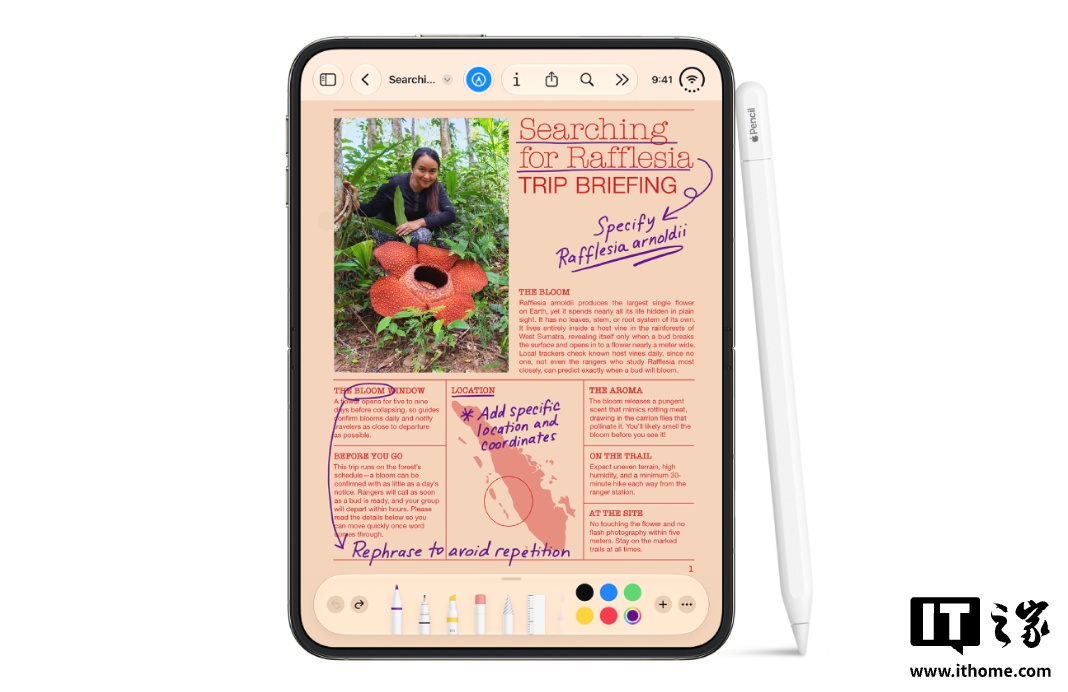
Apple Pencil 지원
Apple은 오늘 iOS 27.2 정식 버전을 배포했으며, 자사의 첫 폴더블 디스플레이 스마트폰인 iPhone Duo에 Apple Pencil 스타일러스 지원 기능을 추가했습니다. Apple은 현재 관련 문서를 공개하여 해당 기능을 소개하고 있습니다.
Apple은 iPhone Duo가 별도로 판매되는 Apple Pencil (USB-C) 모델만 지원한다고 밝혔습니다. 다른 Apple Pencil 모델은 iPhone Duo와 호환되지 않으며, 사용자는 USB-C 충전 케이블을 iPhone Duo에 연결하여 기기를 페어링해야 합니다.
- Apple Pencil 페어링: "탭하여 연결"을 탭합니다. Apple Pencil이 페어링되면 USB-C 충전 케이블에서 분리할 수 있습니다. Apple Pencil은 iPhone Duo를 재시작하거나, Bluetooth를 끄거나, 다른 기기와 페어링하기 전까지 페어링 상태를 유지합니다. 다시 사용하려면 이 단계를 반복하여 페어링해야 합니다.
- Apple Pencil 충전: Apple Pencil은 iPhone Duo에 연결될 때 충전됩니다.
Apple은 사용자가 "메모", "자유형" 및 "마크업" 기능을 제공하는 다른 앱(예: "사진")에서 Apple Pencil을 사용하여 그림을 그릴 수 있다고 설명했습니다. 그림을 그리거나 스케치할 때 Apple Pencil을 기울이면 그림 도구에 따라 그림자 효과를 추가하거나 선 굵기를 변경할 수 있습니다.
또한, 사용자는 시스템 "배터리" 위젯에서 Apple Pencil의 배터리 잔량을 확인할 수 있으며, 설정의 "Apple Pencil" 탭에서 Apple Pencil을 관리할 수 있습니다.
이전에 Apple이 iPhone Duo 전용의 짧은 Apple Pencil을 개발 중이었으며, 이 제품은 iPhone Duo에 자석으로 부착될 수 있었지만, 최종적으로 이 제품은 출시되지 않았다는 소식이 있었습니다.
총평
Apple은 iOS 27.2 정식 버전을 통해 iPhone Duo에 Apple Pencil (USB-C) 지원을 추가했습니다. 사용자는 USB-C 케이블을 통해 Apple Pencil을 페어링하고 충전할 수 있으며, "메모", "자유형" 등 다양한 앱에서 필기 및 그림 그리기 기능을 활용할 수 있습니다. Apple Pencil의 배터리 잔량은 시스템 위젯에서 확인 가능합니다.
系统更新与核心功能发布
Apple 推出了 iOS 27.2 正式版,为旗下首款可折叠显示手机 iPhone Duo 带来了 Apple Pencil 手写笔支持功能。
配件兼容性与连接指南
- 适用型号:该功能仅适用于搭配单独销售的 Apple Pencil (USB-C) 使用。
- 兼容限制:其他 Apple Pencil 型号不兼容 iPhone Duo,用户必须使用 USB-C 充电线进行设备配对。
Apple Pencil 的使用与维护
- 配对流程:通过轻点“连接”功能完成配对;成功配对后可断开 USB-C 充电线,Apple Pencil 会保持配对状态(直至重启、关闭蓝牙或与其他设备配对)。
- 充电方式:当 Apple Pencil 插入 iPhone Duo 时会自动进行充电。
手写笔核心应用场景
- 支持的绘制功能:用户可以在“备忘录”、“无边记”以及提供“标记”功能的其他 App(如“照片”)中使用 Apple Pencil 进行绘图或速写。
- 高级描绘特性:在绘制或速写时,倾斜 Apple Pencil 可实现添加阴影效果或更改线条粗细(具体取决于所使用的绘图工具)。
系统级管理功能
- 电量查询:用户可以在系统“电池”小组件中查看 Apple Pencil 的剩余电量。
- 设置管理:所有 Apple Pencil 的相关操作和管理均可在设备的“Apple Pencil”选项卡中进行。
行业背景信息
此前有消息指出,Apple 曾计划为 iPhone Duo 定制一款专属短款 Apple Pencil,但最终取消了该产品的发布。
总结
本次 iOS 27.2 更新的核心亮点是为 iPhone Duo 带来了专业的 Apple Pencil (USB-C) 支持。用户可以通过系统设置进行配对和管理,并在“备忘录”、“照片”等多个应用中利用手写笔的倾斜感应功能,极大地增强了设备的创意和生产力表现。
Apple Pencilのサポート追加
Appleは本日、iOS 27.2の正式バージョンをリリースし、同社の初のフォルダブルディスプレイスマートフォンであるiPhone DuoにApple Pencilのスタイラスペン対応機能を追加しました。Appleはこの機能を説明するための関連ドキュメントを公開しています。
Appleによると、iPhone Duoに対応するのは、単体で販売される「Apple Pencil (USB-C)」モデルのみです。他のApple PencilモデルはiPhone Duoとは互換性がなく、ユーザーはUSB-C充電ケーブルを使用してデバイスを接続し、ペアリングを行う必要があります。
- Apple Pencilのペアリング: 「タップして接続」をタップします。Apple Pencilがペアリングされると、USB-C充電ケーブルから取り外すことができます。Apple Pencilは、iPhone Duoを再起動したり、Bluetoothをオフにしたり、他のデバイスとペアリングするまで、ペアリング状態を維持します。再度使用するには、この手順を繰り返してペアリングし直す必要があります。
- Apple Pencilの充電: Apple Pencilは、iPhone Duoに接続されている間に充電されます。
Appleは、ユーザーが「メモ」「フリーフォーム」「マークアップ」といった機能を提供する他のアプリ(例:「写真」)でApple Pencilを使用して描画できると説明しています。絵を描いたりスケッチしたりする際、Apple Pencilを傾けると、描画ツールに応じて影のエフェクトを追加したり、線の太さを変更したりすることが可能です。
また、ユーザーはシステム「バッテリー」ウィジェットからApple Pencilの残量を確認でき、設定の「Apple Pencil」タブから管理を行うことができます。
以前、AppleがiPhone Duo専用の短いApple Pencilを開発中であり、この製品はiPhone Duoにマグネットで装着できるという情報がありましたが、最終的にこの製品は発売されないことが報じられていました。
まとめ
AppleはiOS 27.2の正式リリースに伴い、iPhone DuoへのApple Pencil (USB-C) サポートを追加しました。ユーザーはUSB-Cケーブル経由でApple Pencilをペアリングおよび充電でき、「メモ」や「フリーフォーム」などのアプリで高度な筆記・描画機能を利用できます。また、システムウィジェットからバッテリー残量を確認できるなど、利便性が向上しています。
Apple Pencil Support
Apple has released iOS 27.2 and added Apple Pencil stylus support functionality to its first foldable smartphone, the iPhone Duo. Apple has published related documentation introducing this feature.
The company stated that the iPhone Duo only supports the separately sold Apple Pencil (USB-C) model. Other Apple Pencil models are not compatible with the iPhone Duo, and users must connect the device using a USB-C charging cable to pair it with the phone.
- Apple Pencil Pairing: Users tap "Connect by Tapping." Once paired, the Apple Pencil can be detached from the USB-C charging cable. The pairing status is maintained until the iPhone Duo is restarted, Bluetooth is turned off, or the device is paired with another gadget. To use it again, this step must be repeated to re-pair.
- Apple Pencil Charging: The Apple Pencil charges when connected to the iPhone Duo.
Apple explained that users can draw using the Apple Pencil in other apps—such as "Notes," "Freeform," and "Markup"—which provide drawing capabilities (e.g., "Photos"). When sketching or drawing, tilting the Apple Pencil allows users to add shadow effects or change line thickness, depending on the drawing tool used.
Additionally, users can check the remaining battery life of the Apple Pencil via the system "Battery" widget and manage the device through the "Apple Pencil" tab in Settings.
It was previously reported that Apple was developing a shorter Apple Pencil exclusive to the iPhone Duo, which could magnetically attach to the phone, but this product was ultimately not released.
Summary
With the release of iOS 27.2, Apple has added dedicated support for the Apple Pencil (USB-C) to the iPhone Duo. Users can pair and charge the stylus via a USB-C cable and utilize drawing and writing features across various apps like "Notes" and "Freeform." The battery level of the Apple Pencil is accessible through system widgets and managed within the device's settings.