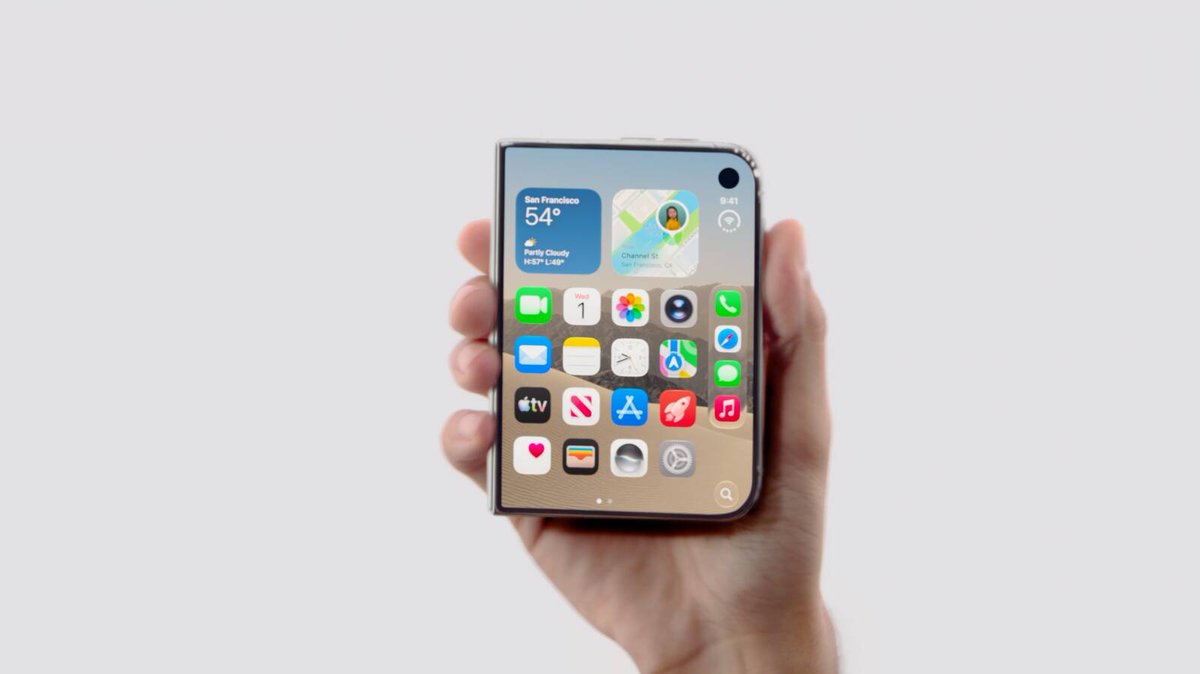
Apple 폴더블 iPhone Duo, 왼손잡이 위한 새로운 제어 센터 제스처 도입
IT之家 10월 24일 보도에 따르면, 기술 매체 9to5Mac은 오늘(10월 24일) 블로그 게시물을 통해 Apple의 첫 폴더블 iPhone Duo에서 Apple이 '왼손잡이' 사용자를 위해 새로운 제어 센터 열기 방식을 도입했다고 보도했습니다.
iPhone X 및 이후 홈 버튼이 없는 모델에서는 화면 오른쪽 상단에서 아래로 스와이프하여 제어 센터를 열 수 있습니다. 그러나 iPhone Duo 폴더블 폰에서는 한 손, 특히 왼손으로 사용할 때 화면 오른쪽 상단에서 아래로 스와이프하여 제어 센터를 여는 것이 다소 어렵습니다.
Apple은 이를 위해 새로운 열기 방식을 도입했습니다. 사용자는 상태 표시줄에 새로 추가된 배터리, Wi-Fi 및 셀룰러 네트워크 조합 아이콘을 직접 탭하여 제어 센터를 불러올 수 있습니다. 오른쪽 상단에서 아래로 스와이프하는 것보다 이 아이콘 위치가 엄지손가락의 자연스러운 활동 영역에 더 가까워 조작이 훨씬 쉽습니다.
화면에 실시간 활동(Live Activity)이 나타나면 해당 아이콘이 더 아래로 이동하여 사용자가 손가락을 뻗거나 손을 바꾸지 않고도 빠르게 제어 센터에 접근할 수 있습니다. 이 매체는 왼손으로 기기를 잡는 데 익숙하거나 자주 한 손으로 휴대폰을 사용하는 사용자에게 이 세부 사항이 일상적인 경험을 크게 개선할 수 있다고 언급했습니다.
총평
Apple은 폴더블 iPhone Duo에서 왼손잡이 사용자를 위한 새로운 제어 센터 열기 방식을 도입했습니다. 기존의 오른쪽 상단 스와이프 방식 대신, 상태 표시줄의 배터리/네트워크 아이콘을 탭하여 제어 센터를 열 수 있도록 하여 한 손 조작 편의성을 높였습니다. 실시간 활동 시 아이콘 위치를 조정하는 등 사용자 경험 개선에 중점을 둔 변화입니다.
移动设备用户体验优化
根据科技媒体 9to5Mac 的报道,Apple 在首款折叠 iPhone Duo 上针对“左撇子”和单手使用用户,引入了新的控制中心(Control Center)打开方式,以改善日常操作的便利性。
控制中心访问改进
- 传统方式痛点:在没有 Home 按钮的机型上,以往用户需要从屏幕右上角向下滑动才能打开控制中心,对于左手或单手使用设备的用户来说较为吃力。
- 新引入方式:Apple 在 iPhone Duo 上新增了直接点击状态栏中的组合图标(包含电池、Wi-Fi 和蜂窝网络)即可调出控制中心。
操作便利性提升细节
- 人体工学优化:相比从右上角下滑,新图标的位置更靠近拇指的自然活动区域,使得操作更加轻松便捷。
- 实时活动适配:当屏幕出现“实时活动”(Live Activity)时,该状态栏图标还会进一步下移,使用户无需伸展手指或更换手部姿势,即可快速进入控制中心。
总结
Apple 在 iPhone Duo 上通过优化用户交互细节,解决了传统操作模式对左撇子和单手用户的可用性问题。新增的点击式状态栏图标替代了传统的右上角下滑手势,显著提升了设备的易用性和日常使用体验。
Appleの折りたたみ式iPhone Duo、左利きユーザー向けに新しいコントロールセンタージェスチャーを導入
IT之家が10月24日に報じたところによると、テクノロジーメディア9to5Macは本日(10月24日)のブログ記事で、Appleが初の折りたたみ式iPhone Duoにおいて、「左利き」ユーザー向けに新しいコントロールセンターの開閉方法を導入したと報道しました。
従来のiPhone X以降のホームボタンのないモデルでは、画面右上の角から下にスワイプすることでコントロールセンターを開くことが一般的です。しかし、iPhone Duoのような折りたたみ式スマートフォンは、特に左手で片手操作を行う際に、右上の角からのスワイプがやや困難になるという課題がありました。
この問題を解決するため、Appleは新しい開閉方法を導入しました。ユーザーは、ステータスバーに新しく追加されたバッテリー、Wi-Fi、セルラーネットワークの組み合わせアイコンを直接タップすることでコントロールセンターを呼び出すことができます。右上の角から下にスワイプするよりも、このアイコンの位置の方が親指の自然な動作範囲に近く、操作が格段に容易になっています。
さらに、画面上にライブアクティビティ(Live Activity)が表示される場合、このアイコンはより下方に移動します。これにより、ユーザーは手を伸ばしたり、手を変えたりすることなく、迅速にコントロールセンターへアクセスすることが可能になります。同メディアは、左手でのデバイス操作に慣れているユーザーや、頻繁に片手でスマートフォンを使用するユーザーにとって、この改善点が日常的な体験を大きく向上させると指摘しています。
総評
Appleは、折りたたみ式iPhone Duoにおいて、左利きユーザーの利便性を考慮した新しいコントロールセンター開閉方法を導入しました。従来の右上のスワイプ方式に代わり、ステータスバーにあるバッテリー/ネットワークアイコンをタップするだけでコントロールセンターを開けるようにすることで、片手操作時の使いやすさを向上させています。この変更は、ライブアクティビティ表示時などにアイコン位置を調整するなど、ユーザー体験の改善に重点が置かれたものです。
Apple Foldable iPhone Duo Introduces New Control Center Gesture for Left-Handed Users
According to a report published by IT之家 on October 24th, the tech media outlet 9to5Mac reported via a blog post today (October 24th) that Apple has introduced a new method for accessing the Control Center on its first foldable iPhone Duo, specifically designed for 'left-handed' users.
On models like the iPhone X and subsequent devices without a Home button, users typically open the Control Center by swiping down from the top right corner of the screen. However, with the iPhone Duo foldable phone, performing this swipe gesture from the top right corner can be somewhat difficult when using the device with one hand, particularly with the left hand.
To address this, Apple has introduced a new opening method. Users can now call up the Control Center by directly tapping the newly added combined icon for battery, Wi-Fi, and cellular network located in the status bar. This icon's position is closer to the natural activity area of the thumb than swiping from the top right corner, making operation significantly easier.
When Live Activity appears on the screen, this specific icon moves lower down, allowing users quick access to the Control Center without having to stretch their fingers or change hands. The outlet noted that these details could greatly improve the daily experience for users accustomed to holding devices with their left hand or who frequently use their phone one-handed.
Summary
Apple has introduced a new method for accessing the Control Center on the foldable iPhone Duo, specifically improving usability for left-handed and single-handed users. Instead of relying on the traditional top-right swipe gesture, users can now tap the combined battery/network icon in the status bar to open the Control Center. This change focuses on enhancing user experience by placing the function within a more natural thumb reach, even adjusting its position when Live Activity is active.