업데이트 개요
Microsoft는 9월 25일 블로그 게시물을 통해 Windows Insider 프로그램의 베타 및 Experimental 채널 회원들을 대상으로 Windows 11의 여러 미리 보기 업데이트 테스트를 요청했습니다. 이번 업데이트에는 다양한 버전이 포함됩니다.
- 베타 26H2: 빌드 26220.9568
- Experimental 26H2: 빌드 26340.9577
- 베타 26H1: 빌드 28020.3112
- Experimental 26H1: 빌드 28120.3122
이번 업데이트는 Experimental 채널에만 새로운 기능을 도입했으며, Experimental(미래 플랫폼) 채널은 오늘 업데이트를 발표하지 않았습니다.
새로운 기능 및 개선 사항
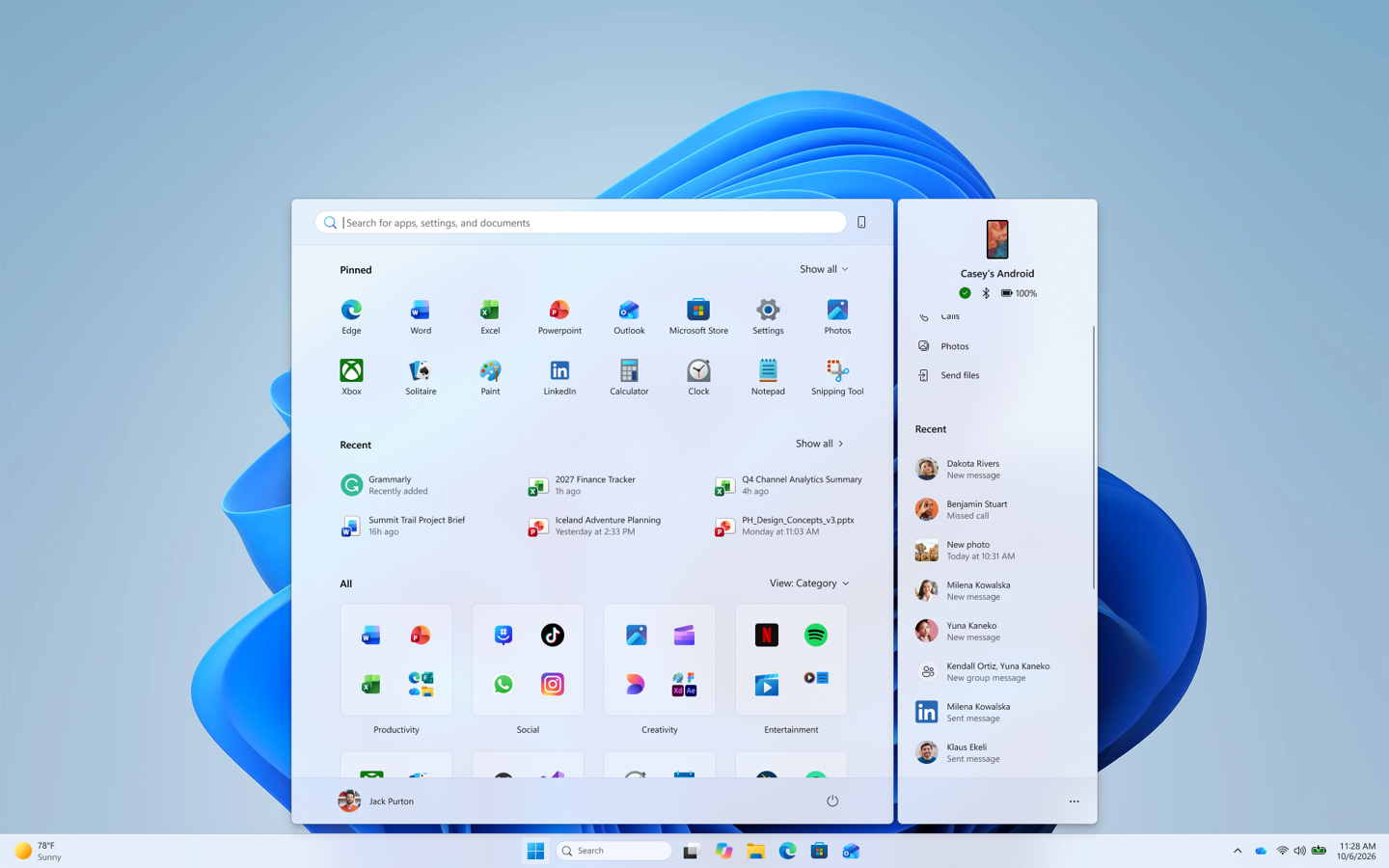
- 시작 메뉴의 휴대폰 컴패니언(Phone companion) 기능이 이제 더 많은 최신 활동 내용을 표시합니다. 새로운 스크롤 가능한 측면 창이 추가되어 사용자가 시작 메뉴를 벗어나지 않고도 더 많은 정보를 볼 수 있습니다.
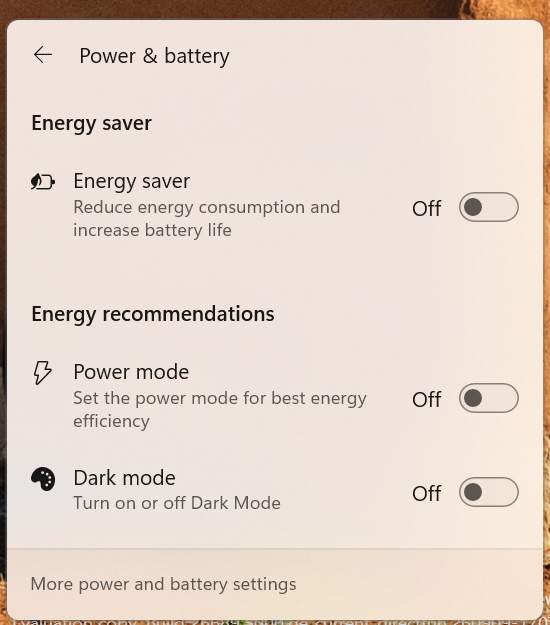
- Windows Insider 프로그램 회원들은 이제 빠른 설정에서 에너지 권장 사항(Energy Recommendations)을 직접 확인할 수 있습니다. 이를 통해 사용자는 에너지 소비를 줄이고 장치의 지속 가능성을 높이는 조치를 더 쉽게 발견하고 취할 수 있습니다.
총평
이번 Windows 11 미리 보기 업데이트는 시작 메뉴의 휴대폰 컴패니언 기능 개선과 빠른 설정 내 에너지 권장 사항 추가를 통해 사용자 편의성과 지속 가능성을 향상하는 데 중점을 두었습니다. 특히 Experimental 채널에 새로운 기능이 도입되어 미래 플랫폼의 발전 방향을 엿볼 수 있습니다.
Windows 11预览版更新发布
微软于9月25日通过博文,向Windows Insider项目的Beta和Experimental频道成员推送了适用于Windows 11的多个预览版更新,供用户进行测试。
本次更新版本信息
- Beta 26H2: Build 26220.9568
- Experimental 26H2: Build 26340.9577
- Beta 26H1: Build 28020.3112
- Experimental 26H1: Build 28120.3122
需要注意的是,本次更新仅针对Experimental频道推出了新功能;而今日(发布日)尚未有新的Experimental频道更新。
系统核心功能改进
- 开始菜单/手机伴侣 (Phone companion): 增加了可滚动侧窗格,使用户无需离开开始菜单即可查看更多最新的活动内容。
- 能源管理与可持续性: Windows预览体验成员现在可以在快速设置中直接看到“能源推荐”(Energy Recommendations),方便用户发现并采取措施减少能耗,提升设备的可持续性。
总结
本次微软为Windows 11 Insider项目成员发布了多版本预览更新,重点优化了系统可用性和可持续性功能。主要改进包括增强了开始菜单的手机伴侣侧窗格,并引入了快速设置中的能源推荐功能,旨在提升用户体验和设备能效管理能力。
アップデート概要
Microsoftは、9月25日のブログ投稿を通じて、Windows InsiderプログラムのベータおよびExperimentalチャネルのメンバーに対し、Windows 11の複数のプレビューアップデートのテストを呼びかけました。今回のアップデートには様々なバージョンが含まれています。
- ベータ 26H2: ビルド 26220.9568
- Experimental 26H2: ビルド 26340.9577
- ベータ 26H1: ビルド 28020.3112
- Experimental 26H1: ビルド 28120.3122
なお、今回のアップデートで新しい機能が導入されたのはExperimentalチャネルのみであり、Experimental(未来プラットフォーム)チャネル自体は本日更新を発表していません。
新機能と改善点
- スタートメニューの「Phone companion(フォンコンパニオン)」機能が、より多くの最新アクティビティを表示するようになりました。新しいスクロール可能なサイドパネルが追加され、ユーザーはスタートメニューから離れることなく、より多くの情報を確認できます。
- Windows Insiderプログラムのメンバーは、クイック設定から直接「Energy Recommendations(エネルギー推奨事項)」を確認できるようになりました。これにより、ユーザーはエネルギー消費を削減し、デバイスの持続可能性を高めるための対策を、より簡単に見つけ、実行することが可能になります。
まとめ
今回のWindows 11プレビューアップデートは、スタートメニューの「Phone companion」機能改善とクイック設定への「エネルギー推奨事項」追加を通じて、ユーザーの利便性と持続可能性の向上に重点を置いています。特にExperimentalチャネルで新機能が導入されたことで、将来的なプラットフォームの進化の方向性を垣間見ることができます。
Update Overview
Microsoft requested that members of the Windows Insider Program in the Beta and Experimental channels test several preview updates for Windows 11 via a blog post published on September 25th. These updates include various versions:
- Beta 26H2: Build 26220.9568
- Experimental 26H2: Build 26340.9577
- Beta 26H1: Build 28020.3112
- Experimental 26H1: Build 28120.3122
The new features were introduced exclusively in the Experimental channel; therefore, the Experimental (Future Platform) channel did not announce an update today.
New Features and Improvements
- The Phone Companion feature in the Start menu now displays more recent activity. A new scrollable side panel has been added, allowing users to view additional information without leaving the Start menu.
- Windows Insider Program members can now check Energy Recommendations directly within Quick Settings. This makes it easier for users to discover and implement measures that reduce energy consumption and enhance device sustainability.
General Review
These Windows 11 preview updates focus on enhancing user convenience and promoting sustainability through two key improvements: the enhanced Phone Companion feature in the Start menu, and the addition of Energy Recommendations within Quick Settings.
The introduction of new features specifically within the Experimental channel offers a glimpse into the future development direction of the platform.
Summary
Microsoft released multiple preview updates for Windows 11 to its Insider Program members across Beta and Experimental channels. Key improvements include an enhanced Start menu Phone Companion with a scrollable side panel, and the addition of Energy Recommendations in Quick Settings to boost device sustainability. These changes emphasize user convenience while providing insights into future platform development via the Experimental channel.