듀얼 스크린 기능
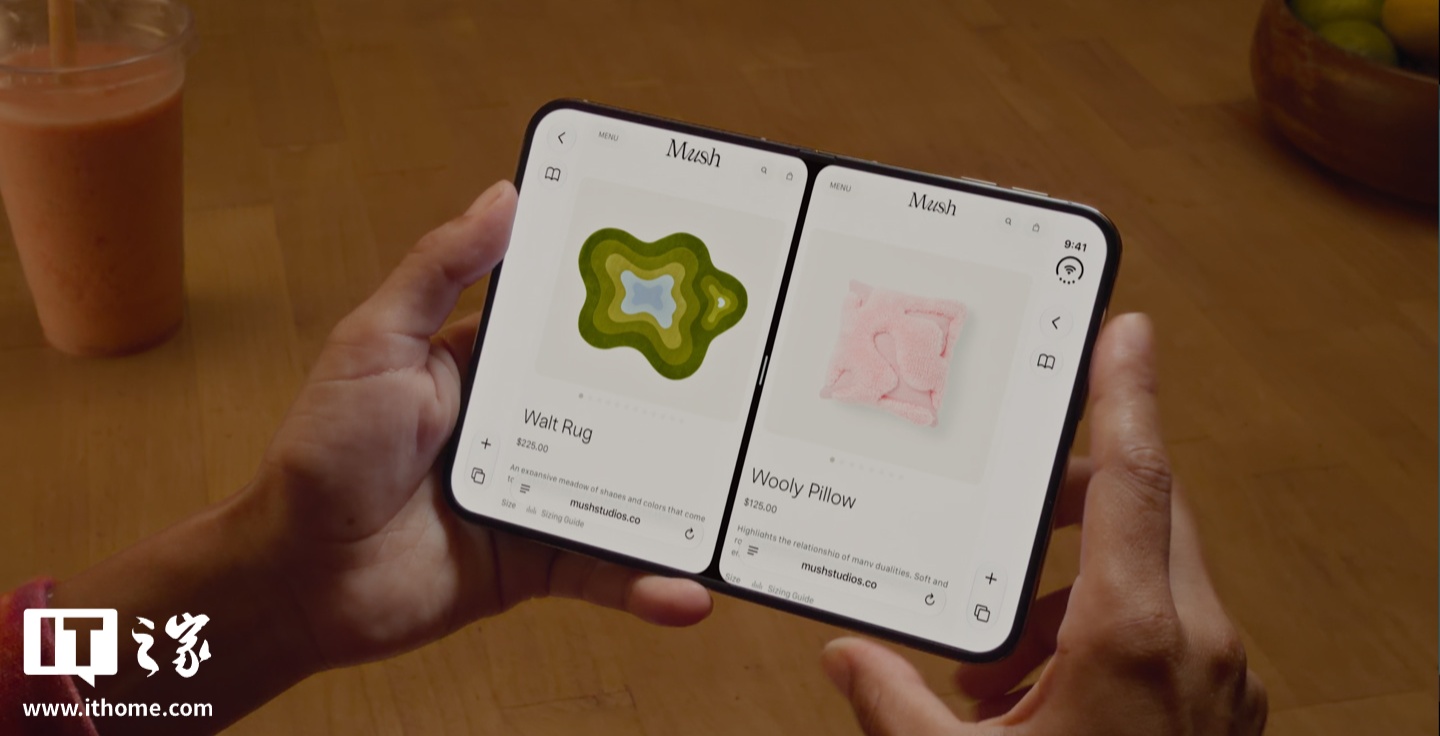
Apple의 iPhone Duo는 두 가지 앱을 동시에 사용할 수 있는 최초의 iPhone이지만, 분할 화면의 자유도는 iPad만큼 높지 않을 수 있습니다.
외신 MacRumors의 오늘 보도에 따르면, iPhone Duo 홍보 자료에는 앱 페어링 및 나란히 배치된 창에 대한 언급이 있었지만, 창 크기 조절에 대한 언급은 없었습니다.
두 개의 앱을 iPhone Duo의 7.6인치 폴더블 디스플레이에 나란히 배치할 경우, 사용자는 구분선을 드래그하여 한 앱이 더 많은 공간을 차지하도록 할 수 없으며, 고정된 1:1 비율로만 사용할 수 있습니다.
그 이유에 대해 외신은 내부 및 외부 화면이 동일한 1:1.4 화면비를 채택하고 있으며, 내부 화면의 두 절반 크기와 모양이 외부 화면과 거의 동일하기 때문이라고 분석했습니다. 이렇게 균등하게 분할될 때 각 앱은 지원해야 할 캔버스를 갖게 됩니다. (유일한 예외는 세로 모드에서 TV 프로그램이나 영화를 시청할 때일 수 있습니다. Apple의 홍보 영상에 따르면 Apple TV 콘텐츠는 올바른 화면비로 표시되며, 아래쪽 앱은 화면보다 높게 표시될 수 있습니다.)
만약 사용자가 분할 화면 구분선을 드래그할 수 있다면, 그 사이에 다양한 크기가 발생하게 되고, 폴더블 디스플레이의 외부 화면이 완전히 표시되지 않아 개발자들이 적응하기 어려울 것입니다.
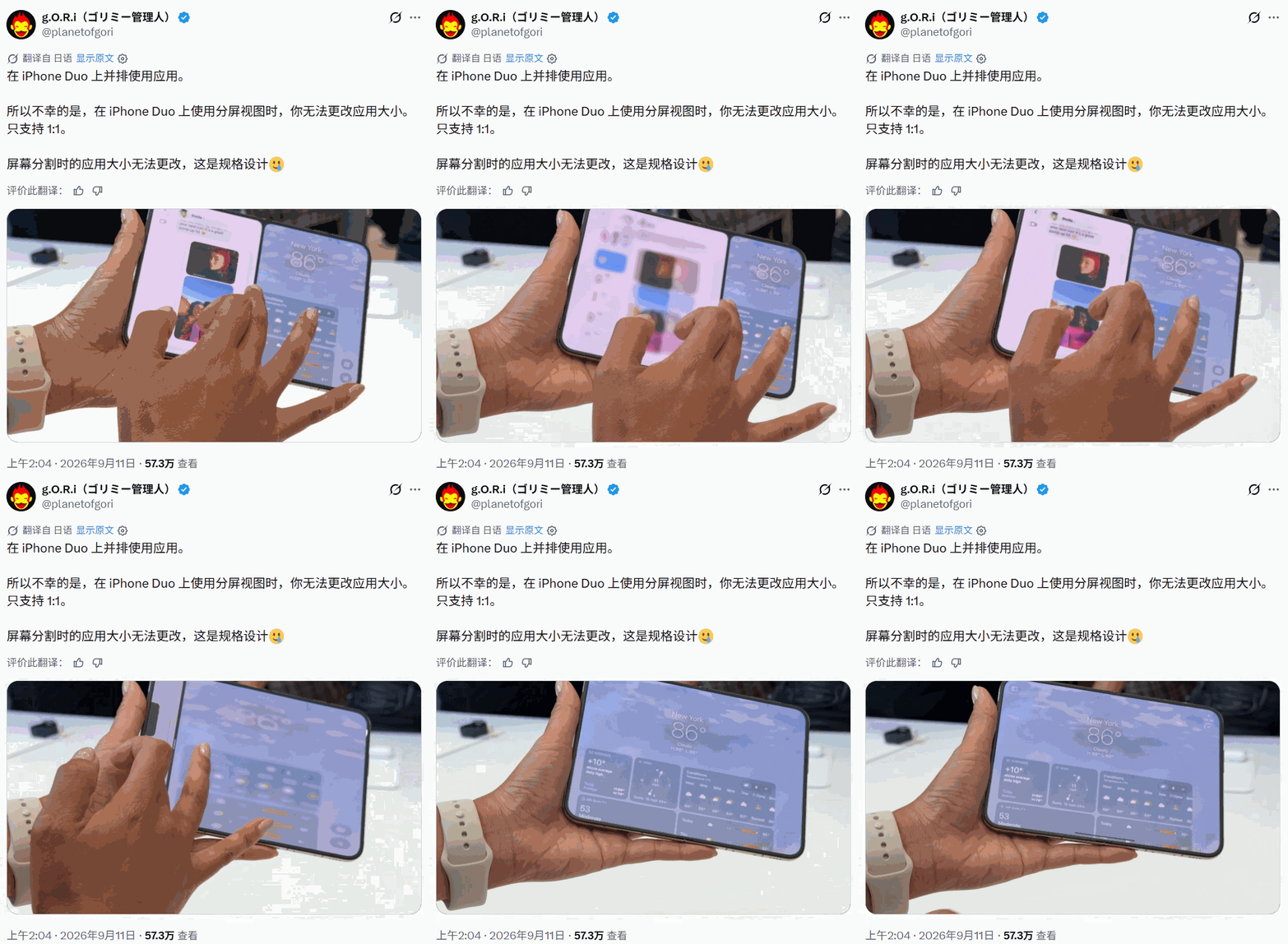
IT之家는 발표회 이후 이미 일부 매체에서 테스트를 진행했으며, 사용자가 iPhone Duo의 분할 화면 구분선을 드래그하면 애니메이션 효과가 나타나지만 UI는 다시 원래대로 돌아오는 것을 확인했습니다.
총평
Apple iPhone Duo는 7.6인치 폴더블 디스플레이에서 두 가지 앱을 동시에 실행할 수 있지만, 분할 화면의 크기 조절은 제한적입니다. 앱은 고정된 1:1 비율로만 표시되며, 이는 내부 및 외부 화면의 동일한 화면비와 개발자 적응의 어려움 때문으로 보입니다. 사용자가 구분선을 드래그해도 UI는 원래 상태로 되돌아옵니다.
产品概述与核心功能
- Apple的iPhone Duo是首款能够实现同时运行两个应用的折叠屏手机。
- 该设备支持应用配对和并排窗口(Side-by-side windows)的多任务处理模式。
显示规格与设计限制
根据外媒报道,iPhone Duo配备了7.6英寸的折叠式显示屏。
- 宽高比一致性:内外屏均采用相同的1:1.4宽高比。
- 固定比例分配:当两个应用并排显示时,系统无法通过拖动分隔线调整窗口大小,而是固定为1:1的等分比例。
多任务处理机制与技术挑战
文章指出,这种固定的分割方式是为了确保每个运行的应用都能拥有一个兼容的支持画布。
- 开发适配难度:如果用户尝试拖动分屏分隔符,会产生大量介于固定比例之间的尺寸。由于折叠显示屏的幕后外屏无法完整支持这些中间尺寸,这对开发者进行应用适配构成了挑战。
- 实际测试反馈:媒体在测试中发现,虽然拖动分隔符会有动画效果,但用户界面(UI)最终会发生回弹现象。
特殊内容显示例外
- 当以竖屏模式观看Apple TV等视频内容时,系统能够保持正确的宽高比显示。
- 在某些情况下,下方的应用被允许超出屏幕的正常高度范围进行展示。
总结
iPhone Duo作为首款双应用并排显示的折叠屏手机,其多任务功能虽然强大,但在窗口大小调整上存在固定1:1的限制。这一设计是出于内外屏宽高比一致性以及保证开发者适配兼容性的技术考量。尽管用户可以进行拖动操作,但系统仍会通过回弹机制来维持预设的最佳显示比例。
デュアルスクリーン機能
AppleのiPhone Duoは、2つのアプリを同時に使用できる初のiPhoneですが、その分割画面の自由度はiPadほど高くない可能性があります。
外信MacRumorsの報道によると、iPhone Duoのプロモーション資料には、アプリのペアリングや横並び配置されたウィンドウについての言及はありましたが、ウィンドウサイズの調整に関する記述はありませんでした。
2つのアプリをiPhone Duoの7.6インチ折りたたみディスプレイに横並びに配置した場合、ユーザーは区切り線(セパレーター)をドラッグして片方のアプリにより大きなスペースを割り当てることはできず、固定された1:1の比率での使用に限られます。
外信は、この理由として、内部画面と外部画面が同じ1:1.4のアスペクト比を採用している点、そして内部画面の半分ほどのサイズと形状が外部画面とほぼ同一である点を分析しています。このように均等に分割される場合、各アプリは対応すべきキャンバスを持つ必要があります。(唯一の例外は、縦モードでテレビ番組や映画を視聴する場合かもしれません。Appleのプロモーション動画によると、Apple TVコンテンツは正しいアスペクト比で表示され、下のアプリが画面より高く表示される可能性があります。)
もしユーザーが分割画面の区切り線をドラッグできる場合、その間に様々なサイズが生じ、折りたたみディスプレイの外部画面全体が表示されなくなるため、開発者が対応するのが困難になるでしょう。
IT之家は、発表会後すでに一部メディアによるテストを実施した結果、iPhone Duoの分割画面の区切り線をドラッグするとアニメーション効果が現れるものの、UIは元の状態に戻ることを確認しています。
総評
Apple iPhone Duoは、7.6インチの折りたたみディスプレイで2つのアプリを同時に実行できますが、分割画面のサイズ調整には制限があります。アプリは固定された1:1の比率でのみ表示され、これは内部および外部画面の同一のアスペクト比と開発者の対応の難しさによるものと考えられます。ユーザーが区切り線をドラッグしても、UIは元の状態に自動的に戻ります。
まとめ
Apple iPhone Duoは2つのアプリを同時に使用できる画期的な機能を持っていますが、分割画面のサイズ調整は固定された1:1の比率に限定されるという制限があります。この制約は、内部・外部ディスプレイのアスペクト比の一致と開発者側の対応の難しさに起因しているようです。ユーザーによる区切り線のドラッグ操作はアニメーション効果を伴いますが、最終的には元のUI状態に戻る仕様となっています。
Dual Screen Functionality
The Apple iPhone Duo is touted as the first iPhone capable of running two apps simultaneously; however, its split-screen flexibility may not match that of an iPad.
According to reports from foreign media MacRumors, while the promotional materials for the iPhone Duo mentioned app pairing and side-by-side windows, they did not mention any functionality for resizing the window dimensions.
When two apps are placed side-by-side on the iPhone Duo's 7.6-inch foldable display, users cannot drag the divider to allow one application to occupy more space; instead, the apps must be used in a fixed 1:1 ratio.
Foreign media analyzed that this limitation exists because both the internal and external screens adopt the same 1:1.4 aspect ratio, and the size and shape of half the internal screen are nearly identical to the external display. When split evenly like this, each app must support a standardized canvas. (The only potential exception might be when viewing TV programs or movies in vertical mode. Apple's promotional video indicates that Apple TV content is displayed with the correct aspect ratio, though the bottom app may appear taller than the screen.)
If users were able to drag the split-screen divider freely, it would create various sizes between the apps, which could make it difficult for developers to adapt because the foldable display's external screen might not be fully utilized.
IT之家 reported that some media conducted tests following the presentation and confirmed that while dragging the split-screen divider on the iPhone Duo creates an animation effect, the user interface (UI) immediately reverts back to its original state.
Overall Assessment
The Apple iPhone Duo is capable of running two apps simultaneously on a 7.6-inch foldable display, but its split-screen resizing functionality is highly restricted. Apps are displayed only in a fixed 1:1 ratio, which appears to be due to the identical aspect ratios between the internal and external screens, posing challenges for developer adaptation. Furthermore, even when users attempt to drag the divider, the UI automatically resets to its original configuration.
Summary
The Apple iPhone Duo allows dual-app usage on a 7.6-inch foldable display, but this functionality is limited by fixed 1:1 app ratios. This restriction stems from the internal and external screens sharing an identical 1:1.4 aspect ratio, making variable resizing difficult for developers to implement. Testing confirms that while dragging the split-screen divider creates a visual animation, the UI always reverts to its default state.