서론
IT之家 8월 25일 보도에 따르면, IT 전문 매체 MacRumors는 어제(8월 24일) 블로그 게시물을 통해 iOS 27 버전 Apple Safari 브라우저의 다양한 새로운 기능들을 정리했습니다. 여기에는 Apple Intelligence를 활용한 탭 자동 정리, 필요에 따른 맞춤형 확장 프로그램 생성, 웹사이트 변경 사항 모니터링 등이 포함됩니다.
Apple Intelligence 통합
iOS 27 버전 Safari 브라우저는 탭 관리, 확장 프로그램 생성, 웹사이트 모니터링, 비밀번호 업데이트 등 다양한 시나리오에 걸쳐 여러 Apple Intelligence 기능을 도입합니다.
탭 관리
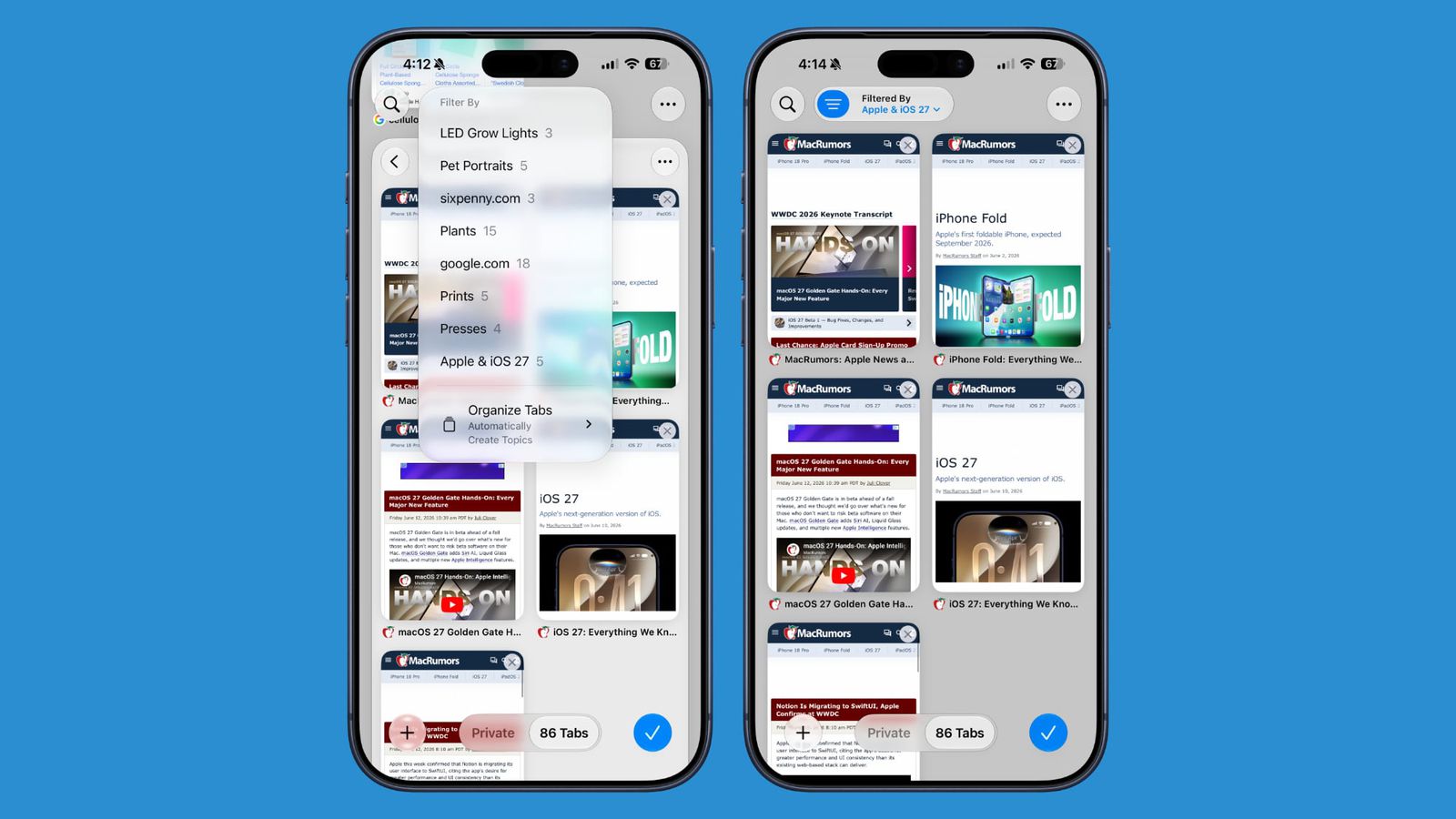
Safari는 Apple Intelligence의 도움을 받아 열려 있는 탭을 분석하고 관련 주제별로 자동으로 분류할 수 있습니다. 예를 들어, 사용자가 새 소파를 검색하고 주말 여행을 계획하는 경우, Safari는 해당 웹사이트들을 관련 주제로 분류합니다.
사용자는 탭 보기에서 화면 오른쪽 상단의 가로줄 세 개 아이콘을 클릭하여 "자동으로 주제 생성" 설정을 열 수 있습니다. Safari 메뉴는 모든 탭 그룹을 보고 주제별로 내용을 필터링하여 특정 주제의 페이지만 열 수 있도록 지원합니다.
시작 페이지에는 "계속 탐색" 영역이 새로 추가되어 사용자가 최근에 닫은 주제와 다른 기기에서 여전히 열려 있는 주제를 표시합니다. 또한 사용자는 북마크 및 읽기 목록에 저장된 페이지를 주제별로 정리할 수 있습니다.
맞춤형 확장 프로그램
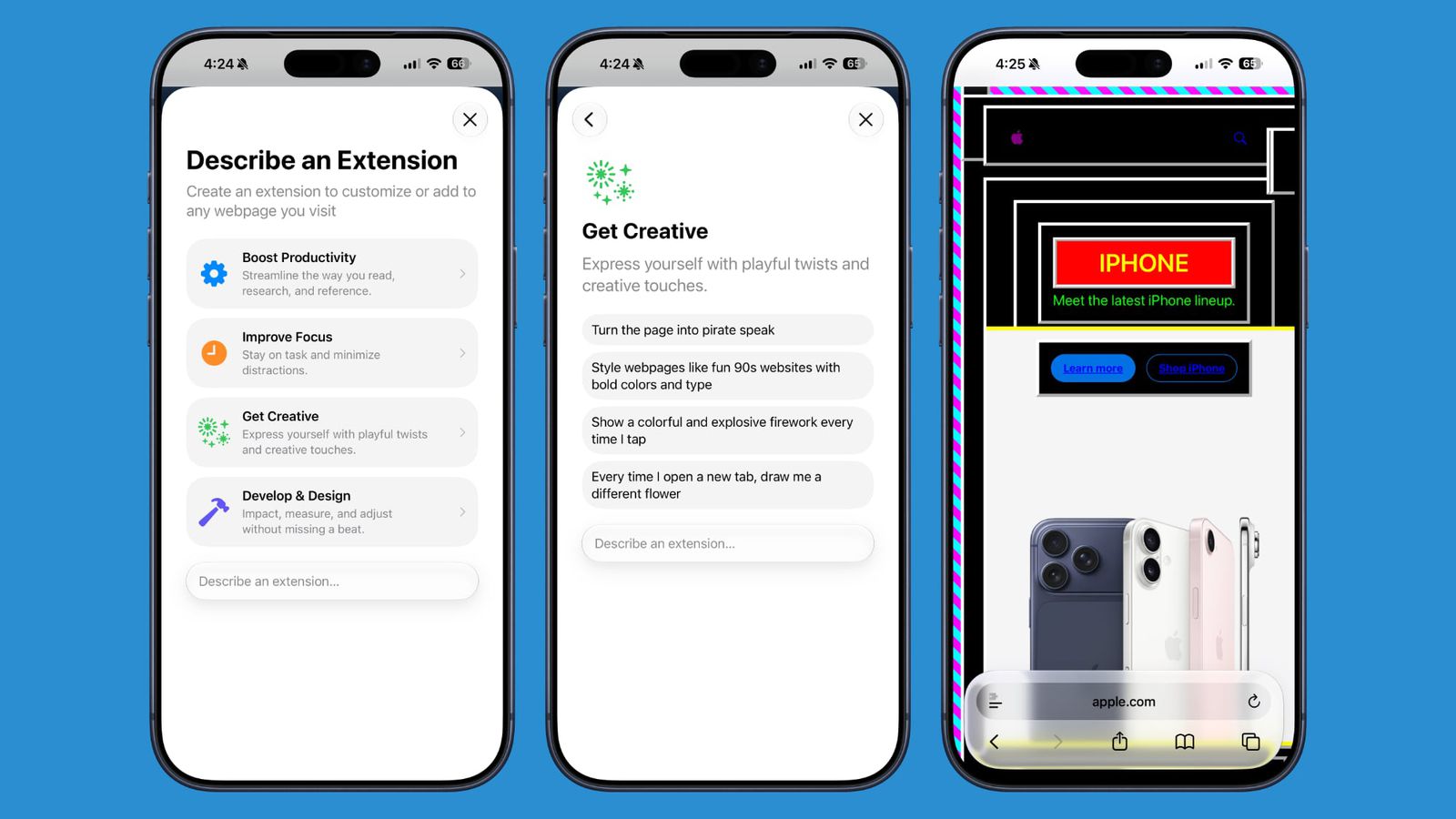
Safari에 "확장 프로그램 생성" 옵션이 새로 추가되어 사용자가 직접 요구 사항을 설명하면 AI가 맞춤형 Safari 확장 프로그램을 생성할 수 있습니다. IT之家는 원문 이미지를 다음과 같이 첨부했습니다.
사용자는 주소 표시줄 왼쪽에서 Safari 설정을 열고 "확장 프로그램 생성"을 클릭한 다음, 확장 프로그램이 수행하기를 원하는 작업을 입력할 수 있습니다. 시스템은 또한 "생산성 향상", "집중력 개선", "창의력 고취", "개발 및 디자인" 등과 같은 범주의 제안을 제공합니다.
- Apple iOS / iPadOS 27 Beta 5 업데이트 요약: Safari 등 새로운 아이콘 적용, Siri AI 맞춤형 음성 지원 등
웹사이트 변경 사항 모니터링
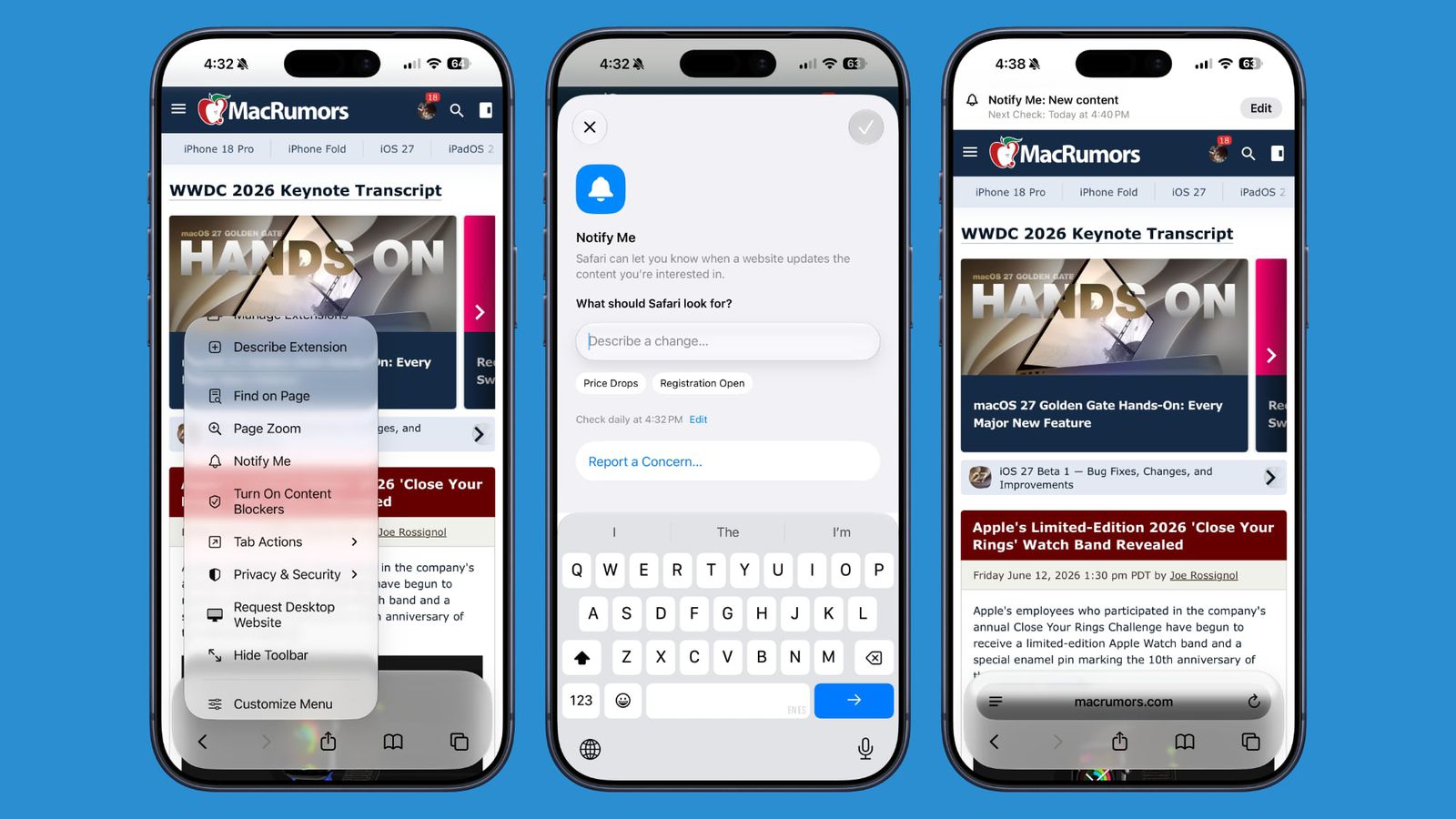
Safari는 웹사이트 콘텐츠 변경 사항을 모니터링하고 새로운 정보가 발견되면 사용자에게 알림을 보낼 수 있습니다. Apple은 이 기능이 콘서트 티켓 판매 시작을 추적하거나 품절된 상품의 재입고를 모니터링하는 데 적합하다고 밝혔습니다.
사용자는 목표 웹사이트를 연 후 주소 표시줄 왼쪽의 설정 아이콘을 클릭하고 "알림 받기"를 선택하여 Safari가 모니터링하기를 원하는 내용을 입력하고 확인 빈도와 시간을 설정할 수 있습니다.
Safari는 웹사이트를 최소 한 시간마다 한 번씩 확인할 수 있으며, 매일, 매주, 매월 확인도 지원합니다.
비밀번호 관리
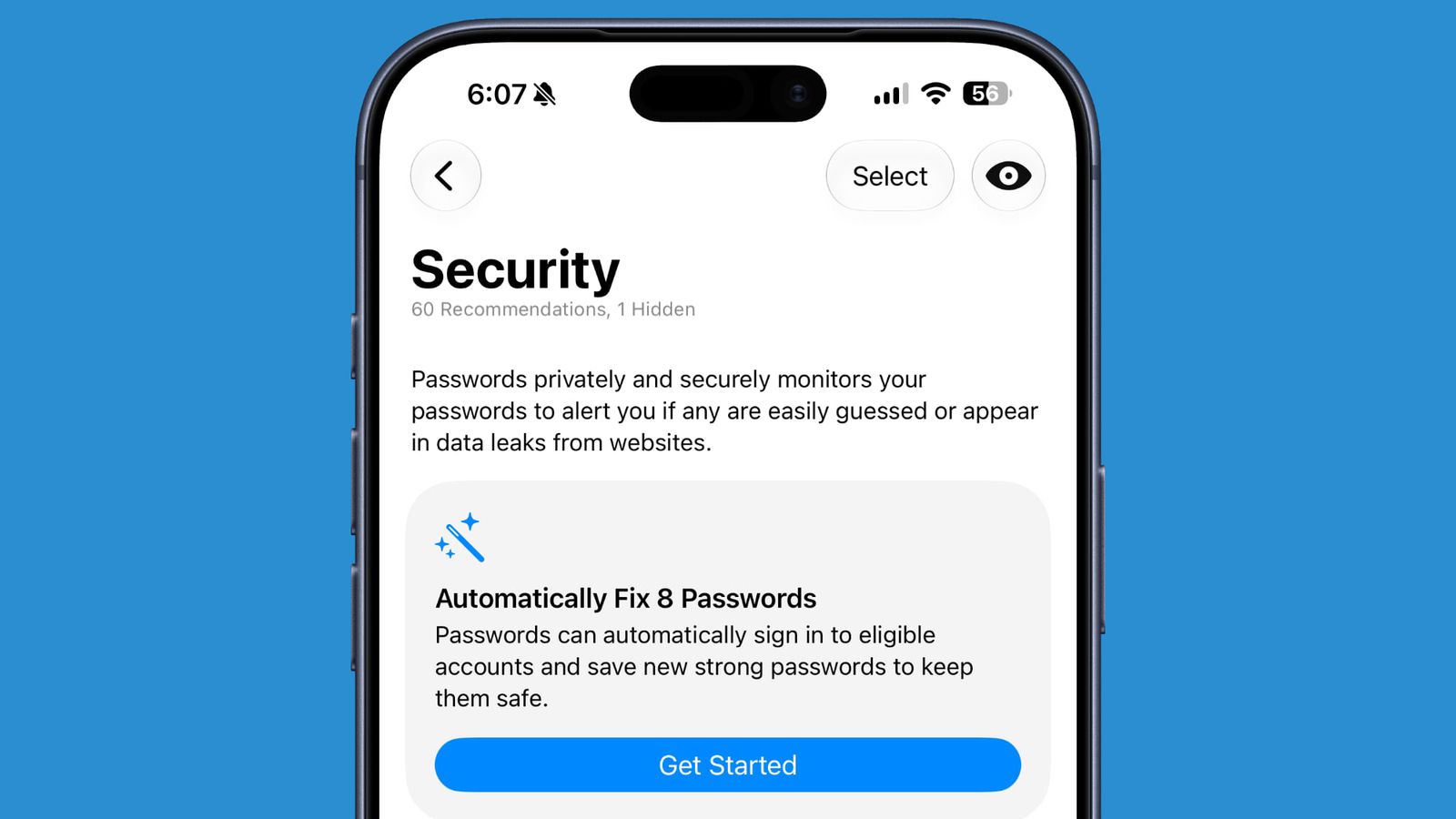
"비밀번호" 앱은 Safari의 도움을 받아 약하거나 유출된 것으로 표시된 비밀번호를 자동으로 변경하고 더 강력한 비밀번호로 대체할 수 있습니다.
이 기능은 Apple Intelligence를 통해 자동으로 적격 웹사이트에 접속하고 로그인하여 비밀번호를 업데이트하며, 사용자는 한 번의 클릭으로 작업을 확인할 수 있습니다.
호환성
탭 자동 정리, 맞춤형 확장 프로그램, 웹사이트 변경 알림 등의 기능은 Apple Intelligence를 지원해야 합니다. Apple Intelligence는 iPhone 15 Pro 및 이후 모델에서 사용할 수 있습니다.
iOS 27은 현재 개발자 및 공개 베타 사용자에게 테스트 버전으로 제공되고 있습니다. 정식 버전은 가을에 새로운 iPhone과 함께 출시될 예정입니다.
기타 기능
iOS 27에는 새로운 자녀 보호 기능인 "탐색 요청"이 추가되었습니다. 이 기능을 활성화하면 어린이가 새로운 웹사이트에 접속하기 전에 부모의 승인을 받아야 합니다.
Apple은 Safari의 에너지 효율성이 개선되어 배터리 소모가 줄어들 것이라고 밝혔습니다. 웹 앱과 시작 페이지 콘텐츠의 로딩 속도가 빨라지고, JavaScript 처리 속도가 향상되었으며, 애니메이션과 그래픽 표시도 더욱 부드러워졌습니다.
총평
iOS 27 버전 Safari는 Apple Intelligence를 통해 탭 자동 정리, 맞춤형 확장 프로그램 생성, 웹사이트 변경 사항 모니터링 등 다양한 AI 기반 기능을 제공하여 사용자 경험을 크게 향상시킵니다. 또한, 비밀번호 관리 기능 강화와 에너지 효율성 개선을 통해 보안과 성능을 모두 잡았으며, 자녀 보호 기능도 추가되어 사용자 편의성을 높였습니다. 이 모든 기능은 iPhone 15 Pro 및 이후 모델에서 Apple Intelligence 지원을 통해 활용 가능합니다.
Safari 与 Apple Intelligence 集成
iOS 27 版 Safari 深度整合了 Apple Intelligence,旨在提升用户在标签页管理、扩展创建及网站监测等场景的体验。
- 利用 AI 分析并按相关主题(如“购物”、“旅行”)自动分类已打开的页面。
- 支持通过描述需求让 AI 生成定制化的 Safari 扩展。
- 提供基于 Apple Intelligence 的密码安全增强功能,自动识别并更换薄弱或泄露的密码。
标签页管理与界面优化
- 自动创建主题: 用户可在设置中开启该功能,方便按相关内容组织页面。
- “继续浏览”区域: 在开始页展示近期关闭的主题或其它设备上仍处于打开状态的页面。
- 内容整理: 支持按主题对书签和阅读列表中的页面进行分类管理。
自定义扩展功能
Safari 新增“创建扩展”选项,用户可直接输入需求描述让 AI 生成定制工具。
- 提供包括“提升效率”、“改善专注”、“激发创意”及“开发与设计”等多个预设类别供参考。
- 通过地址栏设置界面即可快速进入扩展创建流程。
网站监测与提醒
Safari 能够监控特定网页的内容变化并及时通知用户,适用于追踪门票或商品状态。
- 支持用户输入希望监测的内容并设定检查频率(每小时、每天、每周或每月)。
- 在发现新信息时自动推送通知。
安全保障与家长控制
- 密码保护: 依靠 Apple Intelligence 自动访问符合条件的网站,完成登录并更新为更强的密码。
- “请求浏览”功能: 为儿童提供新的家长控制选项,要求在访问新网站前获得家长批准。
系统性能与硬件支持
iOS 27 对 Safari 的底层性能和能效进行了显著优化。
- 降低电池消耗,提升网页应用加载速度及 JavaScript 处理效率,使动画与图形显示更流畅。
- Apple Intelligence 相关功能支持 iPhone 15 Pro 及后续机型。
总结
iOS 27 版 Safari 通过深度集成 Apple Intelligence,大幅增强了自动化标签管理、AI 生成扩展以及智能密码保护等核心功能。同时,系统在提升能效、优化渲染性能以及强化家长控制方面也进行了显著改进。
はじめに
ITハウスの8月25日の報道によると、IT専門メディアMacRumorsは昨日(8月24日)、iOS 27バージョンのApple Safariブラウザにおける様々な新機能をまとめました。これらには、Apple Intelligenceを活用したタブの自動整理、必要に応じたカスタム拡張機能の生成、ウェブサイトの変更監視などが含まれます。
Apple Intelligenceの統合
iOS 27バージョンのSafariブラウザは、タブ管理、拡張機能の作成、ウェブサイトのモニタリング、パスワードの更新など、さまざまなシナリオにおいて複数のApple Intelligence機能を導入します。
タブ管理
SafariはApple Intelligenceの支援を受け、開いているタブを分析し、関連するトピックごとに自動的に分類できます。例えば、ユーザーが新しいソファを検索し、週末の旅行を計画している場合、Safariはそれらのウェブサイトを関連するトピックとして分類します。
ユーザーは「タブを表示」画面の右上にある3本の横線のアイコンをクリックして、「自動でトピックを作成」設定を開くことができます。Safariメニューでは、すべてのタブグループを表示し、内容をトピック別にフィルタリングして特定のトピックのページのみを開くことができるようになります。
スタートページには「さらに探索(Continue Exploring)」エリアが新しく追加され、ユーザーが最近閉じたトピックや、他のデバイスでまだ開いているトピックが表示されます。また、ユーザーはブックマークや読み取りリストに保存されたページをトピック別に整理することも可能です。
カスタム拡張機能
Safariに「拡張機能を生成」オプションが新しく追加され、ユーザーが要件を説明するとAIがカスタマイズされたSafari拡張機能を生成します。ITハウスは原文の画像を以下のように添付しました。
ユーザーはアドレスバーの左側からSafari設定を開き、「拡張機能を生成」をクリックした後、拡張機能に実行してほしいタスクを入力できます。システムはまた、「生産性の向上」「集中力の改善」「創造性の向上」「開発およびデザイン」といったカテゴリーの提案も提供します。
- Apple iOS / iPadOS 27 Beta 5アップデートの要約:Safariなどの新しいアイコンの適用、Siri AIによるカスタム音声サポートなど
ウェブサイトの変更監視
Safariはウェブサイトのコンテンツ変更を監視し、新しい情報が見つかった場合にユーザーに通知を送ることができます。Appleはこの機能がコンサートチケットの販売開始の追跡や、売り切れ商品の再入荷のモニタリングに適していると述べています。
ユーザーは目的のウェブサイトを開いた後、アドレスバーの左側にある設定アイコンをクリックし、「通知を受け取る」を選択して、Safariに監視してほしい内容を入力し、確認の頻度と時間を設定できます。
Safariはウェブサイトを最低1時間ごとに1回確認でき、毎日、毎週、毎月の確認もサポートしています。
パスワード管理
「パスワード」アプリは、Safariの支援を受け、脆弱または漏洩したと表示されたパスワードを自動的に変更し、より強力なパスワードに置き換えることができます。
この機能はApple Intelligenceを通じて、適切なウェブサイトに自動的にアクセスしてログインし、パスワードを更新します。ユーザーはワンクリックで作業を確認できます。
互換性
タブの自動整理、カスタム拡張機能、ウェブサイト変更通知などの機能はApple Intelligenceをサポートする必要があります。Apple IntelligenceはiPhone 15 Pro以降のモデルで使用可能です。
iOS 27は現在、開発者およびパブリックベータユーザー向けにテストバージョンとして提供されています。正式版は秋に新しいiPhoneと共にリリースされる予定です。
その他の機能
iOS 27には、新しい子どもの保護機能である「探索リクエスト」が追加されました。この機能を有効にすると、子供が新しいウェブサイトにアクセスする前に保護者の承認が必要になります。
AppleはSafariのエネルギー効率が改善され、バッテリー消費が減少すると述べています。Webアプリとスタートページの内容の読み込み速度が向上し、JavaScript処理速度も向上したほか、アニメーションやグラフィックの表示もよりスムーズになりました。
まとめ
iOS 27バージョンのSafariは、Apple Intelligenceを活用することでタブの自動整理やカスタム拡張機能の生成など、AIベースの機能を多数提供し、ユーザー体験を大幅に向上させます。また、パスワード管理の強化やエネルギー効率の改善によりセキュリティとパフォーマンスの両立を実現しており、iPhone 15 Pro以降のモデルでこれらの高度な機能を利用することが可能です。
Introduction
According to a report by IT Home on August 25, MacRumors published a blog post on August 24 detailing various new features for the Safari browser in iOS 27. These include tab auto-organization powered by Apple Intelligence, custom extension creation based on user needs, and website change monitoring.
Apple Intelligence Integration
The Safari browser in iOS 27 introduces several Apple Intelligence features across various scenarios, including tab management, extension creation, website monitoring, and password updates.
Tab Management
With the help of Apple Intelligence, Safari can analyze open tabs and automatically categorize them by related topics. For example, if a user is searching for new sofas and planning a weekend trip, Safari will group those websites into relevant categories.
Users can access "Generate Topics Automatically" settings by tapping the three-line icon at the top right of the Tab View. The Safari menu allows users to view all tab groups and filter content by topic to open pages related to specific subjects.
A new "Continue Exploring" section has been added to the start page, displaying recently closed topics and tabs still open on other devices. Additionally, users can organize pages saved in bookmarks and reading lists by topic.
Customized Extensions
A new "Create Extension" option has been added to Safari, allowing AI to generate custom extensions based on the user's description of their requirements. IT Home included the original images as follows:
Users can open Safari settings from the left side of the address bar, click "Create Extension," and input the tasks they want the extension to perform. The system also provides category suggestions such as "Productivity Boost," "Focus Improvement," "Creativity Boost," and "Development & Design."
- Apple iOS / iPadOS 27 Beta 5 Update Summary: New icons for Safari, personalized Siri AI voice support, etc.
Website Change Monitoring
Safari can monitor changes in website content and notify users when new information is detected. Apple stated that this feature is ideal for tracking concert ticket sales or monitoring restocked items.
After opening a target website, users can click the settings icon on the left of the address bar, select "Get Notifications," and input the specific content they want Safari to monitor while setting the frequency and time.
Safari can check websites at intervals of at least once per hour, with support for daily, weekly, and monthly checks as well.
Password Management
The "Passwords" app, supported by Safari, can automatically detect weak or leaked passwords and replace them with stronger ones.
This feature uses Apple Intelligence to automatically navigate to and log in to the relevant websites to update passwords, allowing users to confirm the action with a single click.
Compatibility
Features such as tab auto-organization, custom extensions, and website change notifications require Apple Intelligence support. Apple Intelligence is available on iPhone 15 Pro and later models.
iOS 27 is currently available to developers and public beta users as a test version. The official version is scheduled for release in the fall along with new iPhones.
Other Features
iOS 27 introduces "Ask to Explore," a new parental control feature. When enabled, children must receive parental approval before accessing new websites.
Apple also stated that Safari's energy efficiency has been improved to reduce battery consumption. Loading speeds for web apps and start page content have increased, JavaScript processing speed has improved, and animations and graphics are displayed more smoothly.
Summary
Safari in iOS 27 integrates Apple Intelligence to provide advanced features like automated tab organization, AI-generated custom extensions, and proactive website monitoring. It also enhances security through automatic password updates and improves overall performance with better energy efficiency and faster rendering.