새로운 기능 도입
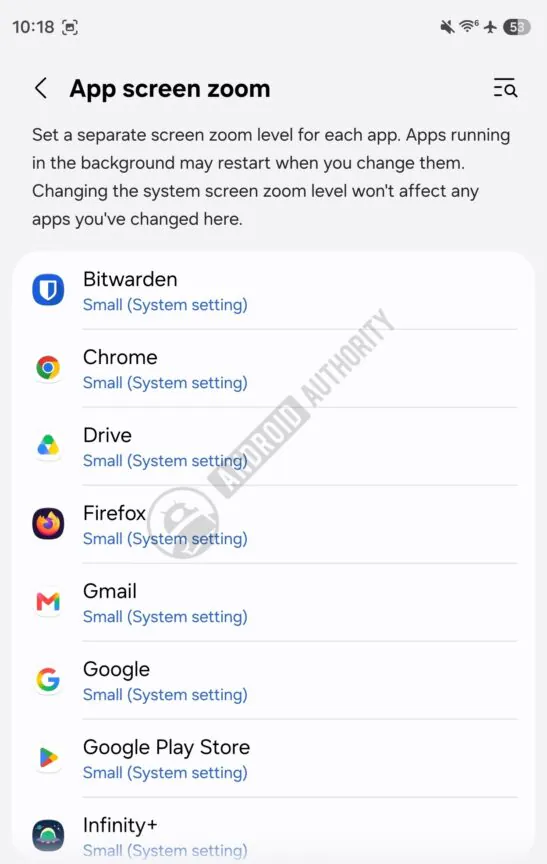
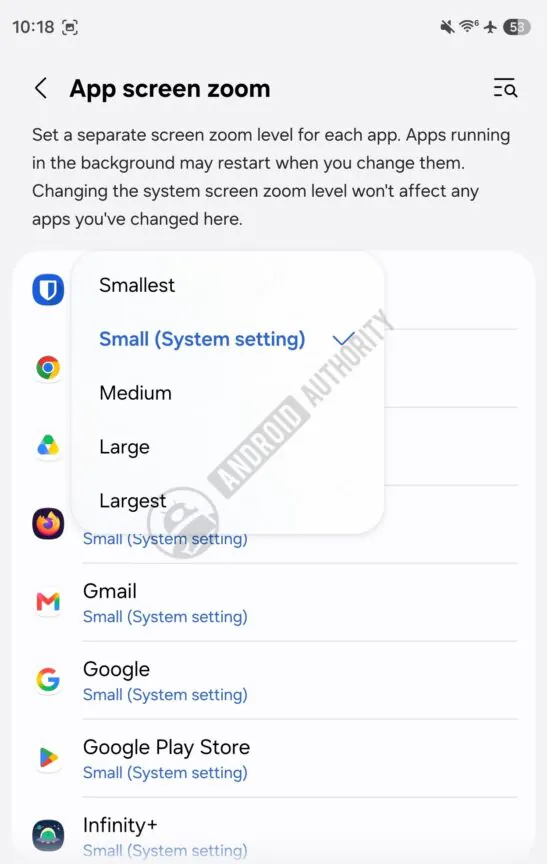
IT소식에 따르면 기술 매체 AndroidAuthority가 7월 27일 보도한 내용에 따르면, Samsung은 Galaxy Z Fold8 등 폴더블 기기에서 더욱 세분화된 앱 크기 조절 기능을 준비 중이며, 사용자가 특정 앱에 대해 5단계의 크기 조절 수준을 설정할 수 있도록 지원할 예정입니다.
개발 현황 및 경로
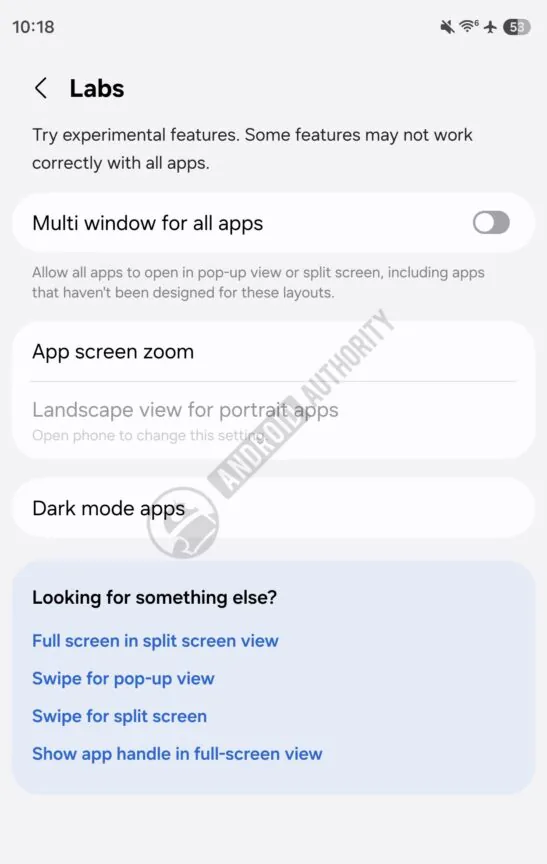
이 기능은 현재 개발 단계에 있으며, "설정 → 고급 기능 → Labs" 경로에서 확인할 수 있습니다. 사용자는 특정 앱을 대상으로 서로 다른 크기 조절 수준을 설정할 수 있습니다.
지원 기기
해당 기능은 현재 One UI 9가 탑재된 Galaxy Z Fold8에서 확인되었으며, Galaxy Z Fold8 Ultra 및 Galaxy Z Flip8에서는 아직 관련 옵션이 발견되지 않았습니다.
기존 기능과의 차이점
안드로이드 시스템에는 이미 모든 앱의 인터페이스를 확대할 수 있는 전체 디스플레이 크기 조절 기능이 제공되고 있습니다. 반면, Samsung이 이번에 도입하는 기능은 사용자의 활용 상황에 따라 특정 앱을 세분화하여 설정할 수 있게 하며, 5가지 수준의 크기 조절을 지원합니다.
테스트 결과
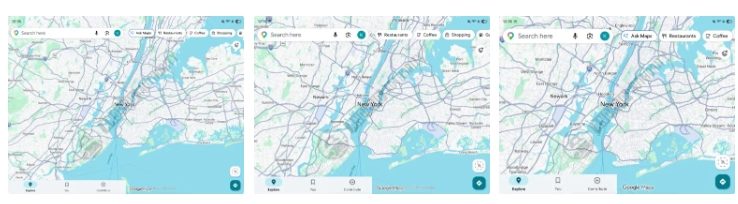
해당 매체는 Chrome 브라우저 테스트 시 아직 기능이 활성화되지 않은 것으로 확인했습니다. 반면 Google Maps 앱에서는 최소, 중간, 최대의 세 가지 크기 조절 단계를 전환할 때 인터페이스 요소와 지도 내용이 함께 확대되는 것이 확인되었습니다.
총평
Samsung은 Galaxy Z Fold8 등 폴더블 기기를 위해 특정 앱에 대해 5단계의 세분화된 크기 조절 기능을 도입할 예정입니다. 이 기능은 안드로이드 기본 시스템의 전체 확대와 달리 개별 앱에 최적화된 설정을 제공하며, 현재 일부 모델과 애플리케이션에서 테스트가 진행 중입니다.
应用缩放功能更新
Samsung 正在为 Galaxy Z Fold8 等折叠手机开发精细化的应用缩放功能。该功能允许用户针对特定应用设置 5 个不同的缩放级别,目前处于开发阶段,路径位于“设置 → 高级功能 → Labs”。
支持设备情况
目前该功能的出现情况如下:
- Galaxy Z Fold8(运行 One UI 9):已发现相关选项。
- Galaxy Z Fold8 Ultra 和 Galaxy Z Flip8:尚未发现相关选项。
功能对比与测试反馈
不同于 Android 系统提供的全局显示缩放,Samsung 的新功能支持用户根据使用场景对特定应用进行细分调节。
- Chrome 浏览器:目前调整后暂未生效。
- Google Maps:在切换最小、中、大三个缩放档位时,界面元素与地图内容能够同步放大。
总结
Samsung 正在为折叠屏手机开发更精细的单应用缩放功能,提供 5 个缩放级别供用户选择。该功能旨在提供比系统全局缩放更灵活的定制化体验,目前已在部分机型上进入测试阶段。
新機能の導入
ITニュースによると、AndroidAuthorityが7月27日に報じた内容に基づき、SamsungはGalaxy Z Fold8などの折りたたみ式デバイスにおいて、より細分化されたアプリサイズ調整機能を準備しています。これにより、ユーザーは特定のアプリに対して5段階のサイズ調整レベルを設定できるようになります。
開発状況とパス
この機能は現在開発段階にあり、「設定 → 高度な機能 → Labs」のパスから確認できる予定です。ユーザーは対象とするアプリごとに異なるサイズ調整レベルを設定することが可能になります。
対応デバイス
この機能は、One UI 9を搭載したGalaxy Z Fold8で確認されていますが、Galaxy Z Fold8 UltraおよびGalaxy Z Flip8ではまだ関連オプションは見つかっていません。
既存機能との違い
Androidシステムには、すべてのアプリのインターフェースを一括して拡大するディスプレイサイズ調整機能がすでに備わっています。これに対し、Samsungが導入する新機能は、ユーザーの使用状況に合わせて特定のアプリごとに細分化された設定が可能であり、5段階のサイズ調整をサポートします。
テスト結果
該当メディアによる調査では、Chromeブラウザではまだこの機能が有効になっていないことが確認されました。一方でGoogle Mapsアプリでは、最小、中間、最大の3つのサイズ調整レベルを切り替える際に、インターフェース要素と地図の内容が連動して拡大されることが確認されています。
まとめ
SamsungはGalaxy Z Fold8などの折りたたみ式デバイス向けに、特定のアプリに対して5段階の細分化されたサイズ調整機能を導入する予定です。この機能はAndroid標準の全体的な拡大とは異なり、個々のアプリに最適化された設定を提供することを目的としており、現在一部のモデルやアプリケーションでテストが進められています。
New Feature Introduction
According to a report by AndroidAuthority on July 27, Samsung is preparing more granular app resizing features for foldable devices such as the Galaxy Z Fold8. This update will allow users to select from five different sizing levels for specific applications.
Development Status and Path
The feature is currently in the development phase and can be accessed through the "Settings > Advanced Features > Labs" path. This allows users to configure different resizing scales for individual apps based on their preferences.
Supported Devices
The feature has been identified on the Galaxy Z Fold8 running One UI 9. However, the option has not yet been found on the Galaxy Z Fold8 Ultra or the Galaxy Z Flip8.
Difference from Existing Features
While the standard Android system already provides a global display size option that scales the interface of all apps simultaneously, Samsung's new feature allows for granular customization. It offers five distinct levels of resizing specifically tailored to individual apps depending on the user's needs.
Test Results
During testing by the outlet, the feature was not yet active in the Chrome browser. In contrast, the Google Maps app demonstrated three scaling stages—Small, Medium, and Large—where both interface elements and map content were scaled together when switching between levels.
Overall View
Samsung plans to introduce a five-level granular resizing feature for specific apps on foldable devices like the Galaxy Z Fold8. Unlike the standard Android system-wide scaling, this feature provides optimized settings for individual applications, with testing currently ongoing across various models and apps.
Summary
Samsung is developing a more granular app resizing feature for its foldables, allowing users to choose from five different size levels for specific apps. This functionality, found in the Labs menu, offers more customization than standard Android system-wide scaling. The feature has been spotted on the Galaxy Z Fold8 running One UI 9 while testing continues across other models and applications.