신규 기능 소개
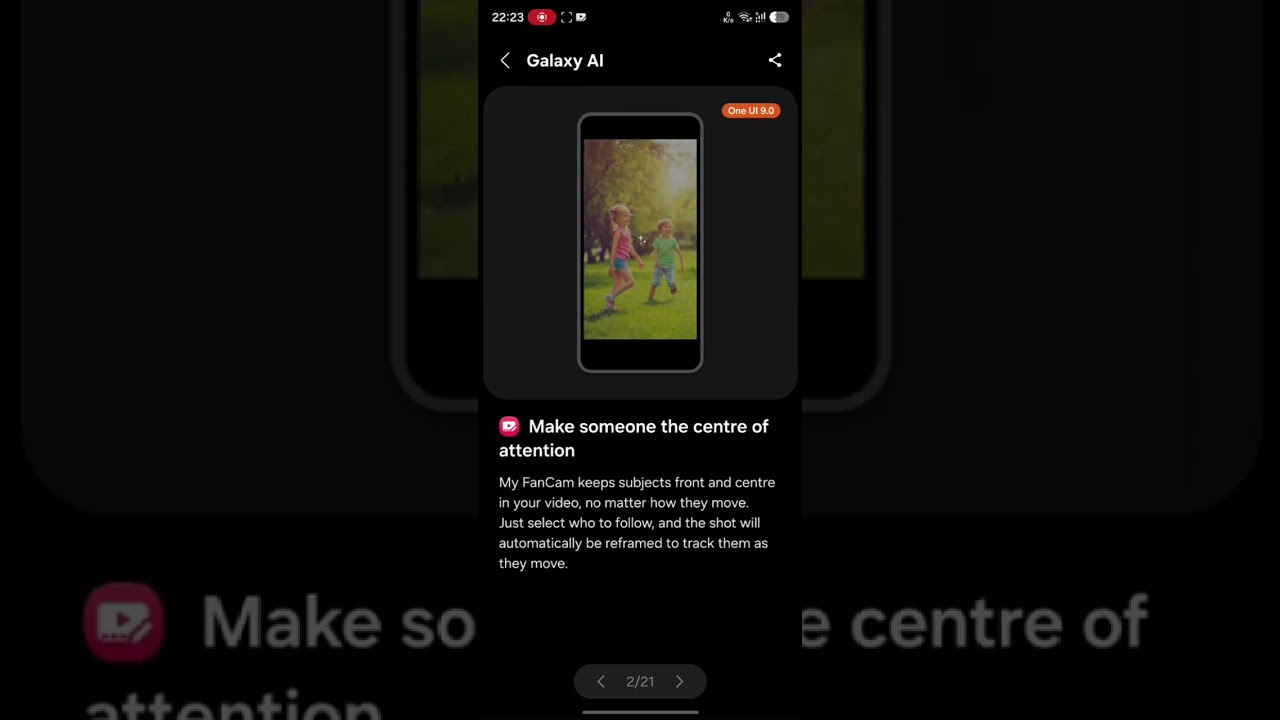
IT홈은 7월 18일, 기술 매체 AndroidAuthority가 7월 17일 One UI 9 베타 버전의 스크린샷을 공개하며 'My FanCam'이라는 AI 기능을 소개했다고 보도했습니다. 이 기능은 영상 내 주요 대상을 인식하고 촬영된 결과물의 구도를 자동으로 조정해 줍니다.
기술 및 작동 방식
IT홈에 따르면 해당 기능은 Galaxy AI를 기반으로 하며, 이번 스크린샷은 One UI 9가 탑재된 Galaxy S25+에서 확인되었습니다. 기능을 활성화하면 촬영 중 영상의 대상을 스마트하게 추적하며, 촬영이 끝난 후 시스템이 자동으로 구도를 재조정하여 피사체가 항상 화면 중앙에 위치하도록 합니다.
기존 기능과의 차이점
Samsung 카메라의 기존 기능인 Auto Track(동영상 녹화 과정에서 선택한 대상을 추적하는 기능)과 달리, My FanCam은 후처리 방식에 가깝습니다. 사용자가 촬영을 마친 후 결과물에서 대상을 선택하면 시스템이 이를 지속적으로 추적하여 구도를 재조정하고 중앙으로 배치합니다.
총평
My FanCam은 Galaxy AI를 활용해 동영상 촬영 후 자동으로 구도를 조정하는 기능입니다. 실시간 추적 방식인 Auto Track과 달리, 촬영 완료 후 결과물에서 대상을 선택하여 재구성하는 후처리 중심의 기능을 제공합니다.
My FanCam AI 功能介绍
科技媒体 AndroidAuthority 披露了 One UI 9 内测版中的 My FanCam 功能。该功能依托 Galaxy AI 技术,能够识别视频中的主体并自动调整成片的构图。
技术细节与支持设备
该功能在搭载 One UI 9 的 Galaxy S25+ 手机上被发现。其核心功能点包括:
- 基于 Galaxy AI 技术驱动。
- 智能追踪视频中的拍摄主体。
- 在拍摄完成后自动重新构图,确保目标始终处于画面中心。
与 Auto Track 功能的区别
My FanCam 与 Samsung 现有的 Auto Track 功能在应用场景上有所不同:
- Auto Track:主要在视频录制过程中实时追踪用户选定的主体。
- My FanCam:侧重于后期处理,用户在拍摄完成后选择特定主体,由系统进行持续追踪并重新居中构图。
总结
Samsung 在 One UI 9 中引入了基于 Galaxy AI 的 My FanCam 功能。与实时跟踪的 Auto Track 不同,My FanCam 专注于后期处理,通过在成片后识别主体并自动重构画面来优化视觉效果。
新機能の紹介
ITホームは7月18日、技術メディアのAndroidAuthorityが7月17日にOne UI 9ベータ版のスクリーンショットを公開し、「My FanCam」というAI機能を導入したと報じました。この機能は動画内の主要な対象物を認識し、撮影された結果の構図を自動的に調整するものです。
技術および動作原理
ITホームの報道によると、この機能はGalaxy AIを基盤としており、One UI 9を搭載したGalaxy S25+のスクリーンショットで確認されました。機能を有効にすると、撮影中に動画内の対象物をスマートに追跡し、撮影終了後にシステムが自動的に構図を再調整することで、被写体が常に画面中央に位置するように調整されます。
既存機能との違い
Samsungカメラの既存機能であるAuto Track(動画録画の過程で選択した対象を追跡する機能)とは異なり、My FanCamは後処理に近いアプローチを採用しています。ユーザーが撮影を終えた後に結果から対象を選択すると、システムがそれを継続的に追跡して構図を再調整し、中央に配置します。
まとめ
My FanCamはGalaxy AIを活用し、動画撮影後に自動で構図を調整する機能です。リアルタイム追跡を行うAuto Trackとは異なり、撮影後の結果から対象を選択して再構成する後処理中心の機能を提供します。
Introduction of New Features
IT Home reported on July 18 that AndroidAuthority revealed screenshots of the One UI 9 beta version on July 17, introducing an AI feature called "My FanCam." This feature identifies primary subjects within a video and automatically adjusts the composition of the final output.
Technology and Mechanism
According to IT Home, this feature is powered by Galaxy AI and was confirmed in screenshots from a Galaxy S25+ running One UI 9. When enabled, the system intelligently tracks the subject during filming; once recording is finished, it automatically readjusts the frame so that the subject remains centered.
Differences from Existing Features
Unlike Samsung's "Auto Track" feature—which tracks a selected subject in real-time during the recording process—My FanCam functions as a post-processing tool. After filming is complete, the user selects the target, and the system then adjusts the composition to center it.
Summary
My FanCam utilizes Galaxy AI to automatically adjust video framing after recording is finished. Unlike real-time tracking features like Auto Track, My FanCam focuses on post-processing to ensure the subject is centered in the final footage.