개요
IT홈의 보도에 따르면, Google 안드로이드 커뮤니티 인터랙션 매니저인 Mishaal Rahman이 오늘(6월 26일) Reddit 커뮤니티에 게시물을 올려 Android 17 시스템의 폴더블 디스플레이 게임 모드를 시연했습니다.
기능 및 작동 방식
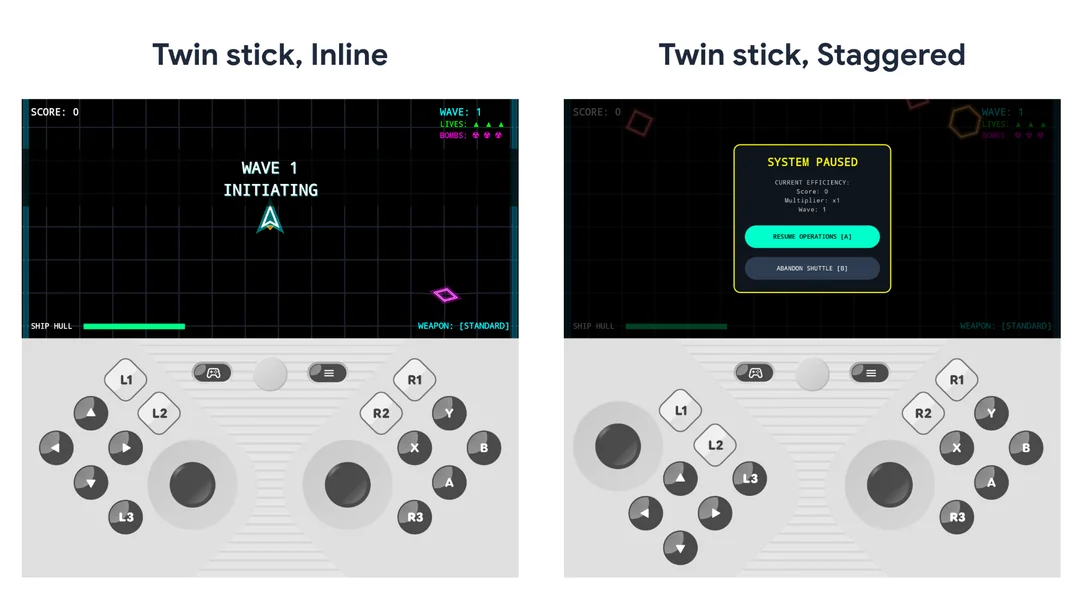
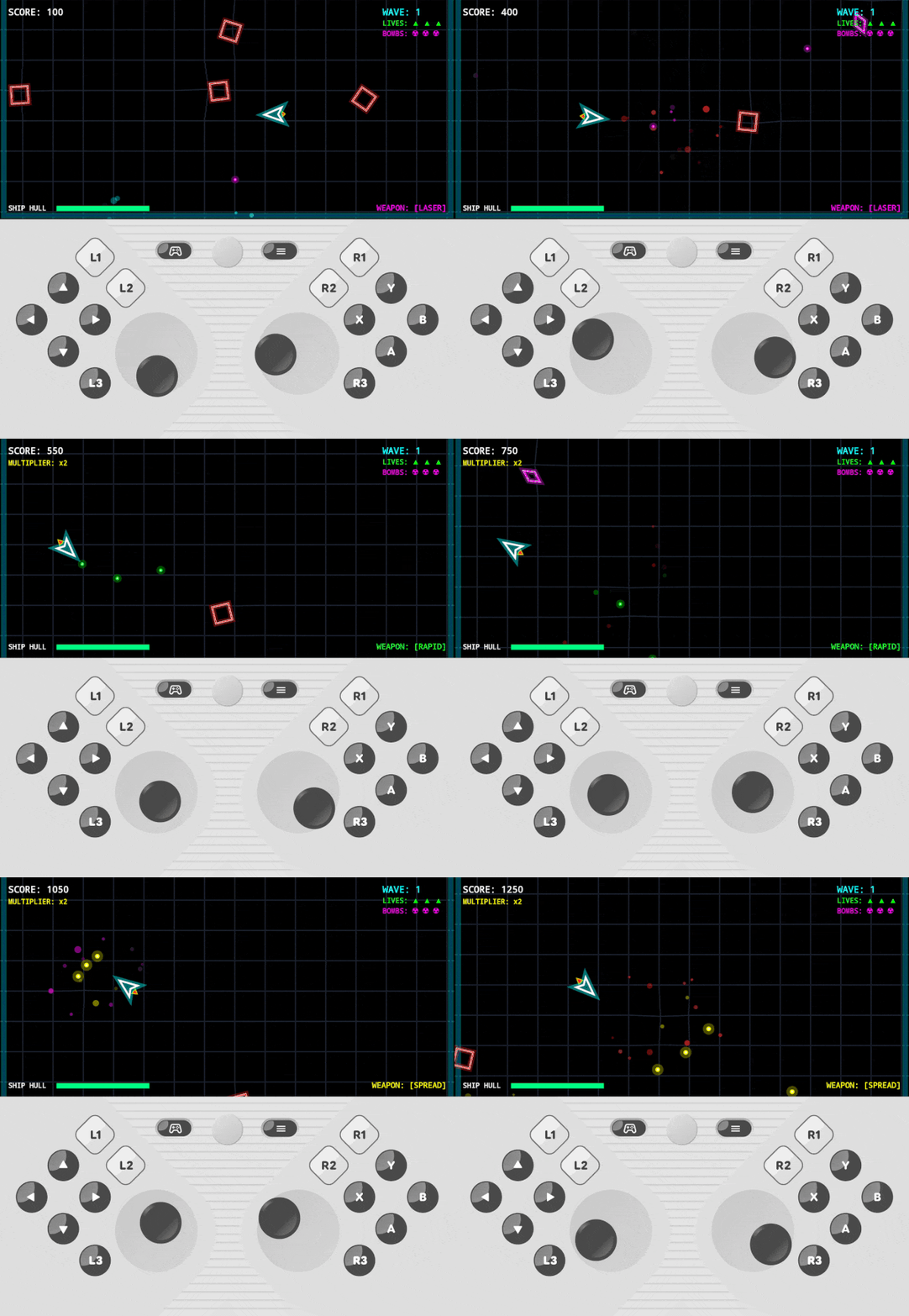
이 모드는 폴더블 스마트폰에서 게임 조작이 매끄럽지 않은 문제를 해결하기 위해 설계되었습니다. 사용자가 이 기능을 활성화하면 내부 화면이 상하 50:50 비율로 분할됩니다. 상단은 게임 화면을 전체 표시하고, 하단은 전용 가상 컨트롤러로 전환되어 모든 주요 조작 입력을 담당합니다.
일반적인 제3자 키 매핑 도구와 달리, 이 기능은 시스템 레벨에서 실제 컨트롤러 버튼 입력을 시뮬레이션합니다. 사용자는 별도의 외부 기기를 연결하거나 전용 매핑 앱을 사용할 필요가 없으며, 이미 컨트롤러 입력을 지원하는 게임의 경우 시스템이 자동으로 최적화를 수행합니다.
커스터마이징
버튼 구성에 대해 다음과 같은 기능을 제공합니다.
- 듀얼 스틱, 방향키, A, B, X, Y 액션 버튼
- L1/L2/L3, R1/R2/R3 총 3단계의 숄더 버튼 지원
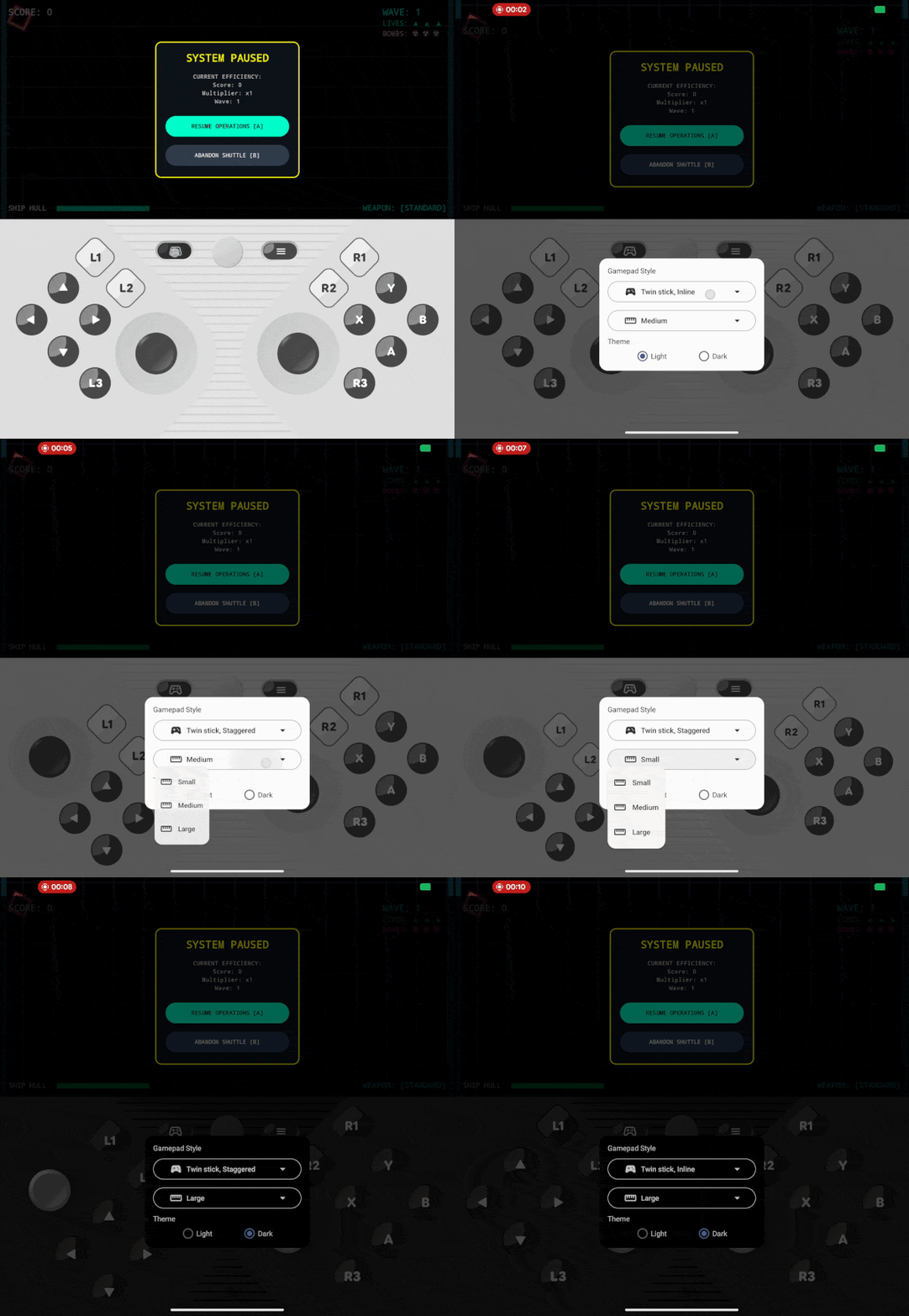
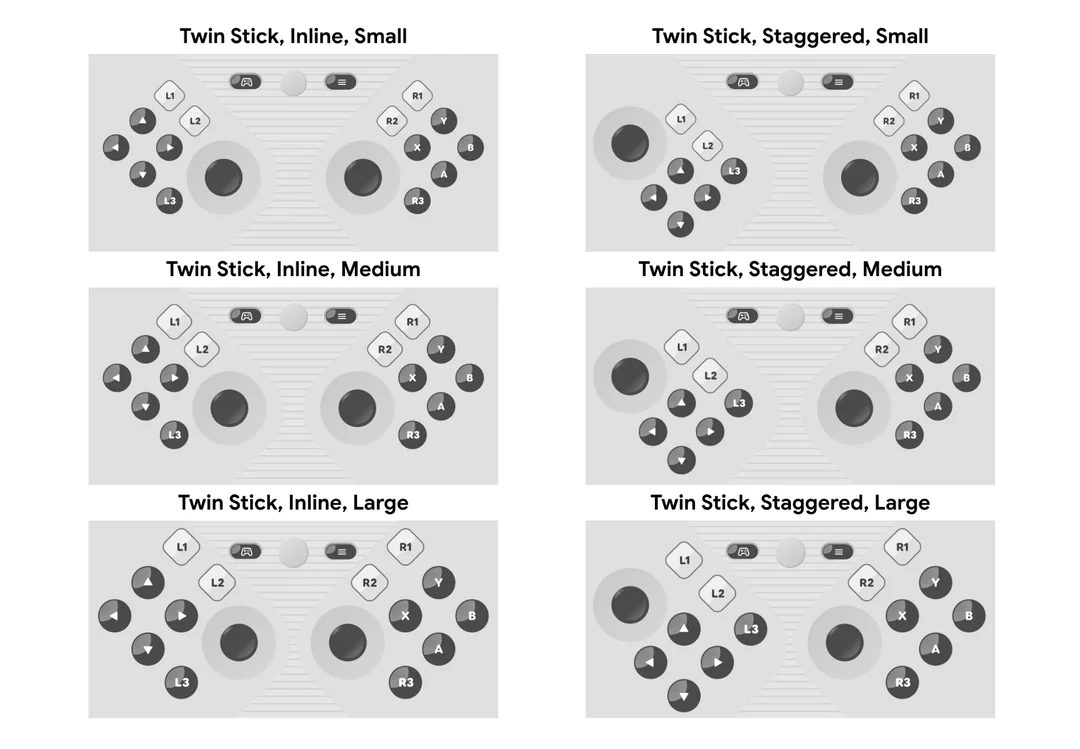
사용자는 레이아웃 스타일도 조정할 수 있습니다. 기본 설정인 '듀얼 스틱 병렬(Twin stick, Inline)'이 너무 조밀하다고 느껴질 경우, '듀얼 스틱 교차(Twin stick, Staggered)' 모드로 전환하여 왼쪽 스틱, 방향키 및 숄더 버튼의 위치를 조정함으로써 엄지손가락 조작에 더 적합하게 설정할 수 있습니다.
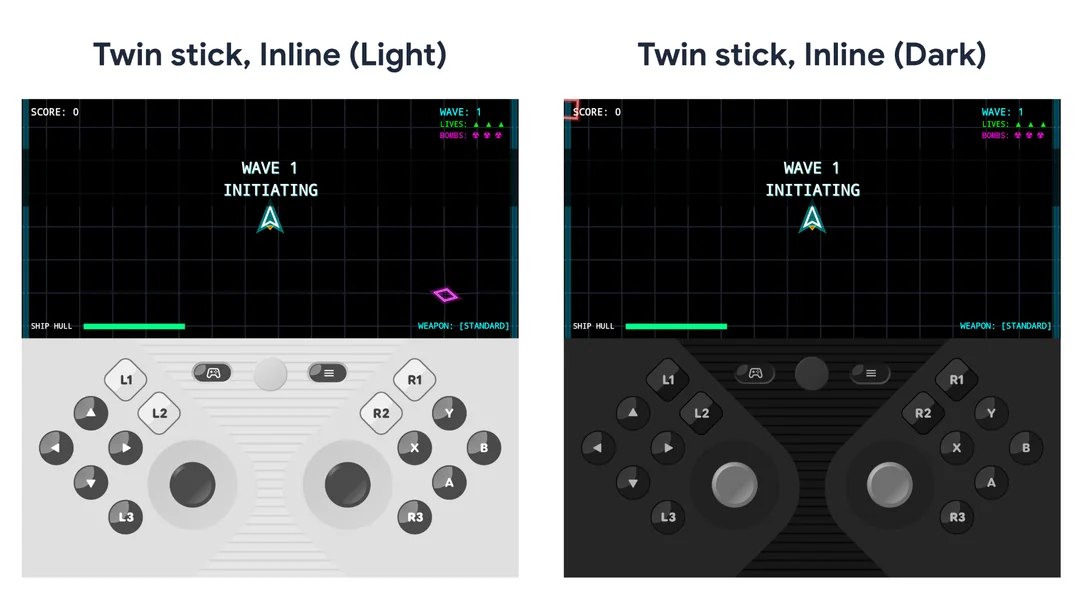
또한 크기 측면에서 사용자는 컨트롤러 전체 크기를 소형, 중형, 대형으로 변경할 수 있으며, 밝은 테마 또는 어두운 테마를 선택하고 햅틱 피드백을 활성화하여 실제 버튼 클릭감을 재현할 수 있습니다.
총평
Android 17에 도입될 폴더블 디스플레이 게임 모드는 시스템 레벨에서 가상 컨트롤러를 구현하여 폴더블 기기에서의 조작 편의성을 개선합니다. 다양한 레이아웃 옵션과 크기 조절, 햅틱 피드백 등을 통해 사용자 맞춤형 게임 환경을 제공하는 것이 특징입니다.
Android 17 折叠屏游戏模式
Google 安卓社区互动经理 Mishaal Rahman 展示了 Android 17 系统针对折叠手机推出的“折叠显示器游戏模式”。该功能旨在解决折叠手机在游戏操作上的痛点,通过系统层模拟实体手柄按键输入。当用户启用此功能时,内屏将按 50:50 的比例进行上下分区:上半部分完整展示游戏画面,下半部分则切换为专门的虚拟手柄区域。
该功能不同于第三方映射工具,它在系统层面运行,能够自动适配支持手柄输入的游戏,用户无需连接额外外设或安装独立的映射应用。
按键配置与布局选项
该模式提供丰富的虚拟按键配置,涵盖了主流游戏的常用操作:
- 双摇杆、方向键
- A、B、X、Y 动作键
- Start 键
- L1/L2/L3 及 R1/R2/R3 共 3 级肩键支持
用户还可以根据个人习惯切换不同的布局样式:
- 双摇杆,并排(Twin stick, Inline)
- 双摇杆,交错(Twin stick, Staggered):调整左摇杆、方向键和肩键位置,更适合拇指操作。
自定义与交互体验
为了提升游戏体验,该功能还提供多项个性化定制选项:
- 尺寸调节:支持切换小、中、大三种手柄整体尺寸。
- 视觉主题:可选择浅色或深色主题。
- 触觉反馈:支持开启触觉反馈,以模拟实体按键的点击感。
总结
Android 17 为折叠手机引入了系统级的虚拟手柄模式,通过 50:50 的屏幕分割提供直观的游戏操作界面。该功能无需外设即可实现高度自定义的按键布局与触觉反馈,显著提升了折叠屏设备的游戏操控体验。
概要
ITホームの報道によると、GoogleのAndroidコミュニティインタラークションマネージャーであるMishaal Rahman氏が本日(6月26日)、Redditコミュニティに投稿を行い、Android 17システムにおける「フォルダブルディスプレイゲームモード」を披露しました。
機能と動作原理
このモードは、折りたたみ式スマートフォンにおいて操作性が向上しない問題を解決するために設計されています。ユーザーがこの機能を有効にすると、内側の画面が上下50:50の比率で分割されます。上半分にはゲーム画面全体が表示され、下半分は専用の仮想コントローラーへと切り替わり、すべての主要な操作入力を担当します。
一般的なサードパーティ製のキーマッピングツールとは異なり、この機能はシステムレベルで実際のコントローラーボタン入力をシミュレートします。ユーザーは外部デバイスを接続したり、専用のマッピングアプリを使用したりする必要がなく、すでにコントローラー入力をサポートしているゲームの場合、システムが自動的に最適化を行います。
カスタマイズ
ボタン構成については、以下の機能を提供します。
- デュアルスティック、方向キー、A、B、X、Yアクションボタン
- L1/L2/L3、R1/R2/R3の計3段階のショルダーボタンをサポート
また、ユーザーはレイアウトスタイルも調整可能です。デフォルト設定の「デュアルスティック並列(Twin stick, Inline)」が密集しすぎていると感じる場合、「デュアルスティック交差(Twin stick, Staggered)」モードに切り替えることで、左スティック、方向キー、およびショルダーボタンの位置を調整し、親指での操作に適した設定に変更できます。
さらにサイズに関しては、コントローラー全体のサイズを小型、中型、大型の3段階に変更でき、ライトテーマまたはダークテーマを選択できるほか、ハプティックフィードバックを有効にして実際のボタン押し心地を再現することも可能です。
総評
Android 17に導入されるフォルダブルディスプレイゲームモードは、システムレベルで仮想コントローラーを実装することで、折りたたみデバイスでの操作性を向上させます。多様なレイアウトオプション、サイズ調整、ハプティックフィードバックなどを通じて、ユーザーの好みに合わせたゲーム環境を提供するのが特徴です。
まとめ
Android 17から導入される「フォルダブルディスプレイゲームモード」は、画面を上下に分割し、下半分をシステムレベルの仮想コントローラーとして機能させることで折りたたみスマホの操作性を改善します。ユーザーはレイアウトやサイズ、ハプティックフィードバックなどの詳細なカスタマイズが可能になり、より快適なゲーム体験が得られるようになります。
Overview
According to a report by IT Home, Mishaal Rahman, an Android Community Interaction Manager at Google, shared a post on the Reddit community today (June 26) demonstrating the "Foldable Display Game Mode" for Android 17.
Features and Functionality
This mode is designed to address the issue of clunky controls on foldable smartphones. When a user enables this feature, the inner screen is split into a top and bottom 50:50 ratio. The top half displays the full game screen, while the bottom half transforms into a dedicated virtual controller that handles all primary input commands.
Unlike typical third-party key mapping tools, this feature simulates actual controller button inputs at the system level. Users do not need to connect external devices or use separate mapping applications; for games that already support controller inputs, the system automatically performs optimizations.
Customization
The following features are provided regarding button configurations:
- Dual sticks, D-pad, and A, B, X, Y action buttons
- Support for three levels of shoulder buttons (L1/L2/L3 and R1/R2/R3)
Users can also adjust the layout style. If the default "Twin stick, Inline" setting feels too cramped, users can switch to "Twin stick, Staggered" mode to reposition the left stick, D-pad, and shoulder buttons for more comfortable thumb operation.
In terms of size, users can change the overall controller dimensions to Small, Medium, or Large. Additionally, they can choose between Light or Dark themes and enable haptic feedback to replicate the feel of physical button presses.
Summary
Android 17 will introduce a "Foldable Display Game Mode" that provides a system-level virtual controller for foldable devices by splitting the inner screen. This feature aims to improve gaming ergonomics without requiring third-party apps, offering extensive customization options for layout, size, and haptic feedback.
Android 17 折叠屏游戏模式
谷歌安卓社区互动经理 Mishaal Rahman 在 Reddit 上展示了 Android 17 系统针对折叠屏设计的“折叠显示器游戏模式”。该功能旨在解决折叠手机在游戏过程中操作不便的痛点。
核心机制与系统集成
当用户启用此功能时,内屏将按 50:50 的比例进行上下分区。上半部分完整显示游戏画面,下半部分则切换为专门的虚拟手柄区域,承担主要的操作输入。
该功能与常见的第三方映射工具不同,它是在系统层模拟实体手柄按键输入。用户无需连接外设或安装额外的映射应用,只要游戏本身支持手柄输入,系统就会自动完成适配。
按键配置与自定义选项
该模式提供了丰富的交互选项供玩家选择:
- 按键组成: 支持双摇杆、方向键、A、B、X、Y 动作键、Start 键,以及 L1/L2/L3、R1/R2/R3 共 3 级肩键。
- 布局样式: 提供“双摇杆,并排”(Twin stick, Inline)和“双摇杆,交错”(Twin stick, Staggered)两种模式,以适应不同的操作习惯。
- 个性化定制: 用户可以调整手柄的整体尺寸(小、中、大),选择浅色或深色主题,并开启触觉反馈以模拟实体按键的点击感。
总结
Android 17 推出的折叠屏游戏模式通过系统级的虚拟手柄方案,解决了折叠手机在游戏操作上的不便。该功能提供丰富的按键配置和个性化定制选项,旨在提升折叠设备的游戏体验。
概要
ITホームの報道によると、GoogleのAndroidコミュニティ・インタラクションマネージャーであるMishaal Rahman氏が本日(6月26日)、Redditコミュニティに投稿を行い、Android 17システムにおける「フォールダブルディスプレイ・ゲームモード」を公開しました。
機能と仕組み
このモードは、折りたたみスマートフォンにおいてゲーム操作の利便性が損なわれる問題を解決するために設計されています。ユーザーがこの機能を有効にすると、内側の画面が上下50:50の比率で分割されます。上半分にはゲーム画面全体が表示され、下半分は専用の仮想コントローラーへと切り替わり、すべての主要な操作入力を担当します。
一般的なサードパーティ製のキーマッピングツールとは異なり、この機能はシステムレベルで実際のコントローラーボタン入力をシミュレートします。ユーザーは外部デバイスを接続したり、専用のマッピングアプリを使用したりする必要がなく、すでにコントローラー入力をサポートしているゲームの場合、システムが自動的に最適化を行います。
カスタマイズ
ボタン構成については、以下の機能が提供されます。
- デュアルスティック、方向キー、A、B、X、Yアクションボタン
- L1/L2/L3、R1/R2/R3の計3段階のショルダーボタンをサポート
また、ユーザーはレイアウトスタイルも調整可能です。デフォルト設定の「Twin stick, Inline」が密集しすぎていると感じる場合は、「Twin stick, Staggered」モードに切り替えることで、左スティック、方向キー、およびショルダーボタンの位置を調整し、親指での操作に適した構成に変更できます。
さらにサイズに関しては、コントローラー全体のサイズを「小」「中」「大」の3種類から選択でき、ライトテーマまたはダークテーマを選択できるほか、ハプティックフィードバックを有効にして実際のボタンのクリック感を再現することも可能です。
まとめ
Android 17で導入されるフォールダブルディスプレイ向けゲームモードは、システムレベルで仮想コントローラーを実装し、折りたたみデバイスでの操作性を大幅に向上させます。多様なレイアウトオプションやサイズ調整、ハプティックフィードバックの搭載により、ユーザーの好みに合わせた高度なゲーム環境を提供します。
Overview
According to reports from IT Home, Mishaal Rahman, a Google Android Community Interaction Manager, shared a demonstration of the "Foldable Display Game Mode" for the Android 17 system on Reddit today (June 26).
Features and Functionality
This mode is designed to solve the issue of clunky controls on foldable smartphones. When activated, the inner screen is split vertically in a 50:50 ratio. The top half displays the game screen in full, while the bottom half transforms into a dedicated virtual controller that handles all primary input commands.
Unlike common third-party key mapping tools, this feature operates at the system level to simulate actual controller button inputs. Users do not need to connect external devices or use separate mapping applications; for games that already support controller inputs, the system will automatically perform optimizations.
Customization
The following features are provided for button configurations:
- Dual sticks, D-pad, and A, B, X, Y action buttons
- Support for three levels of shoulder buttons: L1/L2/L3 and R1/R2/R3
Users can also adjust the layout style. If the default "Twin stick, Inline" setting feels too cramped, users can switch to "Twin stick, Staggered." This mode adjusts the positions of the left stick, D-pad, and shoulder buttons to make them more suitable for thumb operation.
Regarding size, users can change the overall dimensions of the controller interface between small, medium, and large. Additionally, users can choose between light or dark themes and enable haptic feedback to simulate the tactile feel of physical button clicks.
Summary
Android 17 will introduce a system-level "Foldable Display Game Mode" that splits the inner screen into a game display and a virtual controller. This feature provides extensive customization for layouts, sizes, and haptic feedback, significantly improving the gaming experience on foldable devices without requiring external hardware or third-party apps.
安卓 17 折叠屏游戏模式预览
谷歌安卓社区互动经理 Mishaal Rahman 在 Reddit 上展示了 Android 17 系统针对折叠屏设计的“折叠显示器游戏模式”。该功能旨在解决折叠手机在游戏过程中操作不便的痛点。
核心功能与系统级适配
当用户启用此功能时,内屏将按 50:50 的比例进行上下分区。上半部分完整显示游戏画面,下半部分则切换为专门的虚拟手柄,承担主要的操作输入。
该功能不同于常见的第三方按键映射工具,它在系统层模拟实体手柄按键输入。对于已经支持手柄输入的游戏,系统会自动完成适配,用户无需额外连接外设或依赖特定的映射应用。
按键配置与个性化定制
该模式提供了丰富的控制选项和自定义功能:
- 按键布局:包含双摇杆、方向键、A、B、X、Y 动作键、Start 键,以及 L1/L2/L3、R1/R2/R3 共 3 级肩键支持。
- 操作模式:提供“双摇杆,并排”(Twin stick, Inline)和“双摇杆,交错”(Twin stick, Staggered)两种布局选择,以适应不同的拇指操作习惯。
- 视觉与反馈:用户可以调整手柄的整体尺寸(小、中、大),切换浅色或深色主题,并开启触觉反馈来模拟实体按键的点击感。
总结
Android 17 将引入原生折叠屏游戏模式,通过系统层模拟虚拟手柄解决折叠手机的操作痛点。该功能提供丰富的自定义布局、尺寸选择及触觉反馈,旨在为支持手柄输入的游戏提供更便捷的沉浸式体验。
概要
ITホームの報道によると、GoogleのAndroidコミュニティインタラクションマネージャーであるMishaal Rahman氏がRedditにて、Android 17システム向けに導入される「フォルダブルディスプレイゲームモード」を公開しました。この機能は、折りたたみ式スマートフォンにおける操作性の課題を解決するために設計されています。
機能と動作原理
この機能を有効にすると、デバイスの内側画面が上下50:50の比率で分割されます。上半分にはゲーム画面全体が表示され、下半分は主要な入力を担当する専用の仮想コントローラーへと切り替わります。
一般的なサードパーティ製のキーマッピングツールとは異なり、この機能はシステムレベルで実際のコントローラーボタン入力をシミュレートします。そのため、ユーザーが外部デバイスを接続したり、個別のマッピングアプリを使用したりする必要はありません。すでにコントローラー入力をサポートしているゲームであれば、システムが自動的に最適化を行います。
カスタマイズと操作性
このモードでは、以下のような豊富なボタン構成が提供されます。
- デュアルスティック、方向キー(D-pad)、A、B、X、Yアクションボタン
- L1/L2/L3、R1/R2/R3の計3段階のショルダーボタン
また、ユーザーは好みに合わせてレイアウトスタイルを調整することも可能です。デフォルト設定の「デュアルスティック並列(Twin stick, Inline)」が密集していると感じる場合は、「デュアルスティック交差(Twin stick, Staggered)」モードに切り替えることで、左スティック、方向キー、およびショルダーボタンの位置を再配置し、親指での操作に適した設定に変更できます。
さらに、コントローラー全体のサイズを「小型」「中型」「大型」の3段階から選択できるほか、ライトまたはダークテーマの選択、および物理的なボタンの押し心地を再現するハプティックフィードバックの有効化など、高度なカスタマイズオプションが提供されます。
まとめ
Android 17で導入される「フォルダブルディスプレイゲームモード」は、システムレベルで仮想コントローラーを実装し、折りたたみデバイスでの操作性を大幅に向上させます。画面を上下に分割する仕組みにより、サードパーティ製アプリに頼ることなく、レイアウトやサイズ、ハプティックフィードバックなどの高度なカスタマイズが可能になります。
Overview
According to a report by IT Home, Mishaal Rahman, an Android Community Interaction Manager at Google, shared a post on Reddit today (June 26) showcasing the "Foldable Display Game Mode" for the Android 17 system.
Features and Functionality
This mode is specifically designed to address the issue of cumbersome controls on foldable smartphones. When activated, the inner screen is split into a top and bottom 50:50 ratio. The upper half displays the game screen in full, while the lower half transforms into a dedicated virtual controller that handles all primary input commands.
Unlike typical third-party key mapping tools, this feature operates at the system level to simulate actual controller button inputs. Users do not need to connect external hardware or use separate mapping applications; for games that already support controller inputs, the system automatically performs optimization.
Customization Options
The mode provides a comprehensive set of virtual button configurations to accommodate various gaming needs:
- Dual sticks, D-pad, and A, B, X, Y action buttons
- Start button
- Three levels of shoulder buttons (L1/L2/L3 and R1/R2/R3)
Users can also choose between different layout styles. While "Twin stick, Inline" is the default setting, users who find it too cramped can switch to "Twin stick, Staggered." This option repositions the left stick, D-pad, and shoulder buttons to provide a more ergonomic experience for thumb operation.
Additional customization options include:
- Size adjustment: Choose between Small, Medium, or Large overall controller dimensions.
- Visual themes: Selection of Light or Dark themes.
- Haptic feedback: Ability to enable haptics to simulate the feel of physical button presses.
Summary
Android 17 will introduce a system-level "Foldable Display Game Mode" that splits the inner screen of foldable devices into a game view and a virtual controller interface. This feature eliminates the need for third-party mapping apps by providing native support for various button layouts, sizes, and haptic feedback to improve gaming ergonomics.