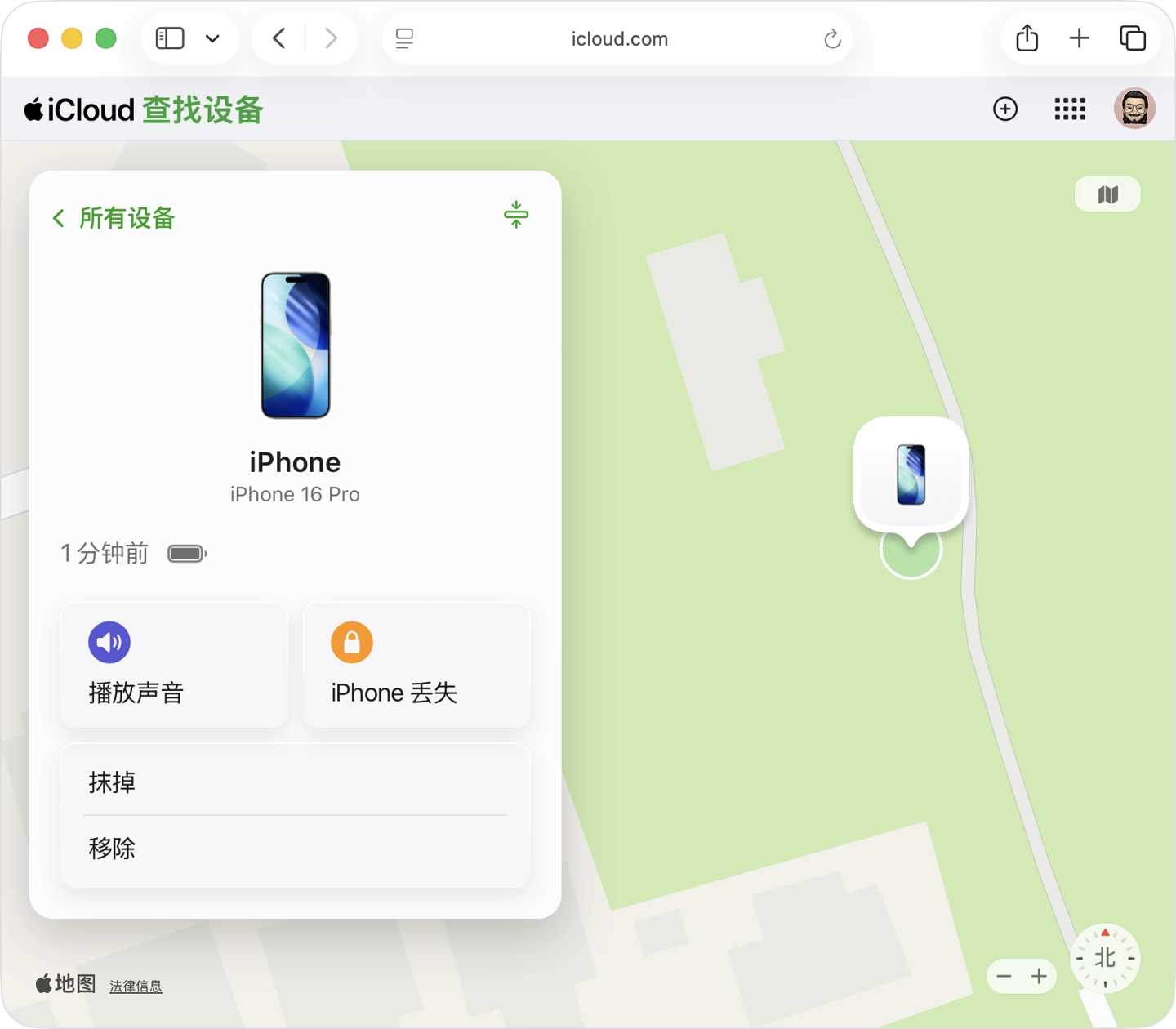
공식 지원 페이지 업데이트
Apple은 오늘 공식 지원 페이지를 업데이트하여 iPhone 도난 시 대응에 관한 더욱 상세한 권장 사항을 제공했습니다.
개인정보 노출 방지
Apple은 기기가 분실이 아닌 도난된 경우, 범죄자가 사회 공학적 공격(Social Engineering)에 악용할 수 있으므로 잠금 화면에 개인 연락처를 표시하지 말라는 경고를 추가했습니다.
Apple은 "기기가 도난된 경우 연락처 정보를 입력하지 마십시오. 기기 분실 시 습득자가 돌려줄 수 있도록 전화번호나 메시지를 남기는 옵션이 보일 수 있지만, 이러한 정보는 도난 시 범죄자가 사회 공학적 사기를 위해 활용할 수 있습니다."라고 명시했습니다.
이러한 공격은 범죄자가 Apple 고객 서비스나 이동통신사로 위장하여 전화를 걸어, 기기 재활성화에 필요한 정보를 가로채려는 시도를 포함합니다.
활성화 잠금 및 보안 유지
Apple은 '나의 찾기(Find My)'에서 도난된 기기를 제거하지 말라고 경고했습니다. "나의 찾기 목록에서 기기를 제거하면 활성화 잠금(Activation Lock)이 해제되어, 범죄자가 기기를 초기화하고 재판매하기가 훨씬 쉬워집니다."
활성화 잠금은 Apple 기기의 도난 방지를 위한 핵심 방어선으로, 한 번 해제되면 기기의 보안이 크게 낮아집니다. 또한 Apple은 '도난 기기 보호' 기능이 활성화되어 있더라도 지체 없이 기기를 분실 모드로 표시할 것을 권고했습니다.
도난 기기 보호 기능
도난 기기 보호가 제공하는 추가 보안 조치는 제한된 시간 동안만 유효하므로, 도난당한 iPhone과 Apple 계정을 보호하기 위해 즉시 분실 모드를 활성화하는 것이 가장 좋은 방법입니다.
이 기능을 활성화하면 저장된 비밀번호나 신용카드 등 민감한 정보에 접근할 때 생체 인증이 요구됩니다. 또한 기기가 낯선 장소에 있을 때 Apple 계정 비밀번호를 변경하려면 Face ID 또는 Touch ID 확인과 1시간의 대기 시간이 필요합니다. 이 메커니즘은 사용자가 분실 모드를 활성화할 시간을 확보하고, 범죄자가 잠금 해제 비밀번호를 알아내더라도 Apple 계정을 침입하지 못하도록 설계되었습니다.
범죄 수법 주의
Apple은 지원 페이지에서 도둑들의 흔한 수법 중 하나를 언급했습니다. 범죄자가 단체 사진을 찍어주겠다고 제안한 뒤, 촬영 시 측면 버튼과 음량 낮추기 버튼을 동시에 눌러 기기를 잠그고 Face ID 기능을 비활성화한 후 다시 돌려주는 방식입니다. 이후 사용자가 사진을 확인하기 위해 비밀번호를 입력할 때 범죄자가 이를 훔쳐보고 기기를 훔쳐갈 기회를 노립니다.
지원 서비스 범위
해당 지원 페이지는 분실 모드 활성화, 원격 초기화, 신뢰할 수 있는 기기 목록에서 제거, 도난 및 분실 보호가 포함된 AppleCare+를 통한 청구 등 전체 프로세스를 다룹니다.
총평
Apple은 iPhone 도난 시 범죄자의 사회 공학적 공격을 방지하기 위해 잠금 화면에 연락처를 표시하지 말고 '나의 찾기'에서 기기를 제거하지 말 것을 강력히 권고했습니다. 특히 활성화 잠금을 유지하고 도난 기기 보호 기능을 활용하는 것이 계정 보안의 핵심이며, 단체 사진 촬영 시 비밀번호를 노출하게 만드는 등의 구체적인 범죄 수법에 대한 경고도 포함되었습니다.
防范社交工程攻击
Apple更新了官方支持页面,明确提醒用户:若确认设备被盗而非遗失,切勿在锁屏界面显示个人联系信息。窃贼可能会利用这些信息进行社会工程诈骗,例如假装成Apple客服或移动运营商来电,试图获取用于重新激活设备的敏感信息。
保护核心防线:激活锁
Apple强调用户不应从“查找”中移除被盗设备。一旦从列表中移除,将导致激活锁失效,使窃贼能够更轻易地抹除并转卖设备。此外,官方建议用户即便已启用“失窃设备保护”,仍应第一时间将设备标记为丢失。
“失窃设备保护”功能细节
该功能旨在提供额外的安全保障,具体机制包括:
- 在执行访问密码、信用卡等敏感操作时,要求进行生物识别认证。
- 当设备处于陌生地点时,更改Apple账户密码需要经过面容ID或触控ID验证,并伴随一小时的等待期。
警惕常见作案手段
官方提醒用户防范一种常见的作案手法:窃贼可能以“协助拍照”为由,在拍摄过程中通过按住特定键位锁定设备并禁用人脸识别。此举旨在让用户在查看照片时输入密码,从而让窃贼窥视到解锁密码并随后偷走手机。
支持页面涵盖范围
该更新内容覆盖了包括启用丢失模式、远程抹除设备、从受信任设备列表中移除、以及通过包含盗窃和丢失保障的AppleCare+提交索赔在内的完整操作流程。
总结
Apple更新了针对iPhone被盗的官方支持指南,核心要求是:严禁在锁屏显示联系信息以防社交工程攻击,切勿从“查找”中移除设备以确保激活锁有效。同时,文章强调了“失窃设备保护”功能的关键作用以及对特定作案手段的警惕。
公式サポートページの更新
Appleは本日、公式サポートページを更新し、iPhoneが盗難された際の対応に関するより詳細な推奨事項を提供しました。
個人情報の流出防止
Appleは、デバイスが紛失ではなく「盗難」された場合、犯人がソーシャルエンジニアリング(Social Engineering)に悪用する可能性があるため、ロック画面に個人の連絡先を表示しないよう警告を追加しました。
Appleは「デバイスが盗まれた場合、連絡先情報を入力しないでください。デバイスを紛失した際に拾得者が返送できるよう電話番号やメッセージを残すオプションが表示されることがありますが、これらの情報は盗難時に犯人がソーシャルエンジニアリング詐欺に利用する可能性があります」と明記しています。
これらの攻撃には、犯人がAppleのカスタマーサービスや通信事業者を装って電話をかけ、デバイスの再アクティブ化に必要な情報を聞き出そうとする試みなどが含まれます。
アクティベーションロックとセキュリティの維持
Appleは「探す(Find My)」から盗まれたデバイスを削除しないよう警告しています。「『探す』リストからデバイスを削除すると、アクティベーションロック(Activation Lock)が解除され、犯人がデバイスを初期化して再販することが非常に容易になります。」
アクティベーションロックはApple製品の盗難防止における重要な防衛線であり、一度解除されるとデバイスのセキュリティが大幅に低下します。また、Appleは「盗難デバイス保護」機能が有効であっても、遅滞なくデバイスを紛失モードに設定することを推奨しています。
盗難デバイス保護機能
盗難デバイス保護が提供する追加のセキュリティ措置は制限された時間内でのみ有効なため、盗まれたiPhoneとAppleアカウントを保護するには、直ちに紛失モードを有効にするのが最善の方法です。
この機能を有効にすると、保存されているパスワードやクレジットカードなどの機密情報にアクセスする際に生体認証が必要となります。また、デバイスが見慣れない場所にある際にAppleアカウントのパスワードを変更する場合、Face IDまたはTouch IDによる確認と1時間の待機時間が必要となります。
この仕組みは、ユーザーが紛失モードを有効にするための時間を確保し、犯人がロック解除パスワードを把握したとしてもAppleアカウントに侵入できないように設計されています。
犯罪の手口への注意
Appleはサポートページにおいて、盗っ人の一般的な手口の一つについて言及しました。犯人がグループ写真を撮ってくれると提案し、撮影時にサイドボタンと音量を下げるボタンを同時に押してデバイスをロックし、Face ID機能を無効化した上で再び返すという手法です。その後、ユーザーが写真を確認するためにパスワードを入力する際に、犯人がそれを盗み見てデバイスを奪う機会を狙います。
サポート範囲
当該サポートページは、紛失モードの有効化、リモート消去、信頼できるデバイスリストからの削除、および盗難・紛失保護を含むAppleCare+を通じた請求など、一連のプロセスを網羅しています。
まとめ
AppleはiPhone盗難時のソーシャルエンジニアリング攻撃を防ぐため、ロック画面への連絡先表示の禁止や、「探す」からのデバイス削除の禁止を強く推奨しています。特にアクティベーションロックの維持と「盗難デバイス保護」の活用がアカウントセキュリティの核心となります。また、グループ写真撮影を装ってパスワードを盗み見るなどの具体的な犯罪手口に対する注意喚起も含まれています。
Official Support Page Update
Apple has updated its official support page to provide more detailed recommendations on how to respond when an iPhone is stolen.
Preventing Personal Information Exposure
Apple added a warning that personal contact information should not be displayed on the lock screen if a device is stolen, as it can be exploited by criminals for social engineering attacks.
The update specifies: "Do not enter contact information if your device is stolen. While an option to leave a phone number or message may appear when a device is lost so that a finder can return it, such information can be used by criminals in social engineering scams if the device is stolen."
These attacks include instances where criminals pose as Apple Customer Service or mobile carriers to intercept information required for device re-activation.
Activation Lock and Maintaining Security
Apple warns users not to remove a stolen device from the "Find My" list. Removing a device from the list disables Activation Lock, making it significantly easier for criminals to reset and resell the device.
Activation Lock serves as a critical line of defense against theft; once disabled, the security of the device is greatly compromised. Additionally, Apple recommends immediately marking the device as lost even if "Stolen Device Protection" is enabled.
Stolen Device Protection Feature
Since some additional security measures provided by Stolen Device Protection are only valid for a limited time, activating Lost Mode immediately is the best way to protect a stolen iPhone and your Apple account.
When this feature is enabled, biometric authentication is required to access sensitive information such as saved passwords or credit cards. Furthermore, changing an Apple ID password in an unfamiliar location requires Face ID or Touch ID verification along with a one-hour waiting period. This mechanism is designed to give users enough time to activate Lost Mode and prevent criminals from infiltrating the Apple account even if they manage to obtain the device's unlock passcode.
Warning on Criminal Tactics
Apple highlighted a common tactic used by thieves in its support page. A criminal may offer to take a group photo and, while doing so, press the side button and volume down button simultaneously to lock the device and disable Face ID before returning it. They then wait for the user to enter their passcode to view the photos, providing an opportunity to steal the device.
Scope of Support Services
The support page covers the entire process, including activating Lost Mode, remote wiping, removing from trusted devices, and filing claims through AppleCare+ which includes theft and loss protection.
Summary
Apple has updated its guidelines to warn users against displaying contact info on lock screens and removing stolen devices from "Find My" to prevent social engineering and easy resale. The update emphasizes the importance of Activation Lock and Stolen Device Protection, while also warning about specific tactics like the "group photo" scam used to trick owners into revealing their passcodes.
防范社会工程攻击
Apple 在官方支持页面中更新了针对 iPhone 被盗的详细建议。其中明确警告用户,若确认设备被盗而非遗失,切勿在锁屏界面显示个人联系信息。此类信息可能被不法分子利用进行社会工程诈骗,例如假冒 Apple 客服或移动运营商来电,试图获取用于重新激活设备的敏感信息。
此外,Apple 强调用户绝不可从“查找”中移除被盗设备。一旦在列表中移除,将导致核心防线——激活锁(Activation Lock)关闭,从而使窃贼更容易抹除并转卖设备。
失窃设备保护功能
Apple 建议用户应立即将被盗设备标记为丢失。即便已启用“失窃设备保护”,也不应拖延操作。该功能的关键安全机制包括:
- 在访问存储密码、信用卡等敏感信息时,要求进行生物识别认证。
- 当设备处于陌生地点时,更改 Apple 账户密码需要经过面容 ID 或触控 ID 验证。
- 针对某些高风险操作提供一小时的等待期,旨在防止窃贼即便获取了解锁密码也无法攻破用户的 Apple 账户。
警惕常见作案手法
Apple 在支持页面中揭露了一种常见的偷窃手段:窃贼可能会以“帮朋友拍合影”为由接近用户,并在操作过程中通过按住特定键位锁定设备并禁用人脸识别。随后,他们会利用用户在查看照片时输入密码的机会窥视密码,进而趁机将手机偷走。
总结
Apple 更新了针对 iPhone 被盗的官方支持内容,强调不应在锁屏显示联系信息或从“查找”中移除被盗设备。同时提醒用户利用“失窃设备保护”功能并警惕通过合影骗取密码等常见作案手段。
公式サポートページの更新
Appleは本日、公式サポートページを更新し、iPhoneが盗難された際の対応に関するより詳細な推奨事項を提供しました。
個人情報の流出防止
Appleは、デバイスが「紛失」ではなく「盗難」された場合、犯人がソーシャルエンジニアリング(Social Engineering)攻撃に悪用する可能性があるため、ロック画面に個人の連絡先を表示しないよう警告を追加しました。
Appleは次のように明記しています。「デバイスが盗まれた場合、連絡先情報を入力しないでください。紛失した場合には、拾得者が返却できるように電話番号やメッセージを残すオプションが表示されることがありますが、これらの情報は盗難時に犯人がソーシャルエンジニアリング詐欺に利用する可能性があります。」
これらの攻撃には、犯人がAppleのカスタマーサービスや移動通信事業者を装って電話をかけ、デバイスの再アクティブ化に必要な情報を聞き出そうとする試みなどが含まれます。
アクティベーションロックとセキュリティの維持
Appleは、「探す(Find My)」から盗まれたデバイスを削除しないよう警告しています。「『探す』のリストからデバイスを削除すると、アクティベーションロック(Activation Lock)が解除され、犯人がデバイスを初期化して再販することが非常に容易になります。」
アクティベーションロックはApple製品の盗難防止における重要な防衛線であり、一度解除されるとデバイスのセキュリティが大幅に低下します。また、Appleは「盗難デバイス保護」機能が有効になっていても、遅滞なくデバイスを紛失モードに設定することを推奨しています。
盗難デバイス保護機能
盗難デバイス保護が提供する追加のセキュリティ措置は、制限された時間内でのみ有効なため、盗まれたiPhoneとAppleアカウントを保護するには、すぐに紛失モードを有効にするのが最善の方法です。
この機能を有効にすると、保存されているパスワードやクレジットカードなどの機密情報にアクセスする際に生体認証が必要になります。また、デバイスが身に覚えのない場所にある場合、Appleアカウントのパスワードを変更するにはFace IDまたはTouch IDによる確認と1時間の待機時間が必要となります。この仕組みは、ユーザーが紛失モードを有効にするための時間を確保し、犯人がロック解除パスワードを突き止めたとしてもAppleアカウントに侵入できないように設計されています。
注意すべき犯罪の手口
Appleはサポートページにおいて、窃盗犯による一般的な手口の一つについて言及しました。犯者が「集合写真を撮ってあげる」と提案し、撮影の際にサイドボタンと音量を下げるボタンを同時に押してデバイスをロックし、Face ID機能を無効化した後、再び返却するという手法です。その後、ユーザーが写真を確認するためにパスワードを入力する瞬間を犯人が盗み見て、デバイスを奪う機会を狙います。
サポート範囲
該当のサポートページでは、紛失モードの有効化、リモート消去、信頼できるデバイスリストからの削除、および盗難・紛失保護が含まれるAppleCare+を通じた請求など、一連のプロセスについて網羅されています。
まとめ
AppleはiPhone盗難時におけるソーシャルエンジニアリング攻撃を防ぐため、ロック画面への連絡先表示の禁止と、「探す」からのデバイス削除の禁止を強く推奨しています。特にアクティベーションロックの維持と「盗難デバイス保護」機能の活用がアカウント保護の鍵となります。また、集合写真撮影を装ってパスワードを盗み見る具体的な犯罪手口についても注意喚起が行われています。
Official Support Page Update
Apple has updated its official support page to provide more detailed recommendations for responding to stolen iPhones.
Preventing Social Engineering
Apple added a warning that if a device is stolen rather than lost, users should not display personal contact information on the lock screen. This prevents criminals from using such information for social engineering attacks.
The update specifies: "If your device is stolen, do not enter contact information. While an option to leave a phone number or message may be visible when a device is lost so that a finder can return it, this information can be exploited by criminals for social engineering scams if the device is stolen."
These attacks involve criminals posing as Apple Customer Service or mobile carriers to call and attempt to obtain information required to reactivate the device.
Maintaining Activation Lock and Security
Apple warns users not to remove stolen devices from "Find My." Removing a device from the Find My list disables Activation Lock, making it significantly easier for criminals to wipe and resell the device.
Activation Lock is a critical line of defense against theft; once disabled, the device's security level drops significantly. Additionally, Apple recommends that even if "Stolen Device Protection" is enabled, users should immediately put the device into Lost Mode.
Stolen Device Protection Features
Because the additional security measures provided by Stolen Device Protection are only effective for a limited time, activating Lost Mode immediately is the best way to protect a stolen iPhone and the associated Apple account.
When this feature is active, biometric authentication is required to access sensitive information such as saved passwords or credit cards. Furthermore, if a user attempts to change their Apple ID password in an unfamiliar location, it requires Face ID or Touch ID verification and a one-hour waiting period. This mechanism is designed to give users enough time to activate Lost Mode while preventing criminals from infiltrating the Apple account even if they manage to obtain the device's passcode.
Warning Against Criminal Tactics
Apple highlighted a common tactic used by thieves on its support page. A criminal may offer to take a group photo and, during the process, press the side button and volume down button simultaneously to lock the device and disable Face ID before returning it. They then wait for the user to enter their passcode to check the photos, creating an opportunity to steal the device.
Scope of Support Services
The updated support page covers the entire process, including:
- Activating Lost Mode
- Remote wiping
- Removing from trusted devices
- Claims through AppleCare+ that includes theft and loss protection
Summary
Apple has updated its guidelines to warn users against displaying contact info on lock screens and removing stolen devices from "Find My" to prevent social engineering and the bypassing of Activation Lock. The update emphasizes using Stolen Device Protection and immediate Lost Mode activation as primary defenses. Additionally, it warns users of specific tactics, such as the "group photo" trick, used by criminals to trick owners into revealing their passcodes.
防范社会工程攻击
Apple 更新了官方支持页面,明确提醒用户:若确认设备被盗而非遗失,切勿在锁屏界面显示个人联系信息。此类信息可能被不法分子利用进行社会工程诈骗,例如窃贼可能假扮成 Apple 客服或移动运营商来电,试图获取用于重新激活设备的敏感信息。
维护核心防线:激活锁
Apple 警告用户切勿从“查找”中移除被盗设备。一旦从列表中移除,将导致激活锁(Activation Lock)关闭,这将使窃贼更容易抹除系统并转卖设备。激活锁是 Apple 设备防盗的核心防线,一旦失效,设备的安全性将大幅降低。
失窃设备保护功能
尽管“失窃设备保护”提供了额外安全措施,但其有效时间有限,用户仍应尽快将被盗设备标记为丢失。该功能的具体机制包括:
- 在访问存储密码和信用卡等敏感操作时,要求进行生物识别认证。
- 当手机处于陌生地点时,更改 Apple 账户密码需要经过面容 ID 或触控 ID 验证,并经历一小时的等待期。
警惕常见作案手段
Apple 在支持页面中揭示了一种常见的窃取手法:窃贼可能以“帮朋友拍照”为借口,在操作过程中通过按住特定键位锁定设备并禁用人脸识别。此举旨在让用户在查看照片时输入密码,从而让窃贼窥视到解锁密码,随后趁机偷走手机。
总结
Apple 更新了针对 iPhone 被盗的官方建议,强调不应在锁屏显示联系信息且严禁从“查找”中移除被盗设备以确保激活锁处于开启状态。同时提醒用户利用“失窃设备保护”功能并警惕通过假装拍照等手段获取密码的常见作案手法。
公式サポートページの更新
Appleは本日、公式サポートページを更新し、iPhoneが盗難された際の対応に関するより詳細な推奨事項を提供しました。
個人情報の流出防止
Appleは、デバイスが紛失ではなく「盗難」された場合、犯人がソーシャルエンジニアリング(Social Engineering)に悪用する可能性があるため、ロック画面に個人の連絡先を表示しないよう警告を追加しました。
具体的には、「デバイスが盗まれた場合、連絡先情報を入力しないでください。デバイスを紛失した際に拾得者が返送できるよう電話番号やメッセージを残すオプションが表示されることがありますが、これらの情報は盗難時に犯人がソーシャルエンジニアリング詐欺に利用する可能性があります」と明記されています。
これらの攻撃には、犯人がAppleのカスタマーサービスや通信事業者を装って電話をかけ、デバイスの再アクティブ化に必要な情報を聞き出そうとする試みなどが含まれます。
アクティベーションロックとセキュリティの維持
Appleは「探す(Find My)」から盗まれたデバイスを削除しないよう警告しています。「『探す』リストからデバイスを削除すると、アクティベーションロック(Activation Lock)が解除され、犯人がデバイスを初期化して再販することが非常に容易になります。」
アクティベーションロックはApple製品の盗難防止における重要な防衛線であり、一度解除されるとデバイスのセキュリティが大幅に低下します。また、Appleは「盗難デバイス保護」機能が有効であっても、遅滞なくデバイスを紛失モードに設定することを推奨しています。
盗難デバイス保護機能
盗難デバイス保護が提供する追加のセキュリティ措置は制限された時間内でのみ有効なため、盗まれたiPhoneとAppleアカウントを保護するには、直ちに紛失モードを有効にするのが最善の方法です。
この機能を有効にすると、以下のセキュリティが適用されます。
- パスワードやクレジットカードなどの機密情報にアクセスする際に生体認証が必要となる。
- デバイスが見慣れない場所にある際にAppleアカウントのパスワードを変更する場合、Face IDまたはTouch IDによる確認と1時間の待機時間が必要となる。
この仕組みは、ユーザーが紛失モードを有効にするための時間を確保し、犯人がロック解除パスワードを把握したとしてもAppleアカウントに侵入できないように設計されています。
犯罪の手口への注意
Appleはサポートページにおいて、盗っ人の一般的な手口の一つについて言及しました。犯人がグループ写真を撮ってくれると提案し、撮影時にサイドボタンと音量を下げるボタンを同時に押してデバイスをロックし、Face ID機能を無効化した上で再び返すという手法です。その後、ユーザーが写真を確認するためにパスワードを入力する際に、犯人がそれを盗み見てデバイスを奪う機会を狙います。
サポート範囲
当該サポートページは、紛失モードの有効化、リモート消去、信頼できるデバイスリストからの削除、および盗難・紛失保護を含むAppleCare+を通じた請求など、一連のプロセスを網羅しています。
まとめ
AppleはiPhone盗難時のソーシャルエンジニアリング攻撃を防ぐため、ロック画面への連絡先表示の禁止や、「探す」からのデバイス削除の禁止を強く推奨しています。特にアクティベーションロックの維持と「盗難デバイス保護」機能の活用がアカウントセキュリティの核心となります。また、グループ写真撮影を装ってパスワードを盗み見るなどの具体的な犯罪手口に対する注意喚起も含まれています。
Official Support Page Update
Apple has updated its official support page to provide more detailed recommendations and guidelines for users whose iPhones have been stolen.
Preventing Personal Information Exposure
Apple added a specific warning regarding the display of personal contact information on lock screens. If a device is confirmed as stolen rather than simply lost, displaying contact details can be exploited by criminals through social engineering attacks.
The update clarifies that while providing a phone number or message for a "finder" to call is helpful in cases of accidental loss, such information can be used by thieves to impersonate Apple Customer Service or mobile carriers. These scammers then attempt to obtain sensitive information required to reactivate the device.
Activation Lock and Security Maintenance
Apple warns users against removing a stolen device from the "Find My" list. Removing a device from this list disables Activation Lock, which significantly simplifies the process for criminals to wipe and resell the hardware.
Activation Lock serves as a critical line of defense; once it is disabled, the security of the device is severely compromised. Furthermore, Apple recommends that users immediately mark their device as lost even if the "Stolen Device Protection" feature is already enabled.
Stolen Device Protection Features
Because certain protections within Stolen Device Protection are only effective for a limited window, activating Lost Mode immediately is the most effective way to secure both the iPhone and the associated Apple account. When this feature is active, several security layers are triggered:
- Biometric authentication is required to access sensitive information such as saved passwords or credit cards.
- When a device is in an unfamiliar location, changing the Apple account password requires Face ID or Touch ID verification and initiates a one-hour waiting period.
This mechanism is designed to give users enough time to activate Lost Mode while preventing criminals from gaining access to the Apple account even if they manage to obtain the device's unlock passcode.
Warning Against Common Criminal Tactics
The support page highlights a specific tactic used by thieves: offering to take a group photo. During this process, the thief may press the side button and volume down button simultaneously to lock the screen and disable Face ID before handing the phone back. The goal is to wait for the user to enter their passcode to view the photos, allowing the thief to observe the code and subsequently steal the device.
Support Service Scope
The updated support page covers the entire process of handling a stolen device, including:
- Activating Lost Mode
- Remote wiping of the device
- Removing the device from the trusted devices list
- Filing claims through AppleCare+ (which includes theft and loss protection)
Summary
Apple has updated its support guidelines to emphasize that users should never display contact information on lock screens or remove stolen devices from "Find My" to prevent social engineering and the bypassing of Activation Lock. The update also highlights the importance of "Stolen Device Protection" and warns against specific physical tactics used by thieves to trick users into revealing their passcodes.