iOS 27 Siri 앱 업데이트
IT홈(IT之家)의 보도에 따르면, 기술 매체 9to5Mac은 오늘(6월 25일) 게시물을 통해 iOS 27 버전의 독립적인 Siri 애플리케이션에서 Apple이 기본적으로 Siri AI를 호출하지만, 사용자가 입력창을 길게 눌러 ChatGPT로 전환할 수 있다고 보도했습니다.
Siri 앱 기능
iOS 27 시스템에서 Apple은 채팅봇 스타일의 독립적인 Siri 애플리케이션을 도입했습니다. 사용자는 텍스트 박스에 내용을 입력하여 AI와 대화를 시작할 수 있으며, 이미지 및 파일 첨부 기능을 지원하고 과거 대화 기록을 확인할 수 있습니다.
모델 선택 및 확장성
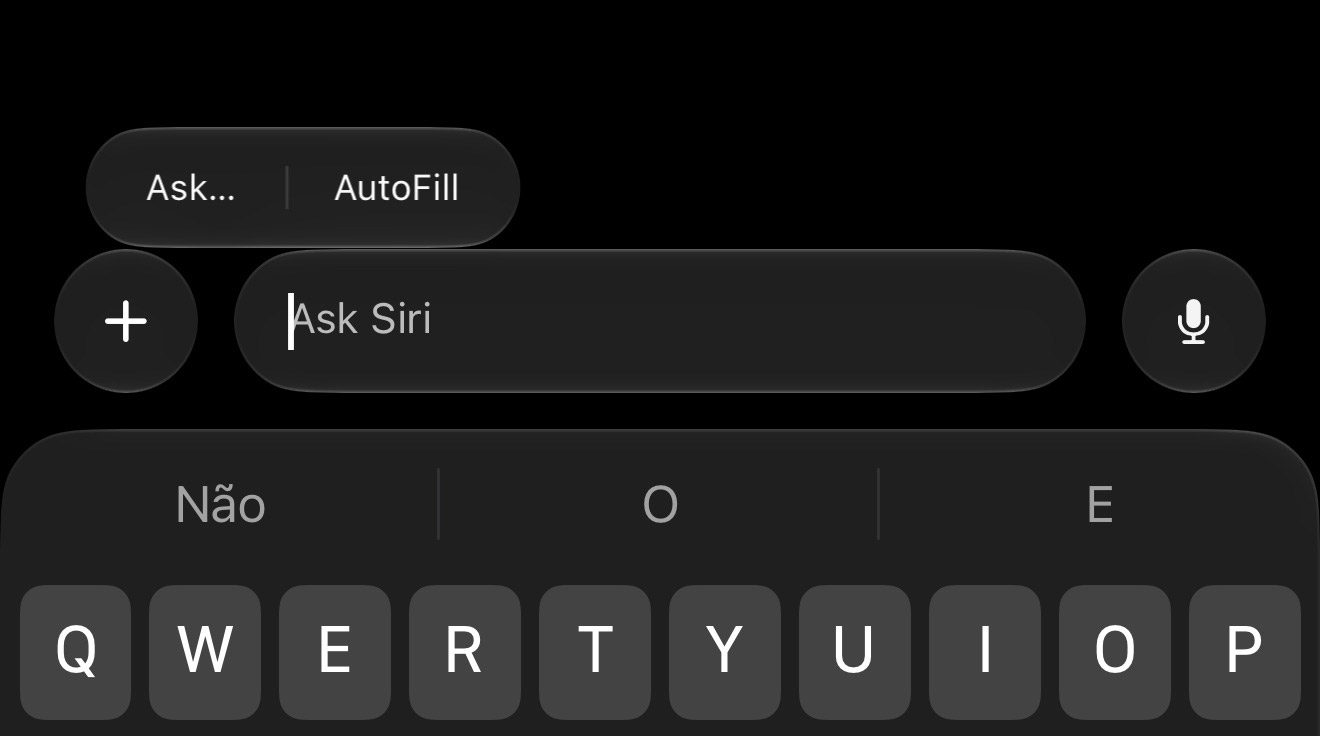
해당 매체는 이 애플리케이션이 기본적으로 Siri AI를 사용하여 사용자의 요청을 처리하지만, 사용자가 입력창을 길게 누르고 "Ask..." 버튼을 클릭하면 시스템에서 선택 창이 나타나며 Siri AI와 ChatGPT 사이를 전환할 수 있다고 밝혔습니다.
현재 해당 애플리케이션은 위의 두 가지 옵션만 지원하며, Apple은 향후 사용자의 요구에 따라 대화 모델을 조정할 수 있도록 더 많은 모델을 추가로 통합할 가능성이 있습니다.
설정 및 제한 사항
매체에 따르면 애플리케이션을 종료하고 다시 열 경우, 현재 선택된 설정은 Siri로 돌아갑니다. 대화가 진행 중인 상태에서도 시스템은 기본값인 Siri AI로 재설정되며, 현재 설정 메뉴에서는 ChatGPT를 Siri 애플리케이션의 기본 모델로 영구적으로 고정하는 기능을 지원하지 않습니다.
총평
iOS 27에 도입된 독립적인 Siri 앱은 채팅봇 스타일을 채택하여 이미지 및 파일 첨부를 지원하며, 사용자는 입력창을 길게 눌러 Siri AI와 ChatGPT 사이를 전환할 수 있습니다. 다만 현재는 두 가지 모델만 선택 가능하며, 앱 재시작 시 기본값인 Siri AI로 초기화되는 등의 제한 사항이 있습니다.
iOS 27 新增独立 Siri 应用
Apple 在 iOS 27 系统中推出了独立的 Siri 应用,该应用采用聊天机器人风格。用户可以通过文本框输入内容与 AI 进行对话,并具备以下功能:
- 支持上传图片和文件附件
- 支持查看历史对话记录
集成 ChatGPT 模型切换
虽然该应用默认调用 Siri AI 处理请求,但用户可以通过特定操作切换模型。当用户长按输入框并点击“Ask…”按钮时,系统会弹出选择窗口供用户在以下两个选项中进行切换:
- Siri AI
- ChatGPT
当前功能限制
目前该应用仅支持上述两个模型的切换。此外,系统暂不支持在设置中永久将 ChatGPT 设置为默认模型。如果用户关闭并重新打开应用,即使对话仍在继续,系统也会自动将模型重置回 Siri AI。
总结
Apple 在 iOS 27 中推出的独立 Siri 应用支持多媒体交互和历史记录查看。该应用允许用户通过长按操作在 Siri AI 和 ChatGPT 之间切换,但目前仍无法在设置中永久锁定非默认模型。
iOS 27 Siriアプリのアップデート
ITホームの報道によると、テックメディアの9to5Macは6月25日の投稿において、iOS 27バージョンの独立したSiriアプリケーションに関する情報を公開しました。同レポートでは、AppleがデフォルトでSiri AIを呼び出すものの、ユーザーが入力欄を長押しすることでChatGPTに切り替えることができると報じられています。
Siriアプリの機能
iOS 27システムにおいて、Appleはチャットボットスタイルの独立したSiriアプリケーションを導入しました。ユーザーはテキストボックスに内容を入力してAIとの対話を開始でき、画像やファイルの添付機能もサポートされているほか、過去の会話履歴を確認することも可能です。
モデルの選択と拡張性
同メディアによると、このアプリケーションはデフォルトでSiri AIを使用してユーザーのリクエストを処理しますが、入力欄を長押しして「Ask...」ボタンをクリックするとシステムに選択メニューが表示され、Siri AIとChatGPTの間を切り替えることができます。
現在、このアプリケーションは上記2つのオプションのみをサポートしていますが、Appleは今後、ユーザーの需要に応じてより多くのモデルを追加統合する可能性があります。
設定および制限事項
メディアの報告によれば、アプリケーションを終了して再起動する場合、現在の選択設定はSiriに戻ります。会話の進行中であってもシステムはデフォルトのSiri AIにリセットされる仕様となっており、現時点では設定メニューからChatGPTをSiriアプリのデフォルトモデルとして永続的に固定する機能は提供されていません。
まとめ
iOS 27で導入される独立したSiriアプリはチャットボット形式を採用し、画像やファイルの添付に対応します。ユーザーは入力欄の長押しによってSiri AIとChatGPTを切り替えることができますが、現在は選択可能なモデルが限定されており、再起動時にデフォルトのSiri AIにリセットされるなどの制約が存在します。
iOS 27 Siri App Update
According to a report by IT Home, tech outlet 9to5Mac published a post on June 25 stating that in the standalone Siri application for iOS 27, Apple defaults to Siri AI, but users can switch to ChatGPT by long-pressing the input field.
Siri App Features
In the iOS 27 system, Apple has introduced a chatbot-style standalone Siri application. Users can initiate conversations with the AI by entering text into a text box. The app supports several key features:
- Image and file attachment support
- Access to past conversation history
Model Selection and Scalability
While the application defaults to Siri AI to process user requests, users can long-press the input field and click the "Ask..." button to bring up a selection menu. This allows users to toggle between Siri AI and ChatGPT.
Currently, the app supports only these two options. However, Apple may integrate additional models in the future based on user demand.
Settings and Limitations
According to the report, if the application is closed and reopened, the selected setting reverts to Siri. Even during an active conversation, the system defaults back to Siri AI. Currently, the settings menu does not support a feature to permanently set ChatGPT as the default model for the Siri application.
Overall Review
The standalone Siri app introduced in iOS 27 adopts a chatbot style that supports image and file attachments. While users can switch between Siri AI and ChatGPT by long-pressing the input field, there are limitations such as only two available models and the system resetting to Siri AI upon restarting the app.
Summary
The standalone Siri app in iOS 27 features a chatbot interface that supports media attachments and conversation history. While it allows users to toggle between Siri AI and ChatGPT via a long-press menu, the selection is not permanent and defaults back to Siri AI when the app is restarted.
iOS 27 新增独立 Siri 应用
在 iOS 27 系统中,Apple 推出了独立的 Siri 应用。该应用采用聊天机器人风格的交互界面,支持以下功能:
- 用户可通过文本框输入内容发起 AI 对话
- 支持上传图片和文件附件
- 提供历史对话记录查看功能
模型切换与 ChatGPT 集成
该应用默认调用 Siri AI 处理请求。根据 9to5Mac 的报道,用户可以通过长按输入框并点击“Ask…”按钮,在弹出的选择窗口中将当前模型切换至 ChatGPT。目前系统仅支持这两个选项,Apple 未来可能会接入更多模型。
当前的限制与机制
目前该应用在模型持久化方面存在限制:
- 关闭并重新打开应用后,当前选中的模型会自动重置为 Siri AI。
- 即使对话仍在继续,系统也会在重启或重新进入时切换回默认的 Siri AI。
- 目前的设置中暂不支持将 ChatGPT 设为永久默认模型。
总结
iOS 27 推出了具备多媒体交互和历史记录功能的独立 Siri 应用。用户可以在对话过程中手动切换至 ChatGPT 模型,但目前该选择仅在当前会话有效,重启应用后仍会自动恢复为默认的 Siri AI。
iOS 27 Siriアプリのアップデート
ITホームの報道によると、テックメディアの9to5Macは6月25日の投稿において、iOS 27バージョンで提供されるスタンドアロンのSiriアプリケーションに関する情報を公開しました。同レポートでは、AppleがデフォルトでSiri AIを呼び出すものの、ユーザーが入力欄を長押しすることでChatGPTに切り替えることが可能になると報じられています。
Siriアプリの機能
iOS 27システムにおいて、AppleはチャットボットスタイルのスタンドアロンなSiriアプリケーションを導入しました。ユーザーはテキストボックスに内容を入力してAIとの対話を開始することができ、以下の機能を備えています。
- 画像およびファイルの添付に対応
- 過去の会話履歴の確認が可能
モデルの選択と拡張性
このアプリケーションはデフォルトでSiri AIを使用してユーザーのリクエストを処理しますが、ユーザーが入力欄を長押しして「Ask...」ボタンをクリックすると、システムに選択ウィンドウが表示され、Siri AIとChatGPTの間を切り替えることができます。
現在、このアプリケーションは上記2つのオプションのみをサポートしていますが、Appleは今後、ユーザーの需要に応じてより多くのモデルを追加・統合する可能性があります。
設定と制限事項
メディアの報告によると、アプリケーションを終了して再起動する場合、現在選択されている設定はSiriに戻ります。会話の最中であってもシステムはデフォルトのSiri AIにリセットされるため、現在の設定メニューではChatGPTをSiriアプリケーションのデフォルトモデルとして永続的に固定する機能はサポートされていません。
まとめ
iOS 27で導入されるスタンドアロンのSiriアプリは、チャットボット形式を採用し、画像やファイルの添付、履歴の確認などのマルチメディア機能を備えています。ユーザーは入力欄の長押し操作によってSiri AIとChatGPTを切り替えることができますが、現時点では設定によるデフォルトモデルの固定はできず、アプリ再起動時にはSiri AIにリセットされるという制限があります。
iOS 27 Siri App Update
According to a report by IT Home via 9to5Mac on June 25, Apple has introduced a standalone Siri application in the iOS 27 system. While the app defaults to Siri AI, users can switch to ChatGPT by long-pressing the input field.
Siri App Features
In the iOS 27 system, Apple introduced a chatbot-style independent Siri application. Users can start a conversation with the AI by entering content into a text box. The app also supports several key features:
- Support for attaching images and files
- Ability to view past conversation history
Model Selection and Scalability
While the application defaults to Siri AI to process requests, users can switch models through a specific interaction. When a user long-presses the input box and taps the "Ask..." button, a selection menu appears allowing the user to toggle between:
- Siri AI
- ChatGPT
Currently, the application only supports these two options. However, Apple may integrate additional models in the future based on user demand.
Settings and Limitations
There are currently some limitations regarding the persistence of model selection. If a user closes and reopens the application, the system will automatically reset the selection to the default Siri AI, even if a conversation is still in progress. At this time, the settings menu does not support an option to permanently set ChatGPT as the default model for the Siri application.
Summary
Apple's standalone Siri app in iOS 27 features a chatbot-style interface that supports media attachments and conversation history. While users can switch between Siri AI and ChatGPT via a long-press gesture, the system currently lacks a way to set ChatGPT as the permanent default model.
iOS 27 新型 Siri 应用功能
在 iOS 27 系统中,Apple 推出了独立的 Siri 应用。该应用采用聊天机器人风格的交互界面,旨在提供更直观的 AI 对话体验。
- 核心功能:支持用户在文本框输入内容、上传图片及文件附件。
- 记录管理:支持查看历史对话记录。
模型切换与 ChatGPT 集成
该应用默认调用 Siri AI 处理请求,但提供了切换到第三方模型的选项。
- 操作方式:用户可以通过长按输入框并点击“Ask…”按钮弹出选择窗口。
- 可选模型:目前支持在 Siri AI 和 ChatGPT 之间进行切换。
当前限制与系统逻辑
尽管支持多模型切换,但目前的系统实现仍有一些局限性。
- 模型数量:目前仅支持上述两个选项,Apple 未来可能加入更多模型。
- 状态持久性:关闭并重新打开应用后,当前选择会自动重置为 Siri AI。
- 设置限制:目前在系统设置中暂不支持将 ChatGPT 设为永久默认模型。
总结
Apple 在 iOS 27 中引入了具备聊天机器人风格的独立 Siri 应用,支持多媒体交互和历史记录查看。该应用允许用户通过长按操作在 Siri AI 与 ChatGPT 之间切换,但目前仍不支持将 ChatGPT 设置为默认模型。
iOS 27におけるSiriアプリのアップデート
ITホームの報道によると、テックメディアの9to5Macは6月25日の投稿において、iOS 27バージョンで提供される独立したSiriアプリケーションに関する情報を公開しました。同レポートでは、AppleがデフォルトでSiri AIを呼び出すものの、ユーザーが入力欄を長押しすることでChatGPTに切り替えることが可能になると報じられています。
Siriアプリの機能
iOS 27システムにおいて、Appleはチャットボットスタイルの独立したSiriアプリケーションを導入しました。ユーザーはテキストボックスに内容を入力してAIとの対話を開始することができ、以下の機能を備えています。
- 画像およびファイルの添付に対応
- 過去の会話履歴の確認が可能
モデルの選択と拡張性
このアプリケーションはデフォルトでSiri AIを使用してユーザーのリクエストを処理しますが、入力欄を長押しして「Ask...」ボタンをクリックすると、システムに選択メニューが表示され、Siri AIとChatGPTの間を切り替えることができます。
現在、このアプリケーションは上記2つのオプションのみをサポートしていますが、Appleは今後、ユーザーの需要に応じてさらに多くのモデルを追加・統合する可能性があります。
設定と制限事項
メディアの報告によると、アプリケーションを終了して再起動する場合、現在の選択設定はSiriに戻ります。会話の進行中であってもシステムはデフォルトのSiri AIにリセットされる仕様となっており、現時点では設定メニューからChatGPTをSiriアプリのデフォルトモデルとして永続的に固定する機能は提供されていません。
まとめ
iOS 27で導入される独立したSiriアプリはチャットボット形式を採用し、画像やファイルの添付、履歴の確認をサポートします。ユーザーは入力欄の長押しによってSiri AIとChatGPTを切り替えることができますが、再起動時にデフォルトのSiri AIにリセットされるなど、現時点ではいくつかの制限があります。
iOS 27 Siri App Update
According to a report by IT Home, tech outlet 9to5Mac revealed on June 25 that the standalone Siri application in iOS 27 defaults to Siri AI but allows users to switch to ChatGPT by long-pressing the input field.
Siri App Features
In the iOS 27 system, Apple has introduced a chatbot-style standalone Siri application. Users can initiate conversations with the AI by entering text into a text box. The app supports several key features:
- Support for image and file attachments
- Access to past conversation history
Model Selection and Scalability
While the application defaults to Siri AI to process user requests, users can long-press the input field and click the "Ask..." button to bring up a selection menu. This allows users to toggle between Siri AI and ChatGPT.
Currently, the app supports only these two options. However, Apple may integrate additional models in the future based on user demand.
Settings and Limitations
According to the report, there are currently limitations regarding model persistence. If the application is closed and reopened, the selected setting reverts to Siri AI. Even during an active conversation, the system defaults back to Siri AI if the session is interrupted. Currently, the settings menu does not support a feature to permanently set ChatGPT as the default model for the Siri application.
Summary
iOS 27 introduces a standalone Siri app with a chatbot interface that supports media attachments and conversation history. While it allows users to toggle between Siri AI and ChatGPT via a long-press menu, the selection is not permanent and reverts to Siri AI whenever the application is restarted.