알리페이 교통카드 서비스
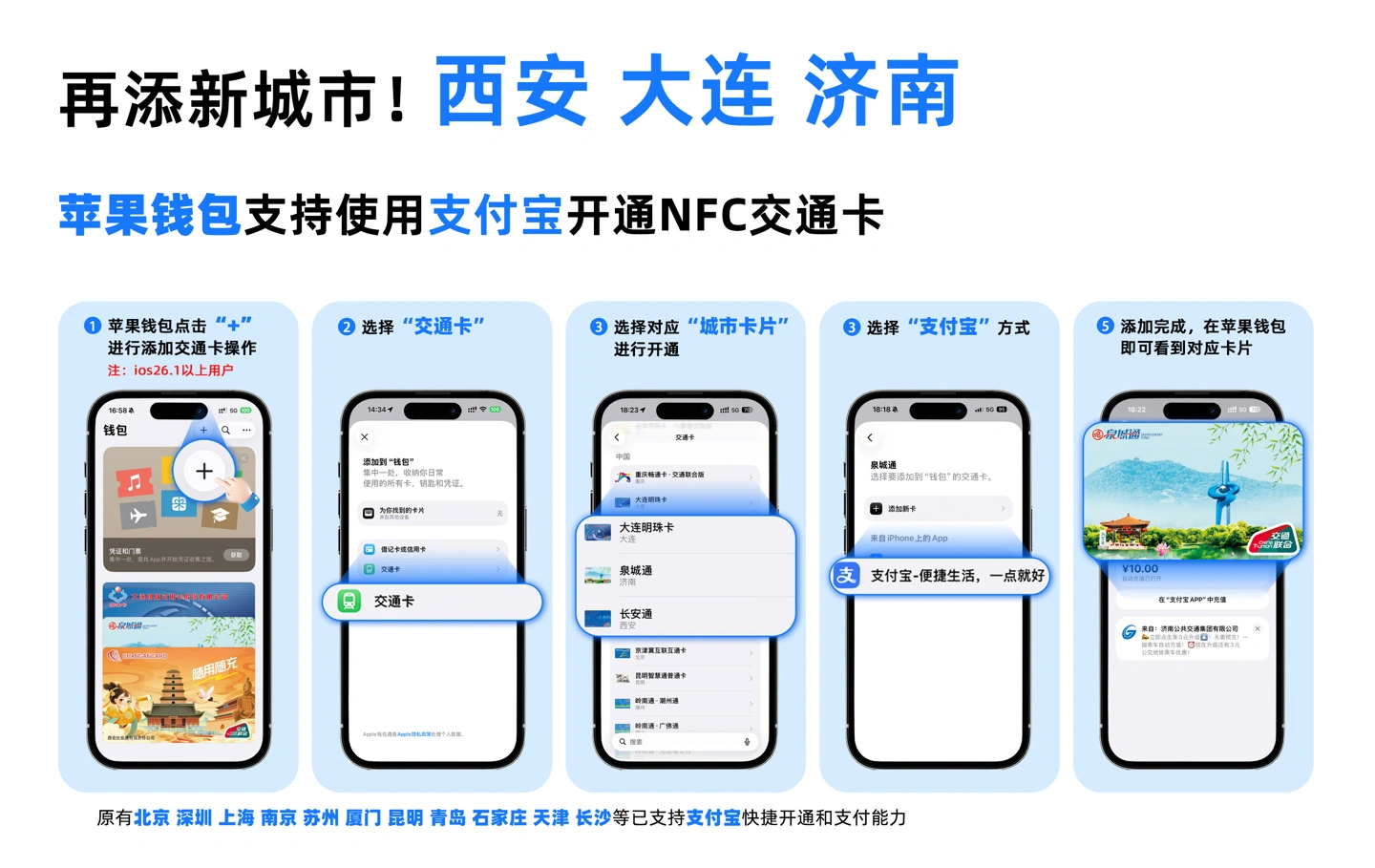
IT홈(IT之家)의 보도에 따르면, 오늘 오후 알리페이(Alipay) 공식 계정을 통해 시안, 다롄, 지난 세 지역의 iPhone 사용자가 Apple 지갑에서 직접 알리페이를 추가하여 교통카드를 개통할 수 있게 되었다고 발표했습니다. 은행 카드를 연결할 필요 없이 원클릭으로 활성화하여 전국 공공교통을 이용할 수 있습니다.
개통 절차
알리페이 교통카드 개통 단계는 다음과 같습니다 (iOS 26.1 이상 사용자):
- Apple 지갑에서 "+"를 클릭하여 교통카드를 추가합니다.
- "교통카드"를 선택합니다.
- "Alipay" 방식을 선택합니다.
- 알리페이 앱을 실행하여 확인 및 카드 추가 작업을 완료합니다.
- 추가가 완료되면 Apple 지감에서 해당 도시의 카드를 확인할 수 있습니다.
Huawei 협력 서비스
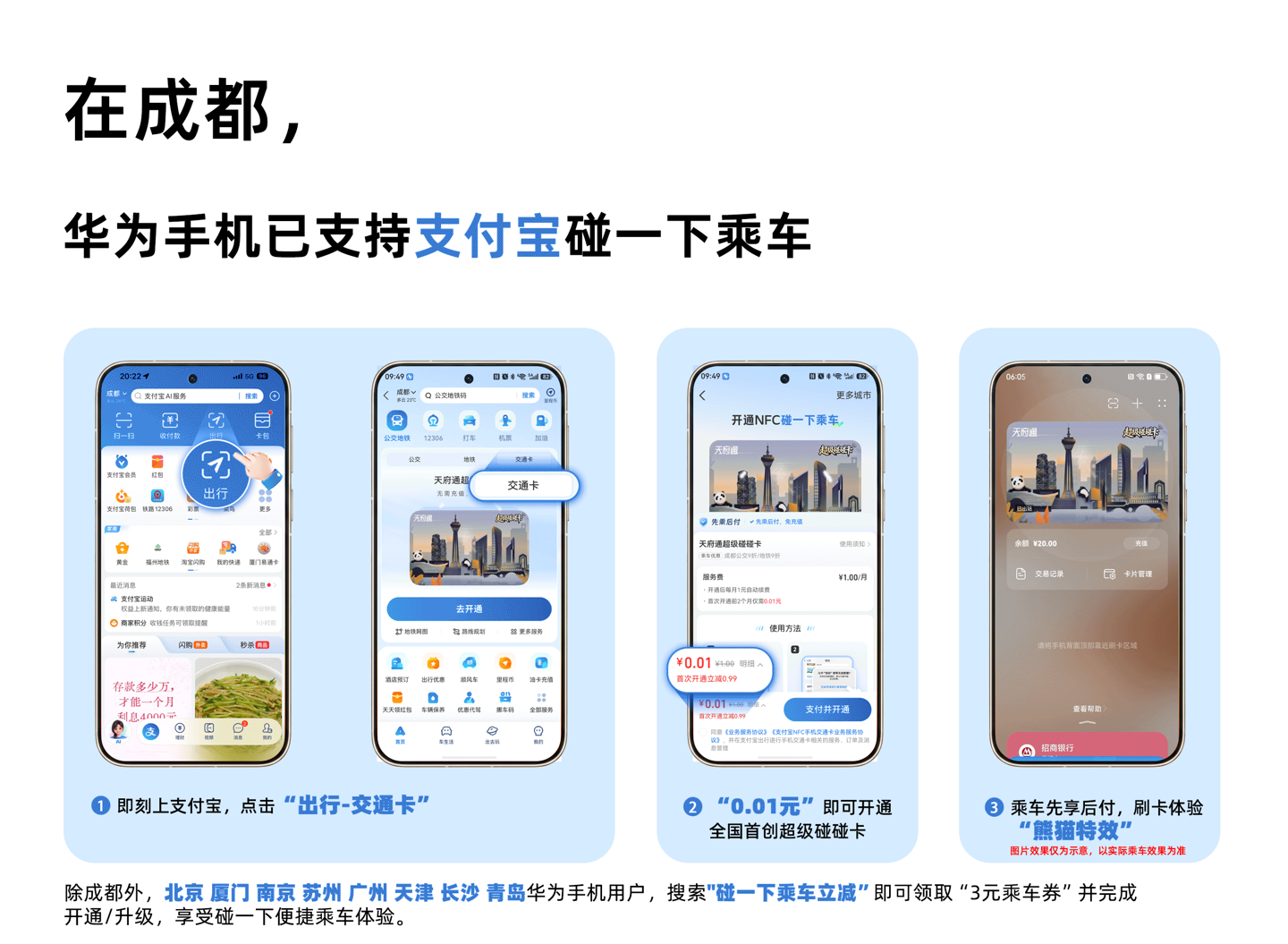
또한, 청도 지역의 Huawei 휴대폰 사용자는 알리페이와 텐푸통(天府通) 및 Huawei가 공동 출시한 "슈퍼 펑펑 카드"를 체험할 수 있으며, 후불 결제, 충전 불필요, 카드 태그 시 판다 낙하 효과 등 다양한 혜택을 누릴 수 있습니다.
Huawei 휴대폰 내 알리페이 교통카드는 현재 베이징, 난징, 샤먼, 톈진, 광저우, 쑤저우, 창사, 칭다오 등 여러 도시에서 편리한 승차를 지원하며, 더 많은 도시가 지속적으로 추가될 예정입니다.
총평
알리페이가 Apple 지갑과 연동하여 특정 지역의 iPhone 사용자가 은행 카드 연결 없이 간편하게 교통카드를 개통할 수 있는 기능을 제공합니다. 또한 Huawei와 협력하여 청도 등에서 특별한 혜택이 포함된 카드를 지원하며 서비스 범위를 확대하고 있습니다.
iPhone 用户在 Apple 钱包中添加交通卡
支付宝宣布,西安、大连、济南三地的 iPhone 用户现可在 Apple 钱包中直接通过支付宝开通交通卡。该功能无需绑定银行卡,支持一键开通并畅行全国公共交通。
- 在 Apple 钱包点击“+”进行添加交通卡操作(iOS 16.1 以上用户)
- 选择“交通卡”
- 选择“支付宝”方式
- 确认打开“支付宝”并完成添加卡片操作
Huawei 手机用户相关功能
在成都,Huawei 手机用户可体验由支付宝、天府通及 Huawei 联合推出的“超级碰碰卡”,包含先乘后付、免充值等权益。
此外,Huawei 手机中的支付宝交通卡已支持以下城市:
- 北京、南京、厦门、天津、广州、苏州、长沙、青岛等
总结
支付宝与 Apple 及 Huawei 合作推动了移动支付在公共交通领域的融合。iPhone 用户可在特定城市通过 Apple 钱包快速开通卡片,而 Huawei 用户则可享受特定的联合权益及多城市便捷乘车支持。
Alipay交通カードサービス
ITホームの報道によると、本日午後、Alipayの公式アカウントを通じて、西安、大連、瀋陽の3都市においてiPhoneユーザーがApple Walletに直接Alipayを追加し、交通カードを有効化できるようになったと発表されました。銀行カードを連携させる必要がなく、ワンクリックでアクティベーションすることで、全国の公共交通機関を利用することが可能です。
開通手順
Alipay交通カードの開通手順は以下の通りです(iOS 26.1以降のユーザー向け):
- Apple Walletで「+」をタップし、交通カードを追加します。
- 「交通カード」を選択します。
- 「Alipay」の方式を選択します。
- Alipayアプリを起動し、確認およびカード追加の手続きを完了します。
- 追加が完了すると、Apple Walletで該当都市のカードを確認できます。
Huawei提携サービス
また、青島エリアのHuaweiスマートフォンユーザーは、Alipayと天府通(Tianfutong)、およびHuaweiが共同リリースした「スーパーポンポンカード」を体験でき、後払い、チャージ不要、カードをかざした際のパンダ落下エフェクトなど、さまざまな特典を享受できます。
Huaweiスマートフォン内のAlipay交通カードは、現在北京、南京、厦門、天津、広州、蘇州、長沙、青島など多くの都市で便利な乗車をサポートしており、今後さらに多くの都市が追加される予定です。
総評
AlipayはApple Walletと連携することで、特定の地域のiPhoneユーザーが銀行カードの紐付けなしで簡単に交通カードを開通できる機能を提供しています。また、Huaweiと提携して青島などで特別な特典を含むカードをサポートするなど、サービス範囲を拡大しています。
まとめ
AlipayはApple Walletとの連携により、特定の都市のiPhoneユーザーが銀行カードの紐付けなしで交通カードを利用可能にする機能を導入しました。また、Huaweiと提携して青島などで独自の特典付きカードを提供するなど、サービスの利便性と範囲を拡大しています。
Alipay Transit Card Service
According to a report by IT Home, Alipay announced through its official account today that iPhone users in Xi'an, Dalian, and Jinan can now add Alipay directly to Apple Wallet to activate transit cards. This allows for one-click activation without the need to link a bank card, enabling users to access public transportation across these regions.
Activation Process
The steps to activate an Alipay transit card are as follows (for users on iOS 26.1 or higher):
- Click "+" in Apple Wallet to add a transit card.
- Select "Transit Card."
- Choose the "Alipay" method.
- Open the Alipay app to complete the verification and card addition process.
- Once completed, the card for the respective city can be confirmed in Apple Wallet.
Huawei Collaboration Services
Additionally, Huawei phone users in the Qingdao area can experience the "Super PangPang Card," co-released by Alipay, Tianfutong, and Huawei. This card offers various benefits, including post-payment, no top-up required, and a unique panda falling effect when tapping the card.
Alipay transit cards on Huawei phones currently support convenient boarding in several cities, including Beijing, Nanjing, Xiamen, Tianjin, Guangzhou, Suzhou, Changsha, and Qingdao. More cities are expected to be added continuously.
Summary
Alipay has integrated with Apple Wallet to allow iPhone users in specific regions to activate transit cards without the need for a linked bank card. Furthermore, its collaboration with Huawei expands service coverage and introduces unique features like the "Super PangPang Card" in select areas.
iPhone 用户在 Apple 钱包中添加交通卡
支付宝宣布,西安、大连、济南三地的 iPhone 用户现在可以在 Apple 钱包中直接添加支付宝交通卡。该功能无需绑定银行卡,用户可一键开通并畅行全国公共交通。
在 Apple 钱包中添加交通卡的具体步骤如下:
- 点击“+”进行添加交通卡操作(iOS 26.1 以上用户)
- 选择“交通卡”
- 选择“支付宝”方式
- 确认打开“支付宝”并完成添加卡片操作
Huawei 用户在成都的专属权益
在成都的 Huawei 手机用户可体验由支付宝联合天府通及 Huawei 推出的“超级碰碰卡”。
- 支持先乘后付
- 免充值
- 刷卡熊猫掉落特效
Huawei 支持的交通卡城市
目前,Huawei 手机中的支付宝交通卡已支持以下城市的便捷乘车:
- 北京、南京、厦门、天津、广州、苏州、长沙、青岛等
更多城市正在持续接入中。
总结
支付宝与 Apple 钱包及 Huawei 合作,提升了移动端交通卡的便捷性。iPhone 用户在特定三城可直接在 Apple 钱包添加卡片,而成都的 Huawei 用户可体验“超级碰碰卡”等特有权益。目前支持的城市范围正在不断扩大。
Alipay交通カードサービス
ITホームの報道によると、本日午後、Alipayの公式アカウントを通じて、西安、大連、瀋陽の3都市においてiPhoneユーザーがApple Walletに直接Alipayを追加し、交通カードを有効化できるようになったと発表されました。この機能は銀行カードを連携させる必要がなく、ワンクリックでアクティベーションすることで、全国の公共交通機関を利用することが可能です。
開通手順
Alipay交通カードの開通手順は以下の通りです(iOS 16.1以降のユーザー向け):
- Apple Walletで「+」をタップし、交通カードを追加します。
- 「交通カード」を選択します。
- 「Alipay」の方式を選択します。
- Alipayアプリを起動し、確認およびカード追加の手続きを完了します。
- 追加が完了すると、Apple Walletで該当都市のカードを確認できます。
Huawei提携サービス
また、成都エリアではHuaweiスマートフォンユーザー向けに、Alipay、天府通(Tianfutong)、およびHuaweiが共同で提供する「スーパーポンポンカード」が体験可能です。このカードは後払い、チャージ不要、カードをかざした際のパンダ落下エフェクトなど、さまざまな特典が含まれています。
さらに、Huaweiスマートフォン内のAlipay交通カードは、現在以下の都市で便利な乗車をサポートしており、今後も対応都市が順次追加される予定です。
- 北京、南京、厦門、天津、広州、蘇州、長沙、青島など
まとめ
AlipayはAppleおよびHuaweiと提携し、公共交通機関におけるモバイル決済の利便性を向上させています。iPhoneユーザーは特定の都市でApple Walletを通じて簡単にカードを発行でき、Huaweiユーザーも特定の地域で独自の特典や広範な都市でのサポートを受けることができます。
Alipay Transit Card Service
According to a report from IT Home, Alipay announced through its official account that iPhone users in Xi'an, Dalian, and Jinan can now add transit cards directly via Apple Wallet. This feature allows for one-click activation without the need to link a bank card, enabling users to access public transportation nationwide.
Activation Process
The following steps are required to activate an Alipay transit card (for users on iOS 16.1 or higher):
- Tap "+" in Apple Wallet to add a transit card.
- Select "Transit Card."
- Choose the "Alipay" method.
- Open the Alipay app to confirm and complete the card addition process.
- Once completed, the card for the respective city will be visible in Apple Wallet.
Huawei Partnership Services
In Chengdu, Huawei phone users can experience the "Super Pong Pong Card," co-launched by Alipay, Tianfutong, and Huawei. This card offers various benefits, including post-payment options and no top-up requirements, along with a special panda falling effect when tapping the card.
Additionally, Alipay transit cards on Huawei phones are currently supported in several cities, including:
- Beijing, Nanjing, Xiamen, Tianjin, Guangzhou, Suzhou, Changsha, and Qingdao.
More cities are expected to be added continuously.
Summary
Alipay has integrated with both Apple Wallet and Huawei to streamline public transportation payments in various Chinese cities. iPhone users can now activate transit cards without linking bank accounts, while Huawei users benefit from specialized features and expanded city support.
iPhone 用户在 Apple 钱包中添加交通卡
支付宝宣布,西安、大连、济南三地的 iPhone 用户现可在 Apple 钱包中直接添加支付宝交通卡。该功能无需绑定银行卡,用户可一键开通并畅行全国公共交通。
在 Apple 钱包中添加卡的具体步骤如下:
- 点击“+”进行添加交通卡操作(iOS 26.1 以上用户)
- 选择“交通卡”
- 选择“支付宝”方式
- 确认打开“支付宝”并完成添加卡片操作
Huawei 手机支持特定城市交通卡
在成都,Huawei 手机用户可体验由支付宝、天府通及 Huawei 共同推出的“超级碰碰卡”,该卡提供先乘后付、免充值、刷卡熊猫掉落特效等多种权益。
此外,Huawei 手机中的支付宝交通卡已支持以下城市便捷乘车:
- 北京
- 南京
- 厦门
- 天津
- 广州
- 苏州
- 长沙
- 青岛
总结
支付宝与 Apple 合作,让特定城市的 iPhone 用户可直接在 Apple 钱包中添加交通卡并免去绑定银行卡的步骤。同时,针对 Huawei 手机用户提供“超级碰碰卡”及多城市的一键乘车支持。
Alipay交通カードサービス
ITホームの報道によると、本日午後、Alipayの公式アカウントを通じて、西安、大連、瀋陽の3都市においてiPhoneユーザーがApple Walletに直接Alipayを追加し、交通カードを有効化できるようになったと発表されました。この機能は銀行カードを連携させる必要がなく、ワンクリックでアクティベーションすることで、全国の公共交通機関を利用することが可能になります。
開通手順
Alipay交通カードの開通手順は以下の通りです(iOS 26.1以降のユーザー向け):
- Apple Walletで「+」をタップし、交通カードを追加します。
- 「交通カード」を選択します。
- 「Alipay」の方式を選択します。
- Alipayアプリを起動し、確認およびカード追加の手続きを完了します。
- 追加が完了すると、Apple Walletで該当都市のカードを確認できます。
Huawei提携サービス
また、成都エリアのHuaweiスマートフォンユーザーは、Alipay、天府通(Tianfutong)、およびHuaweiが共同リリースした「スーパーポンポンカード」を体験でき、後払い、チャージ不要、カードをかざした際のパンダ落下エフェクトなど、さまざまな特典を享受できます。
Huaweiスマートフォン内のAlipay交通カードは、現在以下の都市で便利な乗車をサポートしており、今後も対応都市が順次追加される予定です。
- 北京、南京、厦門、天津、広州、蘇州、長沙、青島など
まとめ
AlipayはAppleおよびHuaweiと提携し、公共交通機関におけるモバイル決済の利便性を向上させています。iPhoneユーザーは特定の都市でApple Walletを通じて直接カードを発行でき、Huaweiユーザーも特定の地域で独自の特典や広範な都市でのサポートを受けることが可能になります。
Alipay Transit Card Service
According to a report by IT Home, Alipay announced through its official account that iPhone users in Xi'an, Dalian, and Jinan can now add Alipay directly to Apple Wallet to activate transit cards. This feature allows for one-click activation without the need to link a bank card, enabling users to access public transportation across these regions.
Activation Process
The steps to activate an Alipay transit card are as follows (for users on iOS 16.1 or higher):
- Click "+" in Apple Wallet to add a transit card.
- Select "Transit Card."
- Choose the "Alipay" method.
- Open the Alipay app to complete the verification and card addition process.
- Once completed, the card for the respective city can be confirmed in Apple Wallet.
Huawei Collaboration Services
In the Chengdu area, Huawei phone users can experience the "Super PangPang Card," co-released by Alipay, Tianfutong, and Huawei. This card offers various benefits, including post-payment, no top-up required, and a unique panda falling effect when tapping the card.
Additionally, Alipay transit cards on Huawei phones currently support convenient boarding in several cities:
- Beijing, Nanjing, Xiamen, Tianjin, Guangzhou, Suzhou, Changsha, and Qingdao.
More cities are expected to be added continuously.
Summary
Alipay has integrated with Apple Wallet to allow iPhone users in specific regions to activate transit cards without the need for a linked bank card. Furthermore, its collaboration with Huawei expands service coverage and introduces unique features like the "Super PangPang Card" in select areas.