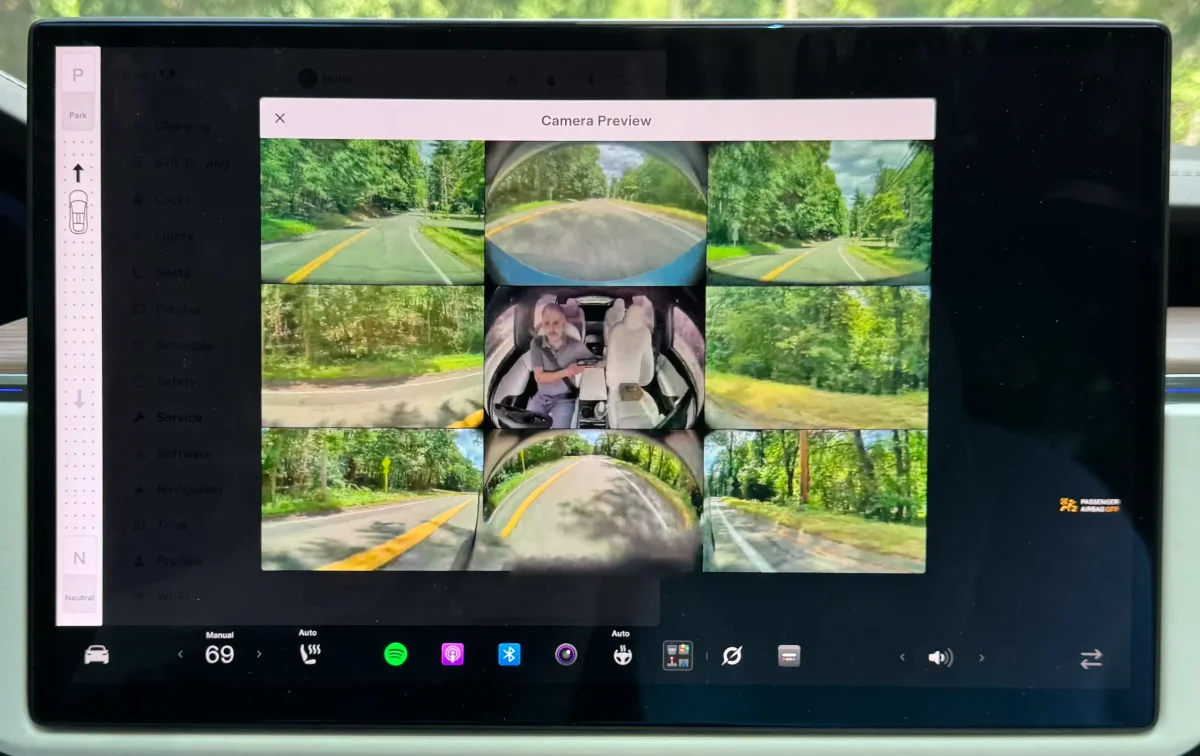
Tesla의 카메라 시스템
Tesla 차량은 FSD 시스템에 시각 데이터를 제공하기 위해 9개의 카메라를 탑재하고 있으며, 이를 통해 도시 도로와 고속도로에서 자율 주행을 지원합니다. 하지만 운전자는 평소 중앙 대형 화면에서 소수의 카메라 영상만 확인할 수 있습니다. 일반적인 주행 상황에서는 표준 후방 영상이나 사이드미러 카메라 화면이 자동으로 나타나지만, 숨겨진 진단 기능은 이러한 제한 없이 모든 차량 내 카메라의 실시간 영상을 한 번에 확인하게 해줍니다.
새로운 소프트웨어 업데이트 및 멀티 카메라 뷰
최신 버전의 소프트웨어는 새로운 기능을 추가했습니다. 이제 운전자는 차량이 주행 중인 상태에서도 전체 멀티 카메라 분할 화면을 확인할 수 있습니다. 이 다중 그리드 카메라 확인 도구는 약 3년 전인 2023.20 버전에서 처음 도입되었으나, 이전에는 주차(P) 상태에서만 활성화되고 주행 모드로 전환되면 자동으로 꺼지는 제한이 있었습니다.
X 플랫폼 사용자 @realwhitakerb가 공유한 실측 영상에 따르면, 차량이 일반 도로 속도로 주행할 때 중앙 화면에 9개의 카메라 영상을 끊김 없이 동시에 표시합니다. 특정 카메라를 클릭하면 전체 화면으로 확대되며, 그리드 아이콘을 누르면 다시 다중 분할 화면으로 전환됩니다.
사용 방법 및 제한 사항
다만 이 기능의 호출 방식에는 여전히 제약이 있습니다. '제어 > 서비스' 메뉴를 통해 진입해야 하며, 주차 상태에서만 활성화할 수 있습니다. 하지만 주행(D) 모드 전환 전 미리 해당 화면을 띄워 놓으면 주행 중에도 분할 화면이 유지됩니다. 주행 중에 수동으로 카메라 뷰를 끌 수는 있지만, 다시 활성화하려면 차량을 완전히 멈추고 P 단으로 변속해야 합니다.
이 실시간 진단 화면은 운전자가 차량의 실제 시야 상태를 즉시 확인하는 데 유용합니다. 어떤 렌즈가 도로 오염이나 강한 빛에 가려졌는지 추측할 필요 없이, 모든 카메라의 작동 상태를 직접 확인할 수 있습니다.
유지보수 및 안전 기능
FSD v14.3 버전에서 Tesla는 카메라 시야 방해 알림 메커니즘을 업그레이드했습니다. 환경 요인으로 인해 카메라 하드웨어의 촬영이 방해받을 때 운전자가 더 명확한 경고를 받을 수 있습니다. 또한 서비스 모드 내에 카메라 세척 안내가 추가되어, 운전자가 전방 메인 카메라를 올바르게 관리할 수 있도록 돕습니다.
공식적으로 발표되지는 않았으나 이번 소프트웨어 변경은 실용적인 차량 진단 도구를 제공합니다. 정돈된 9분할 뷰는 내부 캐빈, A필러 측면, 사이드미러, 후방 및 전방 메인 카메라 등 9가지 다른 시점의 화면을 동시에 보여줍니다. 비록 미리 활성화해야 하는 번거로움은 있지만, 주변 상황 확인이나 차량 하드웨어를 타인에게 보여줄 때 유용합니다.
총평
Tesla는 소프트웨어 업데이트를 통해 주행 중에도 9개의 카메라 영상을 동시에 확인할 수 있는 진단 기능을 강화했습니다. 이 기능은 운전자가 카메라 오염 여부를 즉시 파악하고 차량을 관리하는 데 도움을 주는 실용적인 도구로 활용될 수 있습니다.
隐藏功能:全视角摄像头实时预览
Tesla 整车搭载了 9 颗摄像头,为 FSD 系统提供视觉数据。虽然在常规行驶模式下,驾驶员通常只能看到少数几个摄像头画面,但一项隐藏的诊断功能允许用户一次性查看全部 9 路摄像头的实时画面。
软件更新与动态变化
新版软件对该功能的限制进行了放宽。此前这套多宫格摄像头查看工具仅在车辆挂 P 挡驻车时可用,一旦切换至行驶档位便会自动关闭。最新更新后,即便车辆处于行驶状态,驾驶员也能持续查看完整的多宫格分屏视图。
操作逻辑与交互功能
该功能提供九宫格布局,涵盖了包括座舱、A 柱侧方、后视镜侧边、车尾以及主前向在内的多个视角。相关交互细节如下:
- 用户可点击任意一路摄像头画面进行全屏放大。
- 在全屏模式下点击网格图标,即可切回多宫格分屏界面。
- 进入路径为「控制 > 维修」菜单;虽然需在驻车状态下开启,但只要在挂 D 挡前完成操作,行驶过程中画面即可保留。
FSD v14.3 与维护优化
在 FSD v14.3 版本中,Tesla 对相关硬件保障进行了升级:
- 强化了摄像头视野受阻提醒机制,当环境因素干扰成像时提供更清晰的警示。
- 在维修模式内新增了摄像头清洁指引,方便车主维护前挡风主摄像头。
总结
Tesla 通过软件更新放宽了隐藏诊断功能的限制,允许驾驶员在行驶过程中查看全量 9 路摄像头的实时分屏画面。此功能旨在帮助驾驶员直观判断镜头是否受污或被遮挡,并配合 FSD v14.3 的新特性提升车辆的维护便利性。
Teslaのカメラシステム
Teslaの車両は、FSD(Full Self-Driving)システムに視覚データを提供するために9台のカメラを搭載しており、これによって都市部の道路や高速道路での自動運転をサポートしています。通常、ドライバーは中央の大型ディスプレイで少数のカメラ映像のみを確認できます。一般的な走行状況では、標準的な後方映像やサイドミラーのカメラ映像が自動的に表示されますが、隠された診断機能を使用することで、制限なくすべての車両内カメラのリアルタイム映像を一括で確認することが可能になります。
新しいソフトウェアアップデートとマルチカメラビュー
最新バージョンのソフトウェアにより、新機能が追加されました。現在、ドライバーは走行中であっても、全カメラの分割表示(マルチカメラビュー)を確認できるようになっています。この多重グリッドカメラ確認ツールは、約3年前の2023.20バージョンで初めて導入されましたが、以前は駐車(P)状態でのみ有効になり、走行モードに切り替わると自動的にオフになる制限がありました。
Xプラットフォームのユーザー @realwhitakerb が共有した実測映像によると、車両が通常の道路速度で走行している際に、中央の画面に9つのカメラ映像が途切れることなく同時に表示されます。特定のカメラをクリックすると全画面に拡大され、グリッドアイコンを押すと再びマルチ分割画面に戻ります。
使用方法と制限事項
ただし、この機能の呼び出し方法には依然として制約があります。「コントロール > サービス」メニューを通じてアクセスする必要があり、駐車状態でしか有効にすることができません。しかし、走行(D)モードに切り替える前にあらかじめ該当の画面を表示させておけば、走行中も分割画面を維持することができます。走行中に手動でカメラビューをオフにすることは可能ですが、再度有効にするには車両を完全に停止させ、Pレンジにシフトする必要があります。
このリアルタイム診断画面は、ドライバーが車両の実際の視界状態を即座に確認するのに非常に便利です。どのレンズが道路の汚れや強い光によって遮られているかを推測する必要がなく、すべてのカメラの動作状態を直接確認できます。
メンテナンスと安全機能
FSD v14.3バージョンにおいて、Teslaはカメラ視界妨害の通知メカニズムをアップグレードしました。環境要因によってカメラハードウェアの撮影が妨げられる際、ドライバーにより明確な警告が表示されます。また、サービスモード内に「カメラ洗浄」の案内が追加され、ドライバーが前方のメインカメラを正しく管理できるよう支援します。
公式には発表されていませんが、今回のソフトウェア変更は実用的な車両診断ツールを提供します。整理された9分割ビューでは、以下の視点を同時に表示します。
- 車内(インテリア)
- Aピラー側面
- サイドミラー
- 後方
- 前方のメインカメラ
事前に有効にする手間はありますが、周囲の状況確認や、車両のハードウェアの状態を他人に示す際に非常に有用です。
まとめ
Teslaはソフトウェアアップデートを通じて、走行中にも9つのカメラ映像を同時に確認できる診断機能を強化しました。この機能により、ドライバーはカメラの汚れや不具合を即座に把握でき、車両管理をより円滑に行うための実用的なツールとして活用できます。
Tesla's Camera System
Tesla vehicles are equipped with nine cameras to provide visual data for the FSD system, supporting autonomous driving on both city streets and highways. Typically, drivers can only view a limited number of camera feeds on the large center screen during normal driving, such as standard rear views or side mirror images. However, a hidden diagnostic feature allows users to view real-time footage from all cameras simultaneously without these limitations.
New Software Update and Multi-Camera View
The latest software version has introduced new functionality that allows drivers to view the full multi-camera split screen even while the vehicle is in motion. This multi-grid camera tool was first introduced in version 2023.20, but it previously had a limitation where it would automatically deactivate when transitioning from Park (P) to driving mode.
According to footage shared by X user @realwhitakerb, the center screen displays all nine camera feeds simultaneously without interruption while traveling at normal road speeds. Clicking a specific camera expands it to full-screen mode, and tapping the grid icon returns the display to the multi-split view.
Usage Methods and Limitations
There are still some constraints regarding how this feature is accessed. It must be entered through the 'Control > Service' menu and can only be activated while in Park mode. However, if the screen is activated before shifting into Drive (D) mode, the split view remains active during driving. While users can manually turn off the camera view during a drive, re-activating it requires the vehicle to come to a complete stop and shift back into Park.
This real-time diagnostic screen is highly useful for drivers to immediately verify the actual status of the vehicle's vision. It allows them to confirm whether any specific lenses are obscured by road debris or intense light without having to guess based on performance.
Maintenance and Safety Features
With FSD v14.3, Tesla upgraded its camera obstruction notification mechanism. Drivers now receive clearer warnings when hardware visibility is hindered by environmental factors. Additionally, a "camera cleaning" guide has been added within the service mode to help drivers properly maintain the front main camera.
While not officially announced, this software change provides a practical diagnostic tool. The organized 9-split view displays nine different viewpoints simultaneously:
- Interior cabin
- A-pillar sides
- Side mirrors
- Rear view
- Front main camera
Although it requires the inconvenience of pre-activation, this feature is useful for checking surrounding conditions or demonstrating the vehicle's hardware status to others.
Summary
Tesla has enhanced its diagnostic capabilities by allowing drivers to view all nine camera feeds simultaneously during operation. This update provides a practical tool for identifying camera obstructions caused by dirt or glare and offers better maintenance guidance. The feature serves as an efficient way for owners to monitor the health of their vehicle's vision hardware.
隐藏的九路摄像头视图
Tesla 整车搭载了 9 颗用于 FSD 系统的数据采集摄像头。虽然在标准驾驶模式下,用户通常只能看到部分关键视角(如倒车影像或侧后视镜),但一项隐藏的诊断功能允许用户在中控大屏上同时查看全部 9 路摄像头的实时画面。
软件更新与功能变动
该多宫格摄像头视图工具最早于 2023.20 版本引入。此前,该功能受到严格限制,仅能在车辆处于 P 挡驻车状态时开启;而在新版软件中,只要驾驶员在挂入 D 挡前提前进入相关菜单,即使车辆正在行驶,多宫格分屏画面也会持续保留。
操作细节与实用性
该功能提供以下交互体验:
- 通过「控制 > 维修」菜单进入隐藏入口。
- 支持点击任意单路摄像头进行全屏放大,并可通过网格图标切换回多宫格视图。
- 帮助驾驶员实时判断镜头是否被路面污渍或强光遮挡,确保硬件处于良好工作状态。
FSD v14.3 相关优化
在 FSD v14.3 版本中,Tesla 进一步升级了相关功能:
- 强化了摄像头视野受阻的提醒机制,提供更清晰的警示。
- 在维修模式内新增了针对前挡风主摄像头的清洁指引。
总结
Tesla 在新版软件中放宽了隐藏诊断功能的限制,允许用户在行驶过程中查看全车 9 路摄像头实时画面。此项更新旨在提供更直观的硬件状态检查工具,帮助驾驶员及时识别并处理镜头遮挡问题。
Teslaのカメラシステム
Teslaの車両は、FSDシステムに視覚データを提供するために9台のカメラを搭載しており、これによって都市部や高速道路での自動運転をサポートしています。通常、ドライバーは中央の大型ディスプレイで少数のカメラ映像のみを確認できますが、隠された診断機能を利用することで、制限なくすべてのカメラのリアルタイム映像を一括で確認することが可能になります。
新しいソフトウェアアップデートとマルチカメラビュー
最新バージョンのソフトウェアにより、新たな機能が追加されました。現在、ドライバーは走行中であっても、全カメラの分割表示(マルチグリッド)を確認できるようになっています。この多重グリッドカメラ確認ツールは、約3年前の2023.20バージョンで初めて導入されましたが、以前は駐車(P)状態でのみ有効で、走行モードに切り替わると自動的にオフになる制限がありました。
Xプラットフォームのユーザー@realwhitakerbが公開した実測動画によると、車両が通常の道路速度で走行している際、中央の画面に9つのカメラ映像が途切れることなく同時に表示されます。特定のカメラをクリックすると全画面に拡大され、グリッドアイコンを押すと再びマルチ分割画面に戻ります。
操作方法と制限事項
ただし、この機能の呼び出し方法には依然として制約があります。「コントロール > サービス」メニューからアクセスする必要があり、駐車状態でのみ有効化できます。しかし、走行(D)モードに切り替える前にあらかじめ該当の画面を表示させておけば、走行中も分割画面を維持することができます。走行中に手動でカメラビューをオフにすることは可能ですが、再度有効にするには車両を完全に停止し、P段にシフトする必要があります。
このリアルタイム診断画面は、ドライバーが車両の実際の視界状態を即座に確認するのに非常に便利です。どのレンズが道路の汚れや強い光によって遮られているかを推測する必要がなく、すべてのカメラの動作状態を直接確認できます。
メンテナンスと安全機能
FSD v14.3バージョンにおいて、Teslaはカメラの視界妨害通知メカニズムをアップグレードしました。環境要因によりカメラハードウェアの撮影が妨げられる際、ドライバーにより明確な警告が表示されます。また、サービスモード内にはカメラの洗浄案内も追加され、ドライバーが前方のメインカメラを適切に管理できるようサポートします。
公式には発表されていませんが、今回のソフトウェア変更は実用的な車両診断ツールを提供しています。整理された9分割ビューでは、キャビン内部、Aピラー側面、サイドミラー、後方、および前方メインカメラなど、9つの異なる視点の映像を同時に表示します。事前に有効にする手間はありますが、周囲の状況確認や、他人に車両のハードウェアの状態を見せる際に非常に有用です。
まとめ
Teslaはソフトウェアアップデートを通じて、走行中にも9つのカメラ映像を同時に確認できる診断機能を強化しました。この機能により、ドライバーはカメラの汚れや故障を即座に把握でき、車両管理の利便性が向上します。また、FSD v14.3では視界妨害の警告や清掃案内も強化され、より安全な運用をサポートしています。
Tesla's Camera System
Tesla vehicles are equipped with 9 cameras that provide essential visual data for the FSD system, supporting autonomous driving on both city roads and highways. While drivers typically only see a few camera feeds—such as standard rear views or side mirror images—on the large center screen during normal operation, a hidden diagnostic feature allows users to view real-time footage from all 9 cameras simultaneously without these limitations.
New Software Updates and Multi-Camera View
The latest software update has expanded the functionality of this feature. Drivers can now view a full multi-camera split screen even while the vehicle is in motion. This multi-grid camera viewing tool was first introduced around three years ago in version 2023.20; however, it previously had a restriction where it would automatically turn off once the vehicle switched from Park (P) to driving mode.
According to footage shared by X user @realwhitakerb, the system displays all 9 camera feeds simultaneously on the center screen while traveling at standard road speeds. Users can click any specific camera feed to enlarge it to full screen and tap a grid icon to return to the multi-split view.
Operation Methods and Limitations
There are still certain constraints regarding how this feature is accessed. It must be entered through the "Control > Service" menu and can only be activated while the vehicle is in Park (P). However, if the screen is activated before shifting into Drive (D) mode, the split view will remain active during the trip. While users can manually turn off the camera view during driving, they must come to a complete stop and shift back into Park (P) to reactivate it.
This real-time diagnostic screen is highly useful for drivers to immediately verify the vehicle's vision status. It allows them to confirm which lenses are obstructed by road debris or intense light without having to guess, providing a direct look at all camera operations.
Maintenance and Safety Features
With the FSD v14.3 update, Tesla upgraded the notification mechanism for obstructed camera views. Drivers now receive clearer warnings when environmental factors interfere with the camera hardware's ability to capture images. Additionally, a camera cleaning guide has been added to the service mode to help drivers properly maintain the front main camera.
While not officially announced as a primary feature, this software change provides a practical diagnostic tool. The organized 9-split view covers various perspectives, including the cabin, A-pillar sides, side mirrors, rear, and the front main camera. Although it requires pre-activation before driving, it is useful for checking surroundings or demonstrating the vehicle's hardware status to others.
Summary
Tesla has enhanced a hidden diagnostic feature that allows drivers to view all 9 camera feeds simultaneously during operation, a capability previously restricted to Park mode. This update provides a practical tool for identifying lens obstructions and ensuring hardware is clear of debris. Furthermore, the inclusion of improved alerts and cleaning prompts in FSD v14.3 helps ensure optimal vision for the vehicle's autonomous systems.
特斯拉全视角摄像头预览功能更新
特斯拉整车搭载 9 颗摄像头以支持 FSD 系统。新版软件更新后,原本仅在 P 挡驻车时可用的“多宫格”隐藏诊断功能现在允许驾驶员在车辆行驶过程中查看全部 9 路摄像头的实时画面。该功能旨在帮助驾驶员快速判断镜头是否被污垢或强光遮挡,从而更准确地掌握车辆的实际视野状态。
功能细节与操作逻辑
该多宫格摄像头查看工具最早于 2023.20 版本引入,但此前在行驶过程中会自动关闭。新版更新后,只要驾驶员在起步前通过特定路径进入并开启该界面,系统将允许在行驶状态下持续保留分屏画面。
- 总摄像头数量:9 颗
- 功能入口:控制 > 维修(Control > Service)
- 交互操作:支持点击任意单路镜头全屏放大,并通过网格图标切换回多宫格视图。
- 使用限制:若在行驶中手动关闭该视图,必须重新停稳车辆并挂入 P 挡才能再次调出。
FSD v14.3 系统优化
在 FSD v14.3 版本中,特斯拉针对摄像头硬件状态进行了进一步的软件优化:
- 升级了摄像头视野受阻提醒机制,当环境因素干扰成像时提供更清晰的警示。
- 在维修模式内新增了摄像头清洁指引,方便车主维护前挡风主摄像头。
总结
特斯拉通过放开隐藏诊断功能的限制,允许驾驶员在行驶中实时查看全部 9 路摄像头画面,显著提升了对车辆硬件状态的监控便利性。同时,FSD v14.3 版本配套提供的警示优化和清洁指引,进一步增强了用户对车辆视觉系统的维护体验。
Teslaのカメラシステム
Teslaの車両は、FSD(Full Self-Driving)システムに視覚データを提供するために9台のカメラを搭載しており、これによって都市部の道路や高速道路での自動運転をサポートしています。通常、ドライバーは中央の大型ディスプレイで少数のカメラ映像のみを確認できますが、隠された診断機能を使用することで、制限なくすべての車両内カメラのリアルタイム映像を一括で確認することが可能になります。
新しいソフトウェアアップデートとマルチカメラビュー
最新バージョンのソフトウェアにより、新機能が追加されました。現在、ドライバーは走行中であっても、全カメラの分割表示(マルチカメラビュー)を確認できるようになっています。この多重グリッドカメラ確認ツールは、約3年前の2023.20バージョンで初めて導入されましたが、以前は駐車(P)状態でのみ有効になり、走行モードに切り替わると自動的にオフになる制限がありました。
Xプラットフォームのユーザー @realwhitakerb が共有した実測映像によると、車両が通常の道路速度で走行している際に、中央の画面に9つのカメラ映像が途切れることなく同時に表示されます。特定のカメラをクリックすると全画面に拡大され、グリッドアイコンを押すと再びマルチ分割画面に戻ります。
使用方法と制限事項
ただし、この機能の呼び出し方法には依然として制約があります。「コントロール > サービス」メニューを通じてアクセスする必要があり、駐車状態でしか有効にすることができません。しかし、走行(D)モードに切り替える前にあらかじめ該当の画面を表示させておけば、走行中も分割画面を維持することができます。走行中に手動でカメラビューをオフにすることは可能ですが、再度有効にするには車両を完全に停止させ、Pレンジにシフトする必要があります。
このリアルタイム診断画面は、ドライバーが車両の実際の視界状態を即座に確認するのに非常に便利です。どのレンズが道路の汚れや強い光によって遮られているかを推測する必要がなく、すべてのカメラの動作状態を直接確認できます。
メンテナンスと安全機能
FSD v14.3バージョンにおいて、Teslaはカメラ視界妨害の通知メカニズムをアップグレードしました。環境要因によってカメラハードウェアの撮影が妨げられる際、ドライバーにより明確な警告が表示されます。また、サービスモード内に「カメラ洗浄」の案内が追加され、ドライバーが前方のメインカメラを正しく管理できるよう支援します。
公式には発表されていませんが、今回のソフトウェア変更は実用的な車両診断ツールを提供します。整理された9分割ビューでは、以下の視点を同時に表示します。
- 車内(インテリア)
- Aピラー側面
- サイドミラー
- 後方
- 前方のメインカメラ
事前に有効にする手間はありますが、周囲の状況確認や、車両のハードウェアの状態を他人に示す際に非常に有用です。
まとめ
Teslaはソフトウェアアップデートを通じて、走行中にも9つのカメラ映像を同時に確認できる診断機能を強化しました。この機能により、ドライバーはカメラの汚れや不具合を即座に把握でき、車両管理をより円滑に行うための実用的なツールとして活用できます。
Tesla's Camera System
Tesla vehicles are equipped with nine cameras to provide visual data for the FSD system, supporting autonomous driving on both city streets and highways. Under normal conditions, drivers typically only see a few camera feeds on the large center screen, such as standard rear views or side mirror images. However, a hidden diagnostic feature allows users to view real-time footage from all cameras simultaneously without these limitations.
New Software Update and Multi-Camera View
The latest software update has introduced new functionality that allows drivers to view the full multi-camera split screen even while the vehicle is in motion. This multi-grid camera tool was first introduced in version 2023.20, but it previously had a limitation where it would automatically deactivate when transitioning from Park (P) to driving mode.
According to footage shared by X user @realwhitakerb, the center screen displays all nine camera feeds simultaneously without interruption while traveling at normal road speeds. Clicking a specific camera expands it to full-screen mode, and tapping the grid icon returns the display to the multi-split view.
Usage Methods and Limitations
There are still some constraints regarding how this feature is accessed. It must be entered through the "Control > Service" menu and can only be activated while the vehicle is in Park mode. However, if the screen is activated before shifting into Drive (D) mode, the split view remains active during driving. While users can manually turn off the camera view during a drive, re-activating it requires the vehicle to come to a complete stop and shift back into Park.
This real-time diagnostic screen is highly useful for drivers to immediately verify the actual status of the vehicle's vision. It allows them to confirm whether any specific lenses are obscured by road debris or intense light without having to guess based on performance.
Maintenance and Safety Features
In FSD v14.3, Tesla upgraded the notification mechanism for camera view obstructions. When environmental factors interfere with camera hardware, drivers will receive clearer warnings. Additionally, a "camera cleaning" guide has been added within the service mode to help owners properly maintain the front main camera.
While not officially announced as a primary feature, this software change provides a practical diagnostic tool. The organized nine-split view displays several key viewpoints simultaneously:
- Interior (cabin)
- A-pillar sides
- Side mirrors
- Rear view
- Front main camera
While it requires the extra step of pre-activating the view, it is highly useful for checking surroundings or demonstrating the vehicle's hardware status to others.
Summary
Tesla has updated its software to allow drivers to access a multi-camera split screen while driving, a feature previously restricted to Park mode. This diagnostic tool enables users to quickly identify if any of the nine cameras are obscured by dirt or environmental factors. Additionally, FSD v14.3 includes improved warning systems and maintenance guides for camera hardware.