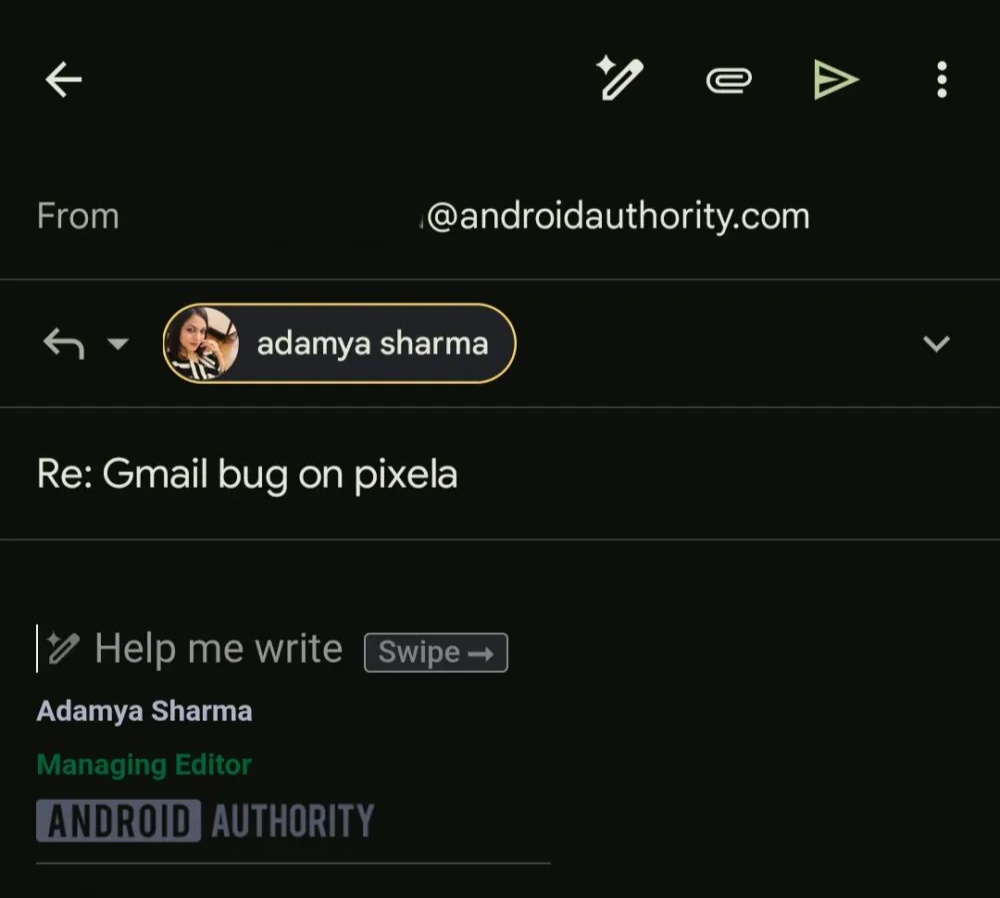
이슈 발생
기술 매체 AndroidAuthority는 Pixel 10 시리즈에서 AI 기능이 키보드 입력을 방해하는 '가로채기' 문제가 발생했다고 보도했습니다. 사용자가 Gmail에서 답장을 작성할 때 입력 키보드가 나타나지 않고, 대신 'Help me write' 기능이 우선적으로 표시되는 현상입니다.
영향을 받는 모델
커뮤니티 사용자들의 피드백에 따르면, 해당 문제는 주로 Pixel 10 Pro XL 및 Pixel 10 Pro Fold 두 모델에서 확인되었습니다.
- Pixel 10 Pro XL: 사용자가 왼쪽 하단의 키보드 숨기기 버튼을 먼저 누른 후 답장 영역을 여러 번 클릭해야 키보드가 나타날 가능성이 있는 상태입니다.
- Pixel 10 Pro Fold: 상황이 더 심각하여, 답장 필드에 커서가 전혀 표시되지 않으며 클릭해도 아무런 반응이 없습니다. 유일하게 확인 가능한 옵션은 AI 인터페이스인 'Help me write'뿐입니다.
기능 설명 및 원인
'Help me write'는 Gmail 내에서 Gemini를 기반으로 하는 AI 글쓰기 지원 기능입니다. 사용자는 스와이프나 클릭을 통해 이 기능을 활성화하고 AI가 자동으로 답장을 생성하게 할 수 있습니다. 현재 버그로 인해 해당 기능이 우선적으로 표시되도록 설정되어 있어, 정상적인 키보드 입력이 방해받고 있는 것으로 파악됩니다.
타 기기 비교
해당 매체는 vivo X300FE 및 OnePlus 15에서는 해당 버그가 재현되지 않았으며, iOS 버전의 Gmail 또한 정상적으로 작동하여 답장 클릭 시 즉시 키보드가 나타나는 것을 확인했습니다.
총평
Pixel 10 시리즈 일부 모델에서 Gmail 사용 시 AI 기능이 우선 노출되어 키보드 입력이 방해받는 버그가 보고되었습니다. 특히 Pixel 10 Pro Fold에서 문제가 더 심각하게 나타나고 있으며, 타사 플래그십 기기 및 iOS 환경에서는 동일한 문제가 발생하지 않은 것으로 확인됩니다.
Pixel 系列 Gmail 应用 Bug
科技媒体 AndroidAuthority 报道,Pixel 10 系列手机在运行 Gmail 应用时出现 AI“抢镜”问题。用户在回复邮件时,系统未能正常弹出输入法键盘,而是优先显示基于 Gemini 的 AI 写作辅助功能“Help me write”。
受影响机型及具体表现
该问题主要出现在以下两款设备上:
- Pixel 10 Pro XL:用户需要先点击左下角的键盘隐藏按钮,并多次点击回复区域,键盘才可能弹出。
- Pixel 10 Pro Fold:情况更为严重,回复字段无法显示光标,点击后无任何反应,仅能看到“Help me write”界面。
功能背景与跨平台对比
“Help me write” 是 Gmail 内集成的 AI 辅助功能。在当前 Bug 状态下,该功能被错误设置为高优先级显示,从而阻碍了正常的键盘输入。此外,该问题并未在 vivo X300FE 和 OnePlus 15 上出现,iOS 版的 Gmail 应用也运行正常。
总结
Pixel 10 Pro XL 和 Pixel 10 Pro Fold 在使用 Gmail 时因 AI 功能“Help me write”的优先级过高,导致系统无法正常弹出键盘。该问题目前仅影响特定型号的 Android 设备,在其他品牌机型及 iOS 系统上未见此问题。
問題の発生
テックメディアのAndroidAuthorityは、Pixel 10シリーズにおいてAI機能がキーボード入力を妨害する「横取り」の問題が発生したと報じました。ユーザーがGmailで返信を作成する際、入力キーボードが表示されず、代わりに「Help me write」機能が優先的に表示される現象です。
影響を受けるモデル
コミュニティのユーザーフィードバックによると、この問題は主にPixel 10 Pro XLおよびPixel 10 Pro Foldの2モデルで確認されています。
- Pixel 10 Pro XL:左下のキーボードを隠すボタンを先に押してから返信エリアを数回タップすることで、キーボードが表示される可能性がある状態です。
- Pixel 10 Pro Fold:より深刻な状況であり、返信フィールドにカーソルが全く表示されず、タップしても反応がない状態です。確認できるオプションはAIインターフェースの「Help me write」のみとなっています。
機能の説明と原因
「Help me write」は、Gmail内でGeminiをベースとしたAI執筆支援機能です。ユーザーはスワイプやクリックを通じてこの機能を有効にし、AIに自動で返信を生成させることができます。現在、バグによってこの機能が優先的に表示されるようになっているため、通常のキーボード入力が妨げられていると分析されています。
他デバイスとの比較
同メディアの報告によると、vivo X300FEおよびOnePlus 15ではこのバグは再現されず、iOS版のGmailも正常に動作しており、返信をタップした際に即座にキーボードが表示されることが確認されました。
まとめ
Pixel 10シリーズの一部モデルにおいて、Gmail使用時にAI機能が優先的に表示され、キーボード入力が妨害されるバグが報告されています。特にPixel 10 Pro Foldで深刻な影響が出ており、他社のフラッグシップ機やiOS環境では同様の問題は確認されていません。
Issue Report
Tech outlet AndroidAuthority has reported an "interception" issue in the Pixel 10 series where AI features interfere with keyboard input. Specifically, when users attempt to compose a reply in Gmail, the input keyboard fails to appear, and the "Help me write" feature is displayed instead.
Affected Models
According to community feedback, this issue has been primarily identified on the Pixel 10 Pro XL and Pixel 10 Pro Fold models.
- Pixel 10 Pro XL: Users may need to tap the "hide keyboard" button in the bottom-left corner first and then tap the reply area multiple times before the keyboard appears.
- Pixel 10 Pro Fold: The issue is more severe on this model; no cursor appears in the reply field, and clicking the area yields no response. The only visible option provided is the "Help me write" AI interface.
Feature Description and Cause
"Help me write" is a Gemini-powered AI writing assistant within Gmail that allows users to generate automated replies via swipes or clicks. It appears that a bug is causing this feature to take priority over standard keyboard input, thereby obstructing the user's ability to type manually.
Comparison with Other Devices
The outlet confirmed that the bug was not reproduced on the vivo X300FE or OnePlus 15. Furthermore, the iOS version of Gmail functions correctly, where the keyboard appears immediately upon clicking a reply field.
Summary
A bug has been reported in certain Pixel 10 series models where AI features override and hinder keyboard input during Gmail usage. The problem is particularly severe on the Pixel 10 Pro Fold, while other flagship devices and iOS environments remain unaffected.
问题描述
Pixel 10 系列手机在 Gmail 应用中出现 AI 功能“抢镜”故障。用户在尝试回复邮件时,系统优先显示基于 Gemini 的 “Help me write” 辅助功能,导致输入法键盘无法正常弹出。
受影响机型及具体表现
该问题主要出现在以下两款机型中:
- Pixel 10 Pro XL:用户需点击左下角隐藏按钮并多次点击回复区域,键盘才可能出现。
- Pixel 10 Pro Fold:情况更为严重,回复字段完全无法显示光标且无任何反应,仅能看到 “Help me write” 的 AI 界面。
跨平台对比
根据测试,该 Bug 并非普遍存在于所有设备或系统中:
- vivo X300FE:未复现该问题。
- OnePlus 15:未复现该问题。
- iOS 版 Gmail:运行正常,点击回复后键盘可立即弹出。
总结
Pixel 10 系列手机因 Gmail 内的 “Help me write” 功能被错误设为优先显示,导致用户在特定机型上无法正常呼出键盘输入文字。该问题目前仅影响 Pixel 10 Pro XL 和 Pixel 10 Pro Fold 两款型号,而在其他 Android 机型及 iOS 系统中表现正常。
問題の発生
テックメディアのAndroidAuthorityは、Pixel 10シリーズにおいてAI機能がキーボード入力を妨害する「横取り」の問題が発生したと報じました。ユーザーがGmailで返信を作成する際、入力用キーボードが表示されず、代わりにGeminiをベースとしたAI執筆支援機能「Help me write」が優先的に表示される現象です。
影響を受けるモデル
コミュニティのユーザーフィードバックによると、この問題は主に以下の2つのモデルで確認されています。
- Pixel 10 Pro XL:ユーザーが左下のキーボード非表示ボタンを先に押し、返信エリアを数回クリックすることでようやくキーボードが表示される可能性がある状態です。
- Pixel 10 Pro Fold:状況はより深刻で、返信フィールドにカーソルが全く表示されず、クリックしても反応がない状態です。確認できるオプションはAIインターフェースである「Help me write」のみとなっています。
機能の背景と他機種との比較
「Help me write」はGmail内で提供されるGeminiベースのAI執筆支援機能です。現在のバグにより、この機能が優先的に表示されるよう設定されているため、通常のキーボード入力が妨げられています。なお、この問題はvivo X300FEやOnePlus 15では再現されておらず、iOS版のGmailも正常に動作していることが確認されています。
まとめ
Pixel 10シリーズの一部モデルにおいて、Gmail使用時にAI機能「Help me write」が優先的に表示されることでキーボード入力が妨げられるバグが報告されました。特にPixel 10 Pro Foldで深刻な影響が出ており、他社フラッグシップ機やiOS環境では同様の問題は発生していないとされています。
Issue Overview
Tech outlet AndroidAuthority has reported a "hijacking" issue on the Pixel 10 series where AI features interfere with keyboard input. When users attempt to compose a reply in Gmail, the input keyboard fails to appear, and the "Help me write" feature is displayed instead.
Affected Models
According to community feedback, this issue has been primarily identified on two specific models:
- Pixel 10 Pro XL: Users may need to tap the keyboard hide button in the bottom left and then tap the reply area multiple times before the keyboard eventually appears.
- Pixel 10 Pro Fold: The situation is more severe; no cursor appears in the reply field, and clicking produces no response other than displaying the "Help me write" AI interface.
Feature Background and Cause
"Help me write" is a Gemini-powered AI writing assistant integrated into Gmail. Users can normally activate this feature via swipe or click to have the AI automatically generate a response. Due to a current bug, this feature has been incorrectly set to high priority, which prevents standard keyboard input from appearing correctly.
Cross-Platform Comparison
The reported issue was not reproduced on the vivo X300FE or OnePlus 15. Additionally, the iOS version of Gmail functions normally, with the keyboard appearing immediately upon clicking a reply field.
Summary
A bug in the Pixel 10 Pro XL and Pixel 10 Pro Fold causes the "Help me write" AI feature to override standard keyboard input when using Gmail. While the issue is more severe on the Fold model, it has not been reported on other flagship devices or on iOS systems.
Pixel 10 系列 Gmail 应用出现 AI “抢镜”问题
根据 AndroidAuthority 的报道,Pixel 10 系列手机在运行 Gmail 应用时存在 Bug。用户在回复邮件时,系统未能正常弹出输入法键盘,而是优先显示基于 Gemini 的 AI 写作辅助功能“Help me write”,导致正常的文字输入受到干扰。
受影响机型及具体表现
该问题主要影响以下两款设备:
- Pixel 10 Pro XL:用户需要先点击左下角键盘隐藏按钮,并多次点击回复区域,键盘才可能弹出。
- Pixel 10 Pro Fold:情况更为严重,回复字段完全无法显示光标,点击后无任何反应,仅能看到“Help me write”界面。
功能背景与跨平台对比
“Help me write” 是 Gmail 内集成的 AI 功能,旨在通过 Gemini 提供自动生成回复的建议。在当前的 Bug 状态下,该功能被错误地设置为优先显示。经测试,该问题并未出现在 vivo X300FE 和 OnePlus 15 上,iOS 版 Gmail 也运行正常。
总结
Pixel 10 Pro XL 和 Pixel 10 Pro Fold 在使用 Gmail 时因 AI 功能“Help me write”的优先级错误导致键盘无法正常弹出。该问题目前仅影响特定型号,而在 vivo X300FE、OnePlus 15 及 iOS 系统上未见此故障。
問題の発生
テックメディアのAndroidAuthorityは、Pixel 10シリーズにおいてAI機能がキーボード入力を妨害する「横取り」の問題が発生したと報じました。具体的には、ユーザーがGmailで返信を作成しようとする際に、入力用キーボードが表示されず、代わりにGeminiをベースとしたAI執筆支援機能「Help me write」が優先的に表示される現象です。
影響を受けるモデル
コミュニティのユーザーフィードバックによると、この問題は主に以下の2つのモデルで確認されています。
- Pixel 10 Pro XL:左下のキーボード非表示ボタンを先に押し、返信エリアを数回タップすることでようやくキーボードが表示される可能性がある状態です。
- Pixel 10 Pro Fold:より深刻な状況であり、返信フィールドにカーソルが全く表示されず、クリックしても反応がないため、AIインターフェースである「Help me write」のみが表示される状態です。
機能の概要と他機種との比較
「Help me write」はGmail内で提供されるGeminiベースのAI執筆支援機能であり、ユーザーはスワイプやクリックを通じてこの機能を有効にし、AIに自動で返信を生成させることができます。現在発生しているバグにより、この機能が優先的に表示されるよう設定されているため、通常のキーボード入力が妨げられていると分析されています。
なお、同メディアの報告によれば、vivo X300FEやOnePlus 15ではこの問題は再現されておらず、iOS版のGmailも正常に動作し、返信をタップした際に即座にキーボードが表示されることが確認されています。
まとめ
Pixel 10シリーズの一部モデルにおいて、Gmail内のAI機能「Help me write」が優先的に表示されることで、通常のキーボード入力が妨害されるバグが報告されています。特にPixel 10 Pro Foldで深刻な影響が出ていますが、他社のフラッグシップ機やiOS環境では同様の問題は確認されていません。
Issue Overview
Tech outlet AndroidAuthority has reported an "interception" issue within the Pixel 10 series where AI features interfere with standard keyboard input. When users attempt to compose a reply in Gmail, the system fails to display the input keyboard and instead prioritizes the Gemini-powered "Help me write" feature.
Affected Models
Based on community feedback, this issue has been primarily identified on two specific models:
- Pixel 10 Pro XL: Users may need to tap the "hide keyboard" button in the bottom-left corner and then tap the reply area multiple times before the keyboard eventually appears.
- Pixel 10 Pro Fold: The issue is more severe on this device; no cursor appears in the reply field, and clicking the area yields no response other than displaying the "Help me write" AI interface.
Feature Context and Cross-Platform Comparison
"Help me write" is an AI writing assistant integrated into Gmail that allows users to generate automated replies via swipes or clicks. Due to a current bug, this feature has been incorrectly set to high priority, thereby obstructing manual keyboard input.
The report confirmed that this bug was not reproduced on the vivo X300FE or OnePlus 15. Additionally, the iOS version of Gmail functions correctly, with the keyboard appearing immediately upon clicking a reply field.
Summary
A bug in the Pixel 10 Pro XL and Pixel 10 Pro Fold causes the "Help me write" AI feature to override and hinder standard keyboard input during Gmail usage. This issue appears to be specific to these Android models, as no similar problems were found on other flagship devices or iOS systems.