iOS 27 콘텐츠 색인 재구축 진행 상황 확인
IT之家 6월 16일 소식, IT 매체 9to5Mac은 오늘(6월 16일) 블로그 게시물을 통해 Mac 장비를 이용해 iOS 27 시스템 콘텐츠 색인 재구축 진행 상황을 확인하는 방법을 공유했습니다.
IT之家 주: iOS 27에서 Apple은 새로운 시스템이 업그레이드된 Apple Intelligence 및 Apple Foundation Models와 연동되도록 사용자 콘텐츠의 색인 구조를 재구축했습니다.
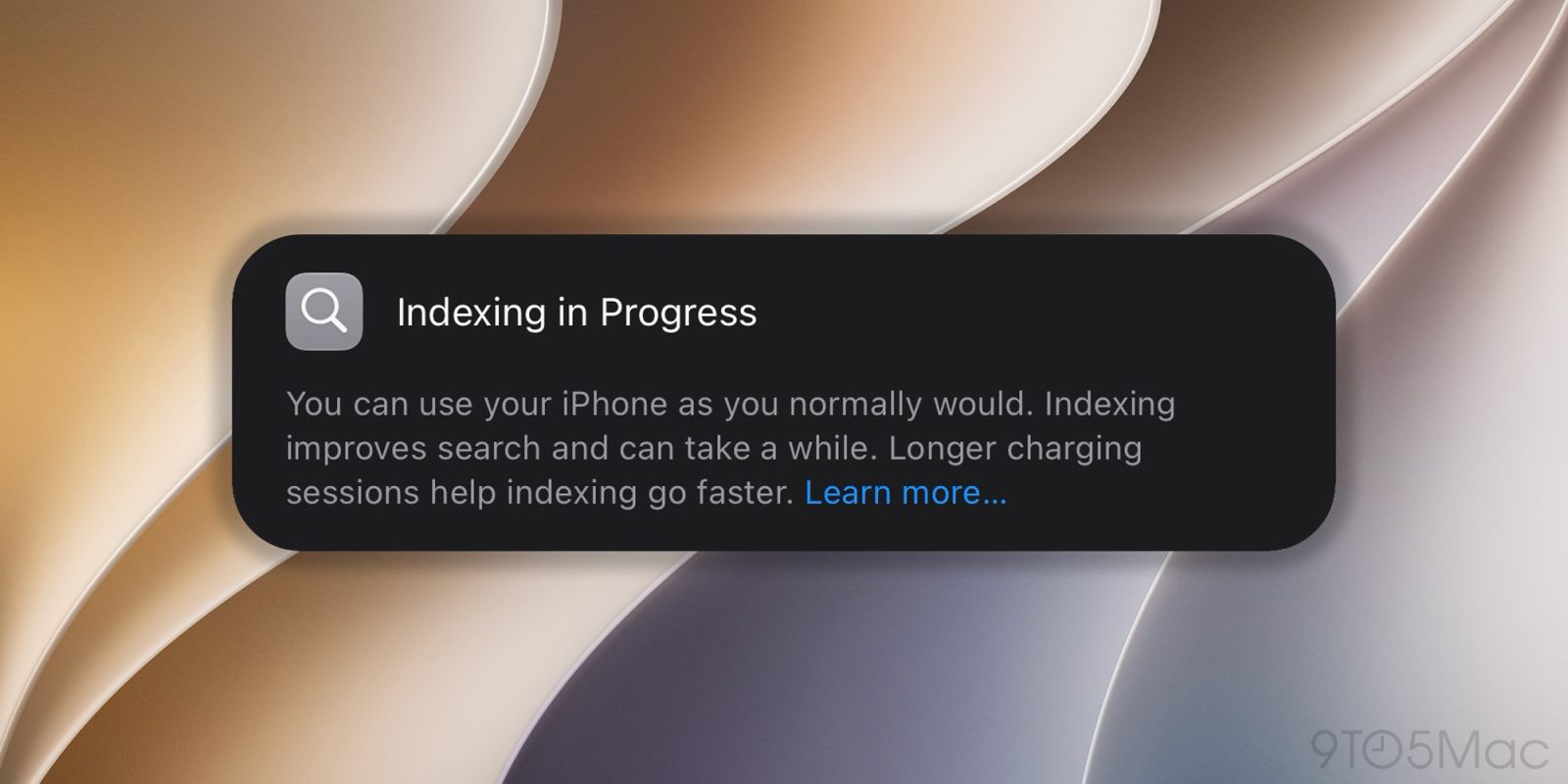
따라서 사용자가 iOS 27 Beta 1 업데이트로 업그레이드하면 시스템이 iPhone 콘텐츠를 다시 색인화합니다. 일부 모델은 비교적 짧은 시간 내에 재구축을 완료하지만, 일부 사용자는 며칠 동안 "색인 처리 중"(Indexing in Progress) 메시지가 계속 표시된다고 보고했습니다.
시스템 팝업은 색인화가 검색 경험을 향상시킨다고 표시하지만, 재구축 과정에는 일정 시간이 필요하며, 사용자가 충전 상태를 유지하면 색인 재구축 속도를 높이는 데 도움이 됩니다.
하지만 iPhone 17과 같은 모델에서는 "색인 처리 중" 상태만 표시되고 남은 진행률이나 완료 비율은 표시되지 않습니다. 사용자가 관련 진행 상황을 알고 싶다면 Mac을 통해 확인할 수 있습니다.
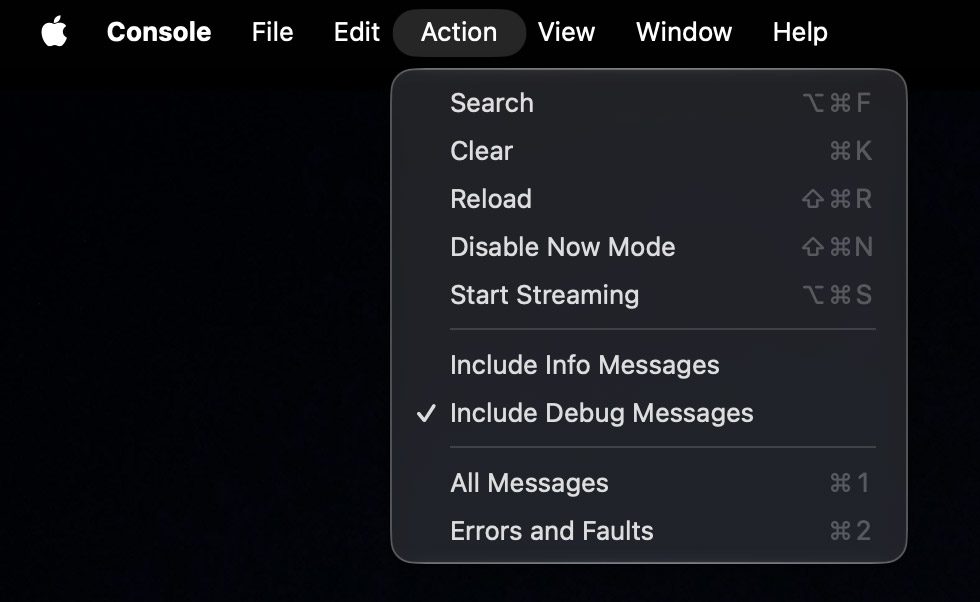
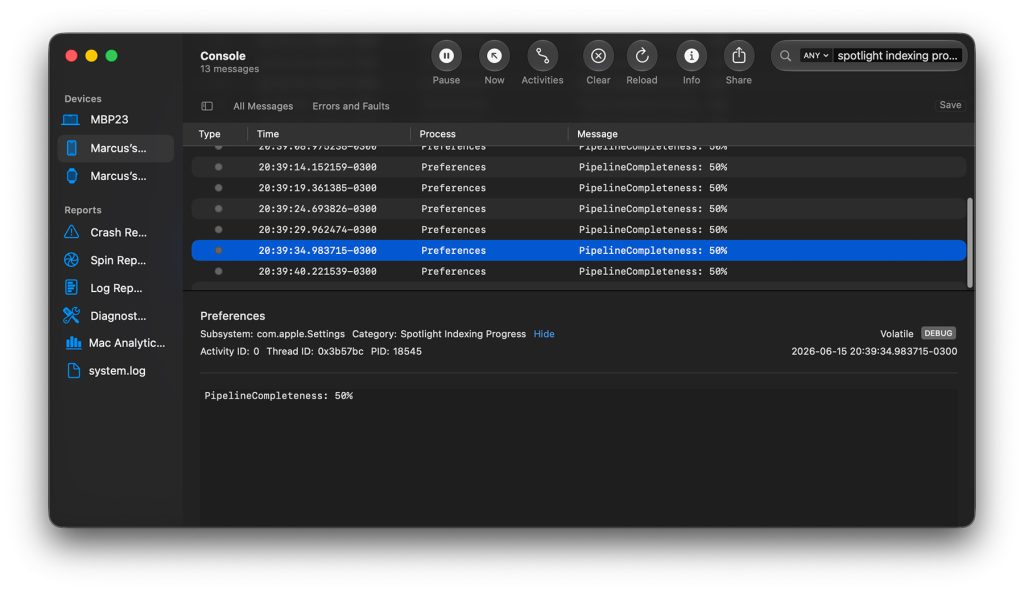
작업 단계는 다음과 같습니다. 먼저 iPhone을 Mac 장비에 연결하고 "콘솔" 앱을 엽니다. 작업 메뉴에서 "디버그 정보 포함"을 활성화한 다음, 사이드바에서 해당 iPhone을 선택하고 오른쪽 상단에서 spotlight indexing progress를 검색한 후 "Start"를 클릭합니다.
이 단계를 완료한 후 iPhone에서 "설정"을 열기만 하면 콘솔에 색인 진행 정보가 나타나기 시작하며, 형식은 일반적으로 PipelineCompleteness: XX%로 표시되어 현재 완료 백분율을 직접 확인할 수 있습니다.
해당 매체는 이러한 현상이 iOS 27이 여전히 매우 초기 개발자 테스트 단계에 있음을 보여주며, Apple이 앞으로 색인 프로세스와 시스템 세부 사항을 지속적으로 조정하고 가을 정식 버전 출시 전에 경험을 최적화할 것이라고 분석했습니다.
총평
iOS 27 Beta 1 업데이트 후 iPhone은 Apple Intelligence 및 Apple Foundation Models 지원을 위해 콘텐츠 색인을 재구축합니다. 이 과정은 시간이 소요되며, 일부 사용자는 "색인 처리 중" 메시지가 계속 표시될 수 있습니다. Mac의 "콘솔" 앱을 통해 iPhone을 연결하고 특정 단계를 거치면 색인 재구축의 정확한 진행률(%)을 확인할 수 있습니다. 이는 iOS 27이 아직 초기 개발 단계에 있으며, Apple이 정식 출시 전까지 색인 프로세스를 지속적으로 최적화할 것임을 시사합니다.
系统更新动态
在 iOS 27 Beta 1 中,Apple 为了配合升级后的 Apple Intelligence 与 Apple Foundation Models,对用户内容进行了索引结构重建。
索引处理机制
系统提示指出,索引过程旨在提升搜索体验。由于重建过程可能耗费较长时间,官方建议用户在充电状态下操作以提高索引重建速度。
设备兼容性与反馈
- 部分机型在更新后会显示“索引处理中(Indexing in Progress)”提示,持续时间因人而异。
- iPhone 17 等特定机型仅显示“索引处理中”状态,不直接显示具体的完成百分比或进度。
技术操作指南
用户可以通过 Mac 设备获取更详细的索引进度信息:
- 将 iPhone 连接至 Mac 并打开“控制台”应用。
- 在操作菜单中启用“包含调试信息”。
- 在侧边栏选择对应 iPhone,并在右上角搜索 "spotlight indexing progress" 并点击“Start”。
技术细节与反馈
完成上述步骤后,用户可以在控制台中看到 PipelineCompleteness:XX% 的具体进度。该现象反映出 iOS 27 目前仍处于早期开发者测试阶段,Apple 将在秋季正式版发布前持续优化相关流程。
总结
iOS 27 Beta 1 为支持 Apple Intelligence 对内容进行了索引重建,部分用户可能会遇到较长时间的“索引处理中”状态。通过 Mac 的控制台工具,用户可以查看具体的进度百分比。目前系统仍处于早期测试阶段,Apple 将在正式版发布前进一步优化相关体验。
iOS 27のコンテンツインデックス再構築の進捗確認
ITメディアの9to5Macは、Macデバイスを使用してiOS 27におけるシステムコンテンツのインデックス再構築の進捗状況を確認する方法を公開しました。
iOS 27においてAppleは、新システムがアップグレードされたApple IntelligenceおよびApple Foundation Modelsと連携するよう、ユーザーコンテンツのインデックス構造を再構築しています。
そのため、ユーザーがiOS 27 Beta 1にアップデートすると、システムはiPhone内のコンテンツを再インデックスします。一部のモデルでは比較的短時間で完了しますが、一部のユーザーからは「インデックス処理中(Indexing in Progress)」というメッセージが数日間表示され続けると報告されています。
システム通知には、インデックス作成によって検索体験が向上することが示されていますが、再構築プロセスには一定の時間を要します。また、デバイスを充電状態に保つことで、インデックスの再構築速度を向上させるのに役立ちます。
しかし、iPhone 17などのモデルでは「インデックス処理中」というステータスのみが表示され、残りの進捗率や完了割合は表示されません。ユーザーが詳細な進捗状況を確認したい場合は、Macを通じて確認することが可能です。
具体的な手順は以下の通りです:
- iPhoneをMacに接続し、「コンソール」アプリを開く。
- アクションメニューから「デバッグ情報の含める」を有効にする。
- サイドバーから該当するiPhoneを選択する。
- 右上の検索窓で「spotlight indexing progress」と入力し、「Start」をクリックする。
これらの手順を完了した後、iPhoneで「設定」アプリを開くと、コンソールにインデックスの進捗情報が表示され始めます。通常は「PipelineCompleteness: XX%」という形式で表示され、現在の完了率を直接確認することができます。
この現象は、iOS 27が依然として非常に初期の開発者テスト段階にあることを示しており、Appleは今後、インデックスプロセスやシステムの詳細を調整し、秋の正式版リリース前にユーザー体験を最適化していくと分析されています。
まとめ
iOS 27 Beta 1では、Apple Intelligence等のサポートに向けたコンテンツの再インデックスが行われ、進捗状況が不明な場合があります。Macの「コンソール」アプリを使用することで、iPhone本体の画面には表示されない正確な進捗率(%)を確認することが可能です。この挙動は初期開発段階特有のものであり、正式リリースに向けて最適化が進められる見込みです。
Checking Content Indexing Progress on iOS 27
On June 16, IT media outlet 9to5Mac shared a method via their blog post for users to check the progress of content indexing on Mac devices when running the iOS 27 system.
According to reports, Apple has reconstructed the index structure of user content in iOS 27 to ensure seamless integration with the upgraded Apple Intelligence and Apple Foundation Models.
When users update to iOS 27 Beta 1, the system begins re-indexing iPhone content. While some models complete this process relatively quickly, other users have reported that the "Indexing in Progress" message persists for several days. Although a system pop-up indicates that indexing improves the search experience, the process takes time; keeping the device connected to a power source can help accelerate the progress.
On certain models, such as the iPhone 17, only the "Indexing in Progress" status is displayed without showing a specific completion percentage. To see the actual progress, users can connect their device to a Mac.
The steps are as follows: First, connect the iPhone to a Mac and open the "Console" app. In the Work menu, enable "Include Debug Information." Select the corresponding iPhone from the sidebar, search for "spotlight indexing progress" in the top right corner, and click "Start."
After completing these steps, opening the "Settings" app on the iPhone will cause the Console to display the indexing progress. The format typically appears as "PipelineCompleteness: XX%," allowing users to see the exact completion percentage.
The media outlet noted that this behavior indicates iOS 27 is still in the early developer testing phase. Apple is expected to continue refining the indexing process and system details to optimize the user experience before the official release this fall.
Summary
iOS 27 Beta 1 requires a comprehensive content re-indexing process to support Apple Intelligence and Apple Foundation Models. While the iPhone's native interface does not show a progress percentage, users can monitor the exact status via the "Console" app on a Mac. This indicates that the software is in early development stages, with further optimizations planned before its official launch.