Adobe Creative Cloud 업데이트
Adobe는 어제(6월 15일) Lightroom, Premiere, After Effects 및 Photoshop을 포함하는 Creative Cloud 제품군을 업그레이드한다고 발표했습니다. 이번 업데이트를 통해 사용자의 제작 공정에 더욱 다양한 AI 기능이 통합됩니다.
Lightroom
새로운 버전의 Lightroom에는 보조 필터링 도구가 추가되어, 사용자가 '눈을 뜨고 있는 상태'나 '눈의 선임도' 등의 조건에 따라 사진을 빠르게 필터링할 수 있습니다. 또한, 사진을 비디오로 변환하는 기능을 통해 정적인 사진을 AI 움직임 효과가 가미된 보충 컷이나 짧은 동영상 콘텐츠로 제작할 수 있게 되었습니다.
이미지 품질 처리 측면에서 Lightroom은 Topaz Labs의 노이즈 감지 기반 샤프닝 모델을 채택한 AI 선명도 강화 기능을 추가했습니다. 이를 통해 꽃잎, 머리카락, 나뭇잎 등의 세부 묘사를 더욱 정교하게 표현할 수 있습니다.
또한 Lightroom, Lightroom Classic 및 Adobe Camera Raw에서 Sony Alpha 7R VI의 모든 Sony RAW 형식을 지원합니다.
Premiere
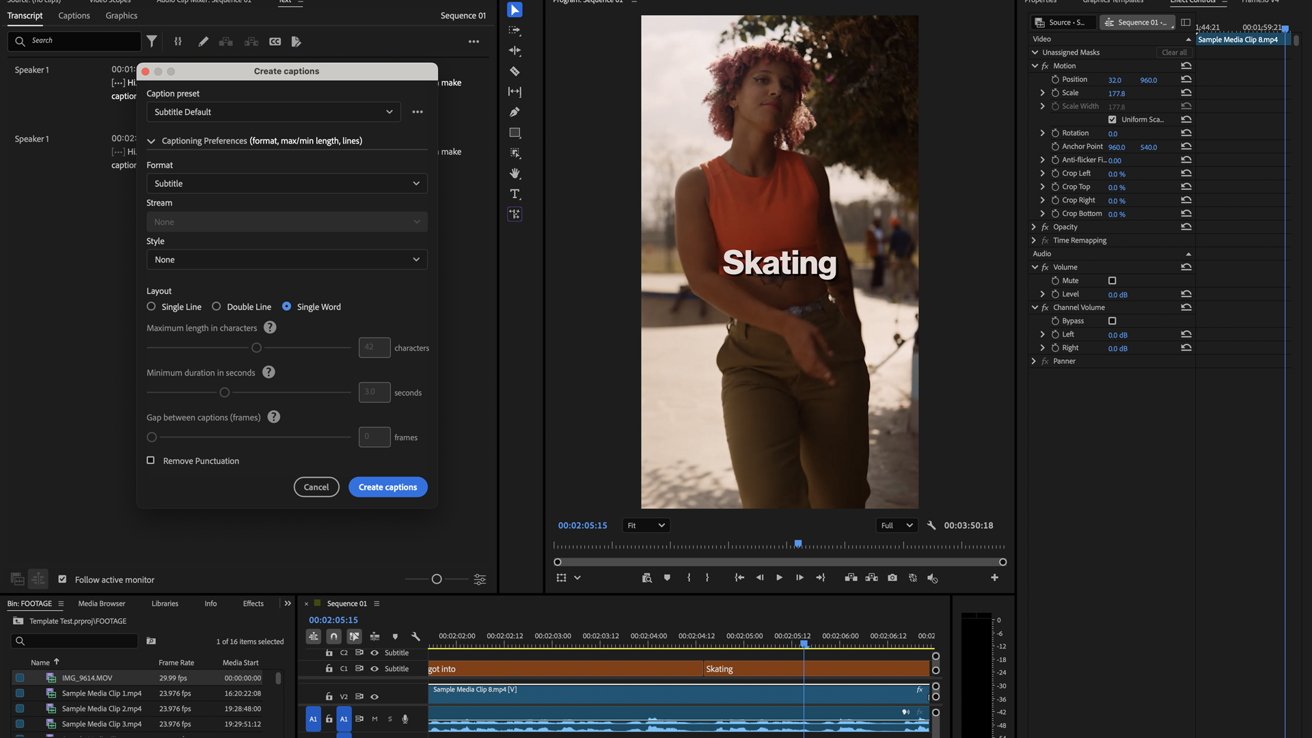
이번 Premiere 업데이트에서는 전체 오디오 음소거 기능을 도입하여 사용자가 클릭 한 번으로 애플리케이션 내의 모든 소리를 끌 수 있게 되었습니다. 마커 검색 기능은 색상이나 이름에 따라 열려 있는 모든 프로젝트에서 마커를 찾을 수 있도록 지원하며, 'Single Word' 기능은 자막 전체 구조를 해치지 않으면서도 개별 단어만 직접 수정할 수 있어 정교한 후반 작업 공정에 적합합니다.
Premiere에 3D Spinback 및 Slide 두 가지 전환 효과가 추가되었으며, 가감속(Easing) 제어를 지원합니다. 타임라인에서 Channel Blur, Gradient, Noise FX 등과 같은 유기적 질감 효과를 직접 추가할 수 있습니다.
After Effects 및 Illustrator
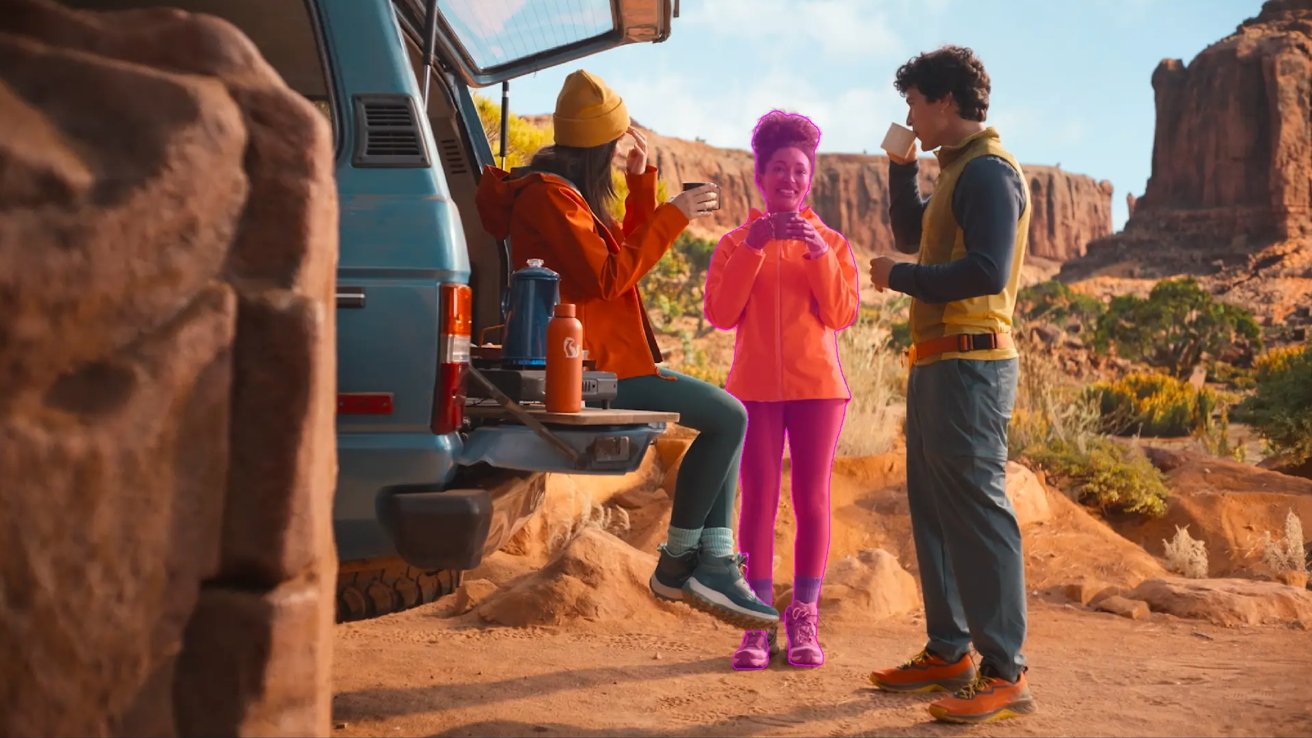
After Effects에는 키잉(Keying) 경험을 개선하기 위한 AI 오브젝트 매트(Object Matte) 기능이 새롭게 추가되었습니다.
이제 디자이너는 SVG 파일을 편집 가능한 모양 레이어로 After Effects에 직접 가져올 수 있습니다. 또한 Illustrator의 새로운 복사 및 붙여넣기 워크플로우를 통해 디자이너가 서로 다른 프로그램 간에 원활하게 협업할 수 있게 되었습니다.
Photoshop
Photoshop은 업데이트 규모는 작지만, 인터넷 연결 없이 처리 가능한 기기 기반 AI 제거 도구가 추가되었습니다. 또한 새로운 반사 제거 도구는 유리 너머로 촬영할 때 발생하는 반사를 자동으로 인식하고 제거해 줍니다.
총평
Adobe는 Creative Cloud의 주요 소프트웨어에 다양한 AI 기술과 워크플로우 개선을 도입했습니다. 특히 Lightroom과 Premiere에서 강화된 AI 도구와 효율적인 편집 기능을 제공하며, Photoshop에서는 온디바이스 AI를 통해 사용자 편의성을 한층 높였습니다.
Lightroom 更新内容
Adobe 为 Lightroom 推送了多项基于 AI 的功能增强,旨在优化图像筛选与后期处理流程。
- 新增辅助筛选工具:支持按“睁眼”和“眼部清晰度”等条件快速过滤照片。
- 照片转视频功能:利用 AI 运动效果将静态照片转换为动态镜头或短视频内容。
- AI 锐化功能:采用 Topaz Labs 的噪声感知锐化模型,强化花瓣、毛发、树叶等细节表现。
- 新增支持:在 Lightroom、Lightroom Classic 和 Adobe Camera Raw 中支持 Sony Alpha 7R VI 的全部 Sony RAW 格式。
Premiere 更新内容
本次更新侧重于音频管理、搜索效率以及更丰富的视觉转场效果。
- 全局音频静音:一键关闭整个应用内的声音。
- 标记搜索:支持按颜色或名称在所有已打开项目中查找标记。
- Single Word 功能:允许设计人员直接修改单个词的字幕,且不打乱整段字幕结构。
- 新转场效果:加入 3D Spinback 和 Slide 转场,并提供缓动控制。
- 有机纹理效果:支持在时间线中直接添加 Channel Blur、Gradient 和 Noise FX 等效果。
After Effects 与 Illustrator 更新
Adobe 强化了矢量图形处理与跨软件协作体验。
- AI 对象蒙版(Object Matte):用于改善抠像体验。
- SVG 支持:支持将 SVG 文件作为可编辑的形状图层导入到 After Effects 中。
- 跨程序协作:Illustrator 新增复制粘贴工作流程,实现与其他 Adobe 程序之间的无缝衔接。
Photoshop 更新内容
虽然更新项较少,但提供了针对特定场景的实用 AI 工具。
- 设备端 AI 移除工具:无需联网即可进行物体移除处理。
- 反光去除工具:能够自动识别并清除隔着玻璃拍摄时的反射。
总结
Adobe 更新了 Creative Cloud 套件,为 Lightroom、Premiere、After Effects 和 Photoshop 集成了更多 AI 能力和实用功能。此次更新涵盖了从图像锐化、视频转场到跨软件协作等多个维度,旨在提升创作者的生产力与工作流效率。
Adobe Creative Cloudのアップデート
Adobeは昨日(6月15日)、Lightroom、Premiere、After Effects、およびPhotoshopを含むCreative Cloud製品群のアップデートを発表しました。今回のアップデートにより、ユーザーの制作ワークフローにさらに多様なAI機能が統合されます。
Lightroom
新バージョンのLightroomでは、補助フィルタリングツールが追加され、ユーザーは「目を開けている状態」や「目の際立ち(promyness)」などの条件に基づいて写真を素早くフィルタリングできるようになります。また、静止画をビデオに変換する機能により、AIによる動きの効果を加えたカットや短い動画コンテンツを作成することが可能になりました。
画像品質の処理に関しては、Topaz Labsのノイズ検知ベースのシャープネスモデルを採用したAI鮮明度強化機能が追加されました。これにより、花びら、髪の毛、葉などの細部をより精巧に表現できます。
さらに、Lightroom、Lightroom Classic、およびAdobe Camera Rawにおいて、Sony Alpha 7R VIのすべてのSony RAW形式をサポートします。
Premiere
今回のPremiereアップデートでは、全オーディオ消音機能が導入され、ワンクリックですべての音をオフにできるようになりました。マーカー検索機能は、色や名前に基づいて開いているすべてのプロジェクト内のマーカーを探すことをサポートし、「Single Word」機能により、字幕全体の構造を損なうことなく個々の単語のみを直接編集できるため、精緻な後処理工程に適しています。
Premiereには以下のエフェクトや機能が追加されました:
- 3D SpinbackおよびSlideの2種類のトランジション効果(イージング制御に対応)
- タイムライン上でのChannel Blur、Gradient、Noise FXなどの有機的な質感エフェクトの直接追加
After EffectsおよびIllustrator
After Effectsには、キーイング体験を向上させるためのAIオブジェクトマット(Object Matte)機能が新しく追加されました。
また、デザイナーはSVGファイルを編集可能なシェイプレイヤーとしてAfter Effectsに直接インポートできるようになります。さらに、Illustratorの新しいコピー&ペーストワークフローにより、異なるアプリケーション間でのシームレスな連携が可能になりました。
Photoshop
Photoshopはアップデート規模こそ小さいものの、インターネット接続なしで処理可能なデバイスベースのAI削除ツールが追加されました。また、新しく導入された反射除去ツールは、ガラス越しに撮影した際に発生する反射を自動的に検知して除去します。
まとめ
AdobeはCreative Cloudの主要ソフトウェアに多様なAI技術とワークフローの改善を導入しました。特にLightroomとPremiereでは強化されたAIツールと効率的な編集機能を提供し、PhotoshopではオンデバイスAIを通じてユーザーの利便性を向上させています。
Adobe Creative Cloud Update
Adobe announced on June 15 that it is upgrading its Creative Cloud suite, which includes Lightroom, Premiere, After Effects, and Photoshop. This update integrates a wider range of AI features into the user's creative workflow.
Lightroom
The new version of Lightroom introduces advanced filtering tools, allowing users to quickly filter photos based on specific conditions such as "eyes open" or "eye prominence." Additionally, a new feature allows for converting static photos into videos, enabling the creation of B-roll or short video content with AI-driven motion effects.
In terms of image quality processing, Lightroom has added an AI sharpening feature that utilizes Topaz Labs' noise detection-based model. This allows for more sophisticated rendering of fine details such as flower petals, hair, and leaves.
Furthermore, Lightroom, Lightroom Classic, and Adobe Camera Raw now support all Sony RAW formats from the Sony Alpha 7R VI.
Premiere
The Premiere update introduces a "Mute All" audio feature, allowing users to silence all sounds within an application with a single click. The Marker Search function supports finding markers by color or name across all open projects, while the "Single Word" feature allows for editing individual words without disrupting the overall structure of subtitles, making it ideal for precise post-production workflows.
Two new transition effects, 3D Spinback and Slide, have been added to Premiere with support for easing control. Users can now directly add organic texture effects such as Channel Blur, Gradient, and Noise FX on the timeline.
After Effects and Illustrator
After Effects has introduced a new AI Object Matte feature to enhance the keying experience.
Designers can now import SVG files directly into After Effects as editable shape layers. Additionally, a new copy-and-paste workflow in Illustrator enables seamless collaboration between different applications.
Photoshop
While the update scale is smaller, Photoshop includes an on-device AI removal tool that functions without an internet connection. Furthermore, a new reflection removal tool automatically detects and removes reflections when shooting through glass.
Summary
Adobe has updated its Creative Cloud suite by integrating advanced AI technologies and workflow improvements across Lightroom, Premiere, After Effects, and Photoshop. Key highlights include enhanced image sharpening and motion effects in Lightroom, more precise editing tools in Premiere, and the introduction of on-device AI features in Photoshop.
Lightroom 更新
Adobe 为 Lightroom 推送了多项基于 AI 的功能增强,旨在优化图像处理与内容创作流程。
- 新增辅助筛选工具:支持按“睁眼”及“眼部清晰度”等条件快速过滤照片。
- 照片转视频:利用 AI 运动效果将静态照片转换为带动态效果的补充镜头或短视频。
- AI 锐化功能:采用 Topaz Labs 的噪声感知锐化模型,强化花瓣、毛发、树叶等细节表现。
- 硬件支持:Lightroom、Lightroom Classic 和 Adobe Camera Raw 已支持 Sony Alpha 7R VI 的全部 Sony RAW 格式。
Premiere 更新
本次更新侧重于音频管理、搜索效率以及转场效果的丰富性。
- 全局音频静音:提供一键关闭整个应用内声音的功能。
- 标记搜索:支持按颜色或名称在所有已打开项目中查找标记。
- Single Word 功能:允许设计人员在不破坏字幕结构的情况下直接修改单个词汇。
- 新转场效果:加入 3D Spinback 和 Slide 转场,并提供缓动控制。
- 有机纹理效果:支持在时间线中直接添加 Channel Blur、Gradient 和 Noise FX 等效果。
After Effects 与 Illustrator 更新
强化了抠像体验以及跨软件的协作流程。
- AI 对象蒙版(Object Matte):旨在改善用户的抠像体验。
- SVG 导入:支持将 SVG 文件作为可编辑的形状图层直接导入到 After Effects 中。
- Illustrator 联动:新增复制粘贴工作流,支持在不同程序之间进行无缝协作。
Photoshop 更新
虽然更新内容较少,但引入了关键的本地化 AI 工具。
- 设备端 AI 移除工具:无需联网即可处理对象移除。
- 反光去除工具:能够自动识别并清除透过玻璃拍摄时的反射。
总结
Adobe 对 Creative Cloud 套件进行了全面升级,重点通过集成更多 AI 能力来优化用户工作流。更新涵盖了 Lightroom 的智能锐化与视频转换、Premiere 的高效编辑功能、After Effects 的增强抠像工具以及 Photoshop 的离线 AI 处理能力。
Adobe Creative Cloudのアップデート
Adobeは昨日(6月15日)、Lightroom、Premiere、After Effects、およびPhotoshopを含むCreative Cloud製品群をアップデートすると発表しました。今回のアップデートにより、ユーザーの制作工程にさらに多様なAI機能が統合されます。
Lightroom
新バージョンのLightroomでは、補助フィルタリングツールが追加され、ユーザーは「目を開けている状態」や「目の鮮明度」などの条件に基づいて写真を素早くフィルタリングできるようになります。また、静止画を動画に変換する機能により、AIによる動きの演出を加えたカットや短い動画コンテンツを作成することが可能になりました。
画像品質処理において、LightroomはTopaz Labsのノイズ検知に基づくシャープニングモデルを採用したAI鮮明度強化機能を搭載しています。これにより、花びら、髪の毛、木の葉などの細部をより精緻に表現できます。
さらに、Lightroom、Lightroom Classic、およびAdobe Camera Rawにおいて、Sony Alpha 7R VIのすべてのSony RAW形式をサポートするようになりました。
- 補助フィルタリングツールの追加:「目を開けている」や「目の鮮明度」などの条件で写真を高速にフィルタリング。
- 写真から動画への変換機能:AIによる動きの効果を用いて、静止画を動的なカットや短編動画へ変換。
- AIシャープニング機能:Topaz Labsのノイズ感知モデルを採用し、細部の描写を強化。
- 新サポート:Lightroom、Lightroom Classic、Adobe Camera RawでSony Alpha 7R VIの全RAWフォーマットに対応。
Premiere
今回のPremiereのアップデートでは、ワンクリックですべての音を消すことができる「すべてミュート」機能が導入されました。マーカー検索機能は、色や名前に基づいて開いているすべてのプロジェクト内のマーカーを探すことをサポートします。また、「Single Word」機能により、字幕全体の構造を損なうことなく個々の単語のみを直接編集できるため、精緻なポストプロダクション工程に適しています。
Premiereには3D SpinbackおよびSlideの2種類のトランジション効果が追加され、イージング(Easing)制御もサポートされます。タイムライン上でChannel Blur、Gradient、Noise FXなどのオーガニックな質感エフェクトを直接追加できるようになりました。
After Effects および Illustrator
After Effectsには、キーイング体験を向上させるためのAIオブジェクトマット(Object Matte)機能が新しく追加されました。
また、デザイナーはSVGファイルを編集可能なシェイプレイヤーとしてAfterEffectsに直接インポートできるようになります。さらに、Illustratorの新しいコピー&ペーストワークフローにより、異なるアプリケーション間でのスムーズな連携が可能になりました。
Photoshop
Photoshopのアップデート規模は比較的小さいものの、インターネット接続なしで処理可能なデバイスベースのAI削除ツールが追加されました。また、新しく導入された反射除去ツールは、ガラス越しに撮影した際に発生する反射を自動的に認識して取り除きます。
まとめ
AdobeはCreative Cloudの主要ソフトウェアに多様なAI技術とワークフローの改善を導入しました。特にLightroomとPremiereでは高度なAIによる編集支援や効率的なツールを提供し、PhotoshopではオンデバイスAIを通じてユーザーの利便性を向上させています。
Adobe Creative Cloud Update
Adobe announced on June 15 that it is upgrading its Creative Cloud suite, including Lightroom, Premiere, After Effects, and Photoshop. This update integrates a wider range of AI features into the user production workflow.
Lightroom
The new version of Lightroom includes advanced filtering tools, allowing users to quickly filter photos based on specific conditions such as "eyes open" or "eye clarity." Additionally, a new photo-to-video feature allows users to transform static images into b-roll footage or short video content enhanced with AI motion effects.
Regarding image quality processing, Lightroom has introduced an AI sharpening feature that utilizes Topaz Labs' noise-aware sharpening model. This enables more precise rendering of fine details such as flower petals, hair, and leaves.
Furthermore, Lightroom, Lightroom Classic, and Adobe Camera Raw now support all Sony RAW formats for the Sony Alpha 7R VI.
- New filtering tools: Support for "eyes open" and "eye clarity" filters.
- Photo-to-video: AI motion effects to convert static photos into dynamic content.
- AI Sharpening: Topaz Labs noise-aware model for enhanced detail rendering.
- Expanded support: Full Sony RAW format support for Sony Alpha 7R VI across Lightroom, Lightroom Classic, and Adobe Camera Raw.
Premiere
The Premiere update introduces a "Mute All" feature, allowing users to silence all audio within the application with a single click. The Marker Search function enables users to find markers based on color or name across all open projects. Additionally, the "Single Word" feature allows for the precise editing of individual words without compromising the overall structure of the subtitles, making it ideal for sophisticated post-production workflows.
Two new transition effects, 3D Spinback and Slide, have been added to Premiere, both supporting easing control. Organic texture effects such as Channel Blur, Gradient, and Noise FX can now be applied directly on the timeline.
After Effects and Illustrator
After Effects has introduced a new AI Object Matte feature designed to improve the keying experience.
Designers can now import SVG files directly into After Effects as editable shape layers. Furthermore, a new copy-and-paste workflow in Illustrator allows for seamless collaboration between different applications.
Photoshop
While the update scale is smaller, Photoshop has added an on-device AI removal tool that can function without an internet connection. Additionally, a new Reflection Removal tool automatically detects and removes reflections when shooting through glass.
Overall Review
Adobe has integrated various AI technologies and workflow improvements across its core Creative Cloud software. Specifically, Lightroom and Premiere offer enhanced AI tools and efficient editing features, while Photoshop improves user convenience by introducing on-device AI capabilities.
Summary
Adobe's latest Creative Cloud update integrates advanced AI tools across the suite to streamline professional workflows. Key highlights include improved image sharpening in Lightroom, more intuitive editing controls in Premiere, and the introduction of offline, on-device AI features in Photoshop.
Lightroom 更新
Adobe 为 Lightroom 推送了多项功能,重点在于增强 AI 处理能力以及对专业摄影器材的支持。
- 新增辅助筛选工具:支持按“睁眼”与“眼部清晰度”等条件快速过滤照片。
- 推出照片转视频功能:利用 AI 运动效果将静态图片转换为短视频内容。
- 引入 AI 锐化功能:采用 Topaz Labs 的噪声感知锐化模型,优化花瓣、毛发、树叶等细节表现。
- 兼容性增强:在 Lightroom、Lightroom Classic 和 Adobe Camera Raw 中支持 Sony Alpha 7R VI 的全部 Sony RAW 格式。
Premiere 更新
本次更新侧重于提升剪辑效率、音频管理以及后期制作的精细度。
- 全局音频静音:提供一键关闭整个应用内声音的功能。
- 标记搜索优化:支持按颜色或名称在所有已打开项目中查找标记。
- Single Word 功能:允许设计人员在不破坏字幕结构的情况下直接修改单个词汇。
- 新增转场效果:加入 3D Spinback 和 Slide 转场,并提供缓动控制。
- 有机纹理支持:可在时间线中直接添加 Channel Blur、Gradient 和 Noise FX 等效果。
After Effects 与 Illustrator 更新
Adobe 优化了矢量图形处理流程与抠像体验。
- After Effects 新增 AI 对象蒙版(Object Matte)功能,旨在改善抠像体验。
- 支持将 SVG 文件作为可编辑的形状图层导入到 After Effects 中。
- Illustrator 提供新的复制粘贴工作流,支持在不同程序之间无缝协作。
Photoshop 更新
Photoshop 此次更新重点在于本地化 AI 工具的增强。
- 设备端 AI 移除工具:无需联网即可进行内容移除处理。
- 反光去除工具:能够自动识别并清除拍摄过程中产生的玻璃反射。
总结
Adobe 对 Creative Cloud 套件进行了全面升级,重点强化了 Lightroom 和 Premiere 的 AI 处理能力与工作流优化。同时,After Effects 与 Photoshop 在抠像、矢量协作及离线 AI 工具方面也获得了显著功能提升。
Adobe Creative Cloudのアップデート
Adobeは6月15日、Lightroom、Premiere、After Effects、およびPhotoshopを含むCreative Cloud製品群のアップデートを発表しました。今回のアップデートにより、ユーザーの制作ワークフローにさらに多様なAI機能が統合されます。
Lightroom
新バージョンのLightroomでは、補助フィルタリングツールが追加され、ユーザーは「目を開けている状態」や「目の際立ち(promyness)」などの条件に基づいて写真を素早くフィルタリングできるようになります。また、静止用語をビデオに変換する機能により、AIによる動きの効果を加えたカットや短い動画コンテンツを作成することが可能になりました。
画像品質の処理に関しては、Topaz Labsのノイズ検知ベースのシャープネスモデルを採用したAI鮮明度強化機能が追加されました。これにより、花びら、髪の毛、葉などの細部をより精巧に表現できます。さらに、Lightroom、Lightroom Classic、およびAdobe Camera Rawにおいて、Sony Alpha 7R VIのすべてのSony RAW形式をサポートします。
Premiere
今回のPremiereアップデートでは、オーディオ管理、検索効率、および視覚的な演出が強化されています。主な新機能は以下の通りです。
- 全オーディオ消音:ワンクリックでアプリケーション内のすべての音をオフにできます。
- マーカー検索:色や名前に基づいて、開いているすべてのプロジェクト内のマーカーを探すことができます。
- Single Word:字幕全体の構造を損なうことなく個々の単語のみを直接編集できるため、精緻な後処理工程に適しています。
- 新トランジション:3D SpinbackおよびSlideの2種類のトランジション効果が追加され、イージング制御にも対応しています。
- 有機的質感エフェクト:タイムライン上でChannel Blur、Gradient、Noise FXなどのエフェクトを直接追加できます。
After EffectsおよびIllustrator
After Effectsには、キーイング体験を向上させるためのAIオブジェクトマット(Object Matte)機能が新しく追加されました。また、デザイナーはSVGファイルを編集可能なシェイプレイヤーとしてAfterEffectsに直接インポートできるようになります。
さらに、Illustratorの新しいコピー&ペーストワークフローにより、異なるアプリケーション間でのシームレスな連携が可能になりました。
Photoshop
Photoshopでは、インターネット接続なしで処理可能なデバイスベースのAI削除ツールが追加されました。また、新しく導入された反射除去ツールは、ガラス越しに撮影した際に発生する反射を自動的に検知して取り除きます。
まとめ
AdobeはCreative Cloudの主要ソフトウェアに高度なAI技術とワークフローの改善を統合しました。LightroomやPremiereでの編集効率の向上、After Effects/Illustrator間の連携強化、そしてPhotoshopにおけるオンデバイスAIの導入など、クリエイターの生産性を多角的に高めるアップデートとなっています。
Adobe Creative Cloud Update
On June 15, Adobe announced updates to its Creative Cloud suite, including Lightroom, Premiere, After Effects, and Photoshop. This update integrates a wider range of AI features into the user's creative workflow.
Lightroom
The new version of Lightroom introduces advanced filtering tools that allow users to quickly filter photos based on specific conditions such as "eyes open" or "eye prominence." Additionally, a new feature enables the conversion of static photos into videos, allowing for the creation of B-roll or short video content enhanced with AI-driven motion effects.
Regarding image quality processing, Lightroom has added an AI sharpening feature that utilizes Topaz Labs' noise detection-based model. This allows for more sophisticated rendering of fine details such as flower petals, hair, and leaves. Furthermore, Lightroom, Lightroom Classic, and Adobe Camera Raw now support all Sony RAW formats from the Sony Alpha 7R VI.
Premiere
The Premiere update introduces a "Mute All" audio feature, allowing users to silence all sounds within the application with a single click. The Marker Search function supports finding markers by color or name across all open projects, while the "Single Word" feature allows for editing individual words in subtitles without disrupting the overall structure, making it ideal for precise post-production workflows.
The following effects and features have been added to Premiere:
- Two new transition effects: 3D Spinback and Slide (supporting easing control).
- Direct addition of organic texture effects such as Channel Blur, Gradient, and Noise FX on the timeline.
After Effects and Illustrator
After Effects now includes an AI Object Matte feature to improve the keying experience. Additionally, designers can now import SVG files directly into After Effects as editable shape layers. Furthermore, a new copy-and-paste workflow in Illustrator enables seamless collaboration across different Adobe applications.
Photoshop
While the update for Photoshop is smaller in scope, it introduces an on-device AI removal tool that functions without an internet connection. Additionally, a new reflection removal tool automatically detects and removes reflections when shooting through glass.
Summary
Adobe has updated its Creative Cloud suite by integrating advanced AI tools and workflow improvements across Lightroom, Premiere, After Effects, and Photoshop. These updates focus on enhancing image sharpening, video transitions, cross-app collaboration, and offline AI capabilities to improve creator productivity.