신규 기능 소개
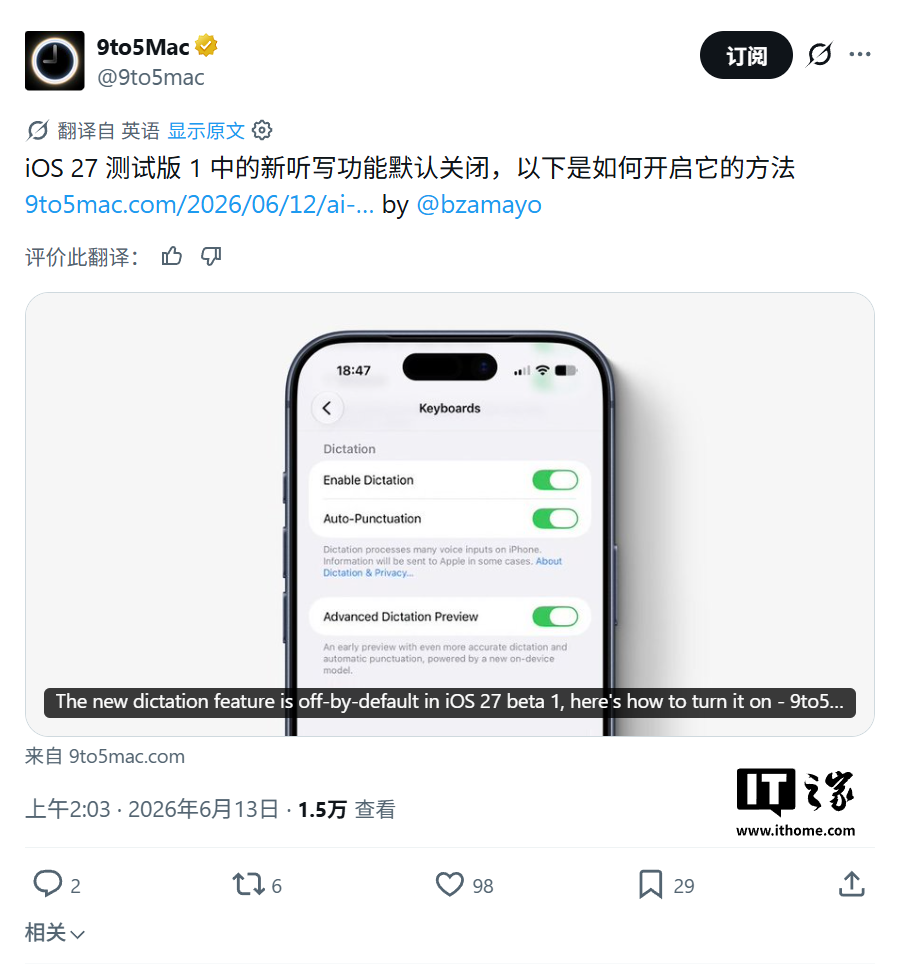
IT홈의 보도에 따르면, 기술 매체 9to5Mac은 iOS 27 Beta 1 업데이트에서 사용자가 수동으로 활성화할 수 있는 '고급 받아쓰기 미리보기' 기능을 발표했습니다. 이 기능은 오프라인 환경에서도 원활하게 작동하는 것을 지원합니다.
Apple은 AI 받아쓰기 기술을 업그레이드하여 정확도를 대폭 향상시켰다고 밝혔습니다. 단순히 음성 내용을 더 정교하게 텍스트로 변환할 뿐만 아니라, 대문자와 문장 부호를 실시간으로 처리하는 기능이 포함되었습니다.
설정 및 작동 방식
해당 기능은 기본적으로 비활성화 상태이며, 사용자가 설정 앱에서 직접 활성화해야 합니다. 설정 경로: '일반' → '키보드'로 이동한 후, 하단의 '받아쓰기' 섹션에서 '고급 받아쓰기 미리보기' 스위치를 켜면 됩니다.
기능을 활성화하면 시스템 전반에 걸쳐 적용되며, 시스템 키보드를 사용하는 모든 음성-텍스트 변환 시나리오를 지원합니다. 또한 Siri AI의 사용 경험도 한층 개선됩니다. 특히 이 기능은 로컬 모델 연산에 완전히 의존하기 때문에, 네트워크 연결이 없는 환경에서도 일관된 텍스트 변환 품질을 제공하는 것이 특징입니다.
지원 기기
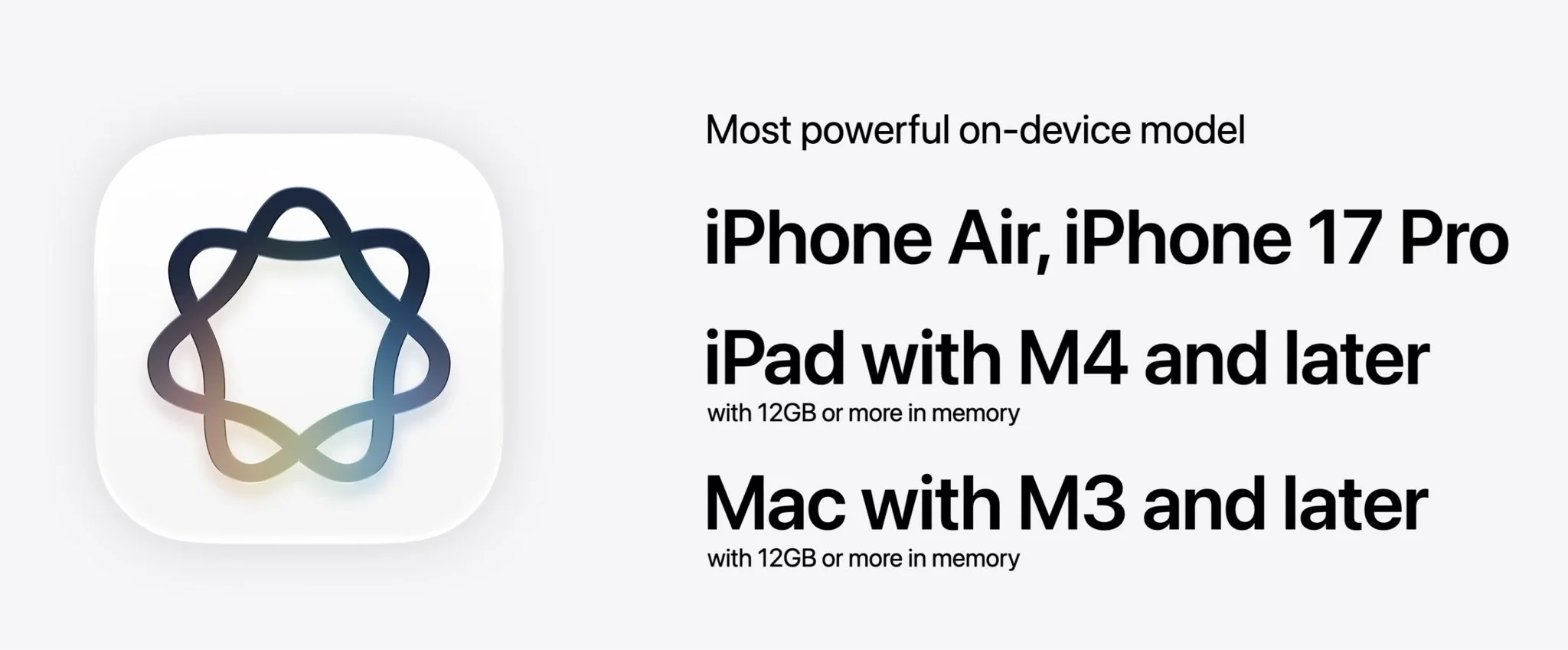
해당 기능은 아래의 사양을 충족하는 기기에서만 지원됩니다.
- iPhone 17 Pro
- iPhone Air
- Vision Pro 2세대 (M5 칩 탑재)
- M4 칩 이상이 탑재된 iPad (12GB 메모리 필요)
- M3 칩 이상이 탑재된 Mac (12GB 메모리 필요)
총평
iOS 27 Beta 1에 도입되는 '고급 받아쓰기 미리보기'는 로컬 모델 기반의 기술을 통해 오프라인에서도 높은 정확도의 음성 인식과 문장 부호 처리를 제공합니다. 특히 고사양 기기를 대상으로 시스템 전반의 편의성을 강화한 것이 특징입니다.
新功能概述
在 iOS 27 Beta 1 更新中,Apple 推出了“高级听写预览”功能。该功能通过升级 AI 听写技术,显著提升了语音转文字的准确率,并能够实时处理大写字母与标点符号。
核心特性
该功能支持离线运行,完全依赖本地模型运算,确保在无网络连接的环境下也能提供一致的转写质量。启用后,该功能将覆盖系统全局所有使用键盘的语音转文字场景,并提升 Siri 的交互体验。
操作路径
该功能默认处于禁用状态,用户需手动开启:
- 进入“设置”应用
- 选择“通用” → “键盘”
- 在“听写”区域找到并开启“高级听写预览”开关
支持设备
该功能仅在以下特定硬件上可用:
- iPhone 17 Pro
- iPhone Air
- 第二代 Vision Pro(搭载 M5 芯片)
- 搭载 M4 芯片及以上的 iPad(需 12GB 内存)
- 搭载 M3 芯片及以上的 Mac(需 12GB 内存)
总结
iOS 27 Beta 1 推出的“高级听写预览”利用本地 AI 模型提供高准确率的离线语音转文字功能。该功能支持自动处理标点与大写,并仅在具备特定高性能芯片和内存要求的设备上提供支持。
新機能の紹介
ITホームの報道によると、技術メディアの9to5MacはiOS 27 Beta 1において、ユーザーが手動で有効にできる「高度なディクテーションプレビュー」機能を発表しました。この機能は、オフライン環境でもスムーズに動作することをサポートしています。
AppleはAIディクテーション技術をアップグレードし、精度を大幅に向上させたと述べています。単に音声内容をより精緻にテキストへと変換するだけでなく、大文字や句読点をリアルタイムで処理する機能も含まれています。
設定および動作の仕組み
この機能はデフォルトでは無効になっており、ユーザーが設定アプリから直接有効にする必要があります。設定パスは「一般」→「キーボード」に進み、下部の「ディクテーション」セクションにある「高度なディクテーションプレビュー」スイッチをオンにします。
機能を有効にするとシステム全体に適用され、システムキーボードを使用するすべての音声からテキストへの変換シナリオをサポートします。また、Siri AIのユーザー体験も向上します。特にこの機能はローカルモデルの演算に完全に依存しているため、ネットワーク接続のない環境でも一貫したテキスト変換品質を提供するのが特徴です。
対応デバイス
この機能は、以下の仕様を満たすデバイスでのみサポートされます。
- iPhone 17 Pro
- iPhone Air
- Vision Pro 第2世代(M5チップ搭載)
- M4チップ以降を搭載したiPad(12GBメモリが必要)
- M3チップ以降を搭載したMac(12GBメモリが必要)
まとめ
iOS 27 Beta 1で導入される「高度なディクテーションプレビュー」は、ローカルモデルを活用することでオフライン環境でも高精度な音声認識と句読点の処理を実現します。特に高性能デバイスにおいてシステム全体の利便性を向上させており、ネットワーク環境に左右されない安定した入力体験を提供します。
New Feature Introduction
According to a report by IT Home, tech outlet 9to5Mac revealed that the iOS 27 Beta 1 update includes a new "Advanced Dictation Preview" feature. This functionality is designed to operate seamlessly even in offline environments.
Apple stated that it has upgraded its AI dictation technology to significantly enhance accuracy. Beyond just converting voice content into text more precisely, the system now handles capitalization and punctuation in real-time.
Settings and Operation
The feature is disabled by default and must be manually enabled within the Settings app. To enable it, navigate to 'General' → 'Keyboard' and toggle the 'Advanced Dictation Preview' switch located in the 'Dictation' section.
Once activated, the feature applies system-wide across all voice-to-text scenarios using the system keyboard. It also enhances the user experience for Siri AI. Notably, because this feature relies entirely on local model processing, it provides consistent text conversion quality even in environments without a network connection.
Supported Devices
This feature is only supported on devices that meet the following specifications:
- iPhone 17 Pro
- iPhone Air
- Vision Pro 2nd Generation (equipped with M5 chip)
- iPad equipped with M4 chip or higher (requires 12GB memory)
- Mac equipped with M3 chip or higher (requires 12GB memory)
Summary
The "Advanced Dictation Preview" introduced in iOS 27 Beta 1 utilizes local model technology to provide high-accuracy voice recognition and punctuation handling even when offline. This feature targets high-end devices to improve system-wide convenience through enhanced AI processing.
功能介绍
Apple 在 iOS 27 Beta 1 中推出了“高级听写预览”功能。该功能通过升级 AI 技术显著提升语音转文字的准确率,支持在离线状态下自动处理大写字母与标点符号,并能提升 Siri 的整体使用体验。
操作路径
该功能默认处于禁用状态,用户需手动进入系统设置进行开启:
- 前往“设置”应用
- 选择“通用” > “键盘”
- 在“听写”区域中开启“高级听写预览”开关
适配机型
由于该功能依赖本地模型运算,仅支持具备特定硬件规格的设备:
- iPhone 17 Pro
- iPhone Air
- 第二代 Vision Pro(搭载 M5 芯片)
- 搭载 M4 芯片及以上、且内存为 12GB 的 iPad
- 搭载 M3 芯片及以上、且内存为 12GB 的 Mac
总结
Apple 在 iOS 27 Beta 1 中引入了基于本地模型的“高级听写预览”功能,旨在提供更精准的离线语音转文字体验。该功能涵盖系统全局场景,但仅支持具备高性能芯片与充足内存的高端设备。
新機能の紹介
ITホームの報道によると、テックメディアの9to5MacはiOS 27 Beta 1において、ユーザーが手動で有効にできる「高度なディクテーションプレビュー」機能を発表しました。この機能は、オフライン環境でもスムーズな動作をサポートしています。
AppleはAIディクテーション技術をアップグレードし、精度を大幅に向上させたと述べています。単に音声内容をより精緻にテキストへ変換するだけでなく、大文字や句読点をリアルタイムで処理する機能も含まれています。
設定と動作の仕組み
この機能はデフォルトでは無効になっており、ユーザーが設定アプリから手動で有効にする必要があります。設定パスは「設定」→「一般」→「キーボード」に進み、下部の「ディクテーション」セクションにある「高度なディクテーションプレビュー」のスイッチをオンにします。
機能を有効にするとシステム全体に適用され、システムのキーボードを使用するすべての音声からテキストへの変換シナリオをサポートします。また、Siri AIのユーザー体験も向上します。特にこの機能はローカルモデルによる演算に完全に依存しているため、ネットワーク接続のない環境でも一貫したテキスト変換品質を提供するのが特徴です。
対応デバイス
この機能は、以下の仕様を満たすデバイスでのみサポートされます。
- iPhone 17 Pro
- iPhone Air
- Vision Pro(第2世代、M5チップ搭載)
- M4チップ以降を搭載したiPad(12GBメモリが必要)
- M3チップ以降を搭載したMac(12GBメモリが必要)
まとめ
iOS 27 Beta 1で導入される「高度なディクテーションプレビュー」は、ローカルモデルを活用することでオフライン環境でも高精度な音声認識と句読点の処理を実現します。この機能は特定の高性能チップを搭載したデバイスに限定して提供され、システム全体での利便性を向上させます。
New Feature Introduction
According to reports from IT Home and 9to5Mac, Apple has introduced a new "Advanced Dictation Preview" feature in the iOS 27 Beta 1 update. This feature is designed to operate smoothly even in offline environments.
Apple stated that it has upgraded its AI dictation technology to significantly improve accuracy. Beyond just providing more sophisticated text conversion, the system now includes functionality to handle capitalization and punctuation in real-time.
Settings and Operation
The feature is disabled by default and must be manually enabled by the user. The navigation path is: Settings → General → Keyboard, where users can toggle the "Advanced Dictation Preview" switch within the Dictation section.
Once activated, the feature applies system-wide to all speech-to-text scenarios using the system keyboard. It also enhances the overall experience of interacting with Siri. Because this feature relies entirely on local model processing, it ensures consistent transcription quality even in environments without a network connection.
Supported Devices
This feature is only supported on devices that meet the following specifications:
- iPhone 17 Pro
- iPhone Air
- Vision Pro 2 (equipped with M5 chip)
- iPad equipped with M4 chip or higher (requires 12GB memory)
- Mac equipped with M3 chip or higher (requires 12GB memory)
Summary
The "Advanced Dictation Preview" in iOS 27 Beta 1 utilizes local AI models to provide high-accuracy, offline speech-to-text capabilities including automatic punctuation and capitalization. This feature is specifically designed for high-performance devices to enhance system-wide convenience.
新功能:高级听写预览
在 iOS 27 Beta 1 更新中,Apple 推出了“高级听写预览”功能。该功能通过升级的 AI 技术显著提升语音转文字的准确率,并能够自动处理大写字母与标点符号。
操作方式与系统范围
该功能默认处于禁用状态,用户需在“设置”中进入“通用”→“键盘”,并在“听写”区域手动开启。启用后,新功能将覆盖所有使用系统键盘的语音转文字场景,并提升 Siri 的交互体验。由于采用本地模型运算,用户在无网络连接的环境下仍可获得一致的转写质量。
适配机型要求
该功能仅支持具备特定硬件规格的设备:
- iPhone 17 Pro
- iPhone Air
- 第二代 Vision Pro(M5 芯片)
- 搭载 M4 芯片及以上的 iPad(需 12GB 内存)
- 搭载 M3 芯片及以上的 Mac(需 12GB 内存)
总结
iOS 27 Beta 1 推出了支持离线运行的“高级听写预览”功能,利用 AI 技术提升语音转文字的准确性与标点处理能力。该功能要求较高的硬件配置支撑,旨在提供更精准、全场景的系统级输入体验。
新機能の紹介
ITホームの報道およびテックメディア9to5Macの報じた内容によると、iOS 27 Beta 1において、ユーザーが手動で有効にできる「高度なディクテーションプレビュー」機能が導入されます。この機能はAIディクテーション技術のアップグレードにより精度を大幅に向上させており、オフライン環境でもスムーズな動作をサポートしています。
単に音声内容をより精緻にテキストへ変換するだけでなく、大文字や句読点をリアルタイムで処理する機能も含まれています。この機能はローカルモデルの演算に完全に依存しているため、ネットワーク接続のない環境でも一貫したテキスト変換品質を提供します。
設定と動作の仕組み
この機能はデフォルトでは無効になっており、ユーザーが設定アプリから手動で有効にする必要があります。設定のパスは以下の通りです:
- 「設定」アプリを開く
- 「一般」→「キーボード」へ進む
- 「ディクテーション」セクションにある「高度なディクテーションプレビュー」をオンにする
機能を有効にすると、システム全体の音声からテキストへの変換シナリオがサポートされ、Siri AIのユーザー体験も向上します。
対応デバイス
この機能は、以下の仕様を満たす特定のハードウェアでのみサポートされます:
- iPhone 17 Pro
- iPhone Air
- Vision Pro 第2世代(M5チップ搭載)
- M4チップ以降を搭載したiPad(12GBメモリが必要)
- M3チップ以降を搭載したMac(12GBメモリが必要)
まとめ
iOS 27 Beta 1で導入される「高度なディクテーションプレビュー」は、ローカルモデルを活用することでオフライン環境でも高精度な音声認識と句読点の処理を実現します。この機能は特定の高性能チップを搭載したデバイスに限定して提供され、システム全体の利便性を向上させます。
New Feature Introduction
According to reports from IT Home and tech outlet 9to5Mac, the iOS 27 Beta 1 update introduces a new feature called "Advanced Dictation Preview." This functionality is designed to operate seamlessly even in offline environments.
Apple has upgraded its AI dictation technology to significantly improve accuracy. In addition to providing more precise voice-to-text conversion, the system now handles capitalization and punctuation in real-time.
Settings and Operation
The feature is disabled by default and must be manually enabled within the Settings app. To enable it, navigate to 'General' → 'Keyboard' and toggle the 'Advanced Dictation Preview' switch located in the 'Dictation' section.
Once activated, the feature applies system-wide across all voice-to-text scenarios using the system keyboard. It also enhances the user experience for Siri AI. Notably, because this feature relies entirely on local model processing, it provides consistent text conversion quality even in environments without a network connection.
Supported Devices
This feature is only supported on devices that meet the following specifications:
- iPhone 17 Pro
- iPhone Air
- Vision Pro 2nd Generation (equipped with M5 chip)
- iPad equipped with M4 chip or higher (requires 12GB memory)
- Mac equipped with M3 chip or higher (requires 12GB memory)
Summary
The "Advanced Dictation Preview" in iOS 27 Beta 1 utilizes local AI models to provide high-accuracy, offline voice-to-text conversion with automatic punctuation and capitalization. This feature is specifically designed for high-end devices to improve system-wide convenience and enhance the Siri experience.