개요
IT홈(IT之家)에 따르면, 기술 매체 MacRumors가 어제(6월 12일) 게시물을 통해 iOS 27 버전 Safari 브라우저의 다양한 개선 사항을 정리했습니다. 주요 업데이트 내용으로는 탭 자동 정리, 맞춤형 확장 프로그램, Notify Me 기능 등이 포함됩니다.
탭 관리 및 Apple Intelligence
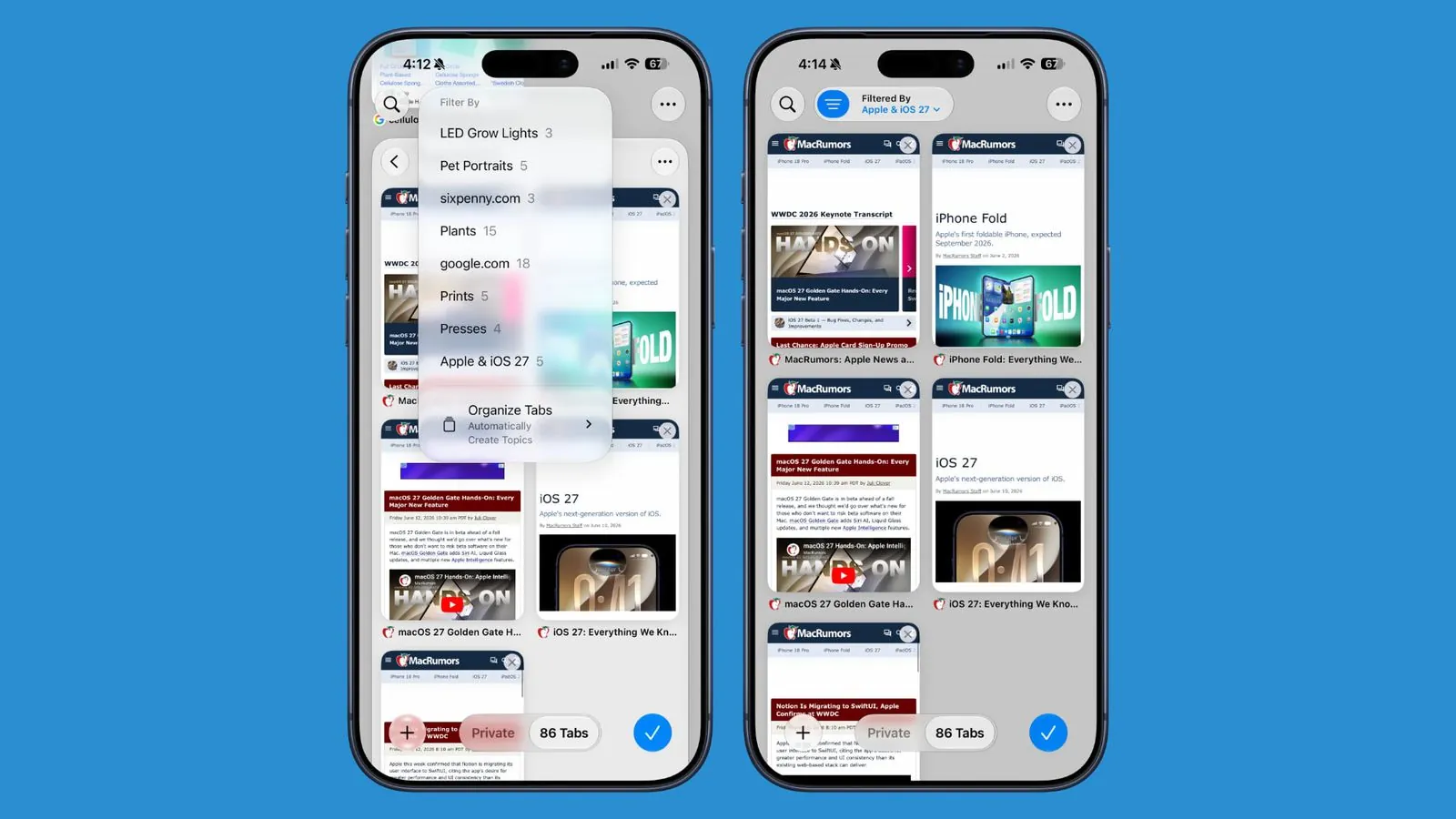
iOS 27 버전의 Safari 브라우저는 Apple Intelligence 기능을 활용하여 현재 열려 있는 탭을 주제별로 자동 분류합니다. 예를 들어, 사용자가 소파를 검색하면서 동시에 주말 여행 계획을 세우고 있을 때, 브라우저가 이 두 가지 성격의 웹사이트를 자동으로 그룹화합니다.
사용자는 탭 뷰 우측 상단의 가로선 아이콘을 클릭한 후 '자동 주제 생성'을 활성화하여 이 기능을 사용할 수 있습니다. 또한 새롭게 추가된 '브라우징 재개' 영역에서는 최근 닫은 주제별 탭과 다른 기기에서 열려 있는 탭을 확인할 수 있습니다.
맞춤형 확장 프로그램
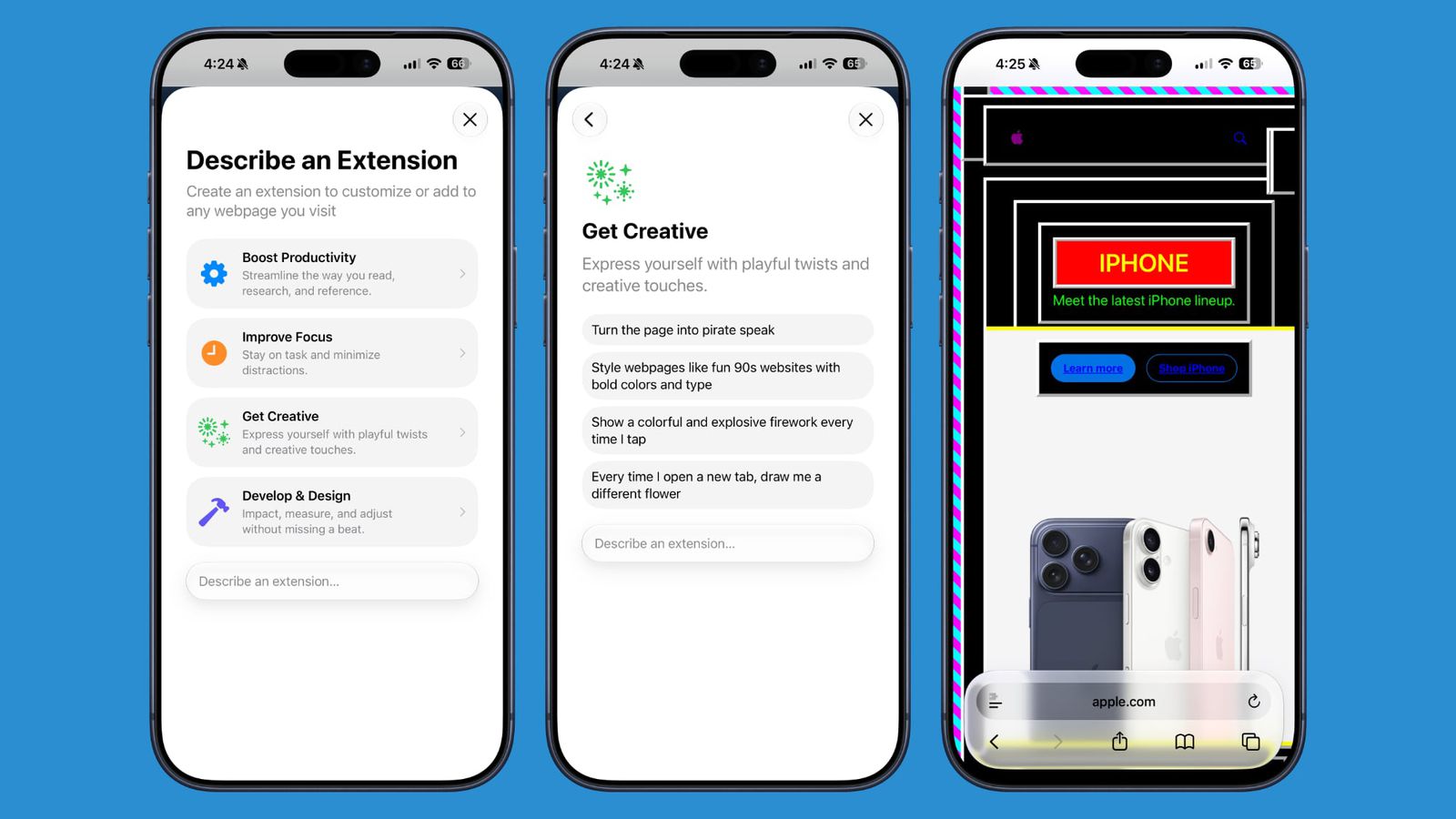
iOS 27 버전 Safari 브라우저에는 '확장 프로그램 생성' 옵션이 도입되었습니다. 사용자가 자연어로 요구 사항을 설명하면 AI가 이를 바탕으로 전용 확장 프로그램을 생성합니다.
Apple은 효율성 향상, 집중력 강화, 창의성 자극, 개발 및 디자인 등 다양한 분야에 대한 추천 사례를 제공하고 있습니다:
- 현재 페이지의 인용 문구를 생성하여 클립보드에 복사
- 페이지에 3분 집중 타이머 설정
- 페이지를 해적 스타일로 전환
- 최소 글꼴 크기를 14포인트로 설정
- 대담한 색상과 글꼴을 사용하여 90년대 스타일의 웹사이트 제작
- 새 탭을 열 때마다 매번 다른 꽃 그리기
- 웹 요소 클릭 시 하이라이트 및 크기 표시
- 콘텐츠 편집을 위한 디자인 모드 진입
편의 기능 및 보안
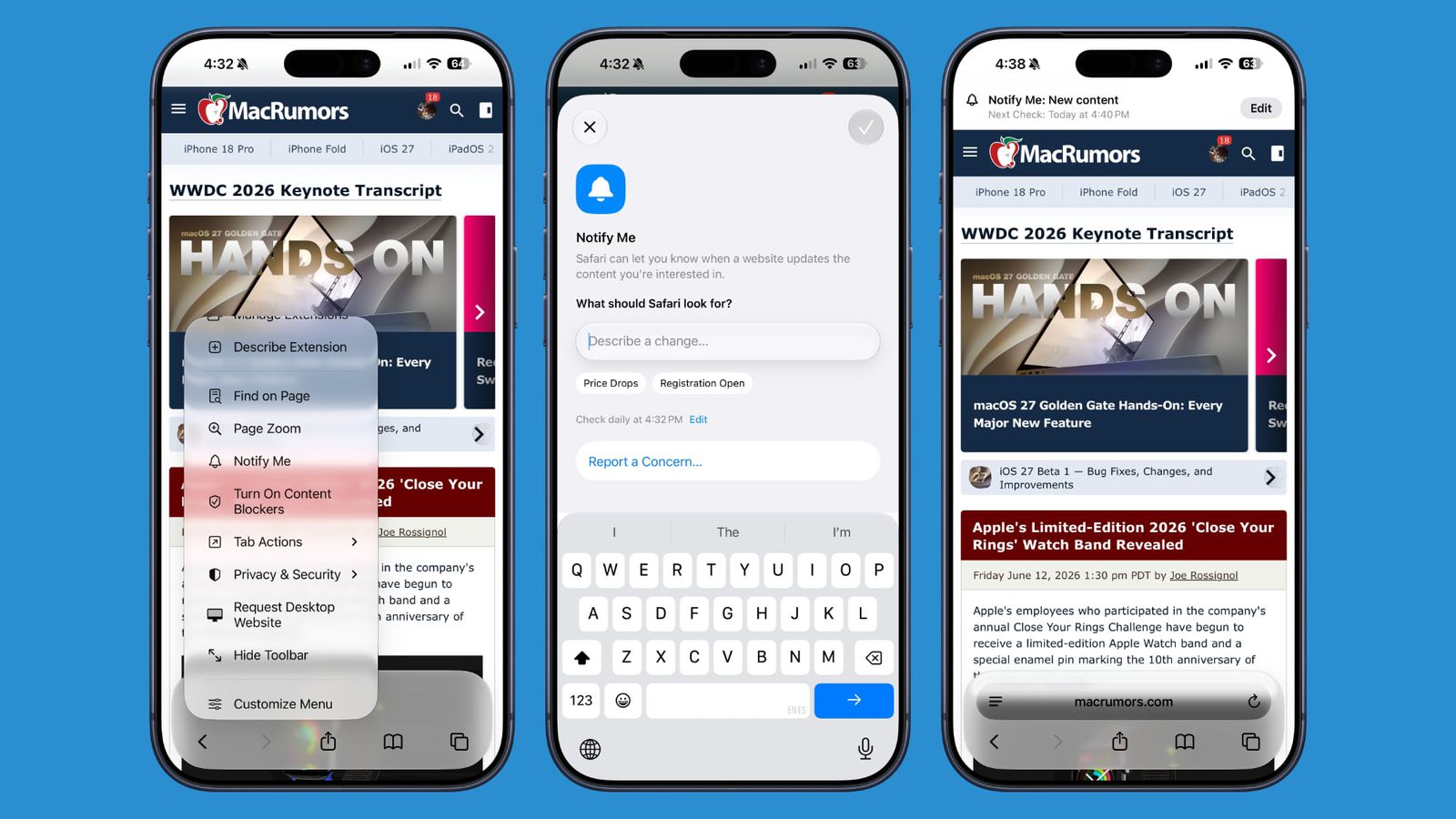
Apple은 Safari 브라우저에 Notify Me 웹 모니터링 기능을 추가했습니다. 이 기능은 페이지 변화를 지속적으로 확인하고 내용이 업데이트될 때 사용자에게 즉시 알림을 보내며, 재입고 확인이나 가격 변동 추적, 또는 페이지 상태 변화를 감지할 때 유용합니다.
사용자는 Notify Me를 통해 반복적인 페이지 새로고침 작업 대신 브라우저가 자동으로 처리하게 할 수 있습니다. 일반 사용자들에게는 수동으로 페이지를 확인하는 시간 비용을 줄여주며, 인기 상품의 재입고나 예약 대기 시 편리함을 제공합니다.
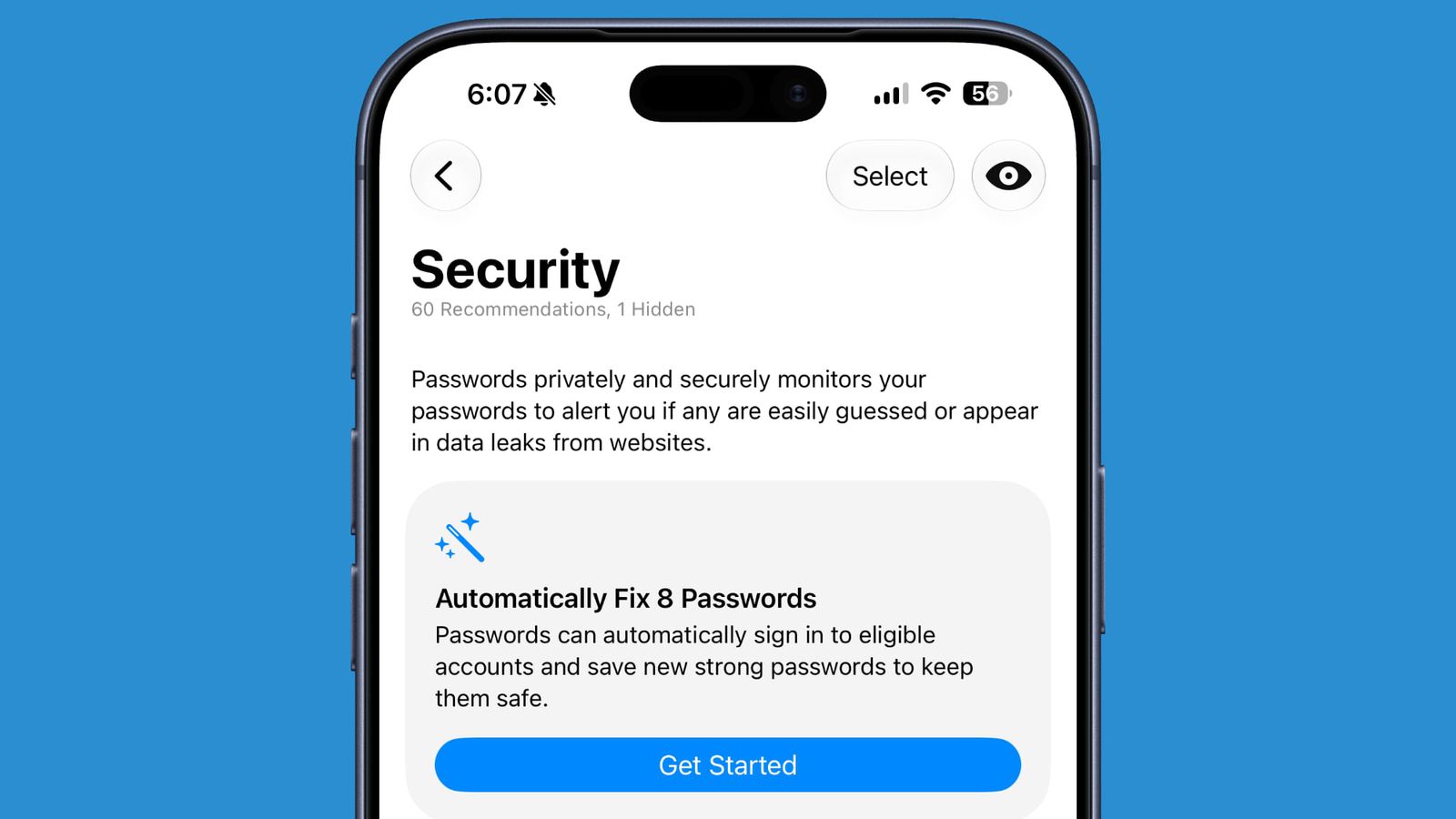
Passwords 앱은 Apple Intelligence를 활용해 관련 웹사이트에 자동 로그인하며, 보안이 취약하거나 유출된 비밀번호를 감지하여 교체함으로써 계정 보안을 강화합니다.
성능 최적화 및 자녀 보호
Apple은 Safari 브라우저의 에너지 효율을 최적화하고, 웹 애플리케이션과 랜딩 페이지의 로딩 속도를 높였으며, JavaScript 처리 효율을 개선하여 애니메이션과 그래픽 렌더링이 더욱 부드럽게 작동하도록 개선했습니다.
iOS 27에서는 자녀 보호 기능도 강화되었습니다. 여기에는 어린이가 새로운 사이트에 접속하기 전에 부모의 승인을 받아야 하는 '방문 전 확인' 기능이 포함됩니다.
총평
iOS 27 Safari는 Apple Intelligence를 깊이 통합하여 사용자 경험을 혁신적으로 개선했습니다. 특히 AI 기반의 맞춤형 확장 프로그램과 자동화된 웹 모니터링 기능을 통해 사용자의 편의성을 극대화했으며, 성능 최적화와 강화된 보안 및 자녀 보호 기능으로 완성도를 높였습니다.
Safari 浏览器功能升级
iOS 27 版 Safari 浏览器深度整合 Apple Intelligence 功能,支持根据主题自动分类当前打开的标签页(例如将购物与行程规划分开)。用户可以通过“自动创建主题”选项启用此功能。此外,新增的“恢复浏览”区域可显示最近关闭的主题标签以及其他设备上打开的标签。
AI 驱动的扩展程序
Safari 引入“创建扩展”选项,支持用户通过自然语言描述需求,由 AI 生成专属扩展。Apple 提供的一系列示例包括:
- 创建当前网页的引用并复制到剪贴板
- 为页面创建一个 3 分钟专注计时器
- 将页面转为海盗风格
- 将最小字体大小设置为 14 磅
- 使用大胆的色彩和字体打造 90 年代风格网站
- 每次打开新标签页时生成不同的花朵图案
- 点击网页元素时高亮显示并显示尺寸
- 进入设计模式以编辑内容
Notify Me 与 Passwords 安全增强
Safari 新增 Notify Me 功能,可自动监控网页变化(如补货、价格或状态更新),减少用户手动刷新页面的频率。同时,Passwords 应用利用 Apple Intelligence 提供自动登录功能,并能识别并替换弱密码或已泄露的密码。
性能优化与家长控制
Apple 优化了 Safari 的能效,提升了网页应用和启动页内容的加载速度、JavaScript 处理效率以及图形渲染的流畅度。在安全领域,iOS 27 加入了“浏览前询问”等家长控制功能,要求儿童访问新网站前获得家长的批准。
总结
iOS 27 版 Safari 通过集成 Apple Intelligence 带来了自动标签分类、AI 生成扩展以及 Notify Me 网页监控等核心功能。同时,系统在显著提升渲染性能与加载效率的同时,强化了 Passwords 安全防护及针对青少年的家长控制机制。
概要
ITホーム(IT之家)の報道によると、テックメディアのMacRumorsが昨日(6月12日)、iOS 27バージョンのSafariブラウザにおける様々な改善点をまとめました。主なアップデート内容には、タブの自動整理、カスタマイズ可能な拡張機能、Notify Me機能などが含まれています。
タブ管理とApple Intelligence
iOS 27のSafariブラウザは、Apple Intelligenceを活用して現在開いているタブをトピックごとに自動的に分類します。例えば、ユーザーがソファを検索しながら同時に週末の旅行計画を立てている場合、ブラウザはこれら2つの異なる性質のウェブサイトを自動的にグループ化します。
ユーザーは、タブビューの右上にある横線アイコンをクリックし、「自動トピック生成」を有効にすることでこの機能を利用できます。また、新しく追加された「ブラウジング再開」エリアでは、最近閉じたトピック別のタブや、他のデバイスで開かれているタブを確認することができます。
カスタマイズ可能な拡張機能
iOS 27のSafariブラウザには、「拡張機能の作成」オプションが導入されました。ユーザーが自然言語で要求事項を説明すると、AIがそれに基づいて専用の拡張機能を生成します。
Appleは、効率性の向上、集中力の強化、創造性の刺激、開発およびデザインなど、さまざまな分野に向けた推奨例を提供しています:
- 現在のページの引用文を作成してクリップボードにコピー
- ページに3分間の集中タイマーを設定
- ページを海賊スタイル(Pirate style)に変更
- 最小フォントサイズを14ポイントに設定
- 大胆な色とフォントを使用して90年代スタイルのウェブサイトを作成
- 新しいタブを開くたびに毎回異なる花を描画
- Web要素をクリックした際にハイライトとサイズを表示
- コンテンツ編集のためのデザインモードに入場
利便性とセキュリティ
AppleはSafariブラウザにNotify MeというWebモニタリング機能を追加しました。この機能はページの変化を継続的に監視し、内容が更新された際にユーザーに即座に通知を送ります。再入荷の確認や価格変動の追跡、またはページの状態変化を検知する際に非常に便利です。
ユーザーはNotify Meを通じて、繰り返しページを更新する作業の代わりにブラウザに自動処理を行わせることができます。一般のユーザーにとっては手動でページを確認する手間を省き、人気商品の再入荷や予約待機時に利便性を提供します。
PasswordsアプリはApple Intelligenceを活用して関連するウェブサイトに自動ログインし、セキュリティが脆弱なパスワードや漏洩したパスワードを検知して交換することで、アカウントのセキュリティを強化します。
パフォーマンスの最適化とペアレンタルコントロール
AppleはSafariブラウザのエネルギー効率を最適化し、Webアプリケーションやランディングページの読み込み速度を向上させました。また、JavaScript処理の効率を改善し、アニメーションやグラフィックのレンダリングがよりスムーズに動作するように改善しました。
iOS 27ではペアレンタルコントロール機能も強化されました。これには、子供が新しいサイトにアクセスする前に保護者の承認が必要となる「訪問前確認」機能が含まれています。
まとめ
iOS 27のSafariはApple Intelligenceを深く統合することで、ユーザー体験を革新的に向上させています。特にAIによるカスタム拡張機能や自動Webモニタリング機能により利便性が最大化されるとともに、パフォーマンスの最適化とセキュリティ・ペアレンタルコントロールの強化によって完成度を高めています。
Overview
According to IT Home, the tech outlet MacRumors published a post on June 12 summarizing various improvements for the Safari browser in iOS 27. Key updates include automatic tab organization, customized extensions, and the Notify Me feature.
Tab Management and Apple Intelligence
The Safari browser in iOS 27 utilizes Apple Intelligence to automatically categorize open tabs by topic. For example, if a user is searching for sofas while simultaneously planning a weekend trip, the browser will automatically group these two different types of websites together.
Users can enable this feature by clicking the horizontal line icon in the top right of the tab view and selecting "Auto-generate Topics." Additionally, a new "Resume Browsing" area allows users to check recently closed tabs organized by topic as well as tabs open on other devices.
Customized Extensions
iOS 27 introduces an "Extension Creation" option for Safari. When a user describes their requirements in natural language, AI generates a dedicated extension based on that input.
Apple provides several use cases across various fields such as productivity, focus, creativity, development, and design:
- Generate quotes from the current page and copy them to the clipboard
- Set a 3-minute focus timer on the page
- Convert the page into "pirate style"
- Set the minimum font size to 14 points
- Create a 90s-style website using bold colors and fonts
- Draw a different flower every time a new tab is opened
- Highlight and display the size of web elements when clicked
- Enter "Design Mode" for content editing
Convenience Features and Security
Apple has added a "Notify Me" web monitoring feature to Safari. This tool continuously monitors page changes and sends immediate notifications when content is updated, making it useful for tracking restocks, price fluctuations, or status changes on a page.
With Notify Me, users can let the browser handle repetitive page refreshing tasks automatically. For general users, this reduces the time cost of manually checking pages and provides convenience when waiting for popular items to be restocked or for reservation slots.
The Passwords app utilizes Apple Intelligence to automatically log in to related websites and enhances account security by detecting and replacing weak or leaked passwords.
Performance Optimization and Parental Controls
Apple has optimized Safari's energy efficiency, improved loading speeds for web applications and landing pages, and enhanced JavaScript processing to ensure smoother animations and graphics rendering.
Parental controls are also strengthened in iOS 27. This includes an "Ask to Join" feature where children must obtain parental approval before accessing new websites.
Summary
iOS 27 Safari deeply integrates Apple Intelligence to revolutionize the user experience through AI-powered custom extensions and automated web monitoring. Furthermore, it enhances overall quality with performance optimizations, improved security, and robust parental controls.
Safari 标签页管理与 Apple Intelligence 集成
iOS 27 版 Safari 浏览器引入了基于 Apple Intelligence 的功能,能够根据主题自动分类当前打开的标签页。例如,当用户同时搜索相关不相关的商品或计划时,系统会自动将不同类别的网站进行分组。此外,新增的“恢复浏览”区域可显示最近关闭的主题标签以及在其他设备上打开的标签。
基于自然语言的扩展程序生成
Safari 引入了“创建扩展”选项,用户可以通过输入自然语言描述需求,由 AI 生成专属的扩展程序。Apple 提供了一系列功能建议供参考:
- 创建当前网页的引用并复制到剪贴板
- 为页面创建一个 3 分钟专注计时器
- 将页面转为海盗风格
- 将最小字体大小设置为 14 磅
- 使用大胆的色彩和字体,打造类似 90 年代风格的网站
- 每次打开新标签页时生成不同的花朵图案
- 点击网页元素时,高亮显示并显示其尺寸
- 进入网站的设计模式以编辑内容
Notify Me 功能与 Passwords 安全增强
Safari 增加了 Notify Me 网页监控功能,可自动监测网页内容的变动(如补货、价格或状态变化)并及时提醒用户。同时,Passwords 应用结合 Apple Intelligence 提供自动登录功能,能够识别并替换弱密码或已泄露的密码,提升账户安全性。
性能优化与家长控制
Apple 对 Safari 进行了能效优化,旨在提高网页应用和启动页内容的加载速度,提升 JavaScript 处理效率,并让动画与图形渲染更加流畅。此外,iOS 27 还新增了“浏览前询问”功能,要求儿童在访问新网站之前获得家长的批准。
总结
iOS 27 版 Safari 通过集成 Apple Intelligence 大幅增强了标签管理、AI 生成扩展及网页监控等智能化功能。同时,Apple 在提升系统渲染性能、强化账户安全防护以及完善青少年上网保护方面进行了全面升级。
概要
ITホーム(IT之家)の報道によると、テックメディアのMacRumorsが昨日(6月12日)、iOS 27バージョンにおけるSafariブラウザの様々な改善点をまとめました。主なアップデート内容には、タブの自動整理、カスタマイズ可能な拡張機能、Notify Me機能などが含まれています。
タブ管理とApple Intelligence
iOS 27バージョンのSafariブラウザは、Apple Intelligence機能を活用して現在開いているタブをトピックごとに自動的に分類します。例えば、ユーザーがソファの検索をしながら同時に週末の旅行計画を立てている場合、ブラウザはこれら2つの異なる性質のウェブサイトを自動的にグループ化します。
ユーザーは、タブビューの右上にある横線アイコンをクリックし、「自動トピック生成」を有効にすることでこの機能を利用できます。また、新しく追加された「ブラウジング再開」エリアでは、最近閉じたトピック別のタブや、他のデバイスで開かれているタブを確認することができます。
カスタマイズ可能な拡張機能
iOS 27バージョンのSafariブラウザには、「拡張機能の作成」オプションが導入されました。ユーザーが自然言語で要求事項を説明すると、AIがそれに基づいて専用の拡張機能を生成します。
Appleは、効率性の向上、集中力の強化、創造性の刺激、開発およびデザインなど、さまざまな分野に向けた推奨事例を提供しています:
- 現在のページの引用文を作成してクリップボードにコピー
- ページに3分間の集中タイマーを設定
- ページを「海賊スタイル」に変換
- 最小フォントサイズを14ポイントに設定
- 大胆な色とフォントを使用して90年代スタイルのウェブサイトを作成
- 新しいタブを開くたびに毎回異なる花を描画
- Web要素をクリックした際にハイライトとサイズを表示
- コンテンツ編集のためのデザインモードに進入
利便機能とセキュリティ
AppleはSafariブラウザに「Notify Me」ウェブモニタリング機能を追加しました。この機能はページの変更を継続的に監視し、内容が更新された際にユーザーに即座に通知を送ります。商品の再入荷確認や価格変動の追跡、またはページの状態変化を検知する際に非常に便利です。
ユーザーはNotify Meを通じて、繰り返しページを更新する作業の代わりにブラウザに自動処理を行わせることができます。これにより、一般ユーザーは手動でページを確認する手間を省くことができ、人気商品の再入荷や予約待機時に利便性が向上します。
PasswordsアプリはApple Intelligenceを活用して関連するウェブサイトに自動ログインし、セキュリティが脆弱なパスワードや漏洩したパスワードを検出し、交換することでアカウントのセキュリティを強化します。
パフォーマンスの最適化とペアレンタルコントロール
AppleはSafariブラウザのエネルギー効率を最適化し、Webアプリケーションやランディングページの読み込み速度を向上させました。また、JavaScript処理の効率を改善することで、アニメーションやグラフィックのレンダリングがよりスムーズに動作するよう改善されました。
iOS 27ではペアレンタルコントロール機能も強化されました。これには、子供が新しいサイトにアクセスする前に保護者の承認を必要とする「訪問前の確認」機能が含まれています。
まとめ
iOS 27のSafariはApple Intelligenceを深く統合することで、ユーザー体験を革新的に向上させています。特にAIによるカスタマイズ可能な拡張機能や自動ウェブモニタリングにより利便性が最大化されるとともに、パフォーマンスの最適化、強化されたセキュリティ、およびペアレンタルコントロールによって完成度を高めています。
Overview
According to IT Home, tech media outlet MacRumors published a post on June 12 summarizing various improvements for the Safari browser in iOS 27. Key updates include automatic tab organization, customized extensions, and the Notify Me feature.
Tab Management and Apple Intelligence
The Safari browser on iOS 27 utilizes Apple Intelligence to automatically categorize currently open tabs by topic. For example, if a user is searching for sofas while simultaneously planning a weekend trip, the browser will automatically group these two different types of websites together.
Users can enable this feature by clicking the horizontal line icon in the top right of the tab view and activating "Auto-generate Topics." Additionally, a newly added "Resume Browsing" area allows users to check recently closed tabs organized by topic as well as tabs open on other devices.
Customized Extensions
iOS 27 introduces an "Extension Creation" option for the Safari browser. When a user describes their requirements in natural language, AI generates a dedicated extension based on that input.
Apple provides several recommended use cases across various fields such as efficiency, focus, creativity, development, and design:
- Generate quotes from the current page and copy them to the clipboard.
- Set a 3-minute focus timer on the page.
- Convert the page into "pirate style."
- Set the minimum font size to 14 points.
- Create a 90s-style website using bold colors and fonts.
- Draw a different flower every time a new tab is opened.
- Highlight and display dimensions of web elements upon clicking.
- Enter "Design Mode" for content editing.
Convenience Features and Security
Apple has added the Notify Me web monitoring feature to Safari. This feature continuously monitors page changes and sends an immediate notification to the user when content is updated, which is useful for checking restocks, tracking price fluctuations, or detecting status changes on a page.
Through Notify Me, users can let the browser handle repetitive page refreshing tasks automatically. For general users, this reduces the time cost of manually checking pages and provides convenience when waiting for popular items to be restocked or for reservation slots to open.
The Passwords app utilizes Apple Intelligence to automatically log in to related websites and enhances account security by detecting and replacing passwords that are weak or have been leaked.
Performance Optimization and Parental Controls
Apple has optimized the energy efficiency of the Safari browser, increased loading speeds for web applications and landing pages, and improved JavaScript processing efficiency to ensure animations and graphics render more smoothly.
Parental control features are also enhanced in iOS 27. This includes an "Ask Before Visiting" feature, where children must receive parental approval before accessing new websites.
Summary
The Safari browser on iOS 27 deeply integrates Apple Intelligence to provide automated tab organization and AI-driven custom extensions based on natural language prompts. It also introduces the Notify Me tool for real-time web monitoring while improving overall performance, security, and parental controls.
智能标签管理与 Apple Intelligence 整合
iOS 27 版 Safari 浏览器引入了基于 Apple Intelligence 的功能,能够根据内容主题自动对当前打开的标签页进行分类。例如,当用户同时搜索不同类别的产品或计划时,系统会自动将相关网页归类。此外,新增的“恢复浏览”区域可显示最近关闭的主题标签以及其他设备上打开的标签。
基于自然语言的自定义扩展
Safari 引入了“创建扩展”选项,用户可以通过自然语言描述需求,由 AI 生成专属扩展。Apple 提供了一些功能示例:
- 创建当前网页的引用并将其复制到剪贴板
- 为页面创建一个 3 分钟专注计时器
- 将页面转为海盗风格
- 将最小字体大小设置为 14 磅
- 用大胆的色彩和字体,打造类似 90 年代风格的网站
- 每次我打开新标签页,都给我画一朵不同的花
- 点击网页元素时,高亮显示并显示其尺寸
- 进入网站的设计模式,以便我可以编辑内容
Notify Me 功能与账户安全
Safari 浏览器新增了 Notify Me 网页监控功能,可自动监测网页变化(如补货、价格或页面状态),减少用户手动刷新页面的操作。同时,Passwords 应用结合 Apple Intelligence 提供自动登录功能,并能识别并替换弱密码或已泄露的密码。
性能优化与家长控制
Apple 优化了 Safari 的能效表现,显著提升了网页应用与启动页内容的加载速度,并提高了 JavaScript 处理效率,使动画与图形渲染更加流畅。此外,iOS 27 还新增了“浏览前询问”等家长控制功能,要求儿童在访问新网站前获得家长的批准。
总结
iOS 27 版 Safari 深度整合 Apple Intelligence 技术,带来了自动标签分类、基于 AI 的自定义扩展生成以及 Notify Me 网页监控等多项核心功能。同时,系统在提升渲染性能和增强账户安全性的基础上,还加入了针对儿童的家长控制功能。
概要
ITホーム(IT之家)の報道によると、テックメディアのMacRumorsが6月12日に、iOS 27バージョンのSafariブラウザにおける様々な改善点をまとめました。主なアップデート内容には、タブの自動整理、カスタマイズ可能な拡張機能、Notify Me機能などが含まれています。
タブ管理とApple Intelligence
iOS 27のSafariブラウザは、Apple Intelligenceを活用して現在開いているタブをトピックごとに自動的に分類します。例えば、ユーザーがソファを検索しながら同時に週末の旅行計画を立てている場合、ブラウザはこれら2つの異なる性質のウェブサイトを自動的にグループ化します。
ユーザーは、タブビューの右上にある横線アイコンをクリックし、「自動トピック生成」を有効にすることでこの機能を利用できます。また、新しく追加された「ブラウジング再開」エリアでは、最近閉じたトピック別のタブや、他のデバイスで開かれているタブを確認することができます。
カスタマイズ可能な拡張機能
iOS 27のSafariブラウザには、「拡張機能の作成」オプションが導入されました。ユーザーが自然言語で要求事項を説明すると、AIがそれに基づいて専用の拡張機能を生成します。
Appleは、効率性の向上、集中力の強化、創造性の刺激、開発およびデザインなど、さまざまな分野に向けた推奨例を提供しています:
- 現在のページの引用文を作成してクリップボードにコピー
- ページに3分間の集中タイマーを設定
- ページを海賊スタイル(Pirate style)に変更
- 最小フォントサイズを14ポイントに設定
- 大胆な色とフォントを使用して90年代スタイルのウェブサイトを作成
- 新しいタブを開くたびに毎回異なる花を描画
- Web要素をクリックした際にハイライトとサイズを表示
- コンテンツ編集のためのデザインモードに入場
利便性とセキュリティ
AppleはSafariブラウザにNotify MeというWebモニタリング機能を追加しました。この機能はページの変化を継続的に監視し、内容が更新された際にユーザーに即座に通知を送ります。再入荷の確認や価格変動の追跡、またはページの状態変化を検知する際に非常に便利です。
ユーザーはNotify Meを通じて、繰り返しページを更新する作業の代わりにブラウザに自動処理を行わせることができます。一般のユーザーにとっては手動でページを確認する手間を省き、人気商品の再入荷や予約待機時に利便性を提供します。
PasswordsアプリはApple Intelligenceを活用して関連するウェブサイトに自動ログインし、セキュリティが脆弱なパスワードや漏洩したパスワードを検知して交換することで、アカウントのセキュリティを強化します。
パフォーマンスの最適化とペアレンタルコントロール
AppleはSafariブラウザのエネルギー効率を最適化し、Webアプリケーションやランディングページの読み込み速度を向上させました。また、JavaScript処理の効率を改善し、アニメーションやグラフィックのレンダリングがよりスムーズに動作するように改善しました。
iOS 27ではペアレンタルコントロール機能も強化されました。これには、子供が新しいサイトにアクセスする前に保護者の承認が必要となる「訪問前確認」機能が含まれています。
まとめ
iOS 27のSafariはApple Intelligenceを深く統合することで、タブの自動整理やAIによるカスタム拡張機能、Notify MeによるWebモニタリングなど、ユーザー体験を大幅に向上させています。同時に、パフォーマンスの最適化とセキュリティ・ペアレンタルコントロールの強化により、より安全で快適なブラウジング環境を実現しています。
Overview
According to IT Home, the tech outlet MacRumors published a report on June 12 detailing various improvements for the Safari browser in iOS 27. Key updates include automatic tab organization, customized extensions, and the "Notify Me" feature.
Tab Management and Apple Intelligence
The Safari browser in iOS 27 utilizes Apple Intelligence to automatically categorize currently open tabs by topic. For example, if a user is searching for furniture while simultaneously planning a weekend trip, the browser will automatically group these two different types of websites into separate categories.
Users can enable this feature by tapping the horizontal line icon in the top-right corner of the tab view and selecting "Auto-generate Topics." Additionally, a new "Resume Browsing" area allows users to check recently closed topic-based tabs as well as tabs open on other devices.
Customized Extensions
iOS 27 introduces an "Extension Creation" option for Safari. When a user describes their requirements using natural language, AI generates a dedicated extension based on that input.
Apple provides several recommended use cases across various fields such as productivity, focus, creativity, development, and design:
- Generate quotes from the current page and copy them to the clipboard
- Set a 3-minute focus timer for the page
- Convert the page into "pirate style"
- Set the minimum font size to 14 points
- Create a 90s-style website using bold colors and fonts
- Draw a different flower every time a new tab is opened
- Highlight and display dimensions of web elements when clicked
- Enter "design mode" for content editing
Convenience Features and Security
Apple has added the Notify Me web monitoring feature to Safari. This function continuously monitors page changes and sends immediate notifications to users when content is updated, which is useful for tracking restocks, price fluctuations, or status changes.
Through Notify Me, users can let the browser handle repetitive manual refreshing tasks, reducing the time cost of manually checking pages for popular items or reservation waitlists. Additionally, the Passwords app utilizes Apple Intelligence to provide automatic login for relevant websites and identifies and replaces weak or leaked passwords to enhance account security.
Performance Optimization and Parental Controls
Apple has optimized Safari's energy efficiency, improved loading speeds for web applications and landing pages, and enhanced JavaScript processing to ensure smoother animation and graphic rendering.
Parental controls have also been strengthened in iOS 27. This includes a "Ask Before Visit" feature, which requires children to obtain parental approval before accessing new websites.
Summary
Safari in iOS 27 deeply integrates Apple Intelligence to offer automated tab organization and AI-driven custom extensions created via natural language prompts. The update also introduces the Notify Me tool for web monitoring, alongside significant performance optimizations and enhanced security features like "Ask Before Visit" for parental controls.