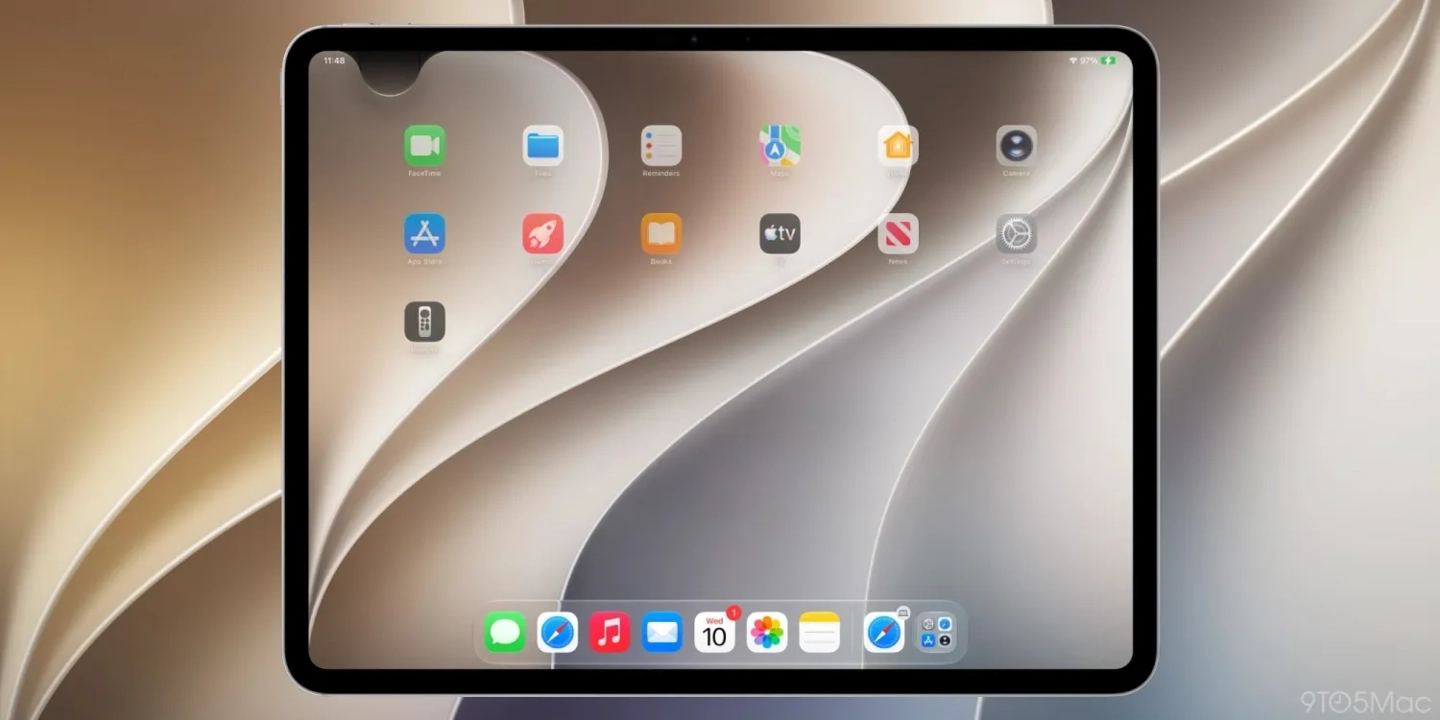
알림 센터 제스처 변경
IT홈은 6월 11일, 기술 매체 9to5Mac이 보도한 내용을 인용해 Apple이 iOS 27 및 iPadOS 27 시스템에서 알림 센터 조작 제스처를 변경했다고 전했습니다. 이번 변화로 iPhone과 iPad 사용자들이 지난 15년 동안 익숙하게 사용해 온 조작 방식을 새롭게 조정하게 되었습니다.
기존 방식과 새로운 인터페이스
Apple은 2011년 iOS 5를 출시한 이후, 화면 상단 중앙을 아래로 쓸어내리면 시간 순서대로 정렬된 알림을 확인할 수 있는 방식을 제공해 왔습니다.
하지만 iOS 27에서는 Siri AI 기능이 강화됨에 따라, 상단 중앙을 쓸어내리는 동작은 새로운 Siri AI 경험을 불러오는 방식으로 변경되었습니다. 알림 센터는 사라진 것이 아니며, 사용자는 이제 왼쪽 상단 모서리에서 아래로 쓸어내려 알림을 확인할 수 있습니다.
iPad 기기별 특징
iPad의 경우 홈 화면 아이콘 위 영역 대부분이 Siri AI 호출에 할당됩니다. 특히 사용자가 AM/PM 또는 날짜 표시를 비활성화할 경우, 알림 센터의 터치 인식 범위가 더욱 축소됩니다.
과거 사례와의 비교
Apple이 제스처 시스템을 이처럼 크게 수정한 것은 iPhone X 시대에 제어 센터 위치를 하단에서 오른쪽 상단으로 변경했을 때 이후로 처음입니다. 당시 Apple은 모든 기기에서 동일한 인터랙션 방식을 채택했으며, 이번에는 알림 센터의 접근 방식이 새롭게 재정의되었습니다.
총평
通知中心交互逻辑变更
在 iOS 27 和 iPadOS 27 系统中,Apple 对通知中心的触发手势进行了重大调整。这一变动打破了用户自 2011 年(iOS 5 发布以来)形成的 15 年肌肉记忆。
新旧交互对比
为了整合全新的 Siri AI 体验,Apple 重新定义了顶部下滑区域的功能:
- 原操作: 用户从屏幕顶部中央向下滑动即可查看按时间顺序排列的通知。
- 现操作: 从屏幕顶部中心向下滑动将唤出全新的 Siri AI 界面。
- 新路径: 通知中心并未消失,用户现在需从左上角向下滑动来访问。
iPad 端特定调整
在 iPad 设备上,主屏幕图标上方区域几乎全部用于唤出 Siri AI。如果用户关闭了 AM/PM 或日期显示,通知中心的触控区域还会进一步缩小。
总结
Apple 在 iOS 27 和 iPadOS 27 中为了引入 Siri AI 功能,将通知中心的手势从顶部中央改为左上角滑动。这是继 iPhone X 时代以来,Apple 对系统核心交互手势进行的重大调整。
通知センターのジェスチャ変更
ITホームは6月11日、技術メディア9to5Macの報道を引用し、AppleがiOS 27およびiPadOS 27において通知センターの操作ジェスチャを変更したと報じました。この変更により、iPhoneおよびiPadユーザーは過去15年間にわたり慣れ親しんできた操作方法を新しく調整することになります。
従来の方式と新しいインターフェース
Appleは2011年にiOS 5をリリースして以来、画面上部中央を下にスワイプすることで、時系列順に並んだ通知を確認できる仕組みを提供してきました。
しかし、iOS 27ではSiri AI機能が強化されることに伴い、上部中央のスワイプ動作は新しいSiri AI体験を呼び出す方法に変更されました。通知センター自体が消えたわけではなく、ユーザーは今後、左上隅から下にスワイプすることで通知を確認できるようになります。
iPadデバイスの特性
iPadの場合、ホーム画面アイコンの上の領域の大部分がSiri AI呼び出しに割り当てられます。特に、ユーザーがAM/PMまたは日付表示を無効にする場合、通知センターのタッチ認識範囲はさらに縮小されます。
過去の事例との比較
Appleがジェスチャシステムをこのように大幅に変更したのは、iPhone X時代にコントロールセンターの位置を下部から右上に変更して以来初めてのことです。当時、Appleはすべてのデバイスで同一のインタラクション方式を採用しましたが、今回は通知センターへのアクセス方法が再定義されました。
まとめ
iOS 27およびiPadOS 27では、Siri AI機能の強化に伴い通知センターへのアクセスジェスチャが変更されます。従来の「上部中央からのスワイプ」はSiri AIの呼び出しに割り当てられ、通知センターを確認するための操作は「左上隅からのスワイプ」へと移行します。
Notification Center Gesture Changes
IT Home reported on June 11, citing a report from 9to5Mac, that Apple has modified the gesture for accessing the Notification Center in iOS 27 and iPadOS 27. This change updates a navigation method that iPhone and iPad users have been familiar with for the past 15 years.
Existing Method vs. New Interface
Since the release of iOS 5 in 2011, Apple allowed users to view chronologically ordered notifications by swiping down from the top center of the screen.
In iOS 27, as Siri AI features have been enhanced, the gesture at the top center has been changed to trigger a new Siri AI experience. The Notification Center is not gone; instead, users must now swipe down from the top-left corner to access it.
iPad Specific Features
On iPad devices, most of the area above the home screen icons is now allocated to Siri AI calls. Specifically, if a user disables the AM/PM or date display, the touch recognition area for the Notification Center becomes even more restricted.
Comparison with Past Precedents
This is the first time Apple has significantly overhauled its gesture system since the iPhone X era, when the Control Center was moved from the bottom to the top-right. In both instances, Apple adopted a consistent interaction method across all devices while redefining how users access core interface elements.
Summary
Apple has relocated the Notification Center gesture to the top-left corner in iOS 27 and iPadOS 27 to accommodate enhanced Siri AI features at the top center. This marks a major shift in user interaction for the first time since the iPhone X transition, affecting both iPhone and iPad users.
通知中心手势重大调整
在 iOS 27 和 iPadOS 27 系统中,Apple 对通知中心的交互逻辑进行了重大变动。自 2011 年 iOS 5 发布以来,用户一直习惯于从屏幕顶部中央向下滑动来查看通知,这一长达 15 年的“肌肉记忆”将被打破。
- 旧有操作: 从屏幕顶部中心向下滑动 $ ightarrow$ 查看按时间排序的通知。
- 新版操作(iOS 27): 从屏幕顶部中心向下滑动 $ ightarrow$ 唤出全新的 Siri AI 体验。
新的访问路径与 iPad 特性
虽然通知中心并未消失,但其触控区域发生了变化:
- 通用操作: 用户现在需要从屏幕左上角向下滑动来进入通知中心。
- iPad 适配: 在 iPad 上,主屏幕图标上方区域几乎全部用于唤出 Siri AI。如果用户关闭了 AM/PM 或日期显示,通知中心的触控区域会进一步缩小。
历史变动背景
这是 Apple 近年来对系统手势进行的重大调整。上一次类似的变革发生在 iPhone X 时代,当时将控制中心从底部上滑改为右上角下滑,并随后在所有设备上统一了该交互方式。
总结
Apple 在 iOS 27 和 iPadOS 27 中为了整合 Siri AI 功能,改变了自 2011 年以来的通知中心滑动手势。用户现在需通过左上角下拉进入通知中心,这一变动标志着系统交互逻辑的重大更新。
通知センターのジェスチャ変更
ITホームは6月11日、技術メディア9to5Macの報道を引用し、AppleがiOS 27およびiPadOS 27において通知センターの操作ジェスチャを変更したと報じました。この変更により、iPhoneおよびiPadユーザーは過去15年間にわたり慣れ親しんできた操作方法を新しく調整することになります。
新旧インターフェースの比較
Siri AI機能の強化に伴い、Appleは画面上部エリアの機能を以下のように再定義しました。
- 従来の操作: 画面上部中央から下にスワイプすることで、時系列順に並んだ通知を確認。
- 現在の操作: 画面上部中央から下にスワイプすることで、新しいSiri AIインターフェースを呼び出し。
- 新ルート: 通知センターは廃止されたわけではなく、今後は左上隅から下にスワイプすることでアクセスが可能。
iPadデバイスの特性
iPadでは、ホーム画面アイコンの上部領域の大部分がSiri AI呼び出しに割り当てられます。特にユーザーがAM/PMまたは日付表示を無効にする場合、通知センターのタッチ認識範囲はさらに縮小されます。
過去の事例との比較
Appleがジェスチャシステムをこれほど大幅に変更したのは、iPhone Xの時代にコントロールセンターの位置を下部から右上へ変更して以来初めてのことです。当時、すべてのデバイスで共通のインタラクションを採用したのに対し、今回は通知センターへのアクセス方法が再定義されました。
まとめ
AppleはiOS 27およびiPadOS 27において、Siri AI機能の統合に向けた大きな変更として通知センターの操作ジェスチャを刷新しました。上部中央のスワイプはSiri AIの呼び出しに割り当てられ、通知へのアクセスは左上隅からのスワイプへと変更されます。これはiPhone X以降で初めて行われる主要なインタラクションの変更となります。
Notification Center Gesture Changes
IT Home reported on June 11, citing a report from tech outlet 9to5Mac, that Apple has modified the gesture for accessing the Notification Center in iOS 27 and iPadOS 27. This change requires iPhone and iPad users to adjust a navigation method they have been accustomed to for the past 15 years.
Old vs. New Interface
Since the release of iOS 5 in 2011, Apple provided a system where swiping down from the top center of the screen allowed users to view notifications sorted chronologically.
With the enhanced Siri AI features in iOS 27, the gesture of swiping down from the top center has been repurposed to trigger a new Siri AI experience. The Notification Center has not been removed; instead, users must now swipe down from the top-left corner to access it.
iPad Specific Features
On iPad devices, most of the area above the home screen icons is now allocated for Siri AI calls. Specifically, if a user disables AM/PM or date displays, the touch recognition area for the Notification Center becomes even smaller.
Comparison with Past Changes
This is the first time Apple has significantly altered its gesture system since moving the Control Center from the bottom to the top-right corner during the iPhone X era. While both changes redefined how users interact with core system features, this update specifically redefines access to the Notification Center.
Summary
Apple has updated the Notification Center gesture in iOS 27 and iPadOS 27 to integrate new Siri AI features. Users must now swipe from the top-left corner instead of the top center, marking a significant shift in system interaction since the iPhone X era.
通知中心交互逻辑调整
在 iOS 27 和 iPadOS 27 系统中,Apple 对通知中心的触发手势进行了重大变动。这一改变打破了自 2011 年 iOS 5 发布以来、持续 15 年的用户操作习惯。
Siri AI 与新交互方式
随着 Siri AI 的引入,顶部区域的滑动逻辑发生了如下变化:
- 从屏幕顶部中央向下滑动:将唤出全新的 Siri AI 体验。
- 从左上角向下滑动:用户仍可访问传统的通知中心。
iPad 端特定变动
在 iPad 设备上,主屏幕图标上方区域几乎全部用于唤出 Siri AI。此外,如果用户关闭了 AM/PM 或日期显示,通知中心的触控区域将会进一步缩小。
总结
Apple 在 iOS 27 和 iPadOS 27 中重新分配了顶部滑动手势,将中心位置交给 Siri AI。用户若需查看通知,现在需要从左上角向下滑动,这一变动是自 iPhone X 时代以来最大规模的交互逻辑调整。
通知センターのジェスチャ変更
ITホームは6月11日、技術メディア9to5Macの報道を引用し、AppleがiOS 27およびiPadOS 27において通知センターへのアクセスジェスチャを変更したと報じました。この変更により、iPhoneおよびiPadユーザーは過去15年間にわたり慣れ親しんできた操作方法を新しく調整することになります。
新旧インターフェースの比較
Siri AI機能の強化に伴い、Appleは画面上部エリアの機能を以下のように再定義しました。
- 従来の操作: 画面上部中央から下にスワイプすることで、時系列順に並んだ通知を確認。
- 現在の操作: 画面上部中央から下にスワイプすることで、新しいSiri AIインターフェースを呼び出し。
- 新ルート: 通知センターは廃止されたわけではなく、今後は左上隅から下にスワイプすることでアクセスが可能。
iPadデバイスの特性
iPadでは、ホーム画面アイコンの上部領域の大部分がSiri AI呼び出しに割り当てられます。特にユーザーがAM/PMまたは日付表示を無効にする場合、通知センターのタッチ認識範囲はさらに縮小されます。
過去の事例との比較
Appleがジェスチャシステムをこれほど大幅に変更したのは、iPhone Xの時代にコントロールセンターの位置を下部から右上へ変更して以来初めてのことです。当時と同様に、すべてのデバイスで共通のインタラクションを採用しつつ、通知センターへのアクセス方法を再定義しました。
まとめ
iOS 27およびiPadOS 27では、Siri AI機能の統合に伴い、通知センターの操作ジェスチャが「上部中央」から「左上隅」へと変更されます。これはiPhone X以降で初めて行われる主要なインタラクションの変更であり、ユーザーは長年慣れ親しんできた操作方法を新しく更新することになります。
Notification Center Gesture Changes
IT Home reported on June 11, citing a report from 9to5Mac, that Apple has modified the gesture for accessing the Notification Center in iOS 27 and iPadOS 27. This change updates a navigation method that iPhone and iPad users have been familiar with for the past 15 years.
Old vs. New Interface
Since the release of iOS 5 in 2011, Apple allowed users to view chronologically ordered notifications by swiping down from the top center of the screen. However, with the enhancement of Siri AI features in iOS 27, this gesture has been reassigned.
- Original Action: Swiping down from the top center of the screen displayed notifications.
- New Action (iOS 27): Swiping down from the top center now triggers a new Siri AI experience.
- New Path: The Notification Center is not gone; users must now swipe down from the top-left corner to access it.
iPad Specific Features
On iPad devices, most of the area above the home screen icons is now allocated to Siri AI calls. Specifically, if a user disables the AM/PM or date display, the touch recognition area for the Notification Center becomes even more restricted.
Comparison with Past Precedents
This is the first time Apple has significantly overhauled its gesture system since the iPhone X era, when the Control Center was moved from the bottom to the top-right. In both instances, Apple adopted a consistent interaction method across all devices while redefining how users access core interface elements.
Summary
Apple is relocating the Notification Center gesture to the top-left corner in iOS 27 and iPadOS 27 to accommodate enhanced Siri AI features at the top center. This marks a major shift in user interaction for the first time since the iPhone X transition, affecting both iPhone and iPad users.