내용 구성
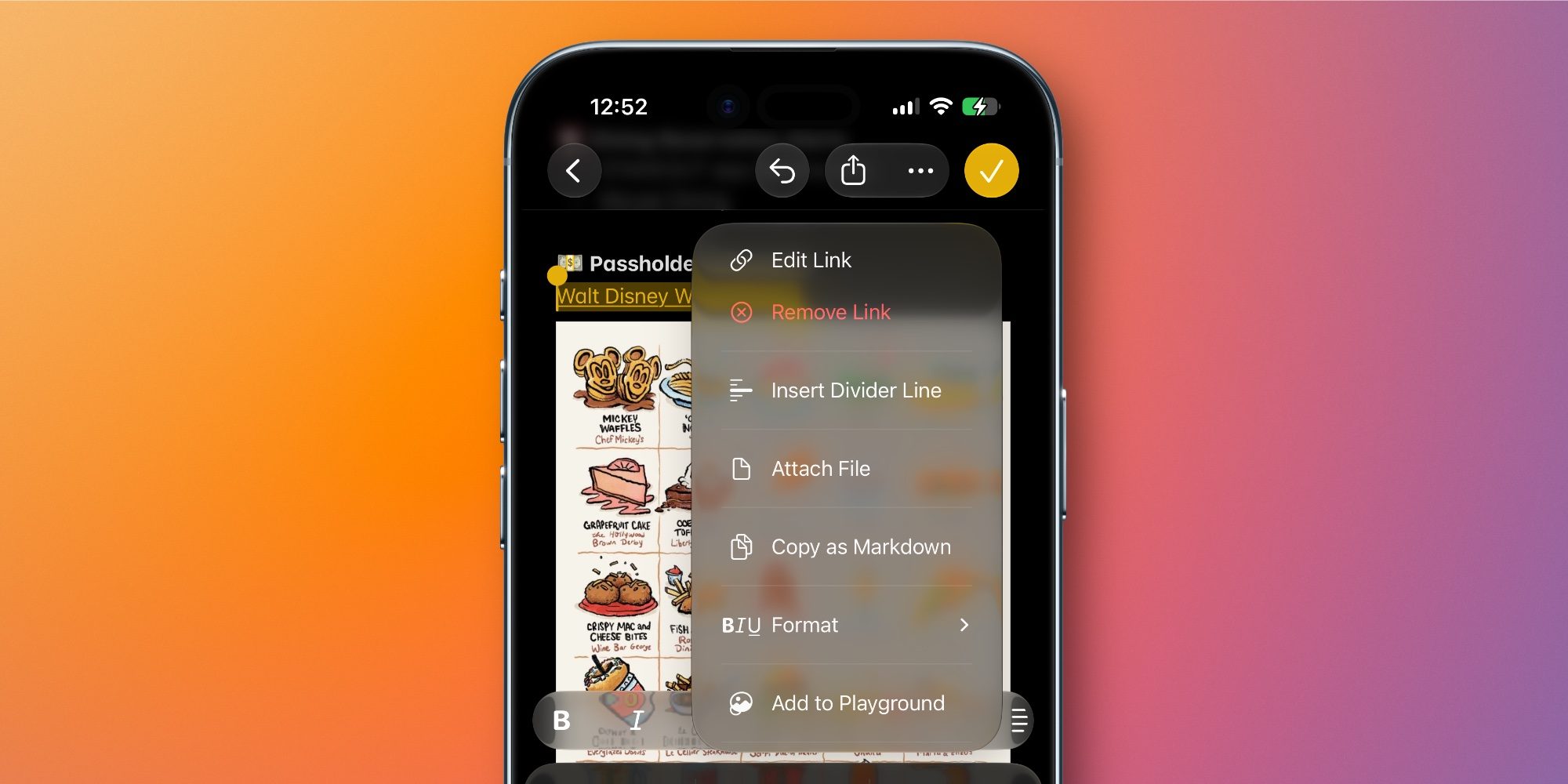
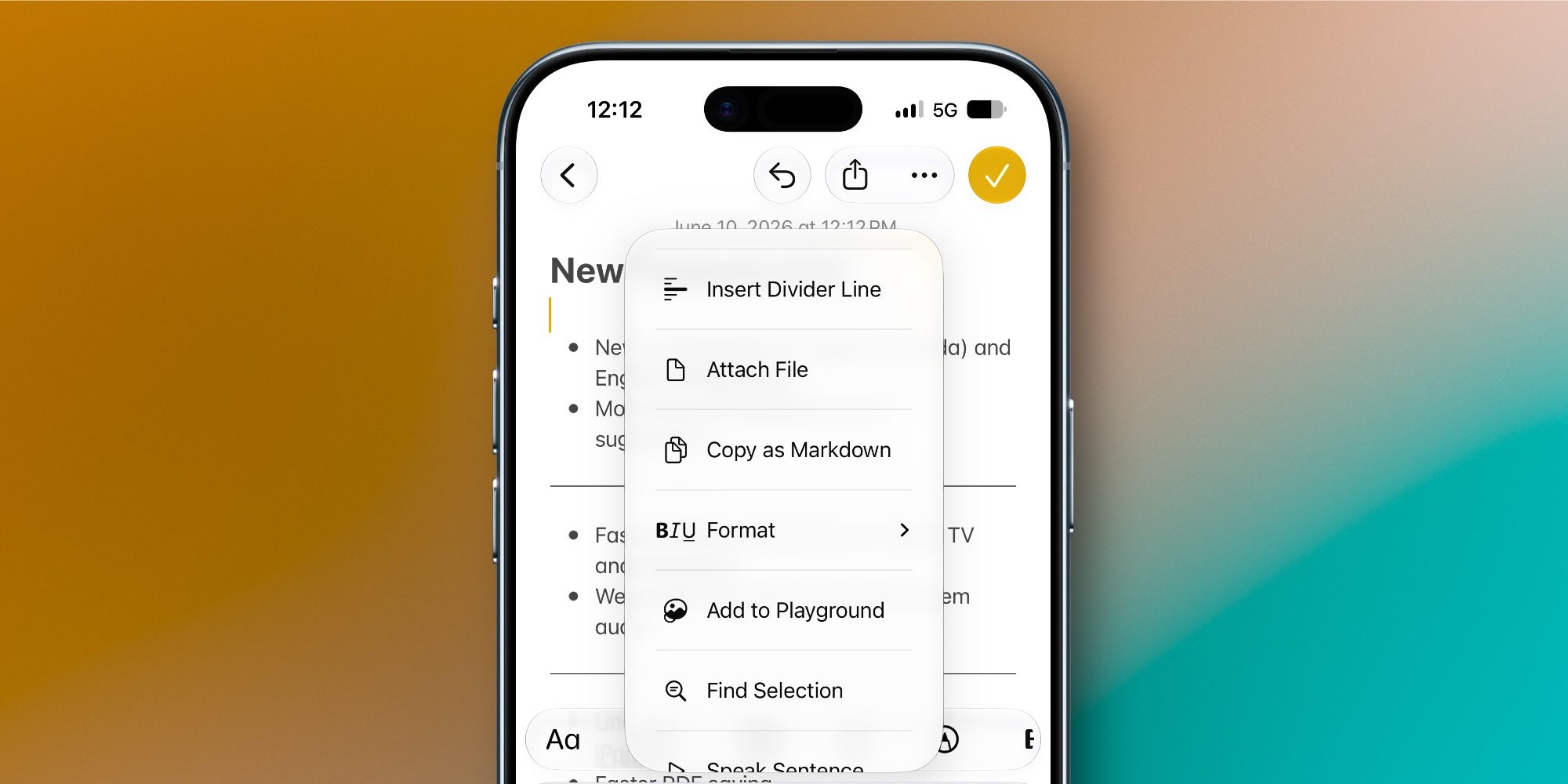
Apple iOS 27 버전의 메모 앱(Apple Notes)에 새로운 구분선 도구가 추가되었습니다. 사용자는 이제 노트를 편집하는 과정에서 원하는 위치를 선택하고 메뉴에서 '구분선 삽입'을 선택하여 간편하게 내용을 분리할 수 있습니다.
인공지능 비서 통합
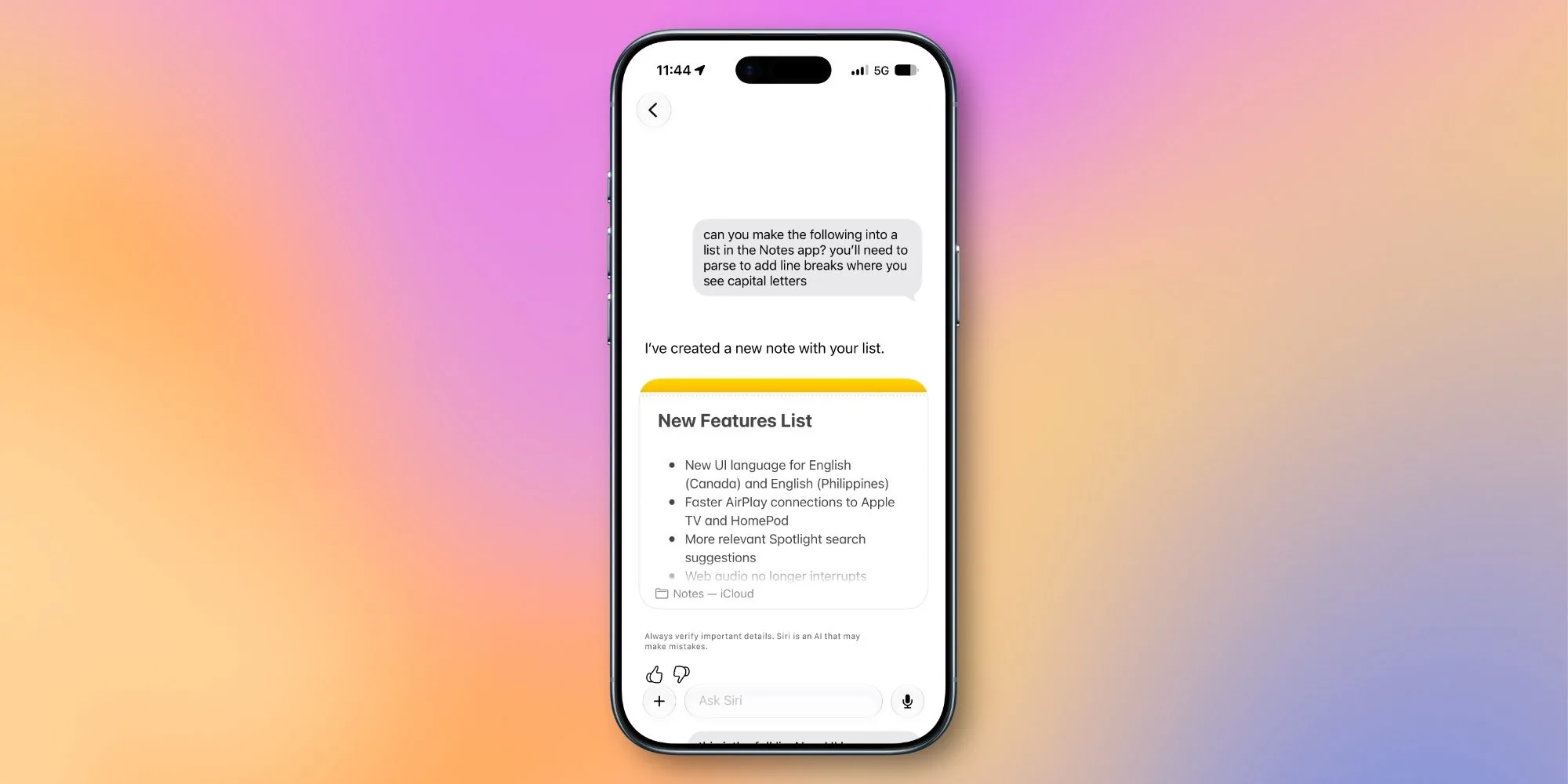
Apple iOS 27 메모 앱은 Siri AI와 깊이 통합되었습니다. 사용자는 이제 Siri에게 답변 내용을 새 메모로 저장하거나 기존 메모에 추가하도록 직접 요청할 수 있습니다.
실제 활용 사례를 살펴보면, iOS 27 사용자는 형식이 뒤섞인 리스트를 Siri를 통해 정리하고 서식을 맞춘 뒤 새로운 메모로 저장할 수 있으며, 이 과정에서 별도의 수동 조작이 필요하지 않습니다.
포맷 지원
iOS 26 버전부터 Markdown 가져오기 및 내보내기가 지원되었으며, iOS 27에서는 다음과 같은 기능이 강화되었습니다.
- Markdown 형식의 텍스트를 붙여넣을 때 별도의 단계 없이 자동으로 리치 텍스트(Rich Text)로 변환
- 편집 메뉴에 'Markdown으로 복사' 옵션 추가로 편리한 내보내기 지원
이미지 생성
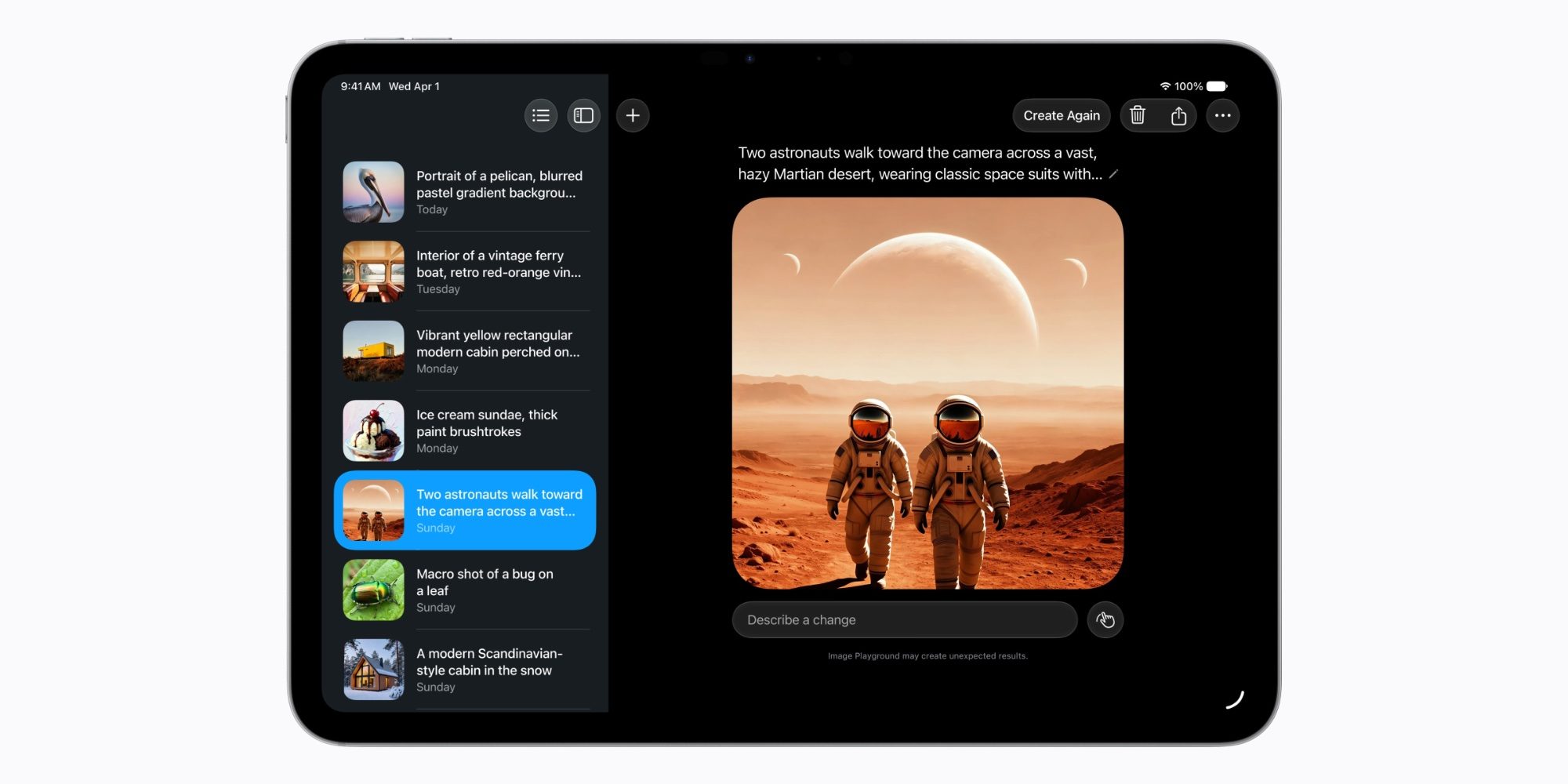
Apple iOS 27은 기반 AI 모델의 성능을 대폭 강화하여 사진과 같은 사실적인 이미지 생성 스타일을 지원합니다. 이 기능은 Private Cloud Compute를 통해 구동되는 새로운 생성 모델을 기반으로 하며, 생성된 이미지에는 AI 생성 콘텐츠임을 식별하기 위한 SynthID 워터마크가 자동으로 포함됩니다.
이미지 생성 기능은 메모 앱 내장 기능으로 제공되어 사용자가 노트 내에서 직접 호출할 수 있습니다. 다만 현재 베타 버전에서는 새로운 이미지 생성 기능이 완전히 개방되지 않았으며, 향후 업데이트를 통해 점진적으로 해제될 예정입니다.
인터페이스 디자인
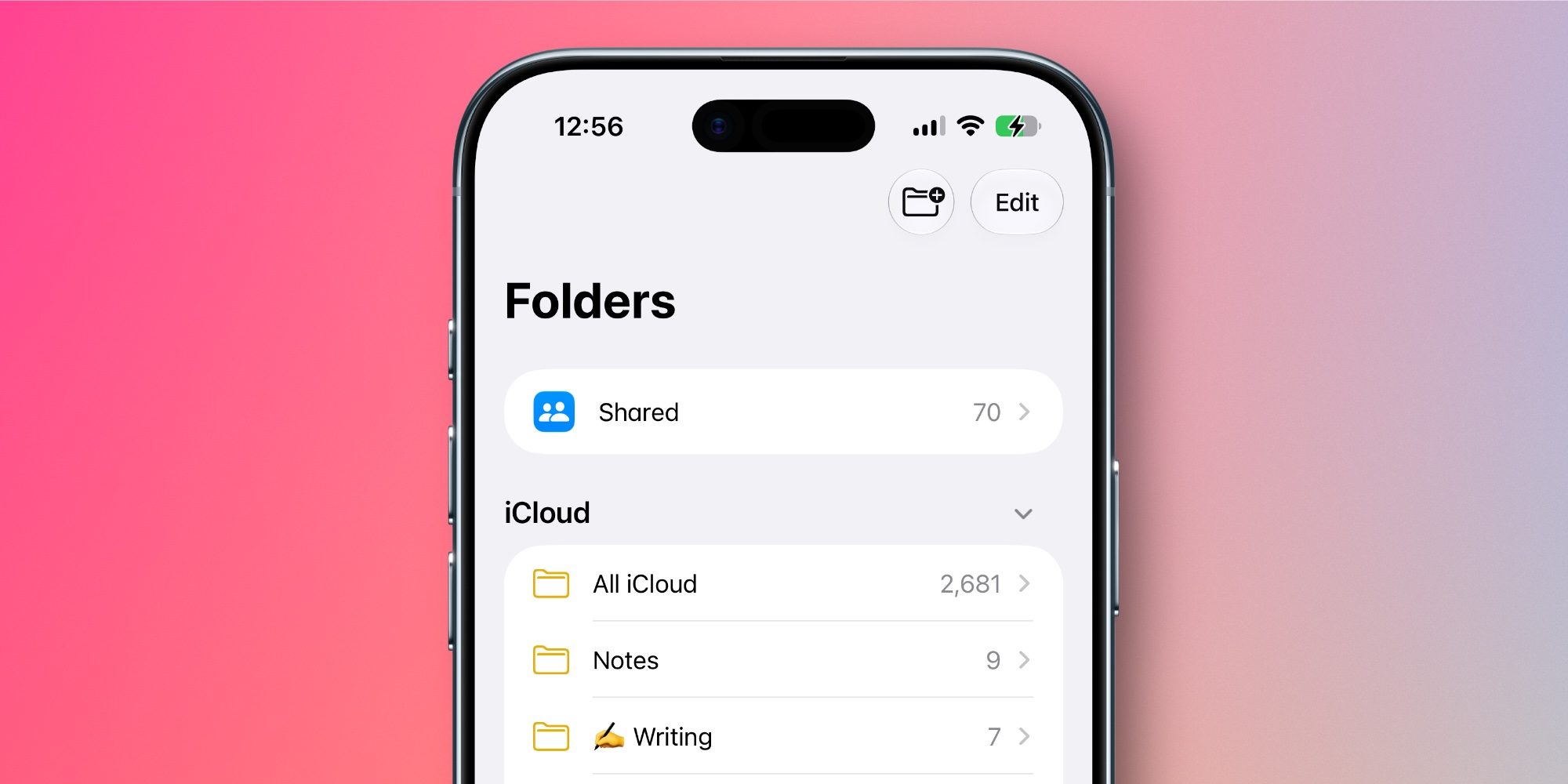
메모 앱의 아이콘이 새롭게 디자인되었으며, 버튼과 메뉴에는 리퀴드 글래스(Liquid Glass) 디자인 스타일이 적용되었습니다. 공유 폴더 목록 상단에 파란색 아이콘 표시가 추가되었으며, 개별 공유 폴더 및 메모의 아이콘도 함께 업데이트되었습니다.
총평
Apple iOS 27은 메모 앱에 강력한 AI 기능과 편리한 포맷 지원을 결합하여 사용자 편의성을 대폭 강화했습니다. 특히 Siri와의 깊은 통합과 자동 Markdown 변환, 고도화된 이미지 생성 기능은 생산성 도구로서의 가치를 한층 높여줄 것으로 기대됩니다.
内容组织与智能助手集成
Apple iOS 27 版备忘录新增了分割线工具,用户可通过编辑菜单快速插入。同时,该版本深度整合了 Siri AI,支持用户直接将 Siri 的回答保存至新笔记或现有笔记中。在实际场景中,Siri 能够自动处理并排版格式混乱的列表内容。
格式支持优化
针对 Markdown 格式的支持在 iOS 27 中得到进一步增强:
- 粘贴 Markdown 文本时,系统将自动转换为富文本显示。
- 编辑菜单新增“复制为 Markdown”选项,方便用户导出内容。
AI 图像生成功能
备忘录内置的图乐园功能在 iOS 27 中大幅提升了底层 AI 模型能力:
- 支持照片级真实的图像生成风格。
- 依托 Private Cloud Compute 运行新的生成模型。
- 生成的图像将自动嵌入 SynthID 水印,用于标识 AI 生成内容。
界面设计更新
备忘录应用图标进行了全新设计,按钮和菜单采用 Liquid Glass 设计风格。此外,共享文件夹列表顶部新增蓝色图标标识,并同步更新了单个共享文件夹和笔记的图标。
总结
Apple iOS 27 版备忘录在功能上实现了显著升级,重点涵盖了 Siri AI 的深度集成、Markdown 格式的自动化转换以及基于 Private Cloud Compute 的高级图像生成能力。同时,新版本通过 Liquid Glass 设计风格提升了视觉体验。
コンテンツの構成
Apple iOS 27のメモアプリ(Apple Notes)に、新しい区切り線ツールが追加されました。ユーザーはノートを編集する際に任意の場所を選択し、メニューから「区切り線を挿入」を選択することで、内容を簡単に分割できるようになります。
AIアシスタントの統合
Apple iOS 27のメモアプリはSiri AIと深く統合されています。ユーザーはSiriに対し、回答内容を新しいメモとして保存したり、既存のメモに追加したりすることを直接依頼できるようになりました。
実際の活用例として、iOS 27ユーザーは体裁の乱れたリストをSiriを通じて整理・整形した上で、手動操作を介さずに新しいメモとして保存することが可能です。
フォーマットのサポート
iOS 26からMarkdownのインポートおよびエクスポートがサポートされており、iOS 27では以下の機能が強化されました。
- Markdown形式のテキストを貼り付ける際、追加の手順なしで自動的にリッチテキスト(Rich Text)に変換
- 編集メニューに「Markdownとしてコピー」オプションを追加し、便利なエクスポートをサポート
画像生成
Apple iOS 27はベースとなるAIモデルの性能を大幅に強化し、写真のようなリアルな画像生成スタイルをサポートします。この機能はPrivate Cloud Computeを通じて動作する新しい生成モデルに基づいており、生成された画像にはAI生成コンテンツであることを識別するためのSynthIDウォーターマークが自動的に付与されます。
画像生成機能はメモアプリ内の組み込み機能として提供され、ユーザーはノート内で直接呼び出すことができます。ただし、現在のベータ版では新機能が完全に開放されておらず、今後のアップデートを通じて段階的に公開される予定です。
インターフェースのデザイン
メモアプリのアイコンが刷新され、ボタンやメニューにはリキッドグラス(Liquid Glass)デザインスタイルが採用されました。共有フォルダリストの上部には青いアイコンが表示されるようになり、個別の共有フォルダおよびメモのアイコンも更新されました。
まとめ
Apple iOS 27のメモアプリは、Siriとの深い統合や自動的なMarkdown変換、高度な画像生成機能など、AI技術を積極的に取り入れることで生産性を大幅に向上させています。これらの新機能により、ユーザーはより直感的でスムーズなコンテンツ管理が可能になります。
New Divider Tool
The Notes app in Apple's iOS 27 has introduced a new divider tool. Users can now select a specific location while editing and choose 'Insert Divider' from the menu to easily separate content within their notes.
AI Assistant Integration
The Notes app in iOS 27 features deep integration with Siri AI. Users can now directly request Siri to save its responses as new notes or append them to existing ones.
In practical use cases, an iOS 27 user can have Siri organize and format a messy list before saving it as a new note, eliminating the need for manual adjustments during the process.
Format Support
While Markdown import and export were introduced in iOS 26, iOS 27 enhances these capabilities with the following features:
- Automatically converts pasted Markdown text into Rich Text without requiring additional steps.
- Adds a 'Copy as Markdown' option to the edit menu for convenient exporting.
Image Generation
Apple iOS 27 significantly boosts the performance of its underlying AI models to support realistic image generation styles. This feature is powered by a new generative model running on Private Cloud Compute, and all generated images automatically include SynthID watermarks to identify them as AI-generated content.
The image generation tool is integrated directly into the Notes app, allowing users to call it within their notes. However, this feature is not fully open in the current beta version and will be rolled out gradually through future updates.
Interface Design
The Notes app icon has been redesigned, and a 'Liquid Glass' design style has been applied to buttons and menus. A blue icon has been added to the top of shared folder lists, and icons for individual shared folders and notes have also been updated.
Summary
iOS 27 significantly enhances the Notes app by combining powerful AI features with improved formatting support. Key upgrades include deep Siri integration, automated Markdown conversion, and integrated image generation, all aimed at increasing productivity and user convenience.
内容组织
Apple iOS 27 版备忘录新增了分割线工具。用户在编辑笔记时,可以通过编辑菜单中的“插入分割线”功能来优化内容的视觉结构。
智能助手集成
备忘录深度整合 Siri AI,显著提升了自动化处理能力:
- 用户可以直接要求 Siri 将回答内容保存为新笔记或添加到现有笔记中。
- 支持通过 Siri 处理格式混乱的列表并自动排版存入新笔记。
格式支持
在 iOS 26 支持 Markdown 的基础上,iOS 27 在交互上进行了优化:
- 用户粘贴 Markdown 格式文本后,系统会自动转换为富文本显示。
- 编辑菜单新增“复制为 Markdown”选项,方便用户将内容导出。
图像生成功能
备忘录利用增强的底层 AI 模型和 Private Cloud Compute 技术提供更强的视觉创作能力:
- 支持照片级真实的图像生成风格。
- 生成的图像会自动嵌入 SynthID 水印以标识 AI 生成内容。
- 该功能目前在 Beta 版中尚未完全开放,预计后续版本将逐步解锁。
界面设计
备忘录的视觉外观进行了全面更新:
- 应用图标更换为新设计。
- 按钮和菜单采用 Liquid Glass 设计风格。
- 共享文件夹列表顶部新增蓝色图标标识,并同步更新了单个分享文件夹和笔记的图标。
总结
Apple iOS 27 版备忘录在内容组织、Siri AI 集成、Markdown 支持以及基于 Private Cloud Compute 的图像生成等方面进行了深度优化。同时,通过全新的 Liquid Glass 设计风格提升了产品的视觉美感与用户交互体验。
コンテンツ構成とAIアシスタントの統合
Apple iOS 27のメモアプリ(Apple Notes)には、新しい区切り線ツールが追加されました。ユーザーはノートを編集する際に任意の場所を選択し、メニューから「区切り線を入れる」を選択することで、簡単に内容を分けることができます。
また、iOS 27のメモアプリはSiri AIと深く統合されています。ユーザーはSiriに対し、回答内容を新しいメモとして保存したり、既存のメモに追加したりすることを直接依頼できるようになりました。実際の活用例として、iOS 27ユーザーは、体裁の乱れたリストをSiriを通じて整理・整形した上で、新しく作成するメモに保存することが可能になり、この過程で手動操作を行う必要がありません。
フォーマット対応の強化
iOS 26からサポートされたMarkdownのインポートおよびエクスポート機能は、iOS 27においてさらに強化されました。
- Markdown形式のテキストを貼り付ける際、追加の手順なしに自動的にリッチテキスト(Rich Text)に変換。
- 編集メニューに「Markdownとしてコピー」オプションを追加し、便利なエクスポートをサポート。
AI画像生成機能
Apple iOS 27は基盤となるAIモデルの性能を大幅に強化し、写真のようなリアルな画像生成スタイルをサポートします。この機能はPrivate Cloud Computeを通じて動作する新しい生成モデルに基づいており、生成された画像にはAI生成コンテンツであることを識別するためのSynthIDウォーターマークが自動的に付与されます。
画像生成機能はメモアプリ内の組み込み機能として提供され、ユーザーはノート内で直接呼び出すことができます。ただし、現在のベータ版では新機能が完全に開放されておらず、今後のアップデートを通じて段階的に公開される予定です。
インターフェースデザイン
メモアプリのアイコンが刷新され、ボタンやメニューにはLiquid Glassデザインスタイルが採用されました。また、共有フォルダリストの上部には青いアイコンが表示されるようになり、個々の共有フォルダおよびメモのアイコンも更新されています。
まとめ
Apple iOS 27のメモアプリは、Siri AIとの高度な統合やMarkdownの自動変換、そしてPrivate Cloud Computeを活用した高品質な画像生成機能など、生産性を高めるための強力なアップデートを多数盛り込んでいます。デザイン面でもLiquid Glassスタイルの採用など、視覚的な刷新が行われています。
Content Organization & AI Assistant Integration
The Apple Notes app in iOS 27 introduces a new divider tool, allowing users to easily separate content by selecting a specific location and choosing "Insert Divider" from the menu during the editing process.
Furthermore, the Notes app is deeply integrated with Siri AI. Users can now directly request Siri to save its responses as new notes or append them to existing ones. In practical scenarios, iOS 27 users can use Siri to organize and format messy lists into structured content and save them as a new note without requiring manual adjustments.
Format Support
While Markdown import and export were introduced in iOS 26, several features have been enhanced in iOS 27:
- Automatically converts pasted Markdown text into Rich Text without additional steps.
- Adds a "Copy as Markdown" option to the edit menu for convenient exporting.
Image Generation
Apple iOS 27 significantly enhances its underlying AI models to support realistic image generation styles, similar to photographs. This feature is powered by a new generative model running on Private Cloud Compute, and all generated images automatically include SynthID watermarks to identify them as AI-generated content.
The image generation functionality is provided as an integrated feature within the Notes app, allowing users to call it directly within their notes. However, in the current beta version, the new image generation features are not fully unlocked and will be rolled out gradually through future updates.
Interface Design
The Notes app icon has been redesigned, and buttons and menus now feature a "Liquid Glass" design style. Additionally, blue icons have been added to the top of shared folder lists, and the icons for individual shared folders and notes have also been updated.
Summary
Apple's iOS 27 significantly upgrades the Notes app by integrating advanced AI capabilities like Siri-assisted content organization and sophisticated image generation. The update also improves productivity through enhanced Markdown support and a refreshed "Liquid Glass" visual design.
内容组织
Apple iOS 27 版备忘录新增了分割线工具。用户在编辑笔记时,可以通过编辑菜单中的“插入分割线”功能快速对内容进行视觉分割。
智能助手集成
备忘录与 Siri AI 深度融合,提升了内容的自动化处理能力:
- 支持直接让 Siri 将回答内容保存为新笔记或添加到现有笔记中。
- 能够自动处理并排版格式混乱的列表,无需用户手动操作即可存入笔记。
格式支持
在 iOS 27 中,Markdown 的兼容性得到增强:
- 粘贴 Markdown 文本时,系统会自动转换为富文本显示。
- 编辑菜单新增“复制为 Markdown”选项,方便用户将内容以 Markdown 格式输出。
图像生成功能
备忘录通过提升底层 AI 模型能力,提供了更强大的视觉创作工具:
- 依托 Private Cloud Compute 运行新模型,支持生成照片级真实的图像。
- 生成的图像将自动嵌入 SynthID 水印以标识 AI 生成内容。
- 该功能目前在 Beta 版中尚未完全开放,预计后续版本将逐步解锁。
界面设计
备忘录应用进行了视觉风格的更新:
- 图标焕新,按钮和菜单采用 Liquid Glass 设计风格。
- 共享文件夹列表顶部新增蓝色图标标识,并同步更新了单个共享文件夹和笔记的图标。
总结
Apple iOS 27 版备忘录在内容组织、Siri AI 集成以及 Markdown 支持方面进行了多项功能优化。同时,新版本引入了基于 Private Cloud Compute 的高级图像生成能力,并对应用界面进行了 Liquid Glass 风格的视觉重塑。
コンテンツの構成
Apple iOS 27のメモアプリ(Apple Notes)に、新しい「区切り線」ツールが追加されました。ユーザーはノートを編集する際に任意の場所を選択し、メニューから「区切り線を挿入」を選択することで、内容を簡単に分割できるようになります。
AIアシスタントの統合
Apple iOS 27のメモアプリはSiri AIと深く統合されています。ユーザーはSiriに対し、回答内容を新しいメモとして保存したり、既存のメモに追加したりすることを直接依頼できるようになりました。
具体的な活用例として、iOS 27ユーザーは体裁の乱れたリストをSiriを通じて整理・整形した上で、手動操作を介さずに新しいメモとして保存することが可能です。
フォーマットのサポート
iOS 26からMarkdownのインポートおよびエクスポートがサポートされており、iOS 27では以下の機能が強化されました。
- Markdown形式のテキストを貼り付ける際、追加の手順なしで自動的にリッチテキスト(Rich Text)に変換
- 編集メニューに「Markdownとしてコピー」オプションを追加し、便利なエクスポートをサポート
画像生成
Apple iOS 27はベースとなるAIモデルの性能を大幅に強化し、写真のようなリアルな画像生成スタイルをサポートします。この機能はPrivate Cloud Computeを通じて動作する新しい生成モデルに基づいており、生成された画像にはAI生成コンテンツであることを識別するためのSynthIDウォーターマークが自動的に付与されます。
画像生成機能はメモアプリ内の組み込み機能として提供され、ユーザーはノート内で直接呼び出すことができます。ただし、現在のベータ版では新機能が完全に開放されておらず、今後のアップデートを通じて段階的に公開される予定です。
インターフェースのデザイン
メモアプリのアイコンが刷新され、ボタンやメニューにはリキッドグラス(Liquid Glass)デザインスタイルが採用されました。また、共有フォルダリストの上部には青いアイコンが表示されるようになり、個別の共有フォルダおよびメモのアイコンも更新されました。
まとめ
Apple iOS 27のメモアプリは、Siri AIとの深い統合や自動的なMarkdown変換、Private Cloud Computeを活用した高度な画像生成など、AI技術を積極的に取り入れることで生産性を大幅に向上させています。これらの新機能により、ユーザーはより直感的でスムーズなコンテンツ管理が可能になります。
New Divider Tool
The Notes app in Apple's iOS 27 introduces a new divider tool. Users can now select any location while editing and choose "Insert Divider" from the menu to easily separate content within their notes.
AI Assistant Integration
The Notes app in iOS 27 features deep integration with Siri AI. Users can now directly request Siri to save its responses as new notes or append them to existing ones.
In practical use cases, an iOS 27 user can have Siri organize and format a messy list before saving it as a new note, eliminating the need for manual adjustments during the process.
Format Support
Building on the Markdown support introduced in iOS 26, iOS 27 enhances these capabilities with the following features:
- Automatically converts pasted Markdown text into Rich Text without requiring additional steps.
- Adds a "Copy as Markdown" option to the edit menu for convenient exporting.
Image Generation
Apple iOS 27 significantly boosts the performance of its underlying AI models to support realistic image generation styles. This feature is powered by a new generative model running on Private Cloud Compute, and all generated images automatically include SynthID watermarks to identify them as AI-generated content.
The image generation tool is integrated directly into the Notes app, allowing users to call it within their notes. However, this feature is not fully open in the current beta version and will be rolled out gradually through future updates.
Interface Design
The Notes app icon has been redesigned, and a "Liquid Glass" design style has been applied to buttons and menus. A blue icon has been added to the top of shared folder lists, and icons for individual shared folders and notes have also been updated.
Summary
iOS 27 significantly enhances the Notes app by combining powerful AI features with improved formatting support. Key upgrades include deep Siri integration, automated Markdown conversion, and integrated image generation powered by Private Cloud Compute, all aimed at increasing productivity and user convenience.