기능 업데이트
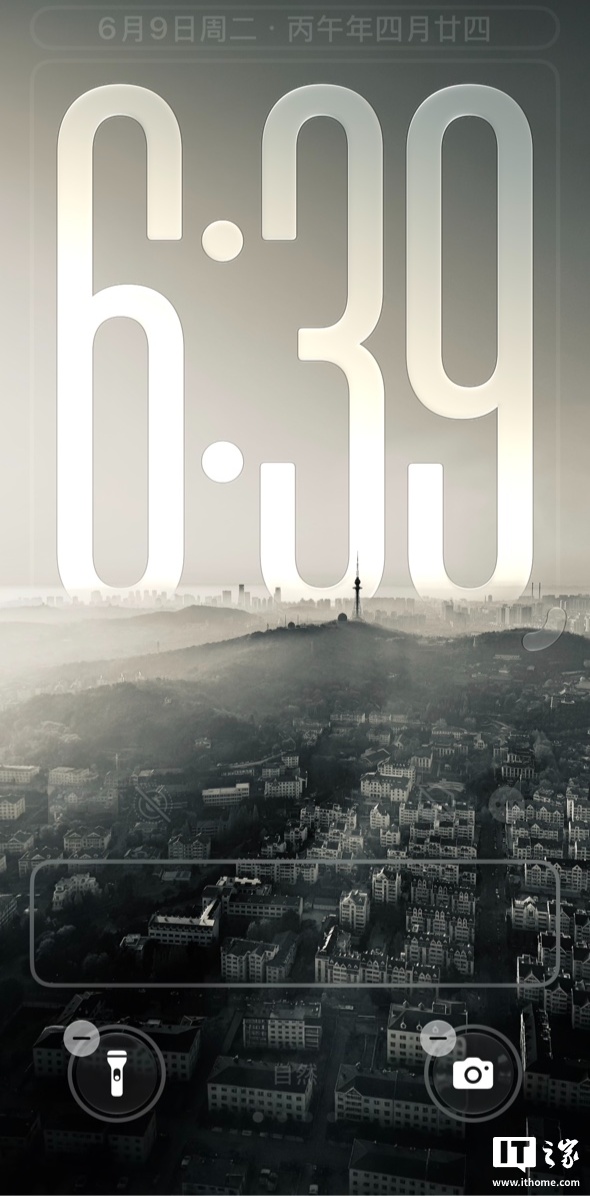
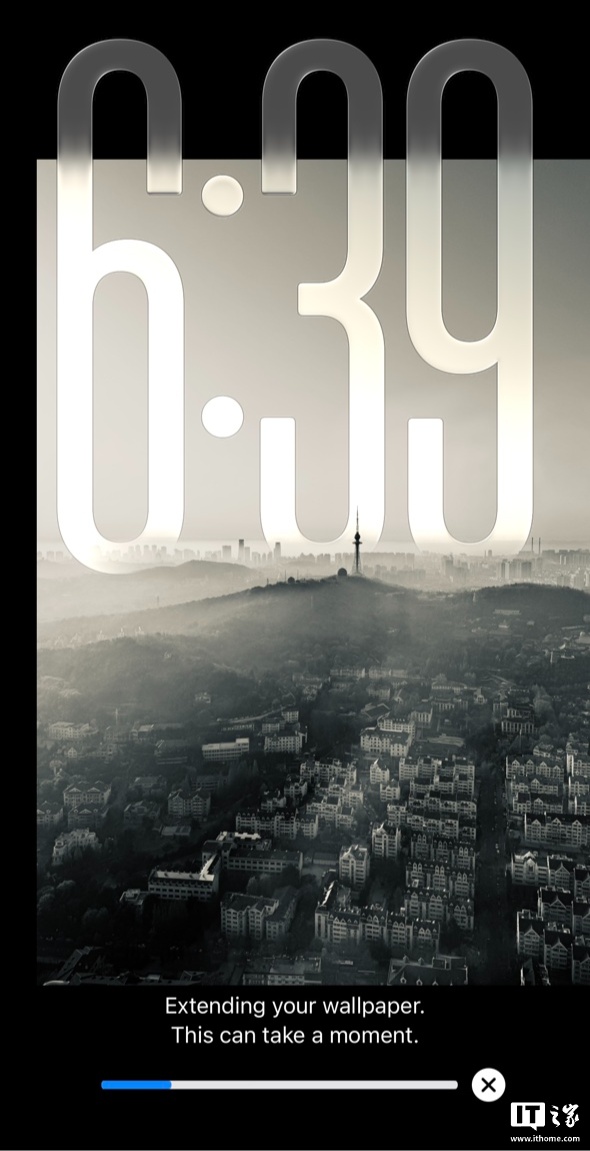
IT소식에 따르면, 일부 Apple iPhone 중국 내수용 모델이 iOS 27 Developer Beta 1(개발자 프리뷰) 시스템으로 업데이트된 후 AI 벽지 확장 기능을 사용할 수 있는 것으로 확인되었습니다.
사용 방법
실제 테스트 영상에 따르면, 해당 기능은 다음과 같은 단계로 작동합니다.
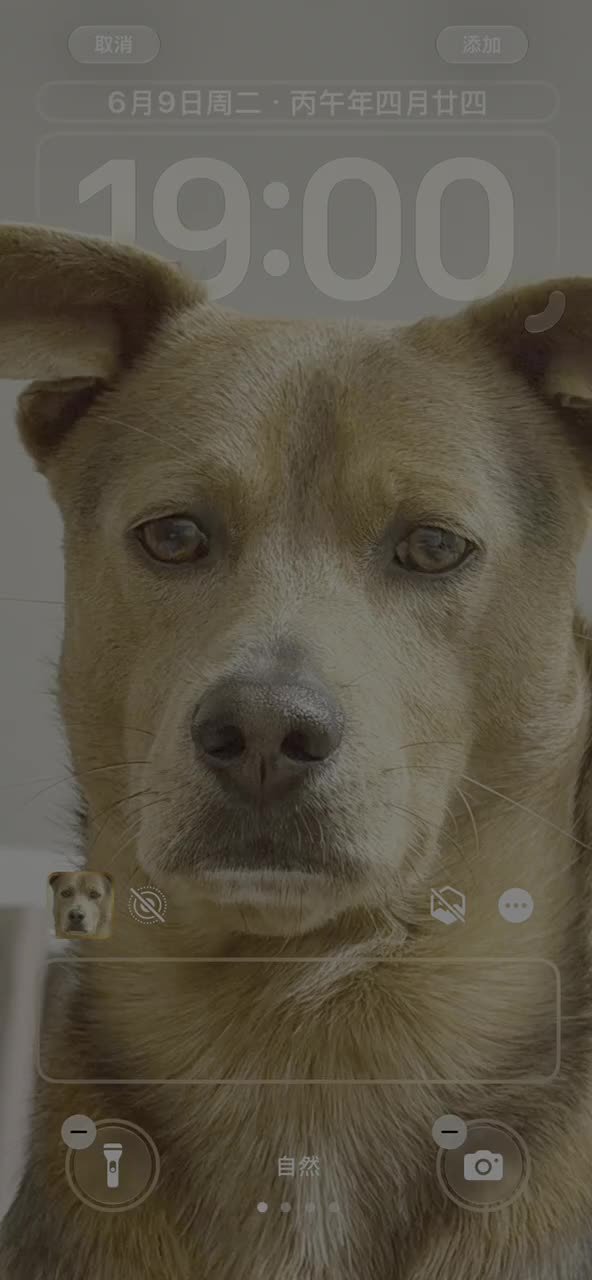
- 잠금 화면의 배경화면을 길게 누릅니다.
- 새로운 사진을 선택한 후 화면을 핀치(Pinch)하여 기능을 활성화합니다.
- 사진 내 주요 대상을 선택하고 "확장" 버튼을 클릭합니다.
- 잠시 기다리면 AI를 통해 확장된 이미지를 확인할 수 있습니다.
총평
iOS 27 Developer Beta 1 버전에서 Apple은 AI 기반의 배경화면 확장 기능을 도입했습니다. 이 기능은 사용자가 선택한 사진의 구도를 인공지능으로 자연스럽게 넓혀주는 시각적 편의성을 제공할 것으로 보입니다.
功能更新
部分 Apple iPhone 国行机型在升级至 iOS 27 Developer Beta 1(开发者预览版)系统后,已支持 AI 壁纸扩图功能。
操作步骤
根据实测视频,用户可以通过以下步骤激活并使用该功能:
- 长按锁屏壁纸。
- 选择一张新照片并捏住屏幕进行激活。
- 选定照片主体后点击“扩展”。
- 等待系统完成 AI 扩充处理。
总结
部分 Apple iPhone 国行机型在 iOS 27 Developer Beta 1 系统中新增了 AI 壁纸扩图功能。用户可以通过特定的长按与捏合操作,利用 AI 技术对锁屏壁纸照片进行内容扩展。
機能アップデート
ITニュースによると、中国国内向けの特定のApple iPhoneモデルにおいて、iOS 27 Developer Beta 1(デベロッパープレビュー)にアップデート後、AIによる壁紙拡張機能が利用可能になったことが確認されました。
操作手順
実際のテスト動画によると、この機能は以下の手順で動作します。
- ロック画面の壁紙を長押しします。
- 新しい写真を選択し、画面をピンチ(Pinch)して機能を有効にします。
- 写真内の主要な対象を選択し、「拡張」ボタンをクリックします。
- しばらく待つと、AIによって拡張された画像が表示されます。
総評
iOS 27 Developer Beta 1において、AppleはAIベースの壁紙拡張機能を導入しました。この機能は、ユーザーが選択した写真の構図を人工知能によって自然に広げることで、視覚的な利便性を提供するものと期待されます。
まとめ
iOS 27 Developer Beta 1において、中国向けのiPhoneでAIによる壁紙拡張機能が確認されました。この機能は、AIを用いて写真の構図を自動的に拡大し、ユーザーに視覚的な利便性を提供します。
Feature Update
According to IT news reports, certain Chinese domestic Apple iPhone models have been confirmed to support an "AI Wallpaper Expansion" feature after updating to the iOS 27 Developer Beta 1 system.
How to Use
Based on actual test videos, the feature operates through the following steps:
- Long-press the wallpaper on the lock screen.
- Select a new photo and pinch the screen to activate the feature.
- Select the main subject in the photo and tap the "Expand" button.
- Wait briefly for the AI to generate the expanded image.
Overall Review
With the release of iOS 27 Developer Beta 1, Apple has introduced an AI-based wallpaper expansion feature. This functionality is expected to provide visual convenience by using artificial intelligence to naturally expand the composition of a user's selected photo.
Summary
Apple has integrated an AI-powered wallpaper expansion tool in the iOS 27 Developer Beta 1 for specific iPhone models. The feature allows users to automatically broaden the frame of their photos, creating more dynamic and visually appealing lock screen backgrounds.
新功能预览
部分 Apple iPhone 国行机型在升级 iOS 27 Developer Beta 1 系统后,实测可使用 AI 壁纸扩图功能。
操作流程
- 长按锁屏壁纸并选择一张新照片
- 捏住屏幕激活相关功能
- 选定照片主体后点击“扩展”
- 等待系统完成 AI 扩充处理
总结
部分 Apple iPhone 国行机型在 iOS 27 Developer Beta 1 系统中新增了 AI 壁纸扩图功能。用户可以通过特定的交互操作,利用 AI 技术对锁屏壁纸进行内容扩展。
機能アップデート
ITニュースの報道によると、中国国内向けの特定のApple iPhoneモデルにおいて、iOS 27 Developer Beta 1(デベロッパープレビュー)にアップデート後、AIによる壁紙拡張機能が利用可能になったことが確認されました。
操作手順
実機テストの動画に基づくと、この機能は以下の手順で実行可能です。
- ロック画面の壁紙を長押しします。
- 新しい写真を選択し、画面をピンチ(Pinch)して機能を有効にします。
- 写真内の主要な対象を選択し、「拡張」ボタンをクリックします。
- システムによるAI処理が完了するまで待機すると、拡張された画像が表示されます。
総評
iOS 27 Developer Beta 1において、AppleはAIベースの壁紙拡張機能を導入しました。この機能により、ユーザーが選択した写真の構図を人工知能によって自然に広げることが可能になり、視覚的な利便性が向上すると期待されています。
まとめ
iOS 27 Developer Beta 1において、中国向けのiPhoneでAIによる壁紙拡張機能が確認されました。この機能は、AI技術を用いて写真の構図を自動的に拡大し、ユーザーにより自由な壁紙設定を提供します。
Feature Update
According to IT reports, certain Chinese domestic Apple iPhone models have been confirmed to support an AI wallpaper expansion feature after updating to the iOS 27 Developer Beta 1 system.
How to Use
Based on actual test videos, the feature can be activated and used through the following steps:
- Long-press the wallpaper on the lock screen.
- Select a new photo and pinch the screen to activate the function.
- Select the main subject in the photo and tap the "Expand" button.
- Wait briefly for the AI to process and display the expanded image.
Summary
Apple has introduced an AI-based wallpaper expansion feature in the iOS 27 Developer Beta 1 for specific Chinese models. This tool utilizes artificial intelligence to naturally expand the composition of selected photos, providing enhanced visual convenience for users.
功能更新
部分 Apple iPhone 国行机型在升级 iOS 27 Developer Beta 1(开发者预览版)系统后,实测可使用 AI 壁纸扩图功能。
操作步骤
- 长按锁屏壁纸。
- 选择一张新照片并捏住屏幕激活。
- 选定照片主体后点击“扩展”。
- 等待系统完成 AI 扩充处理。
总结
部分 Apple iPhone 国行机型在 iOS 27 Developer Beta 1 系统中支持了 AI 壁纸扩图功能。用户可以通过特定的长按与捏合交互操作,实现对壁纸照片的智能内容扩展。
機能アップデート
ITニュースの報道によると、中国国内向けの特定のApple iPhoneモデルにおいて、iOS 27 Developer Beta 1(デベロッパープレビュー)にアップデート後、AIによる壁紙拡張機能が利用可能になったことが確認されました。
操作手順
実機テストの動画に基づくと、この機能は以下の手順で実行可能です。
- ロック画面の壁紙を長押しします。
- 新しい写真を選択し、画面をピンチ(Pinch)して機能を有効にします。
- 写真内の主要な対象を選択し、「拡張」ボタンをクリックします。
- システムによるAI処理が完了するまで待機すると、拡張された画像が表示されます。
総評
iOS 27 Developer Beta 1において、AppleはAIベースの壁紙拡張機能を導入しました。この機能により、ユーザーが選択した写真の構図を人工知能によって自然に広げることが可能になり、視覚的な利便性が向上すると期待されています。
まとめ
iOS 27 Developer Beta 1において、中国向けのiPhoneでAIによる壁紙拡張機能が確認されました。この機能はAI技術を用いて写真の構図を自動的に拡大し、ユーザーにより自由な壁紙設定を提供します。
Feature Update
According to IT news reports, certain Chinese domestic Apple iPhone models have been confirmed to support an AI wallpaper expansion feature after updating to the iOS 27 Developer Beta 1 system.
How to Use
Based on actual test videos, the feature can be activated and used through the following steps:
- Long-press the wallpaper on the lock screen.
- Select a new photo and pinch the screen to activate the function.
- Select the main subject in the photo and tap the "Expand" button.
- Wait briefly for the AI to process and display the expanded image.
Overall Review
With the release of iOS 27 Developer Beta 1, Apple has introduced an AI-based wallpaper expansion feature. This functionality is expected to provide visual convenience by using artificial intelligence to naturally expand the composition of a user's selected photo.
Summary
Apple has integrated an AI-powered wallpaper expansion tool in the iOS 27 Developer Beta 1 for specific Chinese models. The feature utilizes artificial intelligence to automatically broaden the frame of photos, providing enhanced visual convenience for lock screen customization.