AI 기능 통합
Apple은 오늘(6월 9일) 개최된 2026년 WWDC(글로벌 개발자 컨퍼런스)에서 iOS 27 시스템의 캘린더(Calendar) 및 미리 알림(Reminders) 앱에 여러 AI 기능을 추가했습니다.
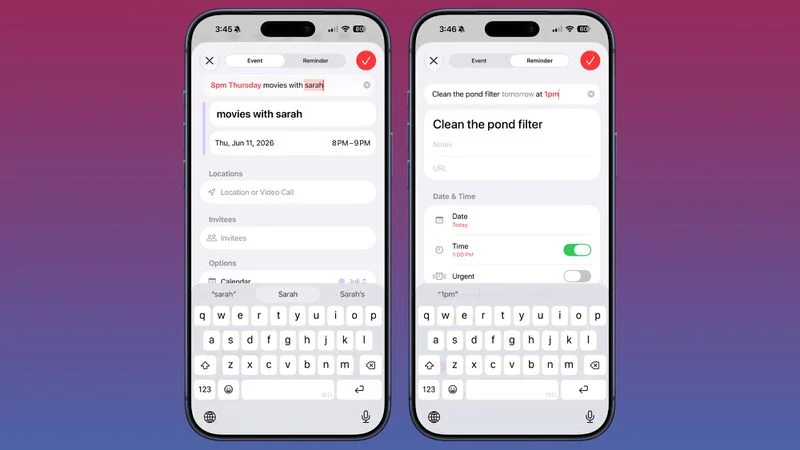
기술 매체 MacRumors는 경험 후 Apple이 캘린더와 미리 알림을 "수동 입력"에서 "자연어 입력"으로 전환하고 있다고 지적했습니다. 사용자가 캘린더 앱의 "+" 버튼을 누른 후 "목요일 저녁 8시에 여자친구 Sarah와 영화 보기"와 같은 텍스트를 직접 입력하면 시스템이 시간, 날짜 및 이벤트 내용을 자동으로 인식하여 해당 일정을 생성하므로 항목별로 입력하는 단계를 생략할 수 있습니다.
사용자는 특정 날짜로 이동하여 새 이벤트를 만들 필요 없이, 입력 과정에서 시스템이 제공하는 날짜 및 시간 제안을 직접 탭하여 생성을 완료할 수 있습니다.
텍스트에 "매주"와 같은 빈도 설명이 포함된 경우, 시스템은 반복 이벤트를 동시에 설정할 수 있어 정기 회의, 수업 및 고정 일정 관리에 적합합니다.
IT之家의 블로그 게시물에 따르면, 미리 알림 앱도 동일한 로직을 사용합니다. 예를 들어 "목요일 오후 2시에 장 보러 가라고 알려줘"라고 입력하면 시스템이 자동으로 작업 내용과 알림 시간을 추출하여 빠르게 할 일을 생성합니다.
Apple은 또한 캘린더 이벤트 편집을 간소화했습니다. 특정 회의가 원래 매주 반복되도록 설정되었지만 나중에 2주에 한 번으로 변경되면 캘린더 앱이 향후 이벤트의 반복 빈도를 지능적으로 조정합니다.
Apple은 또한 Visual Intelligence(시각 지능)와 캘린더 및 미리 알림의 연동을 강화했습니다. 사용자가 온라인에서 활동 정보를 확인하고 스크린샷을 찍거나 iPhone으로 활동 전단지를 찍으면 시스템이 관련 내용을 인식하고 캘린더 앱에 자동으로 추가할 수 있습니다.
총평
Apple은 iOS 27의 캘린더 및 미리 알림 앱에 AI 기능을 대거 추가하여 사용자 경험을 혁신했습니다. 자연어 입력, 자동 일정 생성, 반복 이벤트 설정, 스마트 편집 기능 등을 통해 수동 입력을 최소화하고 편의성을 극대화했습니다. 또한 Visual Intelligence와의 연동으로 이미지 속 정보를 자동으로 인식하여 캘린더에 추가하는 기능도 제공합니다.
系统与软件发布
Apple 在 WWDC 上宣布 iOS 27 系统将为日历(Calendar)和提醒事项(Reminders)引入多项 AI 功能,旨在推动应用从“手动填写”向“自然输入”转变。
日历功能升级
- 支持“自然输入”:用户在点击“+”按钮后可直接输入包含时间、日期及内容的描述性文字。
- 自动识别与建议:系统会自动解析如“周四晚上 8 点和女友 Sarah 看电影”等文本,并提供相应的日期和时间建议供用户快速确认。
- 重复事件管理:支持根据“每周”等频率词汇自动设置循环提醒或课程安排。
提醒事项优化
- 逻辑对齐:提醒事项应用采用与日历相同的自然输入逻辑,例如输入“周四下午 2 点提醒我去买菜”,系统将自动提取任务内容并设定提醒时间。
智能编辑逻辑
Apple 优化了日历事件的编辑体验。当用户修改原本设为重复的事件(如从“每周一次”改为“每两周一次”)时,系统会自动调整未来所有相关事件的频率。
视觉智能联动
强化 Visual Intelligence 与日历、提醒事项的协同。用户可以通过拍摄活动传单或截取网页上的活动信息,由系统自动识别内容并将其加入到相应的应用中。
总结
Apple 在 WWDC 上展示了 iOS 27 中针对日历和提醒事项的重大 AI 功能升级。核心亮点包括基于自然语言的输入处理、智能重复事件管理以及利用 Visual Intelligence 技术从图像中自动提取活动信息,旨在大幅简化用户的日程规划流程。
AI機能の統合
Appleは本日(6月9日)開催された2026年WWDCにて、iOS 27の「カレンダー」および「リマインダー」アプリに複数のAI機能を導入しました。
技術メディアMacRumorsの指摘によると、Appleはこれらのアプリを「手動入力」から「自然言語入力」へと移行させています。ユーザーがカレンダーの「+」ボタンを押した後に、「木曜日の夜8時にSarahと映画を見る」といったテキストを入力するだけで、システムが時間、日付、イベント内容を自動的に認識し、項目ごとに細かく入力する手間を省いてスケジュールを作成します。
この機能により、ユーザーは特定の日に移動して新しいイベントを作成する必要がなく、入力過程でシステムが提示する日時候補を直接タップするだけで登録を完了できます。また、「毎週」といった頻度の説明が含まれている場合、システムが繰り返しイベントを同時に設定するため、定期的な会議や授業などの管理に適しています。
IT之家のブログ記事によると、リマインダーアプリも同様のロジックを採用しています。例えば「木曜日の午後2時に買い物に行くよう通知する」と入力すると、システムが内容と通知時間を自動的に抽出し、迅速にタスクを作成します。
さらに、Appleはカレンダーイベントの編集機能も簡略化しました。特定の会議が本来週単位で繰り返される設定であったものを「2週に1回」に変更した場合、カレンダーアプリが将来のイベントの頻度をインテリジェントに調整します。
また、Visual Intelligenceとの連携も強化されました。ユーザーがオンライン上の情報をスクリーンショットで保存したり、iPhoneでチラシを撮影したりすると、システムが関連内容を認識し、カレンダーに自動的に追加することが可能になります。
まとめ
AppleはiOS 27において、AIを活用することでカレンダーとリマインダーの操作性を大幅に向上させました。自然言語による入力やスマートな編集機能により手動入力を最小限に抑えつつ、Visual Intelligenceとの連携によって画像から情報を自動抽出する高度な利便性を提供しています。
AI Feature Integration
Apple introduced several AI features for the Calendar and Reminders apps in iOS 27 during the WWDC held on June 9.
Tech outlet MacRumors noted that Apple is transitioning these apps from "manual input" to "natural language input." For example, after tapping the "+" button in the Calendar app, a user can enter text such as "Watch a movie with my girlfriend Sarah at 8 PM on Thursday." The system then automatically recognizes the time, date, and event details, allowing users to skip the step-by-step manual entry process.
Users no longer need to navigate to specific dates to create new events; they can simply tap the date and time suggestions provided by the system during the input process.
If a frequency description such as "weekly" is included in the text, the system can automatically set up recurring events, making it ideal for managing regular meetings, classes, and fixed schedules.
According to a post on IT之家, the Reminders app follows the same logic. For example, entering "Remind me to go grocery shopping at 2 PM on Thursday" allows the system to automatically extract both the task content and the notification time to create an entry quickly.
Apple has also simplified the editing of calendar events. If a meeting originally set as a weekly occurrence is changed to every two weeks, the Calendar app intelligently adjusts the frequency for all future instances.
Furthermore, Apple enhanced the integration between Visual Intelligence and both Calendar and Reminders. When a user views information online and takes a screenshot, or captures a photo of an event flyer with an iPhone, the system recognizes the relevant details and automatically adds them to the Calendar app.
Summary
Apple has integrated extensive AI features into the Calendar and Reminders apps in iOS 27, moving toward natural language input and automated task creation. These updates, along with enhanced Visual Intelligence integration, significantly reduce manual effort while improving convenience for managing schedules from both text and visual data.