LM Studio, Mac-iPhone 간 AI 모델 연동 기능 'LM Link' 추가
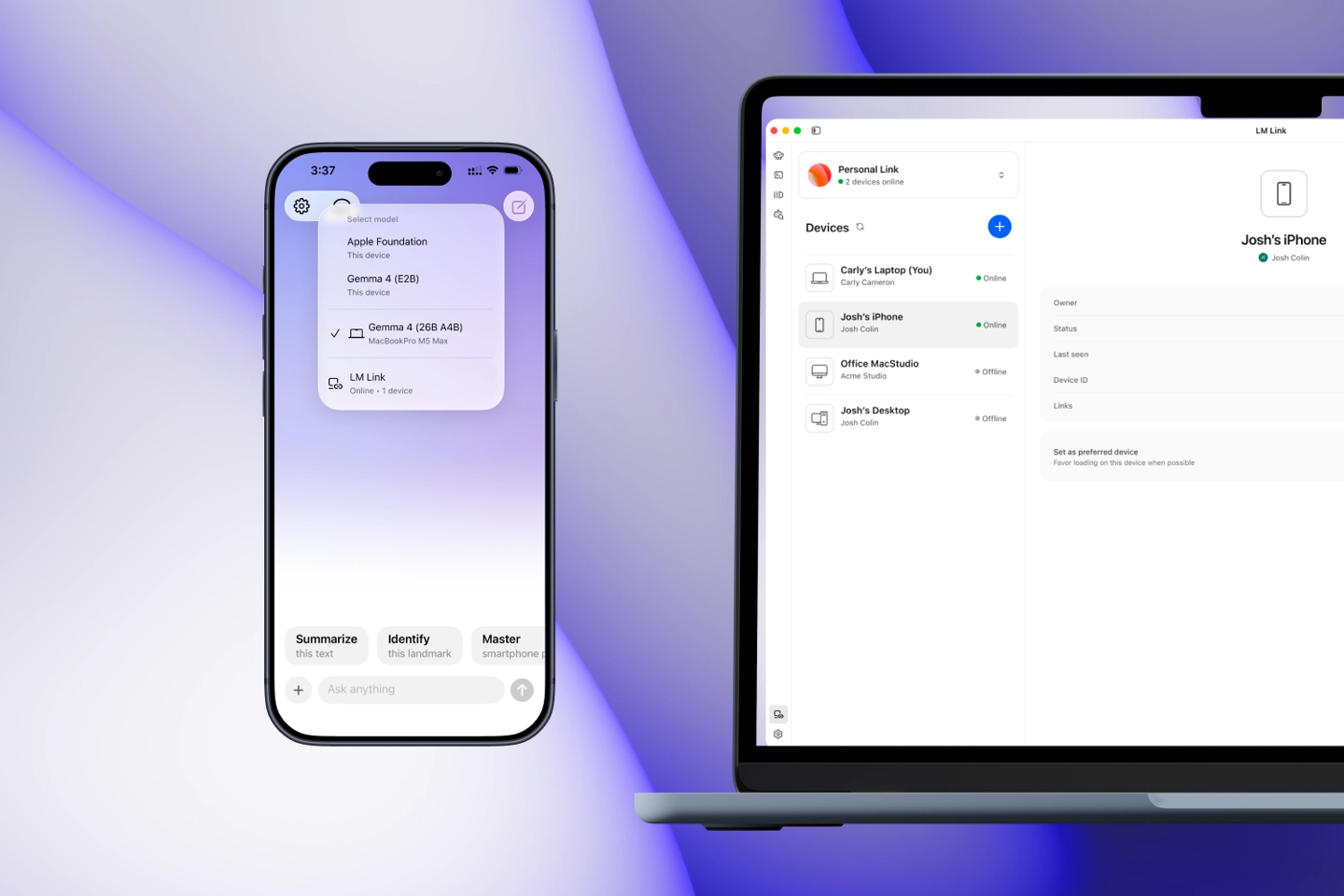
IT之家에 따르면, LM Studio가 6월 5일자로 Mac용 로컬 애플리케이션을 업데이트하며 새로운 'LM Link' 기능을 추가했습니다. 이 기능을 통해 사용자는 iPhone에서 Mac의 로컬로 구동되는 AI 대규모 언어 모델(LLM)을 직접 호출할 수 있게 되었습니다.
주요 기능 및 작동 원리
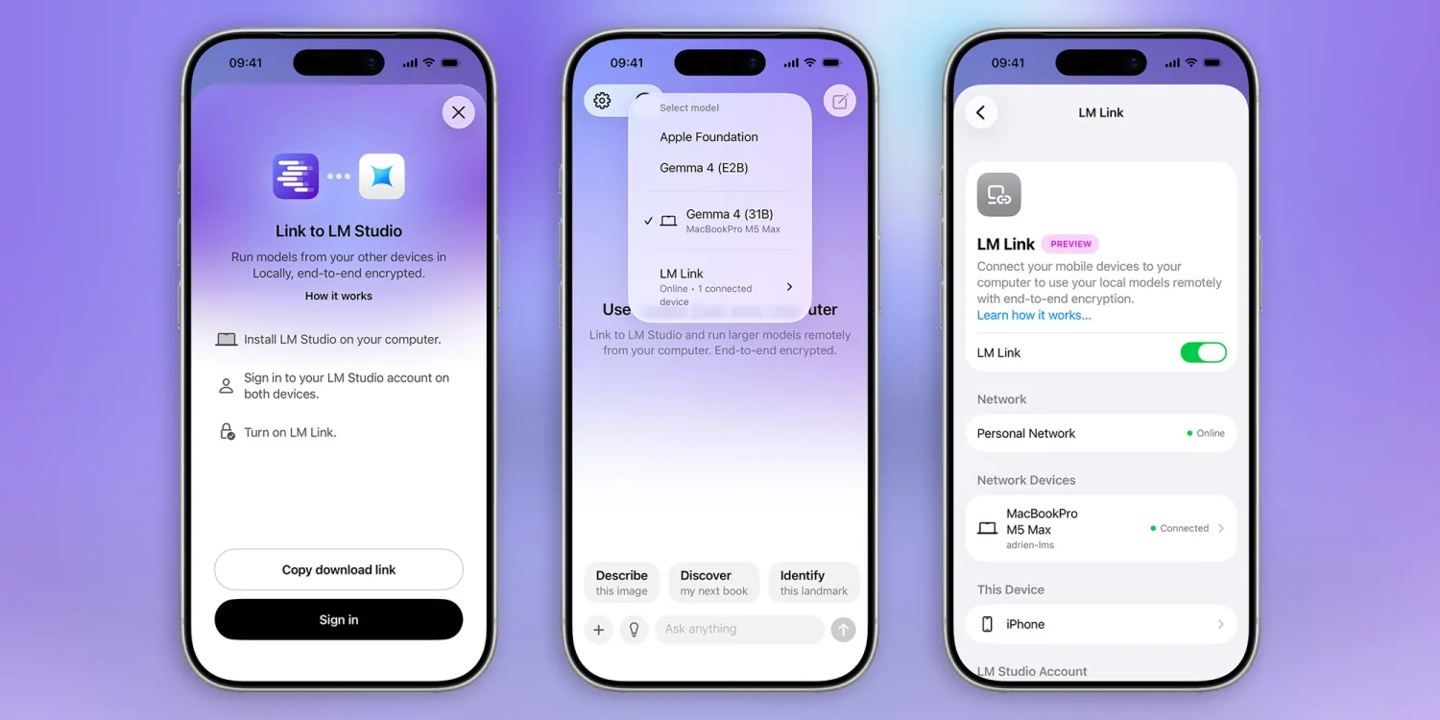
LM Link는 ‘로컬 모델 + 크로스 디바이스 접근’ 경험에 중점을 두고 있습니다. 사용자는 먼저 LM Studio 계정을 생성하고 Mac과 iPhone 양쪽에 동일한 계정으로 로그인해야 합니다.
- 작동 방식: 사용자가 LM Link를 활성화하면, 시스템은 두 장치 사이에 안전한 연결을 구축합니다.
- 데이터 흐름: iPhone이 요청을 Mac으로 전송하고, Mac에 있는 로컬 모델이 이를 처리하여 결과를 다시 반환하는 방식으로 작동합니다.
보안 및 호환성
개인 정보 보호와 보안 측면에서 LM Studio는 LM Link가 종단 간 암호화(end-to-end encryption)를 채택했다고 강조했습니다.
- 네트워크 구조: LM Link는 맞춤형 Tailscale 메시 VPN 위에서 작동합니다.
- 보안성: 장치 간의 모든 데이터와 통신은 사적이고 안전하게 유지되며, 기기들이 공용 인터넷에 직접 노출되지 않습니다.
호환성 측면에서는 Mac에 설치된 임의의 모델을 지원하며, Apple Intelligence 기반 모델도 포함됩니다. 다만, 최종적인 사용 경험은 로컬 모델의 일반적인 원칙과 마찬가지로 Mac 하드웨어 성능에 따라 달라집니다.
가격 정책 및 LM Studio 소개
LM Studio는 현재 LM Link 기능을 프리뷰 단계에서 무료로 제공할 예정입니다. 프리뷰 기간이 끝난 후에도 무료 옵션은 유지되겠지만, 구체적인 유료 플랜의 가격과 기능 계층 구조는 아직 발표되지 않았습니다.
참고로, LM Studio는 사용자의 자체 컴퓨터(로컬)에서 대규모 언어 모델(LLM)을 가볍게 설치하고 구성하며 실행하도록 설계된 강력한 데스크톱 애플리케이션입니다. 이 도구는 명령어 줄이나 깊은 Python 경험이 없는 사용자도 오픈 소스 모델을 빠르게 체험할 수 있도록, AI의 로컬 배포 진입 장벽을 낮추는 것을 목표로 합니다.
총평
LM Studio가 새롭게 선보인 LM Link 기능은 로컬 LLM 구동 환경에 '크로스 디바이스 연결성'이라는 강력한 기능을 추가했습니다. 특히 Tailscale 기반의 종단 간 암호화와 같은 보안 설계는 사용자의 데이터 프라이버시를 최우선으로 고려했음을 보여줍니다. 이 업데이트는 Mac과 iPhone 사용자들에게 로컬 AI 모델을 더욱 편리하고 안전하게 활용할 수 있는 새로운 경험을 제공할 것으로 기대됩니다.
LM Link 功能概述
LM Studio 在 Mac 版应用中新增了 LM Link 功能,旨在实现“本地模型+跨设备访问”的体验。用户可以通过 iPhone 端调用在 Mac 上运行的大语言模型(LLM),打破硬件限制带来的交互隔阂。
安全性与技术架构
为了保障隐私安全,LM Link 采用了端到端加密技术。其核心网络架构如下:
- 基于定制的 Tailscale 网状虚拟专用网络运行。
- 确保所有数据传输和通信保持私密。
- 设备不会直接暴露在公共互联网中。
兼容性与定价策略
LM Link 的支持范围及后续计划如下:
- 模型支持:支持用户在 Mac 上安装的任何模型,包括 Apple Intelligence 基础模型。
- 性能表现:实际体验取决于 Mac 端硬件的性能。
- 价格政策:目前处于预览阶段,提供免费使用;预览结束后将推出包含付费方案在内的多种选择(具体细节待定)。
总结
LM Studio 推出的 LM Link 功能允许用户通过 iPhone 安全地调用 Mac 本地的 AI 模型,并利用 Tailscale 提供端到端加密保护。该功能旨在简化本地模型的使用门槛,提供跨设备的便捷交互体验。
LM Studio、MacとiPhone間でのAIモデル連携機能「LM Link」を追加
IT之家の報道によると、LM Studioは6月5日付のMac用ローカルアプリケーションのアップデートにおいて、新機能「LM Link」を追加しました。この機能を活用することで、ユーザーはiPhoneからMac上で動作するローカルな大規模言語モデル(LLM)を直接呼び出すことが可能になります。
主な機能と仕組み
LM Linkは「ローカルモデル+クロスデバイスアクセス」の体験に焦点を当てています。利用にあたっては、まずLM Studioアカウントを作成し、MacとiPhoneの両方で同じアカウントにログインする必要があります。
- 動作の仕組み:ユーザーがLM Linkを有効にすると、システムは2つのデバイス間に安全な接続を構築します。
- データの流れ:iPhoneがリクエストをMacへ送信し、Mac上のローカルモデルがそれを処理して結果を返すというフローで動作します。
セキュリティと互換性
プライバシーとセキュリティの観点から、LM StudioはLM Linkがエンドツーエンド暗号化(end-to-end encryption)を採用していることを強調しています。
- ネットワーク構造:LM LinkはカスタマイズされたTailscaleメッシュVPN上で動作します。
- 安全性:デバイス間のすべてのデータと通信はプライベートかつ安全に保たれ、デバイスが公共のインターネットに直接露出することはありません。
互換性の面では、Macにインストールされた任意のモデルをサポートしており、Apple Intelligenceベースのモデルも含まれます。ただし、最終的なユーザー体験はローカルモデルの一般的な原則と同様に、Macのハードウェア性能に依存します。
価格ポリシーとLM Studioの紹介
LM Studioは現在、LM Link機能をプレビュー段階で無料提供する予定です。プレビュー期間終了後も無料オプションは維持される見込みですが、具体的な有料プランの価格や機能構成についてはまだ発表されていません。
参考までに、LM Studioはユーザーの自前コンピュータ(ローカル)上で大規模言語モデル(LLM)を簡単にインストール、構成、実行できるように設計された強力なデスクトップアプリケーションです。このツールは、コマンドラインや高度なPythonの知識がないユーザーでもオープンソースモデルを迅速に体験できるようにし、AIのローカル展開への参入障壁を下げることを目的としています。
総評
LM Studioが新たに提供するLM Link機能は、ローカルLLMの動作環境に「クロスデバイス接続性」という強力な機能を付加しました。特にTailscaleベースのエンドツーエンド暗号化などのセキュリティ設計は、ユーザーのデータプライバシーを最優先に考慮していることを示しています。このアップデートにより、MacとiPhoneのユーザーはローカルAIモデルをより便利かつ安全に活用できる新しい体験を得られることが期待されます。
まとめ
LM Studioが提供する新機能「LM Link」により、iPhoneからMac上で動作するローカルLLMを直接呼び出すことが可能になります。Tailscaleによる高度な暗号化技術を採用することで、セキュリティを確保しながらシームレスなクロスデバイス体験を実現しています。このアップデートは、プライバシーを重視しつつ利便性を求めるユーザーにとって大きな価値となるでしょう。
LM Studio Adds 'LM Link' for Cross-Device AI Model Integration
According to IT Home, LM Studio updated its Mac application on June 5th to include a new feature called "LM Link." This functionality allows users to call large language models (LLMs) running locally on a Mac directly from an iPhone.
Key Features and Mechanism
LM Link focuses on providing a "local model + cross-device access" experience. To utilize this, users must first create an LM Studio account and log in with the same credentials on both their Mac and iPhone.
- Operation: Once LM Link is activated, the system establishes a secure connection between the two devices.
- Data Flow: The iPhone sends a request to the Mac, where the local model processes the request and returns the result back to the mobile device.
Security and Compatibility
Regarding privacy and security, LM Studio emphasized that LM Link employs end-to-end encryption.
- Network Architecture: LM Link operates on a customized Tailscale mesh VPN.
- Security: All data and communication between devices remain private and secure, ensuring the devices are not directly exposed to the public internet.
In terms of compatibility, it supports any model installed on the Mac, including models based on Apple Intelligence. However, the final user experience depends on the hardware performance of the local Mac.
Pricing Policy and LM Studio Overview
LM Studio will provide the LM Link feature for free during its preview phase. While a free option will remain available after the preview period ends, specific pricing and features for paid plans have not yet been announced.
For context, LM Studio is a powerful desktop application designed to let users easily install, configure, and run large language models (LLMs) on their own local machines. The tool aims to lower the barrier to entry for local AI deployment, allowing even those without command-line or deep Python experience to quickly explore open-source models.
Summary
LM Studio's new LM Link feature enables seamless cross-device connectivity, allowing iPhone users to access Mac-hosted LLMs securely via a Tailscale mesh VPN. This update enhances the utility of local AI environments by prioritizing user privacy through end-to-end encryption while expanding functionality for Mac and iPhone users.
新功能发布
LM Studio 在 Mac 版 Locally 应用中新增了 LM Link 功能。该功能旨在实现“本地模型+跨设备访问”的体验,允许用户在 iPhone 上直接调用运行在 Mac 本地环境中的大语言模型(LLM)。
连接与安全机制
为了确保数据隐私,LM Link 采用了端到端加密技术。其核心技术架构包括:
- 基于定制的 Tailscale 网状虚拟专用网络运行。
- 所有设备间的通信均保持私密,且设备不会直接暴露到公共互联网。
兼容性与定价
关于 LM Link 的支持范围及后续计划如下:
- 模型支持:支持用户在 Mac 上安装的任何模型,包括 Apple Intelligence 基础模型。
- 性能表现:处理速度取决于 Mac 本地硬件的性能。
- 价格政策:目前处于预览阶段并提供免费使用;预览结束后将推出包含付费在内的多种方案。
总结
LM Studio 推出的 LM Link 功能通过 Tailscale 网络实现了 iPhone 与 Mac 之间的安全连接,让用户能够跨设备调用本地运行的 AI 模型。该功能目前处于预览阶段并提供免费使用,旨在降低用户部署和体验本地化 AI 的门槛。
LM Studio、MacとiPhone間のAIモデル連携機能「LM Link」を追加
IT之家の報道によると、LM Studioは6月5日付でMac用ローカルアプリケーションをアップデートし、新機能「LM Link」を追加しました。この機能により、ユーザーはiPhoneからMac上でローカルに動作している大規模言語モデル(LLM)を直接呼び出すことが可能になります。
主な機能と仕組み
LM Linkは「ローカルモデル+クロスデバイスアクセス」の体験に焦点を当てています。ユーザーはまずLM Studioアカウントを作成し、MacとiPhoneの両方で同じアカウントにログインする必要があります。
- 動作の仕組み: ユーザーがLM Linkを有効にすると、システムは2つのデバイス間に安全な接続を構築します。
- データの流れ: iPhoneがリクエストをMacに送信し、Mac上のローカルモデルがそれを処理して結果を返すというフローで動作します。
セキュリティと技術構成
プライバシーとセキュリティの観点から、LM StudioはLM Linkがエンドツーエンド暗号化(end-to-end encryption)を採用していることを強調しています。
- ネットワーク構造: LM LinkはカスタマイズされたTailscaleメッシュVPN上で動作します。
- 安全性: デバイス間のすべてのデータと通信はプライベートかつ安全に保たれ、デバイスが公共のインターネットに直接露出することはありません。
互換性と価格戦略
LM Linkのサポート範囲および今後の計画は以下の通りです。
- モデルのサポート: Macにインストールされた任意のモデルをサポートし、これにはApple Intelligenceベースのモデルも含まれます。ただし、最終的なユーザー体験はローカルモデルの一般的な原則と同様に、Macのハードウェア性能に依存します。
- 価格設定: LM Studioは現在、LM Link機能をプレビュー段階で無料提供する予定です。プレビュー期間終了後も無料オプションは維持されますが、具体的な有料プランの価格や機能階層についてはまだ発表されていません。
なお、LM Studioはユーザーの自身のコンピュータ(ローカル)で大規模言語モデル(LLM)を簡単にインストール、構成、実行できるように設計された強力なデスクトップアプリケーションです。このツールは、コマンドラインや高度なPythonの経験がないユーザーでもオープンソースモデルを迅速に体験できるようにし、AIのローカル展開への参入障壁を下げることを目的としています。
まとめ
LM Studioが新たに提供するLM Link機能は、ローカルLLM環境に「クロスデバイス接続性」という強力な利便性を追加します。Tailscaleベースのエンドツーエンド暗号化により高いセキュリティを確保しつつ、MacとiPhoneユーザーがより便利かつ安全にローカルAIモデルを活用できる新たな体験を提供します。
LM Studio Adds 'LM Link' for Mac-iPhone AI Model Integration
According to IT Home, LM Studio updated its Mac application on June 5th to include a new feature called "LM Link." This functionality allows users to call Large Language Models (LLMs) running locally on a Mac directly from an iPhone.
Key Features and Operation
LM Link focuses on providing a "local model + cross-device access" experience. To use this, users must first create an LM Studio account and log in with the same credentials on both their Mac and iPhone.
- Operation: Once the user activates LM Link, the system establishes a secure connection between the two devices.
- Data Flow: The iPhone sends a request to the Mac; the local model on the Mac processes the request and returns the result back to the mobile device.
Security and Compatibility
Regarding privacy and security, LM Studio highlighted that LM Link utilizes end-to-end encryption.
- Network Architecture: LM Link operates over a customized Tailscale mesh VPN.
- Security: All data and communication between the devices remain private, ensuring that the hardware is not directly exposed to the public internet.
In terms of compatibility, it supports any model installed on the Mac, including models based on Apple Intelligence. However, the final user experience remains dependent on the performance capabilities of the local Mac hardware.
Pricing Policy and About LM Studio
LM Studio is currently offering the LM Link feature for free during its preview phase. While a free option will remain available after the preview period ends, specific pricing and tiers for paid plans have not yet been announced.
LM Studio is a powerful desktop application designed to let users easily install, configure, and run LLMs on their own local machines. The tool aims to lower the barrier to entry for open-source models, making them accessible even to users without command-line or deep Python experience.
Summary
LM Studio's new LM Link feature enables seamless cross-device interaction by allowing iPhone users to access locally hosted LLMs on a Mac via an encrypted Tailscale mesh VPN. This update enhances the utility of local AI models while maintaining high standards for data privacy and security.
新增功能:LM Link 跨设备访问
LM Studio 更新了 Mac 版 Locally 应用,新增 LM Link 功能。该功能旨在提供“本地模型+跨设备访问”的体验,允许用户在 iPhone 上直接调用运行在 Mac 本地端的 AI 大语言模型。
技术原理与安全性
为了保障数据安全,LM Link 在架构上做了如下设计:
- 要求用户在 Mac 和 iPhone 两端登录同一个 LM Studio 账号。
- 基于定制的 Tailscale 网状虚拟专用网络运行。
- 采用端到端加密技术,确保设备间通信私密且不暴露于公共互联网。
兼容性与定价策略
关于模型支持及后续计划:
- 支持用户在 Mac 上安装的任意模型,包括 Apple Intelligence 基础模型。
- 性能表现取决于 Mac 本地硬件配置。
- LM Link 目前处于预览阶段并提供免费使用;预览结束后将推出包含付费方案的功能分层。
总结
LM Studio 推出的 LM Link 功能通过建立安全的端到端加密连接,实现了 iPhone 对 Mac 本地运行大模型的跨设备调用。该功能在保障隐私安全的同时,提升了本地模型在移动端的易用性。
LM Studio、MacとiPhone間でのAIモデル連携機能「LM Link」を追加
ITのニュースによると、LM Studioは6月5日付のMac用ローカルアプリケーションのアップデートにおいて、新機能「LM Link」を追加しました。この機能を活用することで、ユーザーはiPhoneからMac上で動作するローカルな大規模言語モデル(LLM)を直接呼び出すことが可能になります。
主な機能と仕組み
LM Linkは「ローカルモデル+クロスデバイスアクセス」の体験に焦点を当てています。利用にあたっては、まずLM Studioアカウントを作成し、MacとiPhoneの両方で同じアカウントにログインする必要があります。
- 動作の仕組み:ユーザーがLM Linkを有効にすると、システムは2つのデバイス間に安全な接続を構築します。
- データの流れ:iPhoneがリクエストをMacへ送信し、Mac上のローカルモデルがそれを処理して結果を返すというフローで動作します。
セキュリティと互換性
プライバシーとセキュリティの観点から、LM StudioはLM Linkがエンドツーエンド暗号化(end-to-end encryption)を採用していることを強調しています。
- ネットワーク構造:LM LinkはカスタマイズされたTailscaleメッシュVPN上で動作します。
- 安全性:デバイス間のすべてのデータと通信はプライベートかつ安全に保たれ、デバイスが公開のインターネットに直接露出することはありません。
互換性の面では、Macにインストールされた任意のモデルをサポートしており、Apple Intelligenceベースのモデルも含まれます。ただし、最終的なユーザー体験はローカルモデルの一般的な原則と同様に、Macのハードウェア性能に依存します。
価格ポリシーとLM Studioの紹介
LM Studioは現在、LM Link機能をプレビュー段階で無料提供する予定です。プレビュー期間終了後も無料オプションは維持される見込みですが、具体的な有料プランの価格や機能構成についてはまだ発表されていません。
参考までに、LM Studioはユーザーの自前コンピュータ(ローカル)上で大規模言語モデル(LLM)を簡単にインストール、構成、実行できるように設計された強力なデスクトップアプリケーションです。このツールは、コマンドラインや高度なPythonの知識がないユーザーでもオープンソースモデルを迅速に体験できるようにし、AIのローカル展開への参入障壁を下げることを目的としています。
まとめ
LM Studioの新機能「LM Link」により、iPhoneからMac上のローカルLLMを安全かつシームレスに呼び出すことが可能になります。Tailscaleによるエンドツーエンド暗号化を採用することで高いセキュリティを確保しており、プライバシーを重視しながらクロスデバイスでのAI活用を求めるユーザーにとって非常に便利なアップデートとなります。
LM Studio Adds 'LM Link' for Cross-Device AI Model Integration
According to IT Home, LM Studio updated its Mac application on June 5th to include a new feature called "LM Link." This functionality allows users to call large language models (LLMs) running locally on a Mac directly from an iPhone.
Key Features and Mechanism
LM Link focuses on providing a "local model + cross-device access" experience. To utilize this, users must first create an LM Studio account and log in with the same credentials on both their Mac and iPhone.
- Operation: Once LM Link is activated, the system establishes a secure connection between the two devices.
- Data Flow: The iPhone sends a request to the Mac, where the local model processes the request and returns the result back to the mobile device.
Security and Compatibility
Regarding privacy and security, LM Studio emphasized that LM Link employs end-to-end encryption.
- Network Architecture: LM Link operates on a customized Tailscale mesh VPN.
- Security: All data and communication between devices remain private and secure, ensuring the devices are not directly exposed to the public internet.
In terms of compatibility, it supports any model installed on the Mac, including models based on Apple Intelligence. However, the final user experience depends on the hardware performance of the local Mac.
Pricing Policy and LM Studio Overview
LM Studio will provide the LM Link feature for free during its preview phase. While a free option will remain available after the preview period ends, specific pricing and features for paid plans have not yet been announced.
For context, LM Studio is a powerful desktop application designed to let users easily install, configure, and run large language models (LLMs) on their own local machines. This tool aims to lower the barrier to entry for local AI deployment, allowing even users without command-line or advanced Python experience to quickly explore open-source models.
Summary
LM Studio's new "LM Link" feature enables users to access locally hosted LLMs on a Mac from an iPhone through a secure, end-to-end encrypted connection powered by Tailscale. This update provides a seamless cross-device experience while ensuring that user data remains private and off the public internet.