One UI 8.5 업데이트
Samsung One UI 8.5 정식 버전이 5월 11일부터 전 세계적으로 업데이트되었으며, 인터페이스 디자인이 새롭게 바뀌었습니다. 현재 Samsung Galaxy S25 시리즈 중국 내수용 휴대폰에 업데이트가 배포되었습니다.
해외 매체 SammyGuru는 어제(5월 11일) Samsung One UI 8.5가 Galaxy 휴대폰에 새로운 기능을 도입하여 광고성 알림을 과도하게 보내는 앱으로부터 사용자 불편을 줄일 수 있다고 보도했습니다.
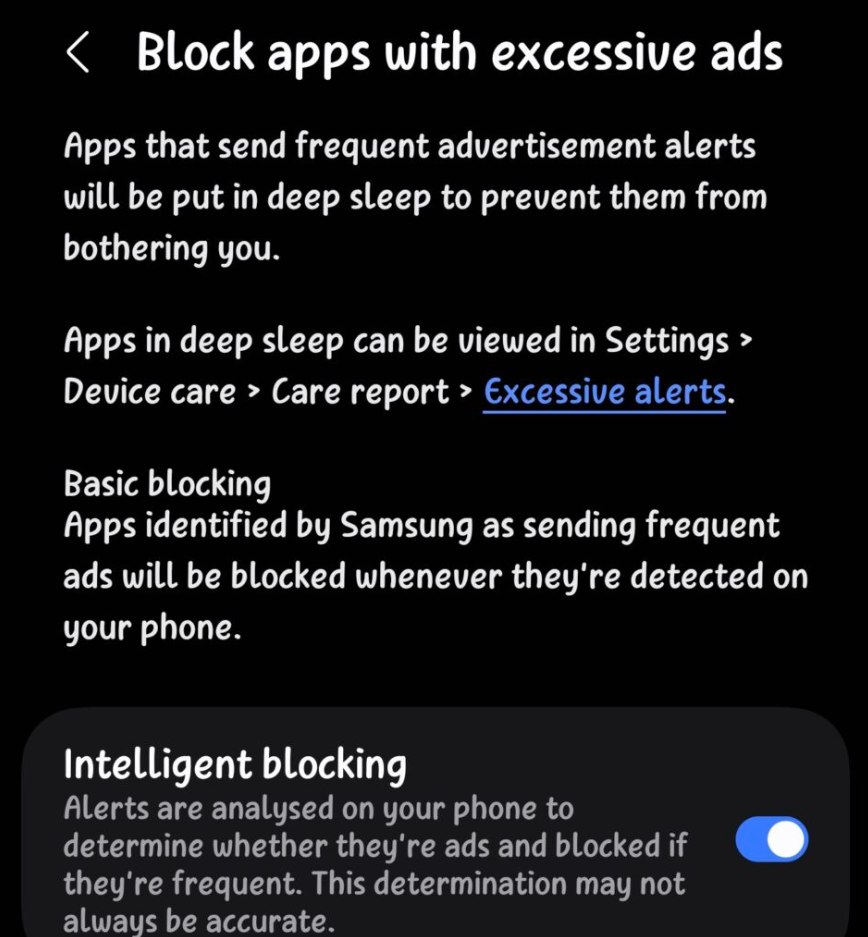
Samsung은 자체 Device Care 앱(휴대폰 관리자와 유사)을 13.8.80.7 버전으로 업데이트하여 "과도한 광고를 보내는 앱 차단(Block apps with excessive ads)"이라는 새로운 기능을 도입했습니다. 이 기능은 과도한 광고 알림을 보내는 앱을 감지하고 차단할 수 있습니다.
이 기능은 단계적으로 출시되는 것으로 보이므로, 해당 사용자들은 사용 가능해질 때까지 며칠 또는 몇 주를 기다려야 할 수 있습니다.
광고 차단 기능
이 기능에는 두 가지 차단 방식이 있습니다. 기본 방식에서는 Samsung이 광고를 자주 보내는 앱을 식별한 다음 알림을 차단합니다.
스마트 방식에서는 휴대폰이 앱 알림을 자체적으로 분석하여 광고인지 여부를 판단합니다. 너무 자주 나타나면 차단됩니다. 단, 이러한 판단이 항상 정확하지는 않을 수 있습니다.
이 기능이 One UI 8.5에만 국한되는지는 아직 불분명합니다. 또한, 이 기능은 현재 최신 Galaxy S26 시리즈에서만 사용할 수 있는 것으로 보입니다.
총평
Samsung One UI 8.5는 5월 11일부터 전 세계적으로 배포되었으며, 특히 Galaxy S25 시리즈에 업데이트가 진행 중입니다. 이번 업데이트의 핵심 기능 중 하나는 "과도한 광고를 보내는 앱 차단"으로, Device Care 앱을 통해 광고성 알림을 줄여 사용자 경험을 개선합니다. 이 기능은 기본 및 스마트 두 가지 방식으로 작동하며, 현재 Galaxy S26 시리즈에서만 사용 가능한 것으로 보입니다.
系统更新动态
Samsung One UI 8.5 已于 5 月 11 日开始全球推送,目前已在 Galaxy S25 系列国行手机上获得更新。
应用组件升级
作为系统的一部分,Device Care 应用已更新至版本 13.8.80.7,并在其中引入了“Block apps with excessive ads”新功能。
核心功能定义
该功能旨在识别并拦截那些频繁发送广告通知的 App,从而减少对用户的干扰。
过滤模式对比
- 基础方案:系统自动识别出频率较高的广告应用并进行阻拦。
- 智能方案:手机通过分析通知内容来判断是否为广告,若判定为广告且出现过于频繁,则会自动拦截(注意该判定的准确性可能受限)。
推送与兼容性
该功能采取分阶段推送,不同用户获取时间可能有差异。目前此项功能似乎主要支持在最新的 Galaxy S26 系列上使用。
总结
Samsung One UI 8.5 更新通过升级 Device Care 组件,新增了针对高频广告通知的拦截功能。系统提供基础与智能两种过滤模式,旨在优化用户体验,目前正逐步推送至相关机型。
One UI 8.5のアップデート
Samsung One UI 8.5の正式バージョンが5月11日より世界中で展開され、インターフェースのデザインが一新されました。現在、中国国内向けのGalaxy S25シリーズにアップデートが配信されています。
海外メディアのSammyGuruは昨日(5月11日)、Samsung One UI 8.5がGalaxyスマートフォンに新機能を導入し、過度な広告通知を送信するアプリによるユーザーの不便を軽減すると報じました。
Samsungは自社のDevice Careアプリ(端末管理機能)をバージョン13.8.80.7にアップデートし、「過度な広告を送信するアプリをブロック(Block apps with excessive ads)」という新機能を導入しました。この機能により、頻繁に広告通知を送るアプリを検知して遮断することが可能になります。
この機能は段階的にリリースされるため、ユーザーによっては利用可能になるまで数日から数週間待つ必要がある場合があります。
広告ブロック機能
この機能には2つのブロック方式があります。基本(Basic)モードでは、Samsungが頻繁に広告を送信するアプリを特定し、通知をブロックします。
スマート(Smart)モードでは、スマートフォンが通知内容を自動的に分析し、それが広告であるかどうかを判断します。通知の頻度が高すぎる場合はブロックされますが、この判定は常に正確とは限りません。
この機能がOne UI 8.5に限定されるかはまだ不明です。また、この機能は現在最新のGalaxy S26シリーズでのみ利用可能であると見られています。
まとめ
Samsung One UI 8.5は5月11日より世界展開を開始しており、特にGalaxy S25シリーズへのアップデートが進んでいます。今回の目玉機能の一つはDevice Careを通じた「過度な広告を送信するアプリのブロック」であり、基本とスマートの2つのモードでユーザー体験の向上を図ります。なお、この機能は現在主にGalaxy S26シリーズで提供されているようです。
One UI 8.5 Update
The official version of Samsung's One UI 8.5 was rolled out globally starting May 11, featuring a redesigned interface. The update has been deployed to the Galaxy S25 series in China.
Media outlet SammyGuru reported on May 11 that One UI 8.5 introduces new features designed to reduce user inconvenience caused by apps that send excessive promotional notifications.
Samsung updated its Device Care app (similar to a phone manager) to version 13.8.80.7, introducing a new feature called "Block apps with excessive ads." This function is capable of detecting and blocking applications that send an overwhelming number of advertisement notifications.
As this feature is being rolled out in stages, some users may need to wait several days or weeks for it to become available on their devices.
Ad Blocking Features
There are two different methods for blocking ads within this feature:
- Default Mode: Samsung identifies apps that frequently send advertisements and blocks those notifications.
- Smart Mode: The phone automatically analyzes app notifications to determine if they are advertisements, blocking them if they appear too frequently. However, these judgments may not always be accurate.
It is currently unclear whether this feature is exclusive to One UI 8.5. Furthermore, the feature appears to be available only on the latest Galaxy S26 series at this time.
Summary
Samsung's One UI 8.5 update was released globally on May 11, featuring a new interface and an integrated "Block apps with excessive ads" tool within the Device Care app. This feature offers both Default and Smart modes to filter out intrusive promotional notifications from third-party applications. While currently seen on the Galaxy S26 series, the update aims to significantly improve user experience by reducing notification clutter.