Huawei HarmonyOS 6의 'Today-Task Skill' 기능
IT之家 5월 6일 소식에 따르면, HarmonyOS 개발자 공식 Weibo는 오늘 Huawei HarmonyOS 6 시스템의 마이너스 1 화면에 있는 'Today-Task Skill' 기능이 공식적으로 출시되었다고 발표했습니다.
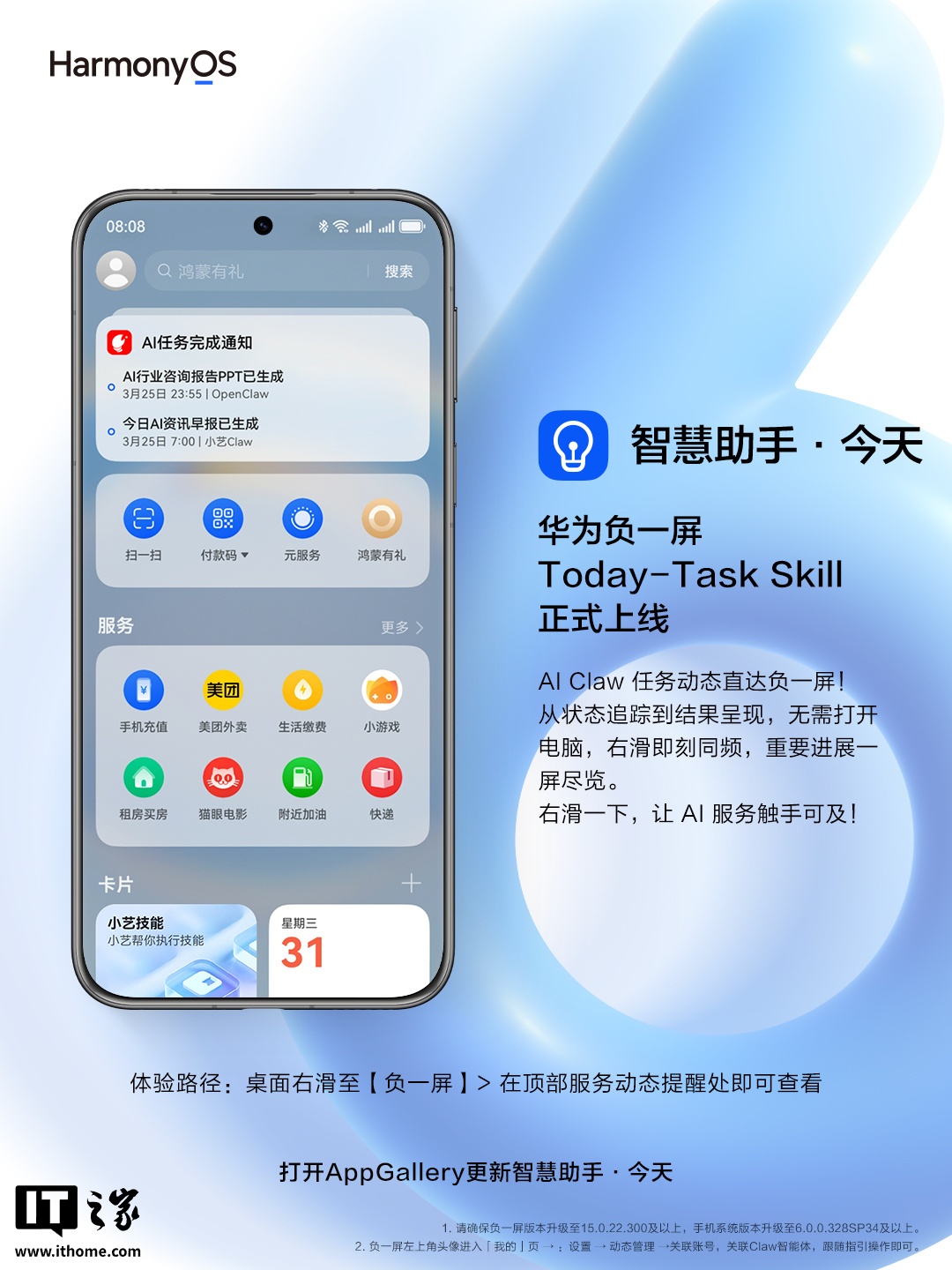
설명에 따르면, AI Claw 작업 동적 기능이 HarmonyOS 6의 마이너스 1 화면에 실시간으로 연동되어, 진행 상황 추적부터 결과 표시까지 PC를 켤 필요 없이 바탕화면을 오른쪽으로 밀면 즉시 동기화되어 중요한 진행 상황을 확인할 수 있습니다. 기능 경로는 다음과 같습니다.
- 바탕화면을 오른쪽으로 밀어 [마이너스 1 화면]으로 이동
- 상단 서비스 동적 알림에서 확인 가능
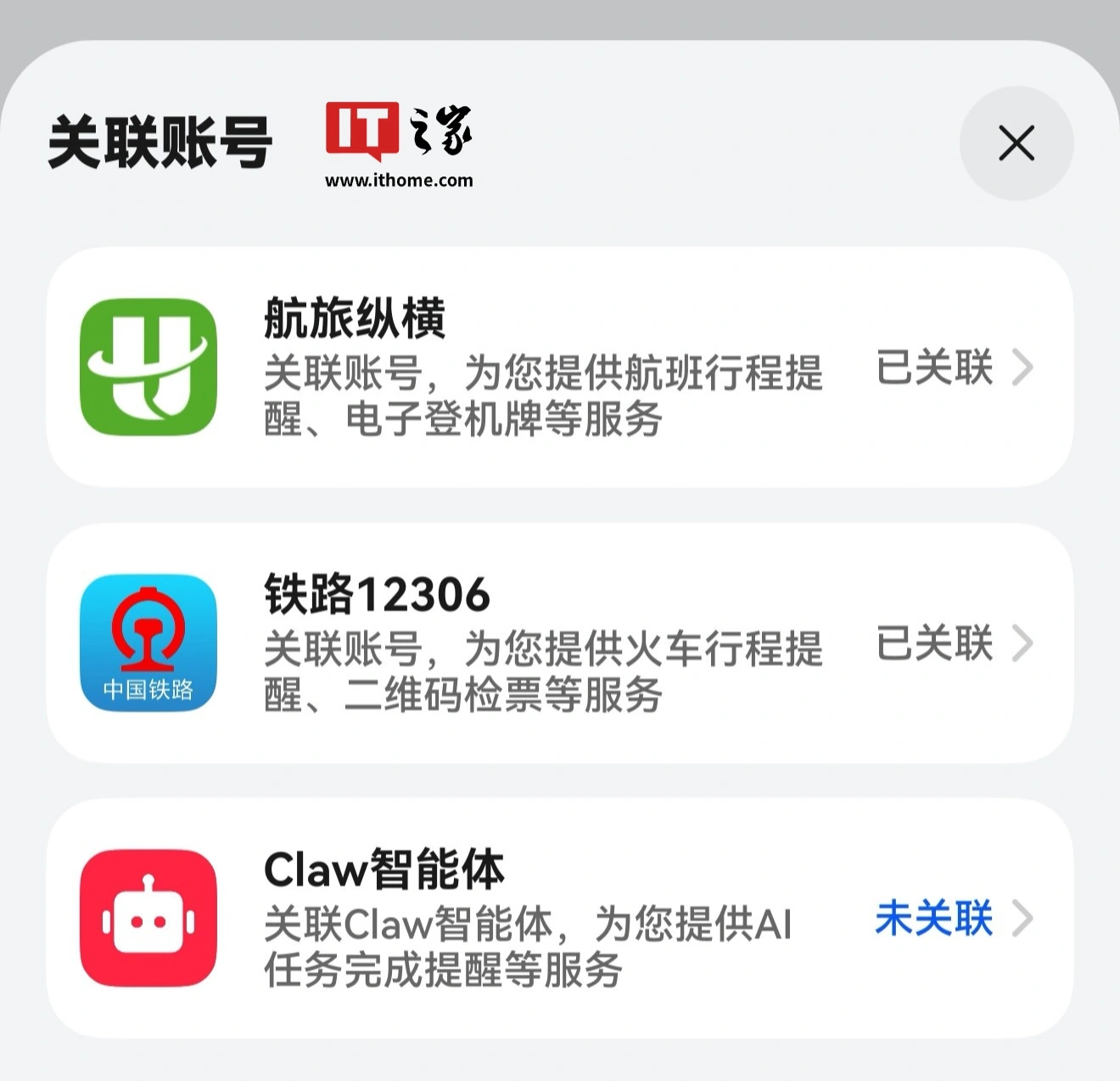
IT之家의 이전 보도에 따르면, 올해 4월 초 Huawei HarmonyOS 6 시스템의 마이너스 1 화면 애플리케이션인 스마트 어시스턴트 Today가 15.0.22.210 버전의 내부 테스트를 시작했으며, Claw 스마트 에이전트 기능 연동을 지원하여 AI 작업 완료 알림 등의 서비스를 제공합니다.
총평
Huawei HarmonyOS 6 시스템에 'Today-Task Skill' 기능이 공식 출시되었습니다. 이 기능은 AI Claw 작업을 마이너스 1 화면에 실시간으로 연동하여 사용자가 PC를 켜지 않고도 작업 진행 상황과 결과를 빠르게 확인할 수 있도록 돕습니다. 이를 통해 사용자 편의성이 향상될 것으로 기대됩니다.
移动设备与系统
HarmonyOS 开发者官方微博宣布,Huawei 鸿蒙 HarmonyOS 6 系统负一屏的「Today-Task Skill」正式上线。
- 该功能将 AI Claw 任务动态实时接入 HarmonyOS 6 的负一屏,支持从进度追踪到结果呈现。
- 用户无需打开电脑,在桌面右滑至【负一屏】后,可在顶部服务动态提醒处查看重要进展。
- 相关功能源于 4 月初内测的「智慧助手 · 今天」版本(15.0.22.210),该版本支持关联 Claw 智能体功能并提供 AI 任务完成提醒。
总结
Huawei 鸿蒙 HarmonyOS 6 系统正式上线「Today-Task Skill」,将 AI Claw 任务动态整合至负一屏。此举旨在让用户无需打开电脑即可在移动端实时查看任务进度,提升了跨设备协作的便捷性。
Huawei HarmonyOS 6の「Today-Task Skill」機能
IT之家の報道(5月6日付)によると、HarmonyOS開発者公式Weiboにて、Huawei HarmonyOS 6システムの「マイナス1画面」における「Today-Task Skill」機能が正式にリリースされたことが発表されました。
この機能により、AI Clawの動的機能がHarmonyOS 6のマイナス1画面とリアルタイムで連携します。これにより、PCを起動することなく、ホーム画面を右にスワイプするだけで進捗状況から結果の表示までを即座に同期し、重要な進行状況を確認できるようになります。操作手順は以下の通りです。
- ホーム画面を右にスワイプして「マイナス1画面」へ移動
- 上部のサービス動的通知から確認可能
IT家(IT之家)の以前の報道によると、今年4月初旬にHarmonyOS 6システムのマイナス1画面アプリケーションであるスマートアシスタント「Today」がバージョン15.0.22.210で内部テストを開始しており、Clawスマートエージェント機能との連携をサポートして、AIタスク完了通知などのサービスを提供していました。
まとめ
Huawei HarmonyOS 6に「Today-Task Skill」機能が正式に導入されました。この機能はAI Clawの作業内容をマイナス1画面とリアルタイムで同期させるもので、ユーザーはPCを操作することなくタスクの進捗や結果を迅速に確認できるようになります。これにより、ユーザーの利便性が大幅に向上することが期待されます。
Huawei HarmonyOS 6 'Today-Task Skill' Feature
According to reports from IT Home on May 6, the official HarmonyOS developer Weibo announced that the "Today-Task Skill" feature on the -1 screen of the Huawei HarmonyOS 6 system has been officially released.
The description states that the AI Claw task dynamic function is integrated in real-time with the -1 screen of HarmonyOS 6. This allows users to track progress and view results immediately by swiping right from the home screen without needing to turn on a PC, ensuring that critical updates are synchronized instantly.
The navigation path for this feature is as follows:
- Swipe right from the home screen to enter the [-1 screen].
- Check via top service dynamic notifications.
Previous reports from IT Home indicated that in early April, "Today," a smart assistant application on the -1 screen of the Huawei HarmonyOS 6 system, began internal testing under version 15.0.22.210. This version supports integration with Claw smart agent functions to provide services such as AI task completion notifications.
Summary
The "Today-Task Skill" has officially launched on Huawei HarmonyOS 6, integrating AI Claw tasks into the -1 screen for real-time tracking. This feature allows users to monitor progress and view results directly from their mobile devices without needing a PC, significantly improving user convenience.