Huawei의 '오늘의 작업 스킬(Today-Task Skill)' 기능 출시
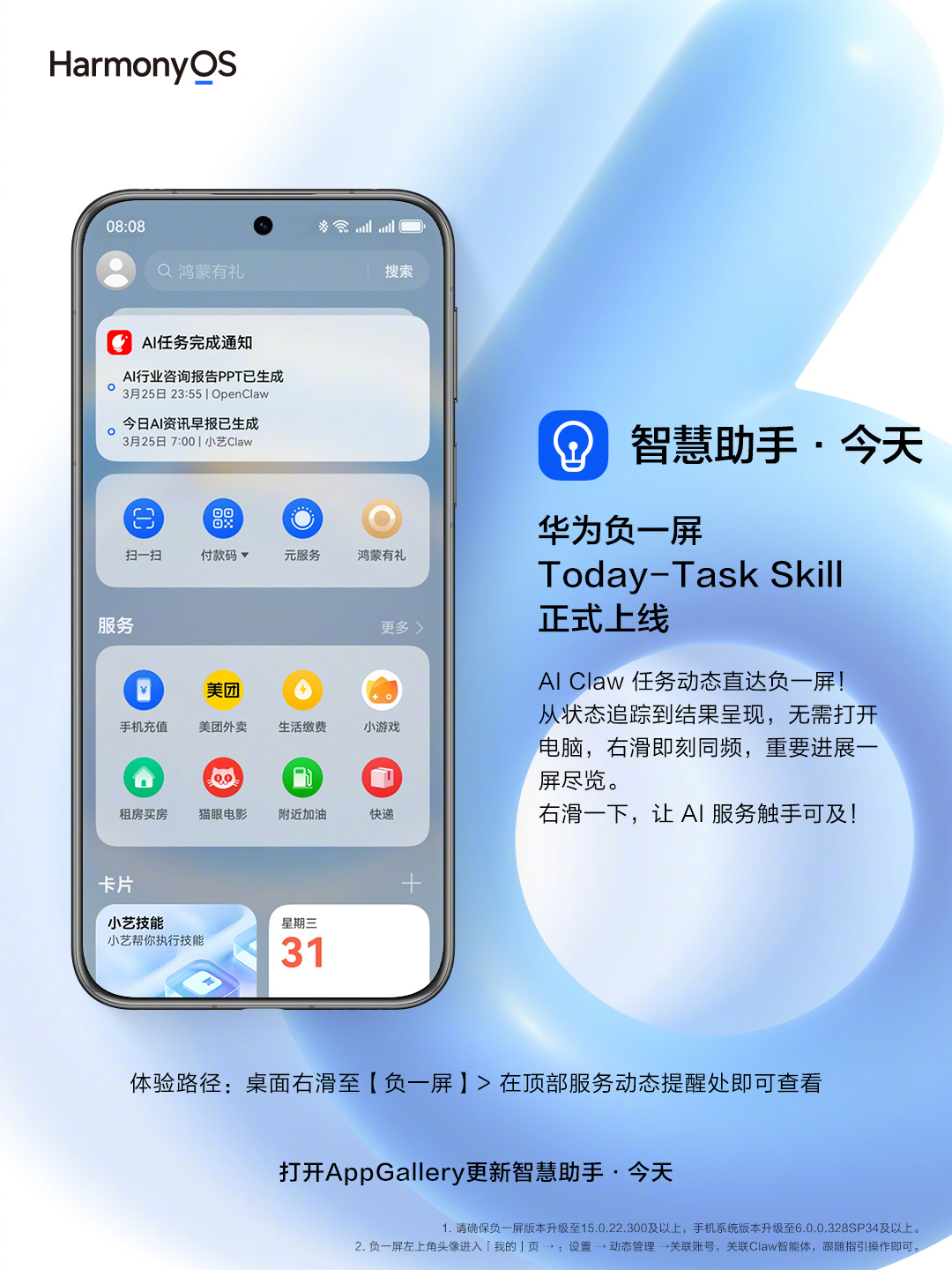
Huawei는 4월 30일, 좌측 화면(Negative Screen)에 탑재되는 ‘오늘의 작업 스킬(Today-Task Skill)’ 기능을 공식적으로 공개하며 정식 서비스를 시작했습니다. 이 기능은 AI 디지털 비서 Claw와 사용자의 작업을 실시간으로 동적 연결합니다. 사용자들은 별도로 컴퓨터를 켜거나 특정 앱을 실행할 필요 없이, 휴대폰 화면 좌측에서 오른쪽으로 스와이프하는 것만으로도 현재 진행 중인 작업의 과정과 결과를 바로 확인할 수 있어, AI 서비스를 손쉽게 이용할 수 있게 되었습니다.
HarmonyOS 6.1 기반, '역대급' 정보 집약
‘오늘의 작업 스킬’은 Huawei 좌측 화면 역사상 가장 많은 기능을 담은 버전의 핵심 구성 요소입니다. HarmonyOS 6.1이 정식으로 배포되면서, 좌측 화면 역시 대폭 업그레이드되었습니다. 상단 영역에는 사용자의 일상생활과 관련된 다양한 실시간 동적 카드들이 모여 있습니다.
- 매일의 일정
- 교통 및 이동 정보
- 스포츠 경기 정보
- 택배 및 배달 서비스 등 사용자 생활 전반의 핵심 정보를 편리하게 보여줍니다.
예를 들어, 노동절 연휴 기간처럼 교통이 몰리는 시기에 사용자가 12306을 통해 예매한 기차표 발권 정보가 앱을 여러 번 열어 확인할 필요 없이, 좌측 화면의 서비스 카드에 즉시 동기화되어 표시됩니다.
AI 비서 Claw와의 강력한 연동 경험
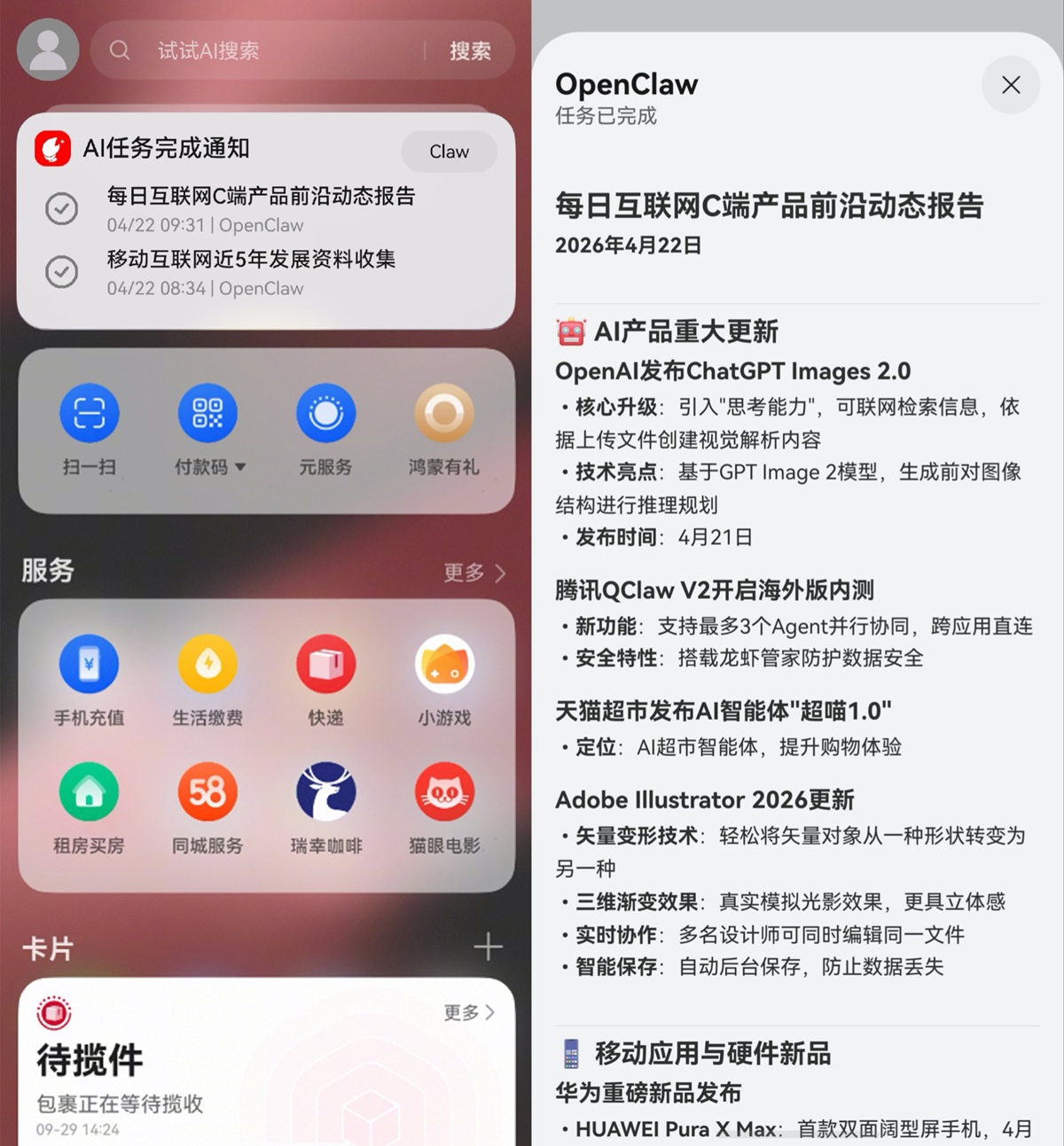
HarmonyOS 6.1 기반에서 작동하는 좌측 화면의 서비스 동적 카드는 AI 디지털 비서 Claw와 직접 연결되어 효율적인 연동을 구현합니다. AI 디지털 비서 Claw가 백그라운드에서 작업을 처리하고 있을 때, 좌측 화면에 ‘AI 작업 완료 알림’ 카드가 실시간으로 업데이트됩니다.
이 덕분에 사용자는 여러 앱을 전환할 필요 없이 언제 어디서든 작업 진행 상황을 파악할 수 있어 매우 편리하고 마음이 놓입니다.
상황 인지 기반의 '탐색형' 서비스 경험 제공
Huawei는 노동절 연휴와 같은 다양한 사용 시나리오를 염두에 두고, 좌측 화면에 ‘탐색형’ 서비스 경험을 구축했습니다. 사용자들은 상단 검색창을 통해 원하는 각종 서비스로 바로 접근할 수 있습니다.
- ‘경기’를 검색하면 레이속 스포츠(雷速体育), 중앙 비디오 선정 콘텐츠 등의 카드를 빠르게 얻어 수페르코파 2026과 같은 주요 경기를 추적할 수 있습니다.
또한, 좌측 화면 하단에서 스와이프하여 진입하는 ‘탐색 메타 서비스’ 공간에서는 여행, 지역 생활, 쇼핑, 음악 등 다양한 분야의 서비스를 이용할 수 있습니다.
이 공간은 상황 인지 및 기억 능력을 갖추고 있어, 사용자가 현재 처한 환경이나 과거 사용 습관을 분석하여 개인화된 서비스를 추천합니다. 이를 통해 서비스 접근성이 더욱 정확하고 효율적으로 높아집니다.
총평
Huawei의 이번 '오늘의 작업 스킬' 기능은 단순히 정보를 보여주는 것을 넘어, AI 비서 Claw와 연동되어 사용자의 일상적인 작업을 실시간으로 관리해 주는 차세대 경험을 제공합니다. HarmonyOS 6.1에 탑재된 이 기능을 통해 사용자들은 앱 전환의 번거로움 없이 핵심 생활 정보와 개인화된 서비스를 손쉽게 얻을 수 있게 되었습니다.
Today-Task Skill 功能上线
Huawei 于 4 月 30 日官宣负一屏“Today-Task Skill”功能正式上线。该功能基于 HarmonyOS 6.1,实现了与 AI 数字助理 Claw 的动态实时联动。用户无需打开特定应用或进入相关 App,仅需在手机桌面右滑,即可在负一屏直接查看任务进程与结果。
丰富的内容卡片与服务集成
作为“史上最忙版本”的重要组成部分,负一屏顶部区域集成了多种日常服务的动态卡片。当 AI 数字助理 Claw 在后台处理任务时,系统会通过“AI 任务完成通知”卡片实时同步结果。
- 每日日程、出行信息(如 12306 候补购票状态)
- 体育赛事(如苏超 2026 等)
- 快递、外卖等各类生活服务动态
探索式体验与个性化推送
负一屏提供“探索式”服务体验,用户可通过顶部搜索栏快速获取相关卡片。此外,通过从底部上滑进入的“探索元服务”空间,系统具备情景感知与记忆能力,能够根据用户所处场景及过往习惯,在旅行、本地生活、购物、音乐等领域推送个性化服务。
总结
Huawei 在 HarmonyOS 6.1 中通过“Today-Task Skill”强化了负一屏与 AI 数字助理 Claw 的联动。该功能整合了丰富的动态卡片和具备情景感知能力的“探索元服务”,旨在让用户无需切换应用即可便捷获取各类生活信息及个性化推荐。
Huaweiの「今日のタスクスキル(Today-Task Skill)」機能公開
Huaweiは4月30日、左側画面に搭載される「今日のタスクスキル(Today-Task Skill)」機能を正式に公開し、サービスを開始しました。この機能はAIデジタルアシスタントのClawとユーザーの作業をリアルタイムで動的に連携させます。ユーザーはPCを起動したり特定のアプリを実行したりする必要がなく、携帯電話の画面左側から右へスワイプするだけで、現在進行中の作業の過程や結果を即座に確認でき、AIサービスを簡単に利用できるようになります。
HarmonyOS 6.1ベース、圧倒的な情報集約
「今日のタスクスキル」は、Huaweiの左側画面において過去最大級の機能を搭載したバージョンの核となる要素です。HarmonyOS 6.1の正式リリースに伴い、左側画面も大幅にアップグレードされました。上部エリアには、ユーザーの日常生活に関連する様々なリアルタイム動的カードが集約されています。
- 毎日のスケジュール
- 交通および移動情報
- スポーツの試合情報
- 宅配や配送サービスなど、ユーザーの生活全般に関する主要な情報を便利に表示します。
例えば、労働節(メーデー)の連休期間のような交通が集中する時期において、ユーザーが12306を通じて予約した列車の乗車情報が、アプリを何度も開いて確認することなく、左側画面のサービスカードに即座に同期されて表示されます。
AIアシスタントClawとの強力な連携体験
HarmonyOS 6.1ベースで動作する左側画面のサービス動的カードは、AIデジタルアシスタントClawと直接接続され、効率的な連携を実現します。AIアシスタントClawがバックグラウンドで処理を行っている際、左側画面に「AIタスク完了通知」カードがリアルタイムで更新されます。
これにより、ユーザーは複数のアプリを切り替える必要がなく、いつでもどこでも作業の進捗状況を把握できるため、非常に便利で安心感のある体験を提供します。
状況認識に基づく「探索型」サービス体験の提供
Huaweiは労働節のような様々な利用シナリオを想定し、左側画面に「探索型」のサービス体験を構築しました。ユーザーは上部の検索窓を通じて、目的の各種サービスへ直接アクセスできます。
- 「試合」と検索すれば、雷速体育(LeiSu Sports)や中央ビデオ選定コンテンツなどのカードを素早く取得でき、Supercopa 2026のような主要な試合を追跡できます。
また、左側画面の下部からスワイプして進入する「探索メタサービス」空間では、旅行、地域生活、ショッピング、音楽など多岐にわたる分野のサービスを利用できます。
この空間は状況認識および記憶能力を備えており、ユーザーが現在置かれている環境や過去の利用習慣を分析してパーソナライズされたサービスを推奨します。これにより、サービスのアクセシビリティがより正確かつ効率的に向上します。
まとめ
Huaweiの「今日のタスクスキル」は、AIアシスタントClawと連携することで、単なる情報表示を超え、ユーザーの日常的なタスクをリアルタイムで管理する次世代の体験を提供します。HarmonyOS 6.1への搭載により、アプリ間の移動の手間を省きながら、重要な生活情報やパーソナライズされたサービスへスムーズにアクセスすることが可能になりました。
Huawei Launches 'Today-Task Skill' Feature
On April 30, Huawei officially launched "Today-Task Skill," a feature integrated into the left screen. This feature creates a dynamic connection between the user's tasks and Claw, an AI digital assistant. Users can now view the progress and results of ongoing tasks simply by swiping right from the left screen, providing easy access to AI services without the need to turn on a computer or open specific applications.
HarmonyOS 6.1 Based, "Record-Breaking" Information Density
The 'Today-Task Skill' is a core component of the most feature-rich version of the left screen to date. With the official release of HarmonyOS 6.1, the left screen has undergone significant upgrades. The top area now features various real-time dynamic cards related to the user's daily life.
- Daily schedules
- Traffic and transportation information
- Sports match information
- Essential lifestyle information such as courier and delivery services
For example, during high-traffic periods like the Labor Day holiday, train ticket booking information from 12306 is automatically synced to the service card on the left screen. This allows users to check their status instantly without having to open the app multiple times.
Seamless Integration with AI Assistant Claw
The dynamic service cards on the left screen, powered by HarmonyOS 6.1, are directly linked with the AI assistant Claw to achieve efficient integration. When Claw is processing tasks in the background, an "AI Task Completed" card updates in real-time on the left screen.
This allows users to monitor progress from anywhere at any time without switching between multiple apps, providing a convenient and reassuring experience.
Context-Aware 'Exploratory' Service Experience
Huawei has established an "exploratory" service experience on the left screen designed for various scenarios, such as holiday travel. Users can access various services directly through the search bar at the top.
- Searching for "Match" provides quick access to cards from Leisu Sports and other curated content, allowing users to track major events like Supercopa 2026.
Additionally, the "Exploration Meta Service" area, accessible by swiping up from the bottom of the left screen, offers a wide range of services including travel, local life, shopping, and music.
This space features context-awareness and memory capabilities, analyzing the user's current environment and past habits to provide personalized recommendations. This significantly improves the accuracy and efficiency of accessing various services.
Summary
Huawei has introduced "Today-Task Skill" on HarmonyOS 6.1, which integrates the left screen with the AI assistant Claw to provide real-time task management. The feature utilizes dynamic cards and a context-aware exploration space to offer personalized information and reduce the need for manual app switching. This update aims to streamline daily life by providing seamless access to essential services and automated updates.
Huawei 发布“今日任务技能(Today-Task Skill)”功能
Huawei 于 4 月 30 日正式发布并上线搭载于左侧屏幕的“今日任务技能(Today-Task Skill)”功能。该功能旨在将 AI 数字助理 Claw 与用户的任务进行实时动态连接。用户无需开启电脑或运行特定应用,仅需在手机左侧屏幕向右滑动,即可直接查看当前任务的进展与结果,从而便捷地调用 AI 服务。
基于 HarmonyOS 6.1 的“史诗级”信息聚合
“今日任务技能”是 Huawei 左侧屏幕史上功能最丰富的版本核心组件。随着 HarmonyOS 6.1 正式发布,左侧屏幕也进行了大幅升级。顶部区域汇集了与用户日常生活相关的多种实时动态卡片:
- 每日日程
- 交通及出行信息
- 体育赛事信息
- 快递、外卖等涵盖用户生活全方位的核心信息
例如,在劳动节假期等交通繁忙时期,用户通过 12306 预订的火车票信息将自动同步至左侧屏幕的服务卡片中,无需反复打开应用即可获取最新状态。
与 AI 助理 Claw 的强力联动体验
基于 HarmonyOS 6.1 的左侧屏幕服务动态卡片与 AI 数字助理 Claw 直接连接,实现了高效的协同。当 Claw 在后台处理任务时,左侧屏幕会实时更新“AI 任务完成通知”卡片。
这使得用户无需在多个应用间切换,即可随时随地掌握任务进度,提供更加便捷且安心的交互体验。
基于情境感知的“探索型”服务体验
Huawei 针对劳动节等多种使用场景,在左侧屏幕构建了“探索型”服务体验。用户可以通过顶部的搜索框直接访问所需的各种服务。例如:通过搜索“赛事”,即可快速获取雷速体育、中央视频精选内容等卡片,追踪 Supercopa 2026 等重要比赛。
此外,通过从左侧屏幕底部滑动进入的“探索元服务”空间,用户可以利用旅行、本地生活、购物、音乐等领域的多种服务。该空间具备情境感知和记忆能力,能够分析用户当前环境及过往习惯,提供个性化的服务推荐,从而显著提升服务的可达性与效率。
总结
Huawei 在 HarmonyOS 6.1 中推出的“今日任务技能”通过与 AI 助理 Claw 的深度联动,实现了高度集成的动态卡片和具备情境感知能力的“探索型”服务。该功能让用户无需频繁切换应用即可实时掌握任务进度并获取个性化推荐,极大地提升了日常生活的便捷性。
Huaweiが「Today-Task Skill」機能をリリース
Huaweiは4月30日、デバイスの「左側画面(負一屏)」に搭載される新機能「Today-Task Skill」を正式に公開しました。この機能は、AIデジタルアシスタントであるClawとユーザーのタスクをリアルタイムで動的に連携させるものです。ユーザーは特定のアプリを開く手間なく、ホーム画面から右へスワイプするだけで、現在進行中のタスクの進捗状況や結果を「左側画面」で即座に確認でき、AIサービスをより直感的に活用できるようになります。
HarmonyOS 6.1による高度な情報集約
「Today-Task Skill」は、Huaweiの「左側画面」において過去最大級の機能を搭載したバージョンの核となる要素です。HarmonyOS 6.1のリリースに伴い、このエリアは大幅にアップグレードされました。上部エリアには、ユーザーの日常生活に関連する多様なリアルタイム動的カードが集約されています。
- 毎日のスケジュール
- 交通および移動情報(例:12306による列車の予約状況など)
- スポーツの試合情報(例:Supercopa 2026など)
- 宅配や配送サービスを含む、生活全般に関する重要情報の表示
例えば、連休期間などの混雑する時期において、ユーザーが12306を通じて予約した列車のチケット情報を確認する際、アプリを何度も開く必要がなく、左側画面のサービスカードに自動的に同期・表示されます。
AIアシスタントClawとの強力な連携
HarmonyOS 6.1ベースで動作する「左側画面」の動的カードは、AIデジタルアシスタントClawと直接接続されており、効率的な連携を実現します。Clawがバックグラウンドでタスクを処理している際、左側画面の「AIタスク完了通知」カードがリアルタイムで更新されます。
これにより、ユーザーは複数のアプリ間を頻繁に切り替えることなく、いつでもどこでも作業の進捗状況を把握できるため、非常に便利で安心感のある体験を提供します。
状況認識に基づく「探索型」サービス体験
Huaweiは多様な利用シナリオを想定し、左側画面に「探索型」のサービス体験を構築しました。ユーザーは上部の検索窓を通じて、目的の各種サービスへ直接アクセスすることが可能です。
- 「試合」と検索すれば、雷速体育や中央ビデオ選定コンテンツなどのカードを素早く取得でき、主要なスポーツイベントを追跡できます。
さらに、左側画面の下部からスワイプして入る「探索メタサービス」空間では、旅行、地域生活、ショッピング、音楽など多岐にわたる分野のサービスを利用できます。この空間は状況認識および記憶能力を備えており、ユーザーの現在地や過去の利用習慣を分析することで、パーソナライズされたサービスを提案します。これにより、サービスのアクセシビリティがより正確かつ効率的に向上します。
まとめ
Huaweiの「Today-Task Skill」は、HarmonyOS 6.1においてAIアシスタントClawと「左側画面」を高度に融合させた機能です。動的な情報カードや状況認識に基づいたパーソナライズ機能により、ユーザーはアプリを切り替える手間を省きながら、日常のタスク管理や生活情報の取得をよりスムーズに行うことができます。
Huawei Launches 'Today-Task Skill' Feature
On April 30, Huawei officially unveiled and launched the "Today-Task Skill" feature integrated into the left screen. This feature establishes a dynamic, real-time connection between user tasks and Claw, an AI digital assistant. Users can now view the progress and results of ongoing tasks simply by swiping right from the left screen, providing easy access to AI services without the need to turn on a computer or open specific applications.
HarmonyOS 6.1 Based, "Record-Breaking" Information Density
The "Today-Task Skill" is a core component of the most feature-rich version of the left screen to date. With the official release of HarmonyOS 6.1, the left screen has undergone significant upgrades. The top area now features various real-time dynamic cards related to the user's daily life.
- Daily schedules
- Traffic and transportation information
- Sports match information
- Essential lifestyle information such as courier and delivery services
For example, during high-traffic periods like the Labor Day holiday, train ticket booking information from 12306 is automatically synced to the service card on the left screen. This allows users to check their status instantly without having to open the app multiple times.
Seamless Integration with AI Assistant Claw
The dynamic service cards on the left screen, powered by HarmonyOS 6.1, are directly linked with the AI assistant Claw to achieve efficient integration. When Claw is processing tasks in the background, an "AI Task Completed" card updates in real-time on the left screen.
This allows users to monitor progress from anywhere at any time without switching between multiple apps, providing a convenient and reassuring experience.
Context-Aware 'Exploratory' Service Experience
Huawei has built an "exploratory" service experience on the left screen tailored for various scenarios, such as holiday travel. Users can access various services directly through the top search bar.
- Searching for "match" will quickly provide cards from LeiSu Sports and other curated content to track major events like Supercopa 2026.
Additionally, the "Exploration Meta Service" space—accessible by swiping up from the bottom of the left screen—offers a wide range of services including travel, local life, shopping, and music. This area utilizes context awareness and memory capabilities to analyze the user's current environment and past habits to provide personalized recommendations, making service access more accurate and efficient.
Summary
Huawei has introduced "Today-Task Skill" on HarmonyOS 6.1, which integrates the left screen with the AI assistant Claw to provide real-time task updates. The feature features dynamic information cards for daily needs like transportation and sports, while utilizing context awareness to offer personalized recommendations. This integration aims to streamline the user experience by reducing the need to switch between multiple apps.