Huawei HarmonyOS 6.0.0.328 SP58 업데이트 주요 내용
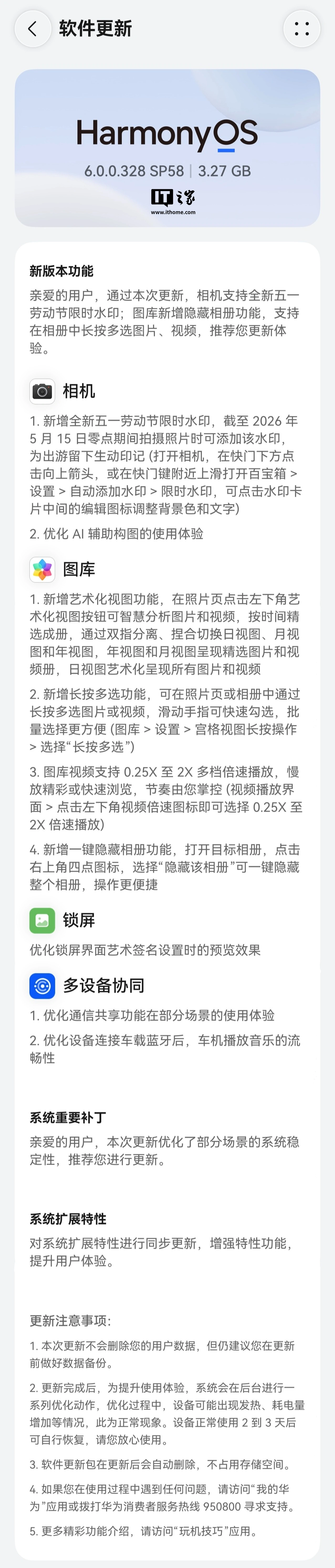
Huawei가 Mate 60/70/80 시리즈, Pura 70/80 등 여러 기종을 대상으로 HarmonyOS 6.0.0.328 SP58 신규 버전을 배포했습니다. 약 3.27GB에 달하는 시스템 패키지에는 새로운 '오월 노동절' 한정 워터마크 기능, 갤러리 숨김 앨범 추가 등 다양한 기능 개선이 포함되었습니다.
갤러리 및 AI 기능 강화
이번 업데이트를 통해 사용자의 사진 관리 편의성과 AI 기반의 사진 편집 기능이 대폭 강화되었습니다.
- 새로운 오월 노동절 한정 워터마크: 2026년 5월 15일 자정까지 촬영한 사진에 해당 워터마크를 추가할 수 있습니다. (카메라 앱에서 플래시 버튼 아래의 화살표를 클릭하거나, 플래시 버튼 근처에서 위로 스와이프하여 '만능 상자' > 설정 > 자동 워터마크 추가 > 한정 워터마크에서 편집 아이콘을 눌러 배경색과 문구를 조정할 수 있습니다.)
- AI 기반 예술적 뷰(Artistic View) 기능 추가: 사진 페이지에서 왼쪽 하단의 예술적 뷰 버튼을 클릭하면, AI가 사진과 비디오를 분석하여 시간 순서대로 자동 편집 앨범을 생성합니다. 두 손가락으로 벌리거나 오므리는 동작을 통해 일별, 월별, 연도별 뷰를 전환할 수 있으며, 연도별/월별 뷰에서는 엄선된 사진과 비디오 앨범이, 일별 뷰에서는 모든 사진과 비디오가 예술적으로 정리되어 표시됩니다.
- 다중 선택 기능 개선: 사진 페이지나 앨범에서 사진 또는 비디오를 길게 눌러 선택한 후, 손가락을 스와이프하여 빠르게 다중 선택할 수 있어 대량 선택이 더욱 편리해졌습니다. (갤러리 > 설정 > 격자 뷰 길게 누르기 > '길게 다중 선택' 선택)
- 비디오 재생 속도 조절: 갤러리 비디오는 0.25배속부터 2배속까지 다양한 배속으로 재생할 수 있어, 중요한 순간을 슬로우 모션으로 감상하거나 빠르게 내용을 훑어볼 수 있습니다. (비디오 재생 화면의 왼쪽 하단 비디오 배속 아이콘 클릭)
- 원클릭 숨김 앨범 기능: 특정 앨범을 열고 오른쪽 상단의 점 세 개 아이콘을 클릭하여 '앨범 숨기기'를 선택하면, 해당 앨범 전체를 한 번에 숨길 수 있어 관리가 매우 편리합니다.
시스템 안정성 및 편의 기능 최적화
사용자 경험을 개선하기 위한 다양한 시스템 최적화가 이루어졌습니다.
- 잠금 화면 예술적 서명 설정 미리보기 개선: 잠금 화면에서 예술적 서명을 설정할 때의 미리보기 효과가 최적화되었습니다.
- 통신 공유 기능 개선: 일부 사용 시나리오에서 통신 공유 기능의 사용 경험이 개선되었습니다.
- 차량용 블루투스 연결 최적화: 기기가 차량용 블루투스에 연결된 후, 차량 미디어 플레이어에서 음악을 재생할 때의 끊김 현상 및 재생 흐름이 더욱 부드럽게 최적화되었습니다.
총평
이번 HarmonyOS 6.0.0.328 SP58 업데이트는 갤러리 기능에 초점을 맞추어 AI 기반의 사진 정리 및 편집 기능을 대폭 강화한 것이 핵심입니다. 특히 '예술적 뷰'와 '원클릭 숨김 앨범' 같은 사용 편의성 개선은 사용자 만족도를 높일 것으로 기대됩니다. 전반적으로 시스템 안정성 향상과 다양한 사용 시나리오에서의 최적화가 이루어져, 사용자들은 더욱 매끄럽고 편리한 모바일 경험을 할 수 있을 것입니다.
系统更新概况
Huawei 推送了 HarmonyOS 6.0.0.328 SP58 版本,适用于 Mate 60 / 70 / 80 系列以及 Pura 70 / 80 等机型。本次更新的系统包大小约为 3.27GB。
新增功能亮点
本次更新在摄影和图库管理方面加入了多项新功能:
- 限时水印: 提供至 2026 年 5 月 15 日的五一劳动节限时水印,支持用户自定义背景色和文字。
- 艺术化视图: 新增按钮可智能分析图片和视频并按时间精选成册,提供日、月、年三种切换视角。
- 长按多选: 优化图库操作,支持通过长按快速勾选多个图片或视频。
- 倍速播放: 图库视频支持从 0.25X 到 2X 的多种速度选择。
- 一键隐藏相册: 支持在设置中快速隐藏整个目标相册。
系统与连接优化
除了功能新增,该版本还针对以下内容进行了优化:
- 优化 AI 辅助构图的使用体验。
- 优化锁屏界面艺术签名设置时的预览效果。
- 优化通信共享功能在部分场景的稳定性。
- 提升连接车载蓝牙后,车机播放音乐的流畅性。
总结
Huawei 推送的 HarmonyOS 6.0.0.328 SP58 版本主要针对 Mate 和 Pura 系列机型,新增了五一限时水印、艺术化视图及倍速播放等丰富功能。同时,该版本显著提升了系统稳定性以及车载蓝牙连接等关键场景的使用体验。
Huawei HarmonyOS 6.0.0.328 SP58 アップデートの主な内容
Huaweiは、Mate 60/70/80シリーズやPura 70/80など複数のモデルを対象に、HarmonyOS 6.0.0.328 SP58の新バージョンを配信しました。約3.27GBのシステムパッケージには、新機能として「五月節(メーデー)」限定ウォーターマーク機能やギャラリーの非表示アルバムの追加など、さまざまな機能改善が含まれています。
ギャラリーおよびAI機能の強化
今回のアップデートにより、ユーザーの写真管理の利便性と、AIを活用した写真編集機能が大幅に強化されました。
- 新しい五月節限定ウォーターマーク: 2026年5月15日までの深夜に撮影された写真に該当するウォーターマークを追加できます。(カメラアプリ内のフラッシュボタン下の矢印をタップ、またはフラッシュボタン付近を上にスワイプして「万能ボックス」>設定>自動ウォーターマーク追加>限定ウォーターマークから編集アイコンを選択し、背景色や文言を調整可能です。)
- AIベースのArtistic View機能の追加: 写真ページで左下のArtistic Viewボタンをクリックすると、AIが写真とビデオを分析し、時系列順に自動編集されたアルバムを生成します。2本の指で広げる、または閉じる操作によって、日別、月別、年別のビューを切り替えることができます。年別・月別ビューでは厳選されたコンテンツが表示され、日別ビューではすべての写真とビデオが美しく整理されて表示されます。
- 複数選択機能の改善: 写真ページやアルバムで写真またはビデオを長押しして選択した後、指をスワイプすることで素早く複数のアイテムを選択できるようになり、大量の選択がより便利になりました。(ギャラリー>設定>グリッドビューの長押し>「長押しで複数選択」を選択)
- ビデオ再生速度の調整: ギャラリー内のビデオを0.25倍から2倍までのさまざまな速度で再生できるようになり、重要な瞬間をスローモーションで楽しんだり、内容を素早く確認したりすることが可能です。(ビデオ再生画面の左下にあるビデオ速度アイコンをクリック)
- ワンクリック非表示アルバム機能: 特定のアルバムを開き、右上の三点リーダーアイコンをクリックして「アルバムを非表示」を選択することで、該当するアルバム全体を一括で非表示にでき、管理が非常に便利になります。
システム安定性と利便性の最適化
ユーザー体験を向上させるためのさまざまなシステム最適化が行われました。
- ロック画面のArtistic Signature設定プレビューの改善: ロック画面でArtistic Signatureを設定する際のプレビュー効果が最適化されました。
- 通信共有機能の改善: 一部の使用シナリオにおいて、通信共有機能のユーザー体験が向上しました。
- 車載Bluetooth接続の最適化: デバイスが車両用Bluetoothに接続された後、車両のメディアプレーヤーで音楽を再生する際の途切れや流れがよりスムーズになるよう最適化されました。
まとめ
今回のHarmonyOS 6.0.0.328 SP58アップデートは、AIを活用した写真整理や編集など、ギャラリー機能の強化に重点を置いています。「Artistic View」や「ワンクリック非表示アルバム」といった利便性の向上が大きな特徴です。システム全体の安定性と接続性の最適化により、よりスムーズで快適なモバイル体験が提供されます。
Huawei HarmonyOS 6.0.0.328 SP58 Update Highlights
Huawei has released the new HarmonyOS 6.0.0.328 SP58 update for several models, including the Mate 60/70/80 series and Pura 70/80 series. The system package, which is approximately 3.27GB in size, includes various feature improvements such as a new "May Day" limited-edition watermark and an added hidden album option for the Gallery.
Enhanced Gallery and AI Features
This update significantly improves photo management convenience and enhances AI-powered photo editing capabilities.
- New May Day Limited Watermark: This feature allows users to add a special watermark to photos taken until midnight on May 15, 2026. (In the camera app, tap the arrow below the flash button or swipe up near the flash button to access 'All Tools' > Settings > Add Auto Watermark > Limited Watermark, where you can adjust the background color and text via the edit icon.)
- AI-powered Artistic View: By tapping the Artistic View button at the bottom left of a photo page, AI analyzes photos and videos to generate an automatically edited album in chronological order. Users can toggle between daily, monthly, and yearly views by pinching or spreading two fingers; while yearly/monthly views show curated content, the daily view displays all media organized artistically.
- Improved Multi-selection: Selecting a photo or video by long-pressing and then swiping allows for faster multi-selection of large quantities. (Path: Gallery > Settings > Long press grid view > select 'Long press multi-select'.)
- Video Playback Speed Control: Videos in the Gallery can now be played at various speeds ranging from 0.25x to 2x, allowing users to watch important moments in slow motion or skim through content quickly. (Tap the speed icon at the bottom left of the video playback screen.)
- One-click Hidden Album: Users can now hide an entire album at once by tapping the three-dot icon at the top right of a specific folder and selecting 'Hide Album.'
System Stability and Convenience Optimizations
Various system optimizations have been implemented to improve the overall user experience.
- Improved Lock Screen Artistic Signature Preview: The preview effect when setting an artistic signature on the lock screen has been optimized.
- Enhanced Communication Sharing: The user experience for communication sharing features has been improved in certain scenarios.
- Optimized Vehicle Bluetooth Connection: After a device connects to vehicle Bluetooth, playback flow is smoother and stuttering is reduced when playing music through the vehicle's media player.
Summary
The HarmonyOS 6.0.0.328 SP58 update focuses heavily on enhancing Gallery functionality, specifically through AI-driven photo organization and "Artistic View" features. Additionally, it provides significant improvements to system stability and vehicle connectivity, ensuring a smoother and more convenient mobile experience for users.
系统更新概况
Huawei 推送了 HarmonyOS 6.0.0.328 SP58 版本,适用于 Mate 60 / 70 / 80 系列以及 Pura 70 / 80 等机型。该版本安装包大小约为 3.27GB。
新增功能特性
- 限时水印: 新增至 2026 年 5 月 15 日的五一劳动节限时水印,支持在拍摄照片时添加并自定义背景色和文字。
- 艺术化视图: 支持智慧分析图片和视频,提供日、月、年三种时间维度视角切换。
- 长按多选: 在图库或相册中通过长按滑动即可快速勾选多个图片或视频。
- 视频倍速播放: 视频播放支持从 0.25X 到 2X 的多档倍速调节。
- 一键隐藏相册: 支持在设置中快速隐藏整个目标相册。
系统优化与改进
- 优化 AI 辅助构图的使用体验。
- 优化锁屏界面艺术签名设置时的预览效果。
- 优化通信共享功能在部分场景下的使用体验。
- 优化连接车载蓝牙后,车机播放音乐的流畅性。
总结
本次 HarmonyOS 6.0.0.328 SP58 更新为 Huawei Mate 和 Pura 系列带来了包括限时水印、艺术化视图及视频倍速在内的多项新功能。同时,更新还针对 AI 构图、系统稳定性以及车载蓝牙连接等关键场景进行了优化。
Huawei HarmonyOS 6.0.0.328 SP58 アップデートの主な内容
Huaweiは、Mate 60/70/80シリーズやPura 70/80など複数のモデルを対象に、HarmonyOS 6.0.0.328 SP58の新バージョンを配信しました。約3.27GBのシステムパッケージには、新機能として「五月節(メーデー)」限定ウォーターマーク機能やギャラリーの非表示アルバムの追加など、さまざまな機能改善が含まれています。
ギャラリーおよびAI機能の強化
今回のアップデートにより、ユーザーのフォト管理の利便性と、AIを活用した写真編集機能が大幅に強化されました。
- 新機能「五月節」限定ウォーターマーク: 2026年5月15日までの深夜に撮影された写真に専用のウォーターマークを追加できます。(カメラアプリ内のフラッシュボタン下の矢印をタップ、またはフラッシュボタン付近を上にスワイプして「万能ボックス」>設定>自動ウォーターマーク追加>限定ウォーターマークから編集アイコンを選択し、背景色や文言を調整可能です。)
- AIベースのArtistic View機能の追加: 写真ページで左下のArtistic Viewボタンをクリックすると、AIが写真とビデオを分析し、時系列順に自動編集されたアルバムを生成します。2本の指で広げる、または閉じる操作によって、日別、月別、年別のビューを切り替えることができます。年別・月別ビューでは厳選されたコンテンツが表示され、日別ビューではすべての写真とビデオが美しく整理されて表示されます。
- 複数選択機能の改善: 写真ページやアルバムで写真または件を長押しして選択した後、指をスワイプすることで素早く複数のアイテムを選択できるようになり、大量の選択がより便利になりました。(ギャラリー>設定>グリッドビューの長押し>「長押しで複数選択」を選択)
- ビデオ再生速度の調整: ギャラリー内のビデオを0.25倍から2倍までのさまざまな速度で再生できるようになり、重要な瞬間をスローモーションで楽しんだり、内容を素早く確認したりすることが可能です。(ビデオ再生画面の左下にあるビデオ速度アイコンをクリック)
- ワンクリック非表示アルバム機能: 特定のアルバムを開き、右上の三点リーダーアイコンをクリックして「アルバムを非表示」を選択することで、該当するアルバム全体を一括で非表示にでき、管理が非常に便利になります。
システム安定性と利便性の最適化
ユーザー体験を向上させるためのさまざまなシステム最適化が行われました。
- ロック画面のArtistic Signature設定プレビューの改善: ロック画面でArtistic Signatureを設定する際のプレビュー効果が最適化されました。
- 通信共有機能の改善: 一部の使用シナリオにおいて、通信共有機能のユーザー体験が向上しました。
- 車載Bluetooth接続の最適化: デバイスが車両用Bluetoothに接続された後、車両のメディアプレーヤーで音楽を再生する際の途切れや流れがよりスムーズになるよう最適化されました。
まとめ
今回のHarmonyOS 6.0.0.328 SP58アップデートは、AIを活用した写真整理や編集など、ギャラリー機能の強化に重点を置いています。「Artistic View」や「ワンクリック非表示アルバム」といった利便性の向上が大きな特徴です。システム全体の安定性と接続性の最適化により、よりスムーズで快適なモバイル体験が提供されます。
Huawei HarmonyOS 6.0.0.328 SP58 Update Overview
Huawei has released the HarmonyOS 6.0.0.328 SP58 update for several models, including the Mate 60/70/80 series and Pura 70/80 series. The system package is approximately 3.27GB in size and includes various feature improvements such as a new "May Day" limited-edition watermark and an added hidden album option for the Gallery.
Enhanced Gallery and AI Features
This update significantly improves photo management convenience and enhances AI-powered photo editing capabilities.
- New May Day Limited Watermark: This feature allows users to add a special watermark to photos taken until midnight on May 15, 2026. (In the camera app, tap the arrow below the flash button or swipe up near the flash button to access 'All Tools' > Settings > Add Auto Watermark > Limited Watermark, where you can adjust the background color and text via the edit icon.)
- AI-powered Artistic View: By tapping the Artistic View button at the bottom left of a photo page, AI analyzes photos and videos to generate an automatically edited album in chronological order. Users can toggle between daily, monthly, and yearly views by pinching or spreading two fingers; while yearly/monthly views show curated content, the daily view displays all media organized artistically.
- Improved Multi-selection: Selecting a photo or video by long-pressing and then swiping allows for faster selection of multiple items, making it much more convenient to select large quantities of media. (Gallery > Settings > Grid View Long Press > Select 'Long Press Multi-select')
- Video Playback Speed Control: Gallery videos can now be played at various speeds ranging from 0.25x to 2x, allowing users to enjoy important moments in slow motion or quickly skim through content. (Tap the video speed icon at the bottom left of the video playback screen.)
- One-click Hide Album Feature: By opening a specific album and selecting "Hide Album" from the three-dot icon at the top right, the entire album can be hidden instantly for easier management.
System Stability and Convenience Optimizations
Various system optimizations have been implemented to improve the overall user experience.
- Improved Artistic Signature Preview: The preview effect when setting an "Artistic Signature" on the lock screen has been optimized.
- Communication Sharing Improvements: The user experience for communication sharing features has been improved in certain usage scenarios.
- Vehicle Bluetooth Connection Optimization: After a device connects to vehicle Bluetooth, the playback flow and stability of music played through the vehicle's media player have been optimized to be smoother.
Summary
The HarmonyOS 6.0.0.328 SP58 update focuses heavily on enhancing Gallery features through AI-driven photo organization and "Artistic View" tools. Additionally, it improves system stability and connectivity, specifically regarding vehicle Bluetooth integration and lock screen previews. These updates aim to provide a smoother and more convenient mobile experience for Mate and Pura series users.