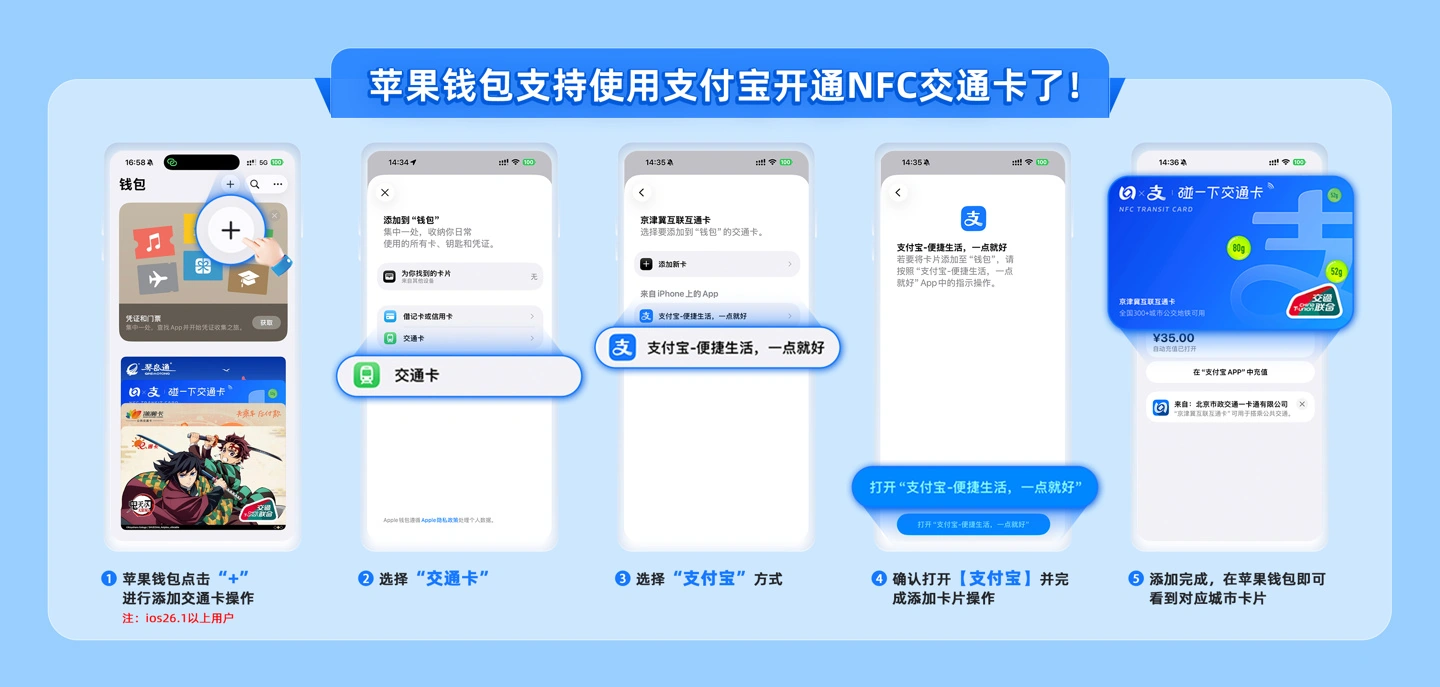
알리페이, Apple Wallet NFC 교통카드 서비스 지원 확대
IT之家에 따르면, Alipay는 4월 14일 발표를 통해 Apple Wallet이 Alipay를 이용해 NFC 교통카드를 발급받을 수 있는 기능을 지원한다고 밝혔습니다. 이 서비스는 베이징, 상하이, 난징, 창사, 샤먼, 쑤저우, 쿤밍, 칭다오, 스자좡, 톈진 등 다수의 주요 도시를 커버합니다.
교통카드 등록 방법
Apple Wallet에 교통카드를 추가하는 구체적인 절차는 다음과 같습니다.
- Apple Wallet에서 ‘+’ 버튼을 눌러 교통카드 추가를 진행합니다. (iOS 16.1 이상 사용자 한정)
- ‘교통카드’를 선택합니다.
- 결제 수단으로 ‘Alipay’를 선택합니다.
- Alipay 앱을 열어 카드 추가 절차를 완료합니다.
등록이 완료되면 Apple Wallet에서 해당 도시의 교통카드를 바로 확인할 수 있습니다.
참고 사항
본 기사에 포함된 외부 링크(하이퍼링크, QR 코드, 비밀번호 등)는 더 많은 정보를 제공하고 시간을 절약하기 위한 참고 자료이며, IT之家 모든 기사에 해당 내용이 포함되어 있습니다.
支付宝支持Apple钱包NFC交通卡
支付宝于4月14日宣布,Apple钱包现已支持通过支付宝开通NFC交通卡。此功能旨在方便用户在移动设备上便捷地使用交通工具支付。
覆盖城市范围
目前提供该服务的城市包括:
- 北京
- 上海
- 南京
- 长沙
- 厦门
- 苏州
- 昆明
- 青岛
- 石家庄
- 天津
开通操作步骤
用户可通过以下流程在Apple钱包中添加交通卡:
- 在Apple钱包点击“+”号进行添加(iOS 26.1 以上用户)
- 选择“交通卡”
- 选择“支付宝”方式
- 确认并跳转至“支付宝”完成卡片添加操作
- 添加完成后,对应城市卡片将显示在Apple钱包中
总结
支付宝与Apple合作,支持用户通过其平台开通涵盖北京、上海等10个城市的NFC交通卡。该功能简化了开通流程,让用户能够更便捷地在Apple设备上使用交通卡。
Alipay、Apple WalletでのNFC交通カードサービスを拡大
IT之家の報道によると、Alipayは4月14日の発表において、Apple Walletを通じてAlipayを利用したNFC交通カードを発行できる機能をサポートすると発表しました。このサービスは、北京、上海、南京、長沙、アモイ、蘇州、昆明、青島、石家荘、天津など、多くの主要都市をカバーしています。
交通カードの登録方法
Apple Walletに交通カードを追加する具体的な手順は以下の通りです。
- Apple Walletで「+」ボタンを押し、交通カードの追加を進める(iOS 16.1以降のユーザー限定)。
- 「交通カード」を選択。
- 決済手段として「Alipay」を選択。
- Alipayアプリを開き、カード追加の手順を完了する。
登録が完了すると、Apple Wallet上で該当する都市の交通カードをすぐに確認できるようになります。
まとめ
Alipayは、北京や上海を含む多くの主要都市において、Apple Walletを通じたNFC交通カードの発行に対応しました。iOS 16.1以降のデバイスでAlipayアプリを通じて登録を行うことで、Apple Walletから直接交通カードを利用することが可能になります。
Alipay Expands NFC Transit Card Support in Apple Wallet
According to IT之家, Alipay announced on April 14 that Apple Wallet now supports the issuance of NFC transit cards through the Alipay platform. This service covers several major cities, including Beijing, Shanghai, Nanjing, Changsha, Xiamen, Suzhou, Kunming, Qingdao, Shijiazhuang, and Tianjin.
How to Register a Transit Card
The specific procedure for adding a transit card to Apple Wallet is as follows:
- Tap the "+" button in Apple Wallet to begin adding a transit card (available for users on iOS 16.1 or later).
- Select "Transit Card."
- Choose "Alipay" as the payment method.
- Open the Alipay app to complete the card addition process.
Once registration is complete, the transit card for the respective city can be viewed directly within Apple Wallet.
Note
External links (hyperlinks, QR codes, passwords, etc.) included in this article are reference materials provided to offer more information and save time; such content is included in all IT之家 articles.
Summary
Alipay has expanded its integration with Apple Wallet by allowing users to add NFC transit cards for various major Chinese cities. Users on iOS 16.1 or later can complete the setup through the Alipay app, enabling seamless access to local transportation via their Apple devices.
功能更新
支付宝宣布 Apple 钱包现已支持通过支付宝开通 NFC 交通卡。此项功能旨在简化用户在相关城市的出行便捷性。
覆盖城市
- 北京
- 上海
- 南京
- 长沙
- 厦门
- 苏州
- 昆明
- 青岛
- 石家庄
- 天津
操作步骤
用户可通过以下流程在 Apple 钱包中添加交通卡:
- 在 Apple 钱包点击“+”号进行添加操作(iOS 26.1 以上用户)。
- 选择“交通卡”。
- 选择“支付宝”方式。
- 确认跳转并打开“支付宝”完成相关卡片的操作。
- 完成后,对应的城市卡片将显示在 Apple 钱包中。
总结
支付宝宣布支持在 Apple 钱包中通过其平台开通 NFC 交通卡。该功能已覆盖北京、上海等多个主要城市,旨在提升用户在这些城市的出行便利性。
Alipay、Apple WalletでのNFC交通カード対応を拡大
IT之家の報道によると、Alipayは4月14日の発表において、Apple Walletを通じてAlipayを利用したNFC交通カードを発行できる機能をサポートすると発表しました。この機能は、ユーザーがモバイルデバイスからよりスムーズに公共交通機関の支払いを行えることを目的としています。
対応する都市範囲
現在、このサービスが提供されている主な都市は以下の通りです。
- 北京
- 上海
- 南京
- 長沙
- アモイ
- 蘇州
- 昆明
- 青島
- 石家荘
- 天津
交通カードの登録手順
Apple Walletに交通カードを追加する具体的な手順は以下の通りです。
- Apple Walletで「+」ボタンをタップ(iOS 16.1以降のユーザー対象)
- 「交通カード」を選択
- 決済手段として「Alipay」を選択
- Alipayアプリへ遷移し、カードの追加手続きを完了する
登録が完了すると、Apple Wallet上で該当する都市の交通カードを即座に確認できるようになります。
まとめ
Alipayは、北京や上海を含む主要な10都市において、Apple Walletを通じたNFC交通カードの発行に対応しました。iOS 16.1以降のデバイスであれば、Alipayアプリを通じて簡単に登録を行い、Appleデバイスから直接交通カードを利用することが可能になります。
Alipay Expands NFC Transit Card Support in Apple Wallet
According to IT之家, Alipay announced on April 14 that Apple Wallet now supports the issuance of NFC transit cards through the Alipay platform. This feature is designed to provide users with a more convenient way to pay for public transportation using their mobile devices.
The service currently covers several major cities, including:
- Beijing
- Shanghai
- Nanjing
- Changsha
- Xiamen
- Suzhou
- Kunming
- Qingdao
- Shijiazhuang
- Tianjin
How to Register a Transit Card
The specific procedure for adding a transit card to Apple Wallet is as follows:
- Tap the "+" button in Apple Wallet to begin the addition process (available for users on iOS 16.1 or later).
- Select "Transit Card."
- Choose "Alipay" as the payment method.
- The system will redirect you to the Alipay app to complete the card addition process.
Once registration is complete, the transit card for the corresponding city will be immediately available in Apple Wallet.
Summary
Alipay has integrated NFC transit cards into Apple Wallet for several major Chinese cities, including Beijing and Shanghai. Users on iOS 16.1 or later can easily add these cards through the Alipay app to facilitate seamless transportation payments via their Apple devices.