App Store 사용자 인터페이스 변경 사항
MacRumors가 Apple이 App Store에 백그라운드 조정을 진행했음을 발견했습니다. 이번 변경 사항은 '업데이트' 탭의 위치를 조정하고 이름을 변경하여 사용자에게 더욱 눈에 띄게 만든 것이 핵심입니다.
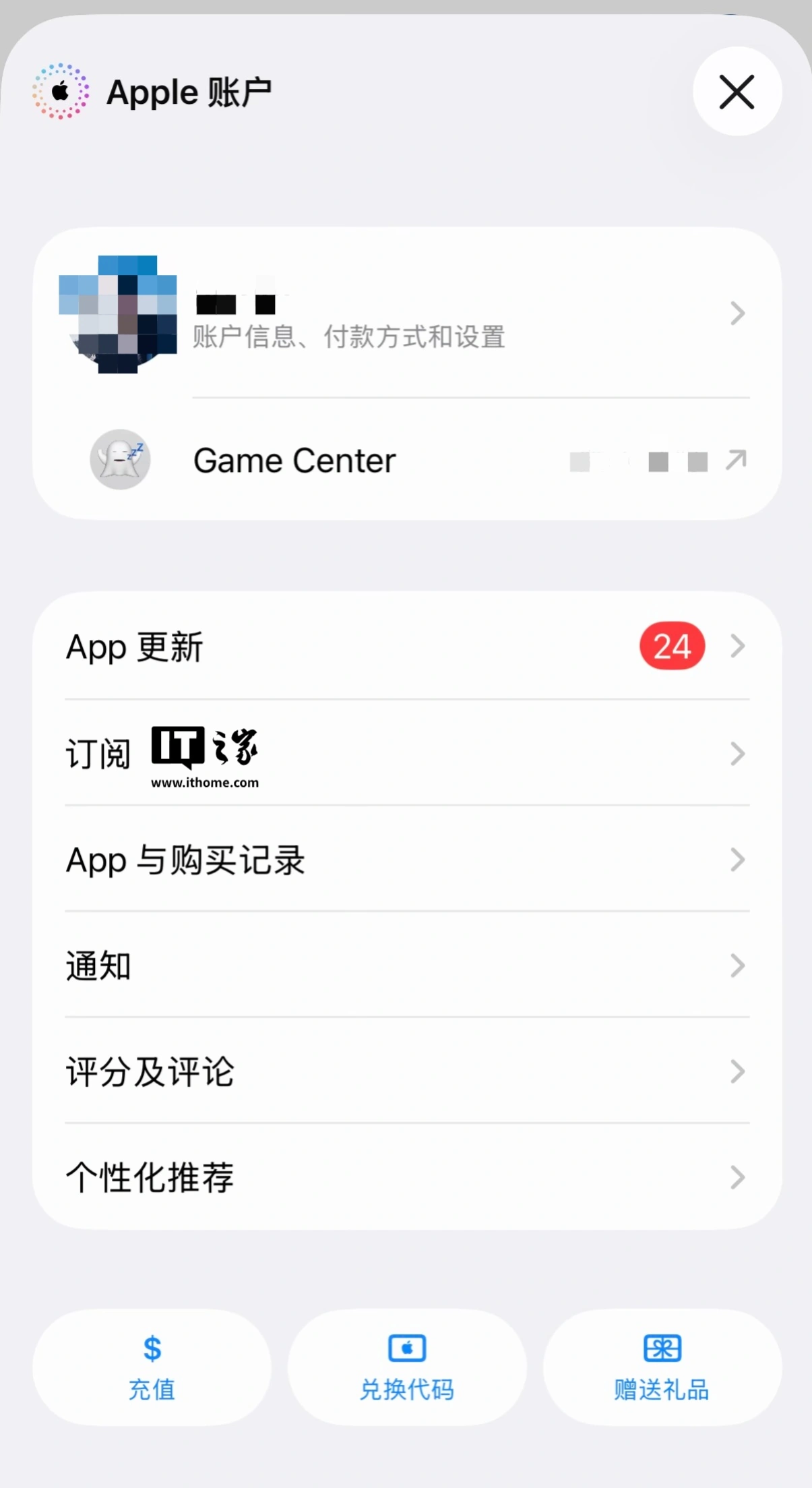
이러한 변경 사항은 App Store에서 우측 상단의 개인 프로필 사진을 클릭하여 확인할 수 있습니다.
주요 변경 내용
기존의 'App 및 구매 기록' 탭이 목록 맨 위에서 '업데이트' 탭과 위치를 교환했습니다. 특히, '업데이트' 탭의 이름이 'App 업데이트'로 변경되었습니다.
이번 UI 조정은 소프트웨어 업데이트를 통해 배포된 것이 아니라는 점이 주목할 만합니다. IT之家에 따르면, 이 변화는 iOS 26.4.1 및 iOS 26.5 베타 버전에서 모두 확인되었습니다.
'App 업데이트' 페이지 접근 방법
Daring Fireball이 추가적인 접근 방법을 발견했습니다. iOS 26.4 버전에서는 홈 화면에서 App Store 앱 아이콘을 길게 누르면, 팝업되는 바로가기 메뉴를 통해 'App 업데이트' 페이지로 직접 이동할 수 있습니다.
총평
Apple은 이번 App Store UI 변경을 통해 사용자들이 '업데이트' 기능에 더 쉽게 접근하도록 유도하고 있습니다. 기존의 'App 및 구매 기록' 탭과 위치가 바뀐 'App 업데이트' 탭은 사용자가 앱 관리에 더 집중할 수 있도록 사용자 경험(UX)을 개선한 것으로 보입니다. 이러한 변화는 별도의 소프트웨어 업데이트 없이도 적용되어 사용자들의 관심을 끌고 있습니다.
App Store 界面调整
Apple 对 App Store 应用商店进行了后台调整,旨在提高“更新”功能的可见性。具体变动如下:
- 将原位于列表顶部的“App 与购买记录”标签与“更新”标签互换位置。
- 将“更新”标签更名为“App 更新”。
版本情况与实现方式
此次调整并非通过发布软件更新来实施,而是直接在系统中生效。该变动已在以下版本中体现:
- iOS 26.4.1
- iOS 26.5 测试版
快捷操作功能
在 iOS 26.4 中,用户可以通过长按主屏幕上的 App Store 应用图标,从弹出的快捷菜单中直接跳转至“App 更新”页面。
总结
Apple 对 App Store 的“更新”标签进行了位置互换和更名处理,使其更加醒目。此外,系统还提供了一种通过长按图标快速进入该页面的便捷操作方式。
App Storeのユーザーインターフェース変更
MacRumorsは、AppleがApp Storeにおいてバックグラウンドでの調整を行ったことを明らかにしました。今回の主な変更点は、「アップデート」タブの位置を調整し、名称を変更することでユーザーにより目立ちやすくしたことです。
これらの変更は、AppStoreの右上にある個人のプロフィール写真をタップすることで確認できます。
主な変更内容
従来の「Appと購入履歴」タブがリストの最上部で「アップデート」タブと入れ替わりました。特に、「アップデート」という名称は「Appアップデート」に変更されています。
注目すべき点は、このUI調整がソフトウェアアップデートを通じて配信されたものではないということです。IT之家によると、この変更はiOS 26.4.1およびiOS 26.5ベータ版の両方で確認されています。
「Appアップデート」ページへのアクセス方法
Daring Fireballは追加のアクセス方法を発見しました。iOS 26.4では、ホーム画面でApp Storeアプリのアイコンを長押しすると、ポップアップするショートカットメニューを通じて「Appアップデート」ページへ直接移動することが可能です。
まとめ
AppleはApp StoreのUI変更を通じて、ユーザーが「アップデート」機能により簡単にアクセスできるように促しています。タブの入れ替えと名称変更によりアプリ管理への集中度を高めるUXの改善が行われ、これらの変更はソフトウェア更新なしで適用されています。
App Store User Interface Changes
MacRumors has discovered that Apple has implemented background adjustments to the App Store. These changes primarily involve repositioning and renaming the "Updates" tab to make it more prominent for users.
These changes can be accessed by tapping the personal profile photo in the top right corner of the App Store.
Key Changes
The existing "Apps & Purchase History" tab has swapped positions with the "Updates" tab at the top of the list. Specifically, the name of the "Updates" tab has been changed to "App Updates."
Notably, these UI adjustments were not deployed through a software update. According to IT之家, these changes were observed in both iOS 26.4.1 and the iOS 26.5 beta versions.
How to Access the 'App Updates' Page
Daring Fireball discovered an additional method for access. In iOS 26.4, long-pressing the App Store app icon on the home screen brings up a shortcut menu that allows users to navigate directly to the "App Updates" page.
Summary
Apple has updated the App Store UI by renaming and repositioning the "Updates" tab to improve user experience and accessibility for managing applications. These changes were implemented as background adjustments without requiring a formal software update, making it easier for users to find and manage app updates.
App Store UI 调整
Apple 对 App Store 应用商店进行了后台调整,旨在提升“更新”功能的可见性。具体变动如下:
- 将原本位于列表顶部的“App 与购买记录”与“更新”标签互换位置。
- 将“更新”标签重命名为“App 更新”。
系统版本与实现方式
该项调整并非通过发布软件更新来实施,而是直接在系统中体现。此变动已在以下版本中被发现:
- iOS 26.4.1
- iOS 26.5 测试版
快捷操作功能
在 iOS 26.4 中,用户可以通过长按主屏幕上的 App Store 应用图标,从弹出的快捷菜单中直接跳转至“App 更新”页面。
总结
Apple 对 App Store 的“更新”标签进行了位置互换和重命名处理,使其更加醒目。此外,iOS 26.4 版本还提供了一种通过长按图标快速进入该页面的快捷方式。
App Storeのユーザーインターフェース変更
MacRumorsの報告によると、AppleはApp Storeにおいてバックグラウンドでの調整を実施しました。この変更の主な目的は、「アップデート」タブの位置を再配置し、名称を変更することで、ユーザーがより容易に認識できるようにすることです。
これらの変更は、App Storeの右上にある個人のプロフィール写真をタップすることで確認できます。
主な変更内容
従来の「Appと購入履歴」タブがリストの最上部で「アップデート」タブと入れ替わりました。特に、「アップデート」という名称は「Appアップデート」へと変更されています。
注目すべき点は、このUI調整がソフトウェアの更新を通じて配信されたものではないことです。IT之家の報告によると、この変更は以下のバージョンで確認されています。
- iOS 26.4.1
- iOS 26.5 ベータ版
「Appアップデート」ページへのアクセス方法
Daring Fireballは、追加のアクセス方法を特定しました。iOS 26.4では、ホーム画面にあるApp Storeアプリのアイコンを長押しすることで、ポップアップするショートカットメニューから「Appアップデート」ページへ直接移動することが可能です。
まとめ
Appleはバックグラウンドでの調整を通じて、App Store内の「アップデート」機能の視認性とアクセスのしやすさを向上させました。名称の変更と位置の入れ替えにより、ユーザーがアプリ管理により集中できるUXへの改善が行われています。
App Store User Interface Changes
MacRumors has reported that Apple implemented background adjustments to the App Store UI. These changes focus on repositioning and renaming the "Updates" tab to make it more prominent for users.
These modifications can be accessed by tapping the personal profile photo in the top-right corner of the App Store.
Key Changes
The existing "Apps & Purchase History" tab has swapped positions with the "Updates" tab at the top of the list. Specifically, the name of the "Updates" tab has been changed to "App Updates."
Notably, these UI adjustments were not deployed through a formal software update. According to IT之家, these changes have been observed in both iOS 26.4.1 and the iOS 26.5 beta versions.
Accessing the 'App Updates' Page
Daring Fireball discovered an additional method for access. In iOS 26.4, long-pressing the App Store app icon on the home screen brings up a shortcut menu that allows users to navigate directly to the "App Updates" page.
Summary
Apple updated the App Store UI by renaming and repositioning the "Updates" tab to improve visibility and user experience for managing applications. These changes were implemented as background adjustments without requiring a formal software update, while also providing a convenient shortcut via long-pressing the app icon.